




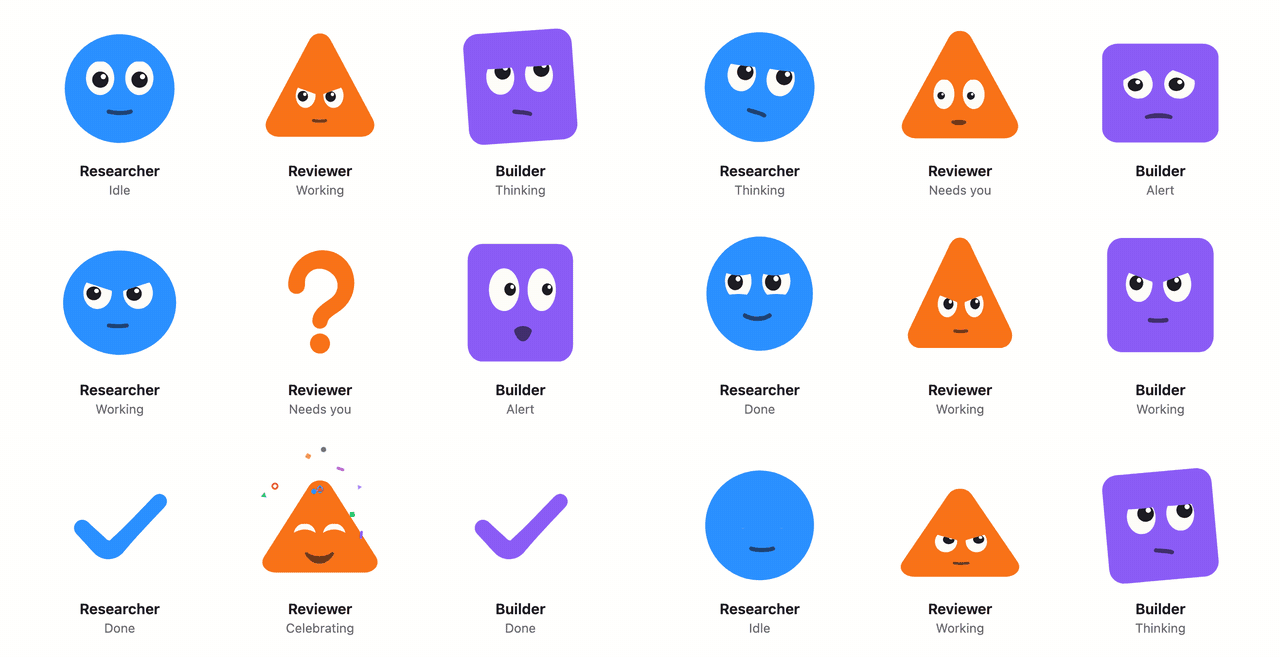
Give your AI agent a face: one component that shows thinking, working, needs you and done at a glance, on web and React Native.
npm install agentfacesimport { AgentFace } from "agentfaces/react";
<AgentFace state="thinking" />;Expressive faces for AI agents. Show what an agent is doing (thinking, working, waiting on you, done) with a face people read at a glance. Works with React, React Native and plain SVG.
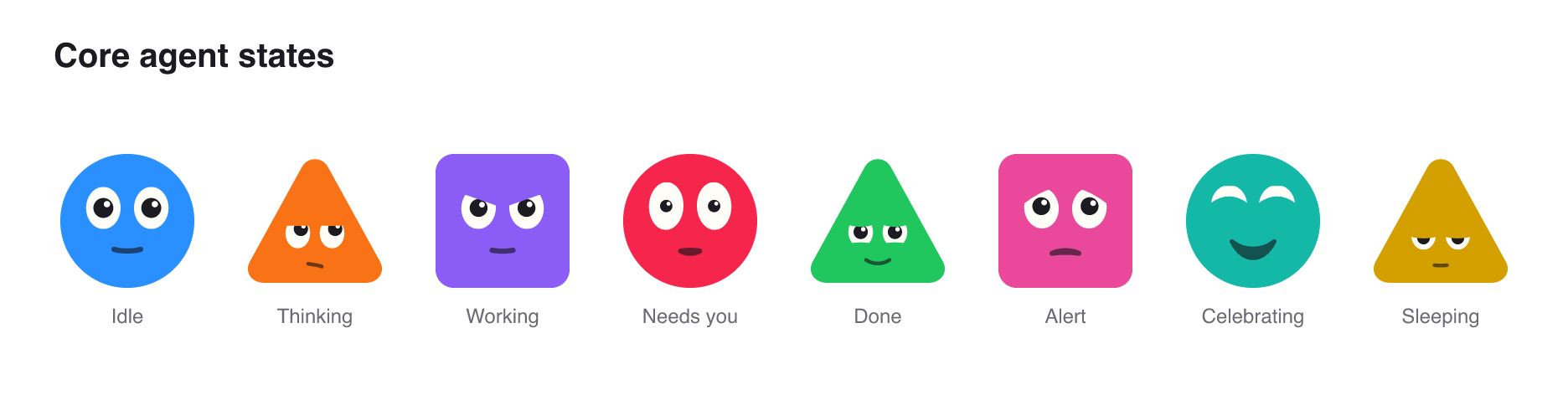
- Agent work states: idle, thinking, working, needs you, done, alert, celebrate and sleeping, plus ten more.
- Alive, not busy: blinks, gaze drift, micro saccades, springy body motion, glyph morphs (the body becomes a
!,?or check mark and back) and confetti on celebrate. - Accessible by default: every face has an accessible name and respects reduced motion. The still variant runs no timers.
- Cheap at scale: one shared ticker drives every face on screen, and off-screen faces pause.
- Zero runtime dependencies, tree-shakeable ESM and CJS builds, full TypeScript types.
import { AgentFace } from "agentfaces/react";

<AgentFace state="working" shape="circle" color="#2F6BFF" size={48} />;
That is it. Change state as your agent works and the face follows.
npm install agentfaces react-native-svgimport { AgentFace } from "agentfaces/react-native";
<AgentFace state="needs-you" seed={agent.id} name={agent.name} size={56} />;Uses react-native-svg and the built-in Animated API. No reanimated needed.
import { renderFaceSvg } from "agentfaces/svg";

const svg = renderFaceSvg({ shape: "square", color: "#8B5CF6", state: "done", size: 64 });| Example | What it shows |
|---|---|
| Vercel AI SDK chat | Next.js app that maps useChat status and tool calls (submitted, streaming, ready, error, approvals) to face states. |
| React Native with Expo | One screen that switches a face between the core states, plus a row of seeded faces. |
Both install agentfaces from npm and are not part of the published package.
| Import | What it is |
|---|---|
agentfaces |
Framework-free core: geometry, expressions, states, the behaviour scheduler and the ticker. Zero dependencies. |
agentfaces/react |
<AgentFace /> and <AgentFacesProvider /> for the web (client component). |
agentfaces/react-native |
The same component for React Native. |
agentfaces/svg |
renderFaceSvg and buildFaceSet for static SVG strings, sprites and manifests. |
agentfaces/livekit |
Maps LiveKit useVoiceAssistant() state and audio track to face props. |
agentfaces/openai-realtime |
Follows OpenAI Realtime events and sessions as face states. |
agentfaces/elevenlabs |
Maps ElevenLabs conversation status, mode and volume to face props. |
| Prop | Type | Default | |
|---|---|---|---|
state |
AgentState |
"idle" |
What the agent is doing. |
shape |
"circle" | "triangle" | "square" |
from seed |
Body shape. |
color |
string |
from seed |
Body color. |
seed |
string |
"" |
Stable id that picks shape and color and seeds the motion. |
size |
number |
48 |
Size in pixels (points on native). |
expression |
ExpressionName |
cycles | Hold one expression. |
variant |
"live" | "still" |
"live" |
still renders one frame with no timers. |
mouth |
boolean |
true |
Draw the mouth. |
label |
string |
state name | Full accessible name. |
name |
string |
Builds the accessible name as "name, state". |
|
decorative |
boolean |
false |
Hide from assistive technology. |
reducedMotion |
boolean |
OS setting | Force reduced motion on or off. |
audio |
AudioLevelSource | null |
simulated when speaking | Audio for listening and speaking. See Voice agents. |
import { AgentFace, AgentFacesProvider } from "agentfaces/react";

<AgentFacesProvider shapes={["circle", "square"]} palette={["#2F6BFF", "#13B8A7", "#F97216"]} size={40}>
  {agents.map((agent) => (
    <AgentFace key={agent.id} seed={agent.id} name={agent.name} state={agent.state} />
  ))}
</AgentFacesProvider>;
The provider also takes variant, mouth, reducedMotion and labels (to translate state names). Outside React, faceFor(seed, { shapes, palette }) from agentfaces returns the same { shape, color } pick.
| Group | States |
|---|---|
| Core work states | idle, thinking, working, needs-you, done, alert, celebrate, sleeping |
| Extended | starting, attentive, exploring, waiting, handing-off, heads-up |
| Ornaments | typing (ellipsis), running (spinner), monitoring (ripple), background (tracker) |
| Voice | listening, speaking |
alert, needs-you and done morph the body into !, ? and a check mark. celebrate throws confetti. Morphs, ornaments and confetti are skipped under reduced motion and in the still variant.
listening leans in, holds its gaze on the user and pulses with their voice. speaking moves the mouth with the agent's audio: it opens with loudness and spreads for bright sounds or rounds for dark ones. Pass the audio as audio.
import { AgentFace, useAudioLevel } from "agentfaces/react";

const level = useAudioLevel(stream);

<AgentFace state={agentIsTalking ? "speaking" : "listening"} audio={level} />;
audio takes a MediaStream, an AudioNode, an HTMLMediaElement, a level callback (now) => number, a level stream (createLevelFeed()), or an AudioLevel. React Native has no Web Audio, so it takes callbacks, streams and levels. Until you connect audio, speaking is simulated: with no audio prop the mouth follows a built-in synthetic voice, so it moves but is not in sync with anything. Connect real audio to lip sync, or pass audio={null} to hold the mouth still. Under reduced motion and in the still variant the face rests and no audio is read.
From the framework-free core: createAudioLevel(source, options) returns a smoothed level (0..1) with coarse low, mid and high bands. It schedules nothing itself: every face calls update(now) from the one shared ticker, and a level shared by many faces is read once per frame. mouthForLevel(level, bands) and MouthModel map levels to mouth openness and width with attack and release smoothing.
| Adapter | Use |
|---|---|
agentfaces/livekit |
<AgentFace {...liveKitFace(useVoiceAssistant(), { microphone })} /> |
agentfaces/openai-realtime |
bindRealtimeSession(session, setState) for @openai/agents-realtime, or createRealtimeFaceState(setState).handle(event) for raw Realtime server events. Over WebRTC pass the session's audio element as audio. |
agentfaces/elevenlabs |
<AgentFace {...elevenLabsFace(useConversation())} />, or spread elevenLabsCallbacks(setState) into Conversation.startSession(). |
Adapters have no runtime dependencies and import nothing from the SDKs. They read small structural interfaces checked against @livekit/components-react 2.9, @openai/agents-realtime 0.19, openai 7.28, @elevenlabs/client 1.26 and @elevenlabs/react 1.16 (node scripts/check-adapters.mjs).
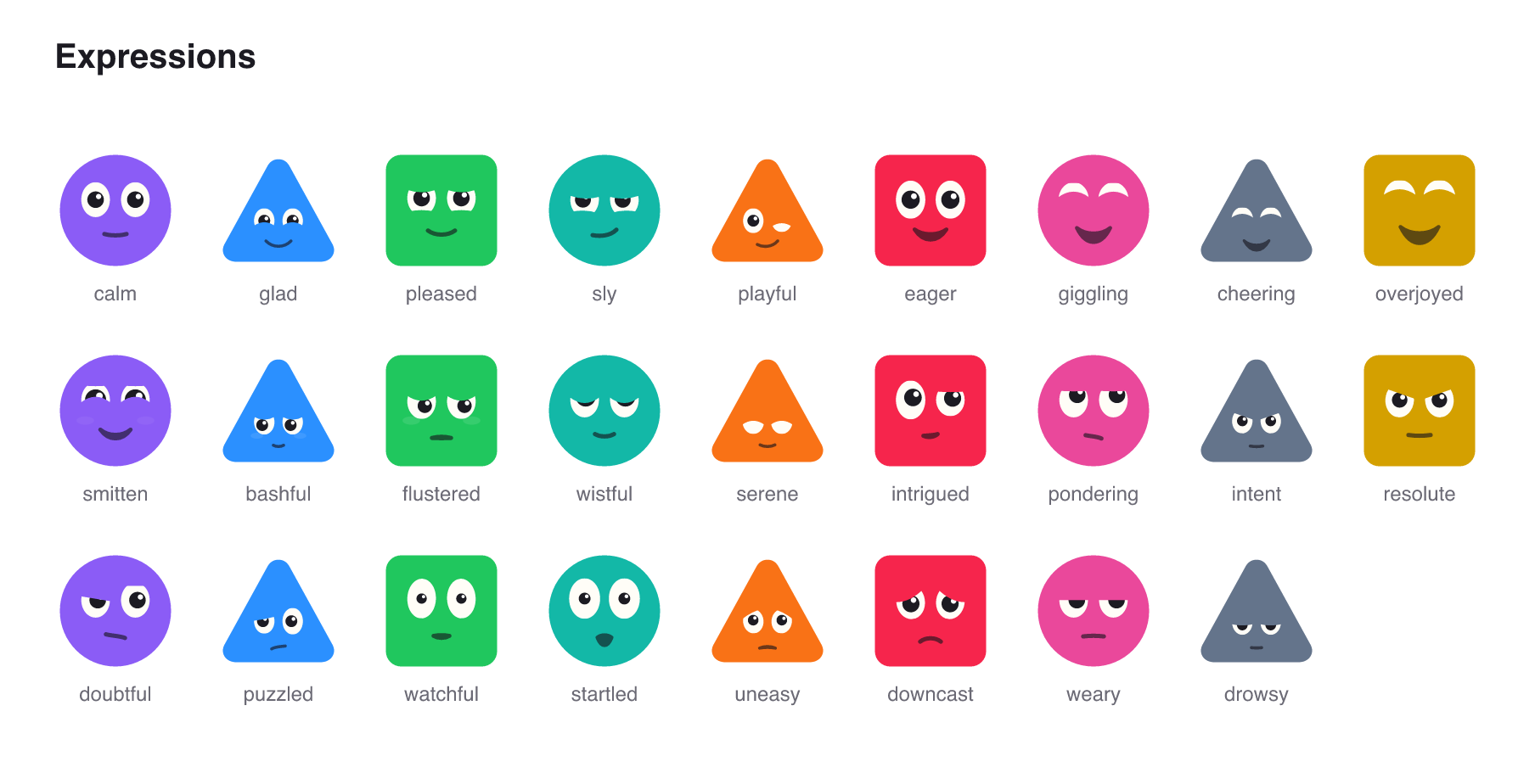
calm, glad, pleased, sly, playful, eager, giggling, cheering, overjoyed, smitten, bashful, flustered, wistful, serene, intrigued, pondering, intent, resolute, doubtful, puzzled, watchful, startled, uneasy, downcast, weary, drowsy, heedful, chatty. Holding smitten morphs the body into a heart.
buildFaceSet(shape, color?) from agentfaces/svg returns every state and expression as SVG files, a sprite.svg of <symbol>s and a manifest.json. Bodies default to currentColor, so set color on the host element to tint them. From a clone of this repo, npm run export:stills writes the full set to dist/stills.
Below 64 px the face grows inside the body and simplifies. From 36 px down the eyes become solid ink on a pixel grid and the mouth gets a full-pixel line, so 24 px avatars still read as faces.
npx shadcn@latest add https://ajibadedapo.github.io/agentfaces/r/agent-face.jsonAdds components/agent-face.tsx, a client component with AgentFace and AgentStatus (a face with a text label), and installs agentfaces.
-
llms.txtandllms-full.txt: the full API reference and recipes in plain markdown, for pasting into a prompt or pointing a tool at. -
AGENTS.md: imports per platform, the state vocabulary, recipes and pitfalls. -
A Claude Code skill. Install it in a project with:
mkdir -p .claude/skills/agentfaces
curl -fsSL https://raw.githubusercontent.com/ajibadedapo/agentfaces/main/skills/agentfaces/SKILL.md -o .claude/skills/agentfaces/SKILL.md
Or copy
skills/agentfacesinto~/.claude/skills/to use it in every project.
Unknown state, shape and expression names never throw: the face falls back and, in development, warns with the fix, for example unknown state "needs_you". Did you mean "needs-you"?.
See CONTRIBUTING.md. node scripts/record-demo.mjs re-records the demo at the top of this README from docs/demo.html (needs Playwright and ffmpeg). Releases are automated with changesets and published from CI with npm provenance.
Every version is built and published by the release workflow on GitHub Actions with npm provenance, so each tarball is signed and linked to the commit and run that produced it. After installing, run npm audit signatures in your project to check the registry signatures and provenance attestations, or open the Provenance section on the package page at npmjs.com/package/agentfaces.
MIT. Created by Hammed Ajibade. Built at Specvista. See PROVENANCE.md for how the artwork and motion were made.