

Open-source tracking auditor for GA4, Google Ads, Meta Pixel and consent mode.
It finds what's broken, shows the request that proves it, and explains the fix.

Status: release candidate for v0.1, runs locally. The web app works end to end on your machine: add a site, audit its pages under each consent choice, watch the run grid fill in, browse every decoded hit and dataLayer push, read 28 deterministic findings each with the request, cookie or dataLayer push that proves it, re-run the audit and see what was fixed, what is new and what came back, re-check just the pages a fix touched, and send the client a white-label report. It has been deployed to Cloudflare once, on a workers.dev stage, where a one-page audit ran end to end; the self-hosting guide describes that deploy. The container's idle shutdown, several audits at once and heavy pages are not measured yet. Zinko is written in TypeScript; the web app runs on Cloudflare Workers.
Licensed AGPL-3.0. If you modify Zinko and let people use it over a network, you must offer those users the source of your version.
- Audit a site's start page and up to 19 key pages under no interaction, accept all, reject all and Global Privacy Control, on desktop and mobile, with or without test click IDs and a journey through the key pages. Live progress, a tag matrix of what fires where, and a hit explorer with every decoded request.
- Read findings with evidence, why it matters, the fix steps, an owner hint and a triage status (open, accepted risk, fixed). Optional AI explanations use a key your organization brings itself; the checks never need one.
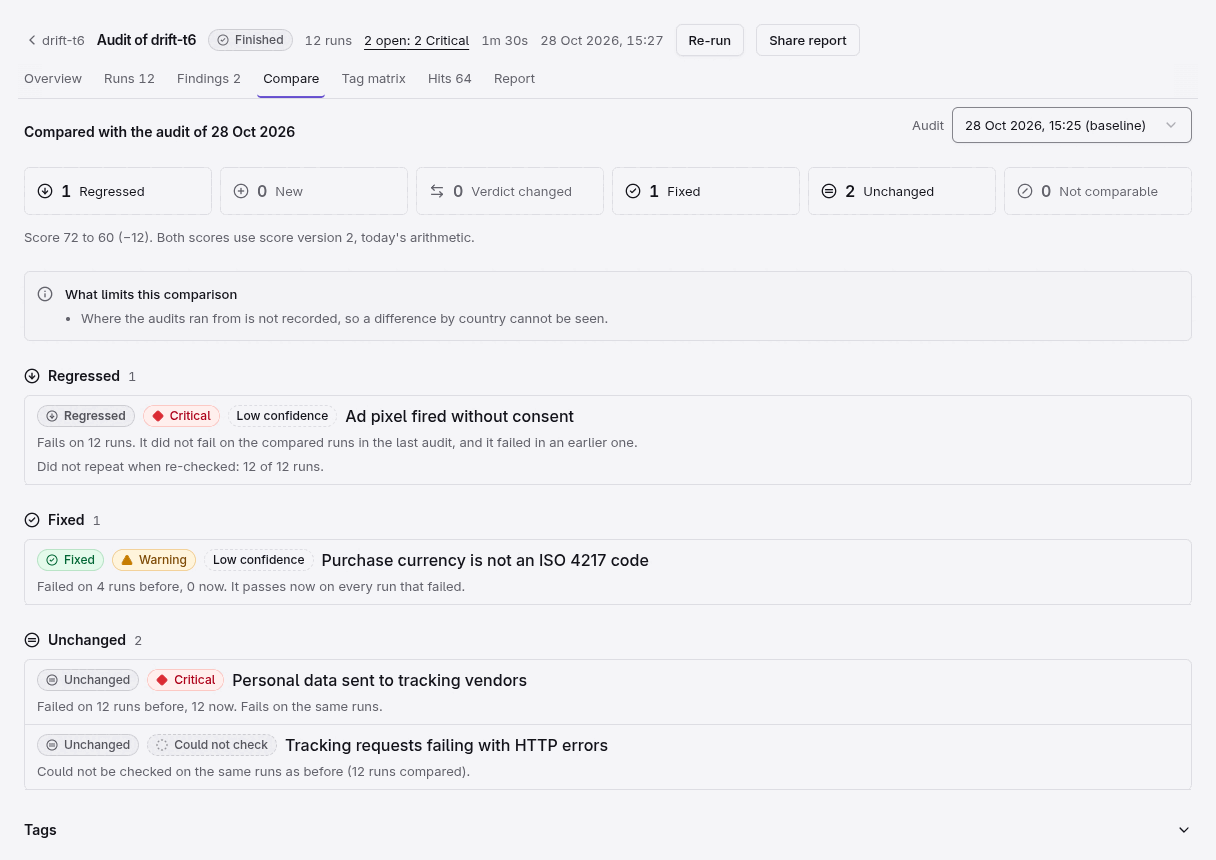
- Re-run and compare. A re-run is compared with the audit it came from, cell by cell (page, scenario, viewport): findings are new, regressed, fixed (only when the re-run passes every run that failed), unchanged, changed from or to "could not check", or not comparable (and the tab says why). Tags that disappeared, appeared or changed destination are listed. Accepted risks and notes carry over. A change that may be a flaky result says so, and "Re-check these pages" confirms it on exactly those pages.
- Report. A white-label report with the organization's logo and accent, a "What changed since" section, a share link that can be revoked, a PDF through the browser's print dialog, and a CSV register.
Needs Node 24.11+ or 26+ (not 25), pnpm, Docker for Postgres, and Python 3.12+ with uv for the capture engine. The first audit from a clean clone, with the capture engine and the fixture sites (small fake shops, each with one known tracking bug), is a few commands; the click-through is in CONTRIBUTING.md:
git clone https://github.com/amagdy46/zinko.git && cd zinko
pnpm install && pnpm build
cp .env.example .env                       # fill the three secrets with: openssl rand -base64 32
docker compose up -d && pnpm db:migrate    # reads DATABASE_URL from .env; a variable already in your shell wins
(cd apps/browser/scrapling && uv sync --frozen && .venv/bin/patchright install chromium)
ALLOW_PRIVATE_NETWORKS=true PORT=8080 pnpm --filter browser start   # the capture engine
pnpm --filter @repo/fixtures serve                                  # the fixture sites on :4400
pnpm dev                                                            # the app on http://localhost:1337
.env.example already sets BROWSER_URL=http://localhost:8080, which points the app at that engine (local dev stages only). The app listens on port 1337 (Alchemy's default); if that is taken it moves to the next free port, so read the URL pnpm dev prints when it starts. Sign-in works on any port because BETTER_AUTH_URL stays empty locally.
Then open the app and sign up. Create an organization, then add a site with the address http://localhost:4400/ (Sites > Add site; private addresses are accepted on local dev stages only), and choose New audit on the site. The numbered click-through, with the pages to pick, is in CONTRIBUTING.md.
- Cookie banner detection is inferred from the accept and reject runs, so under "no interaction" and "Global Privacy Control" a consent check on a page whose banner could not be found says so instead of passing. A banner that reports "accepted" without a consent update (Cookiebot on one tested shop) leaves its accept rows "could not check".
- No region. An audit does not record where it ran from, so a difference caused by a visitor's country cannot be told from a change in the site; the Compare tab says so.
- Click IDs are added to the start URL only. Checks about them on other pages follow the journey.
- The score is provisional. Weights, the cap at 79 with a critical finding and the bands may change; a score delta is shown only between audits that checked the same runs under the same rules, and both scores are always computed with today's arithmetic.
- Not yet measured on Cloudflare: the time of a 30-run audit (about 5 to 6 minutes locally against a 5-minute goal), cold start of the capture container, and the public report's rate limit.
- Capacity limits. An organization can have 5 active (queued or running) audits at a time, and only one re-run of a given audit can be in progress at a time (a second press says so). Audits take turns on the capture engines.
- Vendor-side errors (
hygiene.tag-errors) are "could not check" when tracking requests are answered locally, which is how the fixtures are run.
Needs Node 24.11+ or 26+ (not 25) and pnpm.
git clone https://github.com/amagdy46/zinko.git && cd zinko
pnpm install && pnpm build
node apps/cli/dist/index.js decode 'https://region1.google-analytics.com/g/collect?v=2&tid=G-ABC123&en=purchase&gcs=G100&epn.value=49.9'
[
{
"vendor": "ga4",
"destinationId": "G-ABC123",
"event": "purchase",
"batchIndex": 0,
"params": {
"value": 49.9
},
"ids": {},
"consent": {
"adStorage": "denied",
"analyticsStorage": "denied",
"raw": "G100"
},
"collector": "google",
"host": "region1.google-analytics.com",
"url": "https://region1.google-analytics.com/g/collect?v=2&tid=G-ABC123&en=purchase&gcs=G100&epn.value=49.9"
}
]Meta Pixel (facebook.com/tr), Google Ads and TikTok requests decode the same way. For a POST hit, pass its body with --body '<raw-body>'. The CLI audit command is not built; audits run in the web app.
The web app runs audits against a capture engine you start by hand, on the fixture sites or any site you may audit. Setup (database, secrets, engine, pnpm dev) and the click-through are in CONTRIBUTING.md.
zinko capture loads a page in the capture engine under a consent choice and lists every tracking hit it sent: when, on which document, and whether it fired after the consent action. The engine is a Node server in apps/browser that drives Chromium through a Python child process (Scrapling), so it also needs Python 3.12+ and uv. Set that up once:
(cd apps/browser/scrapling && uv sync --frozen && .venv/bin/patchright install chromium)Start the engine and the fixture sites (small fake shops, each with one known tracking bug) in two terminals. ALLOW_PRIVATE_NETWORKS=true lets the engine load localhost; use it for local fixtures only, because the engine refuses private and local addresses by default.
ALLOW_PRIVATE_NETWORKS=true pnpm --filter browser start     # engine on http://localhost:8080
pnpm --filter @repo/fixtures serve                          # fixtures on http://localhost:4400
To run the web app against that engine, see the quickstart above (CONTRIBUTING.md).
Then capture a fixture. meta-before-consent fires a Meta PageView before the visitor chooses, so it fires even when they reject:
node apps/cli/dist/index.js capture http://localhost:4400/meta-before-consent/ --scenario reject --block-vendors== http://localhost:4400/meta-before-consent/ [reject]
engine: scrapling 0.5 (patchright 1.64.1)
page: HTTP 200
consent: rejected, cmp cookieconsent3, action at 5048ms, completed at 5052ms
documents
#0 /meta-before-consent/ start
hits (3); "after" = sent at or after the consent action; 1 vendor request(s) not decoded
time document vendor destination event consent note
------ ------------------------ ------ --------------- --------------- --------------------- -----
1355ms #0 /meta-before-consent/ meta 100000000000001 PageView ad:unknown an:unknown
2020ms #0 /meta-before-consent/ ga4 G-ZINKO00001 page_view ad:denied an:denied
8118ms #0 /meta-before-consent/ ga4 G-ZINKO00001 user_engagement ad:denied an:denied after
cookies
before-consent @ 5048ms #0 /meta-before-consent/: (none)
after-consent @ 5053ms #0 /meta-before-consent/: cc_cookie
end @ 8720ms #0 /meta-before-consent/: cc_cookie
errors: none
complete: true truncated: false
The Meta hit lands at 1.2 s, before the reject action at 4.9 s. The output also lists cookies per snapshot and errors; times vary from run to run. --block-vendors answers recognised tracking collection requests (any host, a site's own server-side GTM collector included) and known vendor hosts locally, so no recognised hit reaches Google, Meta or TikTok; it is best effort, not a guarantee, and vendors Zinko does not know or unrecognised shapes can still leave (see docs/vision.md). The SDK files themselves (gtag.js, fbevents.js, the TikTok pixel) are still downloaded from the vendors. Against a real site, drop it and leave ALLOW_PRIVATE_NETWORKS unset; load only sites you are allowed to test.
--scenario is none, accept, reject, gpc or all (the four in turn). --click <selector>, --goto <url> and --reload add journey steps in the order given, at most 8 in all. --mobile uses a phone viewport. --engine <url> points at another engine. --json prints one object per scenario, including undecoded: vendor requests no decoder turned into a hit. --rules also runs the 28 checks on each capture and prints one line per rule (pass, fail, inconclusive or not_applicable, its message and how many pieces of evidence it cites); it is the same code the web app runs. --explain-digest prints, for each failing check, what an AI explanation would be given (it runs the checks; pages are aliases such as "Page 1" unless you add --page-paths), and --explain-prompt prints the exact prompt the model would receive; neither calls a model.
A client says their conversions don't match. Today that usually means an afternoon in Tag Assistant and Omnibug, going through the site once per consent choice, then assembling the evidence into a report by hand. Commercial products such as ObservePoint and Trackingplan automate parts of this as closed-source subscriptions.
Zinko is being built to do that audit in one run, in the open. The design:
- Evidence, not opinions. Zinko loads your pages in a real browser and records every tracking request,
dataLayerpush, cookie and consent signal. Each finding links to the decoded hit, the raw request and a screenshot. - Deterministic checks. Rules are plain functions over the captured data, each checked against a fixture page. An LLM can explain a finding and write fix steps, but it never decides pass or fail, and every check works without one.
- Every consent path. Each page runs with no banner interaction, after "accept all" and after "reject all", with and without click IDs such as
gclidandfbclidin the landing URL. - Made for site owners, consultants and agencies. Sites first, with client grouping when you want it, a tag matrix of what fires where, re-runs that mark findings new, regressed or fixed, and a white-label report.
Use something else if you need ongoing monitoring of production traffic today, or vendors beyond GA4, Google Ads, Meta and TikTok.
| Area | What it catches |
|---|---|
| Consent | Ad or analytics cookies set before consent; non-Google pixels firing before consent or after "reject all"; Google hits before consent without a denied consent state (gcs); consent default arriving after the Google tag; Consent Mode v2 signals missing; whether the site runs basic or advanced consent mode (informational); the consent choice not kept on the next page or after a reload; consent lost on another host the site declares |
| Click IDs | gclid and fbclid lost on redirects and across navigation (ttclid across navigation is not checked yet); _gcl_aw, _fbc and _ttp cookies missing after consent; the GA4 cross-domain linker (_gl) missing on a link to a declared host |
| Coverage | purchase without transaction_id, value or currency; key pages with no page_view |
| Duplicates | The same event fired twice for one action; several GA4 IDs on one page; Meta Pixel initialized twice; the same GA4 event sent from the browser and from a first-party server collector; a purchase sent again when the thank-you page is reloaded |
| Dedup | Meta browser eventID missing or reused, so Conversions API events can't be deduplicated; TikTok events without an event ID |
| Hygiene | Email addresses or phone numbers in URLs and parameters; tags failing with 4xx or 5xx; hits sent from staging hosts; the page's own location not matching the audited host; debug or preview parameters left in live hits |
These 28 checks are built and run on every audit. Each is a plain function over one run's capture, proven on a fixture site with a known bug. A run that did not load, or a consent check on a page whose banner was not found, is reported as inconclusive with the reason, never as clean. The full v0.1 scope, and what comes after it (GTM and GA4 configuration checks, scheduled audits, tracking plans in git), is in docs/product.md.
apps/cli            zinko CLI (decode and capture, with --rules; audit is planned)
apps/web            TanStack Start web app on Cloudflare Workers: sites, audits, live progress, Hits explorer, Problems, Compare, reports
apps/browser        capture engine: Node server, egress proxy, Scrapling (Python) in a container image
packages/decoders   GA4, Google Ads, Meta Pixel and TikTok decoders -> a normalized Hit
packages/rules      the 28 checks: one run's capture and hits -> pass, fail, inconclusive or not applicable, with evidence
packages/capture-contract  Effect Schemas for the engine's POST /capture
packages/fixtures   fake shops, each with one known tracking bug
packages/core       Effect service interfaces
packages/db         Postgres schema and migrations (Drizzle)
infra/              Cloudflare resources, declared with Alchemy
The stack is Effect 4 and TanStack Start on Cloudflare Workers, Postgres through Hyperdrive, and Better Auth, scaffolded with efforge.
Issues and pull requests are welcome. Setup, checks and where things live: CONTRIBUTING.md.
AGPL-3.0. Built by Abdulrahman Magdy.