One command turns your repo into a full product launch.
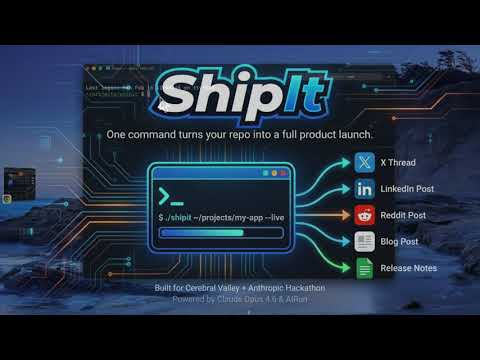
./shipit ~/projects/my-app --liveShipIt reads your repo (README, CHANGELOG, git log, package manifests), builds a structured briefing, then generates platform-specific content for release notes, a blog post, an X/Twitter thread, a LinkedIn post, and a Reddit post. With --open, it loads each draft into your browser's compose UI for review before posting.
Built with AIRun executable markdown and Claude Opus 4.6. Each stage is a separate .md file connected by Unix pipes.
- Claude Code installed (
claudecommand available) - AIRun installed (
aicommand available) - For
--open: Chrome with Claude in Chrome extension
# Install Claude Code (if you don't have it)
curl -fsSL https://claude.ai/install.sh | bash

# Install AIRun (executable markdown runner)
git clone https://github.com/andisearch/airun.git
cd airun && ./setup.sh

# Clone ShipIt
git clone https://github.com/andisearch/shipit.git
cd shipit

# Generate launch content for any repo
./shipit ~/projects/my-app --live# Generate all channels for a repo
./shipit ~/projects/my-app
# Works with GitHub URLs too (shallow-clones to a temp dir, cleaned up after)
./shipit https://github.com/andisearch/airun
# Only specific channels
./shipit ~/projects/my-app --channels x,linkedin
# Focus on a specific feature or angle
./shipit ~/projects/my-app --focus "the new plugin system"
# Include changes since a tag, focused on what matters
./shipit ~/projects/my-app --since v1.2.0 --focus "performance improvements"
# Control how many commits to analyze (default: 20)
./shipit ~/projects/my-app --commits 50
# Open drafts in Chrome for review (fills compose UI, doesn't post)
./shipit ~/projects/my-app --open --accounts x,linkedin
# Actually post (use with caution)
./shipit ~/projects/my-app --dangerously-post --accounts x,linkedinOutput goes to ./output/:
output/
  briefing.md     # Structured repo analysis
  notes.md        # Release notes
  blog.md         # Blog post
  x.md            # X/Twitter thread (6-10 tweets)
  linkedin.md     # LinkedIn post with first-comment link
  reddit.md       # Reddit post with TL;DR
| Channel | What You Get |
|---|---|
| Release Notes | Grouped changes (Added / Changed / Fixed), version header |
| Blog Post | Long-form technical post with code examples |
| X Thread | 6-10 tweets: hook, demos, CTA. Links in reply only |
| LinkedIn Post | Professional narrative, links in first comment |
| Reddit Post | TL;DR + technical body + discussion question |
ShipIt is a bash orchestrator that pipes data between standalone AI scripts. Each script is an executable markdown file that runs through AIRun and Claude Opus 4.6.
shipit [repo-path] [flags]
  |
  |-- analyze.md        reads repo context -> structured briefing
  |
  |-- release-notes.md  -+
  |-- blog-post.md       | each receives the briefing
  |-- x-thread.md        + + channel config via stdin,
  |-- linkedin-post.md   | generates platform-specific content
  |-- reddit-post.md    -+
  |
  |-- review.md         checks each output for AI writing tells
  |
  +-- post.md           (optional) opens drafts in Chrome / posts via --dangerously-post
The scripts communicate through === SECTION: === delimited stdin payloads -- the same pattern Unix pipes use, but for structured AI context.
Opus 4.6 plays a different role at each pipeline stage:
- Analyst --
analyze.mdreads raw repo files and produces a structured briefing - Writer (5 voices) -- Each channel script generates content matched to its platform's format, audience, and algorithm
- Editor --
review.mdchecks for AI writing tells (vocabulary flags, structural patterns) and corrects them - Publisher --
post.mdopens drafts in Chrome compose UIs for review, or posts live with--dangerously-post
All scripts enforce writing quality rules: no "delve," no "game-changer," no bold inline headers, no staccato sentence patterns. The review stage catches anything the generation stage missed.
Each .md script has a shebang that makes it a real program:
#!/usr/bin/env -S ai --opus --skip --live
You are generating an X/Twitter thread for a product launch.
...
=== INPUT ===
This means:
- Scripts run directly:
./scripts/x-thread.md - Scripts compose with pipes:
cat briefing.md | ./scripts/x-thread.md > output/x.md - The prompt IS the program -- no wrapper code, no templates, no config files
# Open drafts in Chrome — review before posting
./shipit ~/projects/my-app --live --open --accounts x,linkedin

# Post directly (skips review)
./shipit ~/projects/my-app --live --dangerously-post --accounts x,linkedin
With --open, ShipIt opens each platform's compose UI in a separate tab and fills in the generated content, then leaves the tabs open for you to review before posting. No API keys, no OAuth tokens -- it uses your existing browser sessions.
--dangerously-post skips review and clicks Post on each platform.
Prerequisites:
- Chrome open with Claude in Chrome extension installed
- Logged into your social accounts
Each channel is a markdown file. Add a platform by copying an existing script and customizing the prompt:
cp scripts/x-thread.md scripts/mastodon-post.md
# Edit the voice and format rules for Mastodon
# Add 'mastodon' to the case statement in the shipit orchestrator| Flag | Description |
|---|---|
--channels x,linkedin,... |
Which channels to generate (default: all) |
--focus "topic" |
Tell the analyst what to emphasize in the briefing |
--since tag-or-date |
Include changes since a git ref |
--commits N |
How many commits to analyze (default: 20) |
--open |
Open drafts in Chrome compose UIs for review |
--dangerously-post |
Actually post (implies --open) |
--accounts x,linkedin |
Which platforms to target (requires --open) |
--live |
Stream output in real-time |
Available channels: notes, blog, x, linkedin, reddit
The examples/ directory contains real ShipIt output from two different repos:
./shipit https://github.com/andisearch/airun --live --focus "executable markdown and Unix pipes"Output: examples/example-output-airun/ -- release notes, blog post, X thread, LinkedIn post, Reddit post, all generated from the AIRun repo.
./shipit https://github.com/anthropics/anthropic-sdk-python --live --since v0.78.0Output: examples/example-output-claude-sdk/ -- launch content for Anthropic's own SDK, scoped to changes since v0.78.0. Demonstrates --since for incremental releases and how ShipIt handles a repo it has never seen before.
Every file in these directories was generated by a single ./shipit command with no manual editing.
- Claude Opus 4.6 -- powers every pipeline stage
- AIRun -- executable markdown runtime
- Claude in Chrome -- browser automation for
--openand--dangerously-post - Bash -- orchestrator, because Unix pipes are the right abstraction
MIT