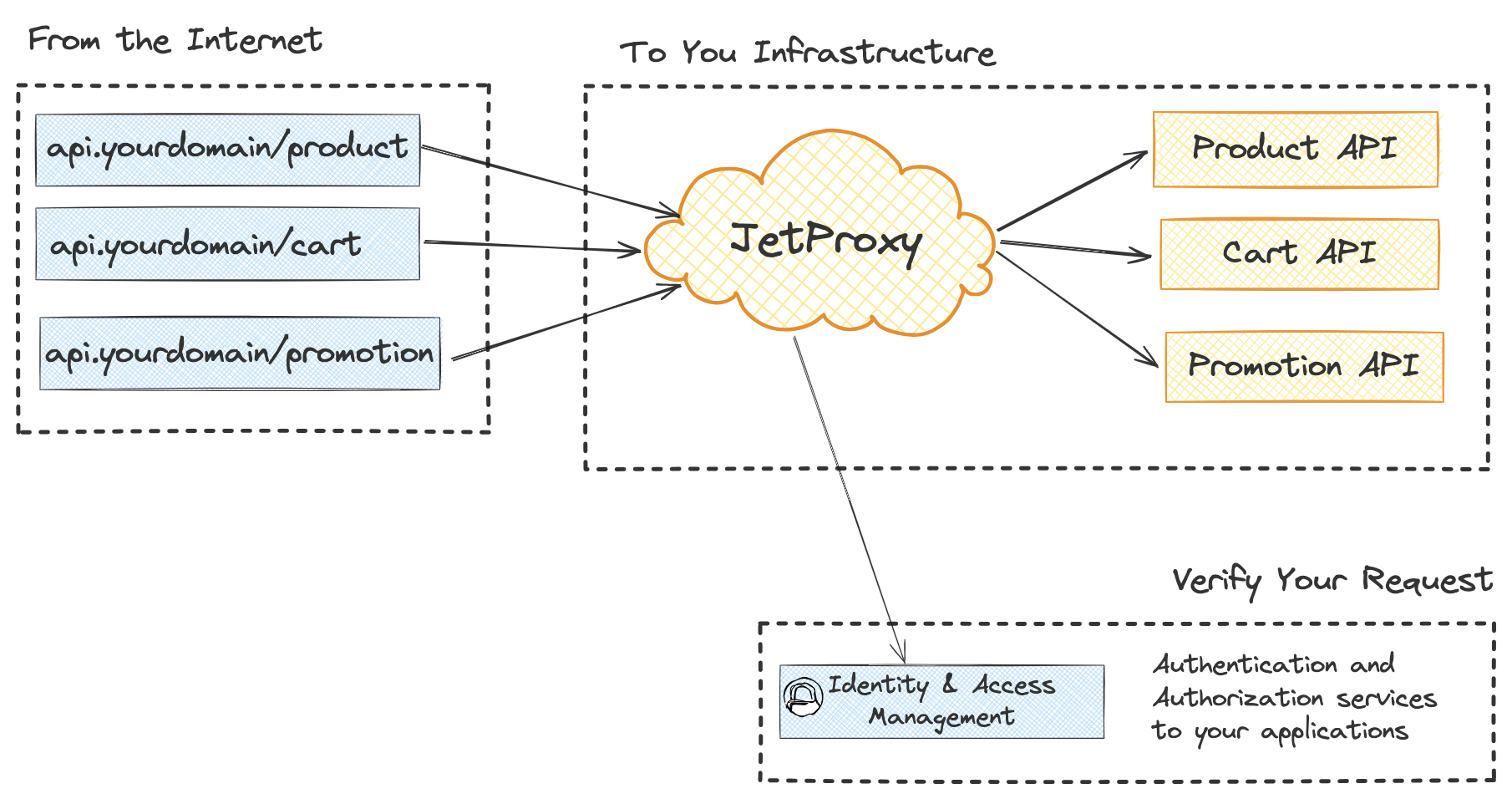


JetProxy is a fast, lightweight, and flexible reverse proxy built using Jetty. Designed for developers and teams who need fine-grained control over proxy behavior, JetProxy is a developer-friendly alternative to tools like Traefik and Nginx.
- 🌐 HTTP reverse proxy with dynamic routing
- 🔐 Middleware-based auth support (BasicAuth, JWT, ForwardAuth)
- 🧠 Flexible middleware engine for request handling and transformations:
- Request rules, header manipulation, CORS, and rate limiting
- Built-in caching, circuit breakers, and mirroring support
- Experimental REST to gRPC conversion and idempotency handling
- ⚡ High-performance Jetty server core
- 📊 Per-route statistics (hits, status codes, latency, host breakdown)
- 💡 Declarative YAML-based configuration for routes and policies
- ☁️ Easy deployment as a standalone JAR – no external dependencies
- 🛠️ Built with modern Java 21 and Gradle
JetProxy eliminates the need for constant manual updates by offering straightforward YAML configuration and real-time adjustments. Its intuitive design reduces operational complexity, enabling teams to focus on service development rather than maintaining intricate proxy configurations.
For active development, a unified script run.sh is provided to manage both the backend and frontend services.
Starts the frontend with Vite's live-reloading dev server and starts the backend. Use this for most development tasks.
In this mode, the frontend is accessible at http://localhost:5173 (Vite's default port) and connects to the backend running on the port defined in your config (e.g., http://localhost:8080).
# Run dev mode with the default config (demo/config.yaml)
./run.sh --dev


### Production Mode

Builds the frontend into an optimized, static bundle and serves it directly from the backend server. This is useful for testing the final application as a single unit.

```bash
# Run production mode with the default config (demo/config.yaml)
./run.sh

# Run production mode with a custom config file
./run.sh --config=path/to/your.yamlYou can also run the dashboard or proxy services by themselves.
# Run only the dashboard development server
./run.sh --dashboard-only

# Run only the proxy server (in production mode)
./run.sh --proxy-only

# Run only the proxy server (in development mode)
./run.sh --proxy-only --devDownload latest jar
Create file config.yaml
appName: ${JET_APP_NAME:API-PROXY}
port: ${JET_PORT:8080}
defaultTimeout: ${JET_DEFAULT_TIMEOUT:10000}
dashboard: ${JET_DASHBOARD:true}
rootPath: ${JET_DASHBOARD:/}
accessLog: ${JET_DEBUG_MODE:true}

corsFilter:
  accessControlAllowMethods:
    - "*"
  accessControlAllowHeaders:
    - "*"
  accessControlAllowOriginList:
    - "*"
  maxAge: 3600

storage:
  inMemory:
    enabled: true
    maxMemory: 50 # MB
    size: 10000

proxies:
  - path: /upload
    service: fileUploadService
    middleware:
      rule: "HeaderPrefix('Content-Type', 'multipart/form-data')"
  - path: /v2/grpc
    service: userGrpcApi
    ttl: 10000
  - path: /user
    service: userApi
    matches:
      - rule: "Header('Content-Type', 'application/json')"
        service: userApi
      - rule: "Header('x-header-hello', 'x-header-hello')"
        service: userApi
    middleware:
      basicAuth: 'basicAuth:administrator'
      mirroring:
        enabled: true
        mirrorService: userV2Api
        mirrorPercentage: 100
      forwardAuth:
        enabled: false
        path: /verify
        service: authApi
        requestHeaders: "Forward(X-Custom-*);Forward(Authorization);"
        responseHeaders: "Remove(X-Powered-By)"
    ttl: 1000
services:
  - name: userApi
    url: http://localhost:30001
    methods: ['GET', 'POST']
  - name: userV2Api
    url: http://localhost:30001/v2
    methods: [ 'GET', 'POST']
  - name: authApi
    url: http://localhost:30001
    methods: ['POST']
  - name: fileUploadService
    url: http://localhost:30001
    methods: ['POST']

grpcServices:
  - name: userGrpcApi
    host: localhost
    port: 50051

users:
  - username: admin
    password: admin
    role: administrator
export APP_CONFIG_PATH=/path/to/config.yaml
java -jar jetproxy-latest.jar