A modern, open-source dashboard extension for Hangfire — analytics, console logs, tags, and recurring job management built in.
Open source (LGPL-3.0-or-later). Requires Hangfire 1.8+ and ASP.NET Core (.NET 8, 9, or 10). Not officially supported by Hangfire OÜ.




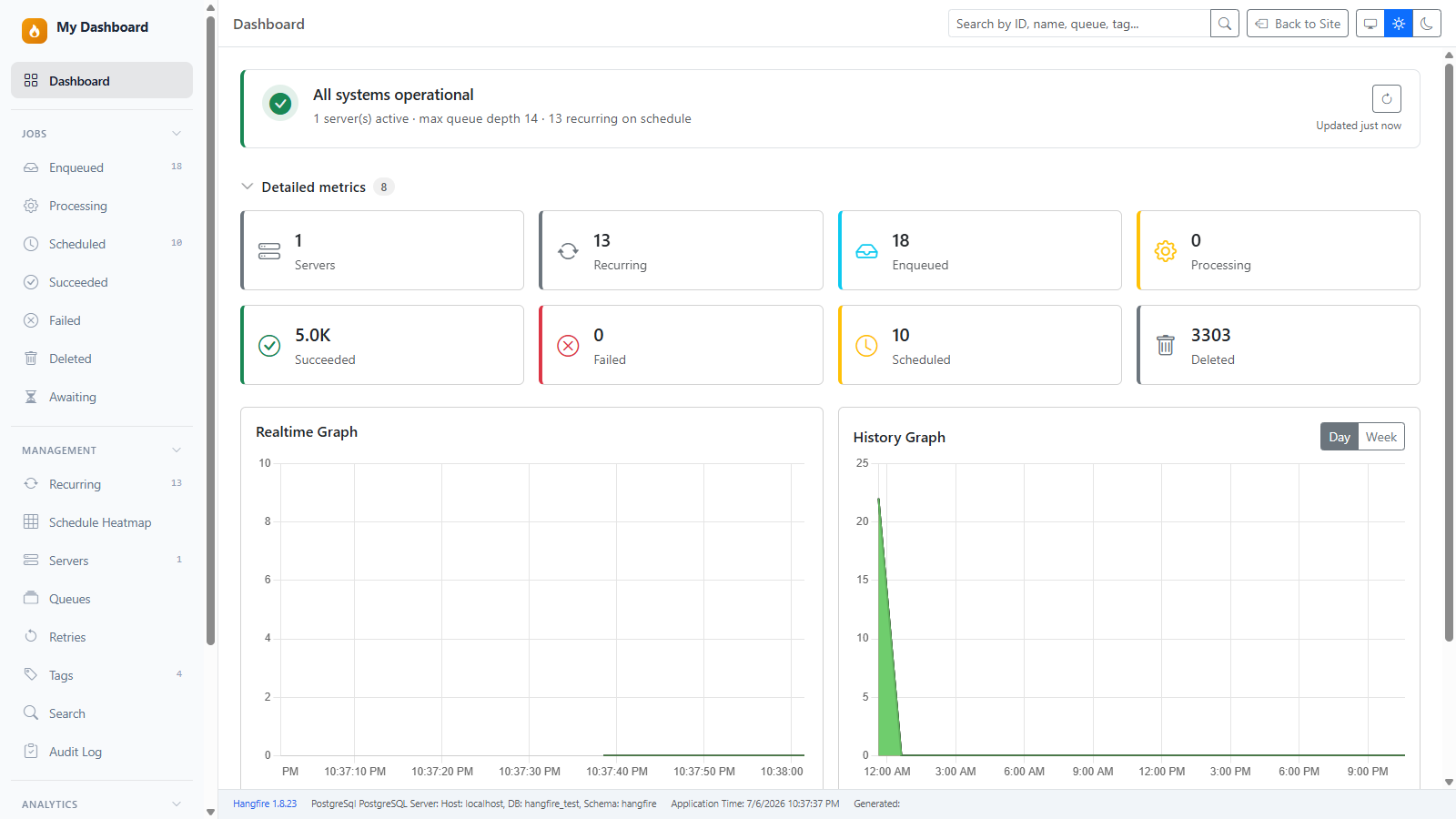
dotnet add package a2n.Hangfire.Dashboard// Use in place of app.UseHangfireDashboard():
builder.Services.AddHangfireDashboardUI();
app.UseHangfireDashboardUI("/hangfire");Navigate to /hangfire. Done.
Authorization: By default, only local requests are allowed (same as the Hangfire dashboard). For remote access, set
Authorization = []or add your own filters. See CHANGELOG.md andsamples/SampleAppAuthfor a cookie login example.
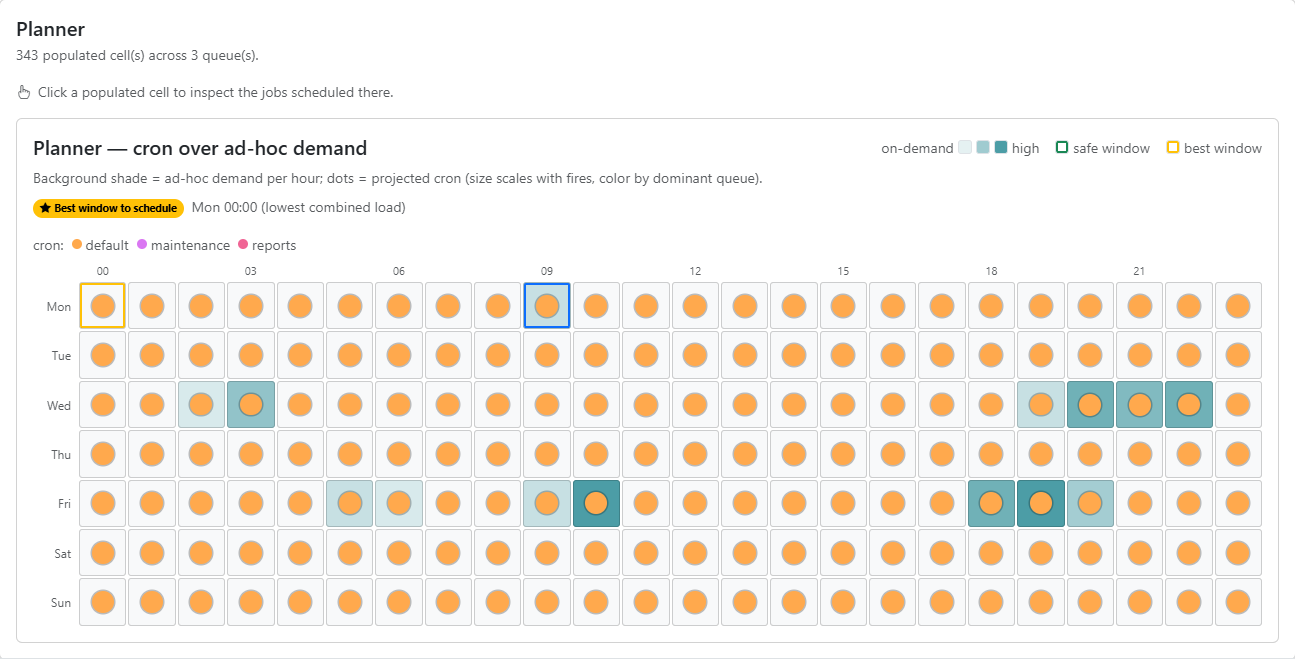
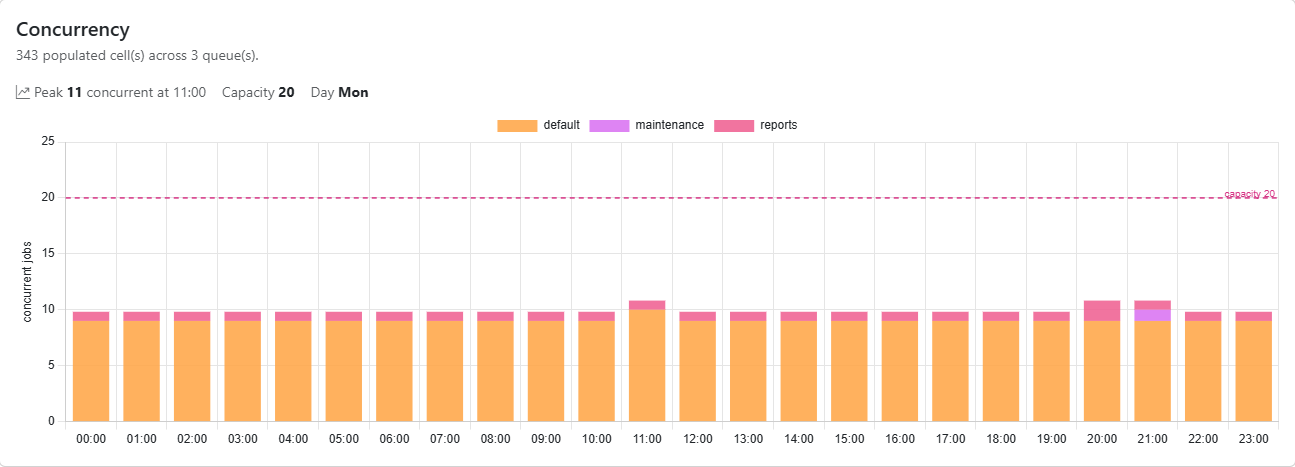
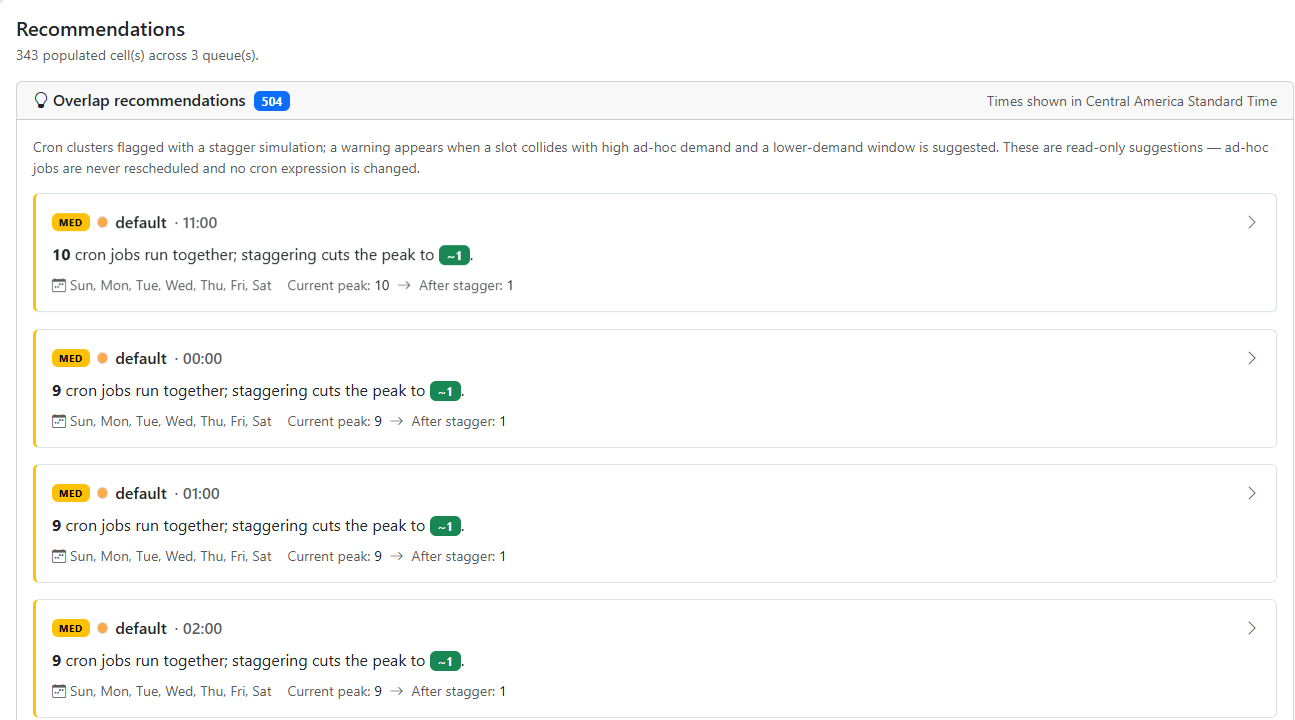
Plan controllable cron jobs around real on-demand load. The new Schedule Heatmap projects your recurring jobs — and actual ad-hoc demand — onto a queue × day × hour grid so you can spot collisions, find the quietest window to schedule, and rebalance load. See the showcase below.
2.5.4 (patch) — Recurring Jobs fixes: the Items per page selector now actually paginates (#37) — it previously changed only its own value while every job stayed rendered; the job Id and Last Execution cells link to the latest execution's details (#38); and the editor no longer drops
Dictionary<K,V>/List<T>arguments when switching JSON ▸ Form (#39) — they were mapped to a reflection-driven nested sub-form that could not represent their entries. Also, a blank required parameter no longer blocks the JSON ▸ Form toggle; required-ness is enforced when you save, not when you switch views. See the changelog.
2.5.3 (patch) — a Throttling page (#30, #31) for teams using Hangfire.Throttling: semaphores with live occupancy and holders, held mutexes, rate-limit windows, and orphaned-holder detection. It auto-detects, so hosts without the package see no change. Also fixes a DST off-by-one-hour that silently dropped heatmap cells, and unguarded use of Hangfire's optional storage API that could take down the whole dashboard shell on third-party storages. See the changelog.
2.5.2 (patch) — the rollup collector no longer drops executions beyond its per-poll cap (#29). It scans at most 2 000 jobs per poll but used to advance its watermark past everything it had not reached, so on non-SQL storages a burst above ~2 000 completions per minute was sampled rather than aggregated. It now tracks the range it has covered and drains the backlog across later polls, counting each execution exactly once. See the changelog.
2.5.1 (patch) — Redis / rollup analytics fixes: the heatmap's estimated duration was stuck at
1m(#27); the Duration, Queue latency, and Average state timing panels were empty (#26); Analytics ▸ Recurring never finished loading on large deployments and the last-results strip stayed blank (#25). Also the sidebar nav group no longer tears down the Blazor circuit on a fresh session (#23). See the changelog.
| Feature | What you get | |
|---|---|---|
| 🗺️ | Seven views | Planner (cron over ad-hoc demand with low-load "safe windows"), Punchcard, Queue × Hour, Per-queue, Calendar, Concurrency, and stagger Recommendations. |
| 🔀 | Projected + Historical | A storage-agnostic Projected source (from cron expressions) on any storage; a Historical source and ad-hoc demand overlay on SQL Server / PostgreSQL — or on any storage via the new rollup adapters. Degrades gracefully where unavailable. |
| 🧰 | Rollup metrics for non-SQL storage (#21) | New a2n.Hangfire.Dashboard.Rollup / a2n.Hangfire.Dashboard.Redis packages bring Analytics, heatmap Historical, and realistic estimated durations to Redis, in-memory, and other NoSQL storages — no SQL required. |
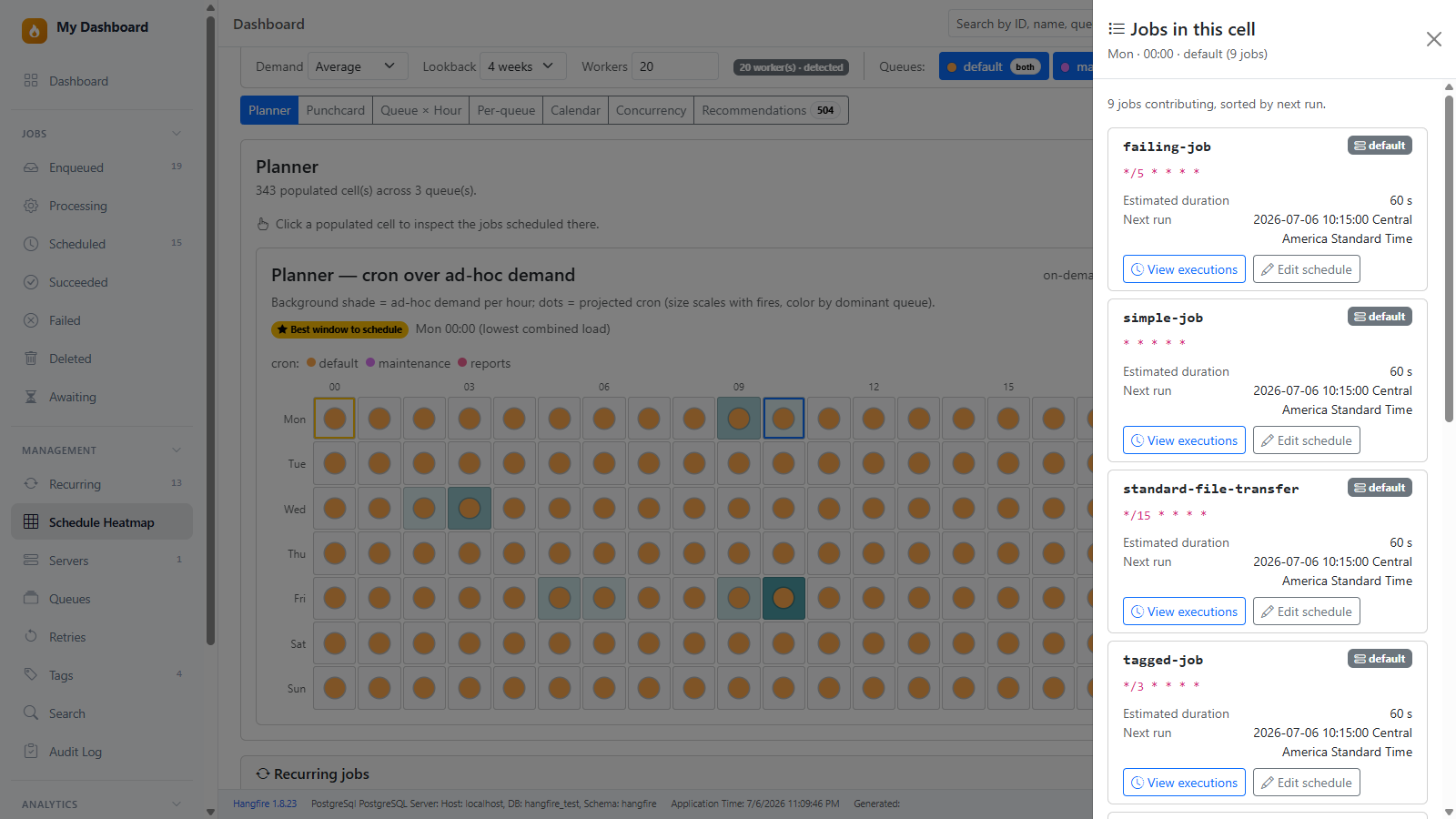
| 🔎 | Drill-down & a11y | Click any cell to inspect the jobs scheduled in that slot. Honors per-job & viewer time zones, light/dark theme, and is keyboard / screen-reader accessible. |
See the changelog for the full list.
Create and schedule jobs with their arguments directly from the dashboard — no code change, no redeploy. This closes a long-standing gap: the recurring editor previously built jobs with empty arguments, so parameterized methods couldn't be scheduled correctly (#8).
2.4.3 (patch) — UI/UX fixes: the Failed Jobs table no longer hides the "Failed" column behind a horizontal scrollbar when an exception is long (#17); the Create Job method dropdown keeps its Contract/Implementation pill aligned for long names (#18); the Recurring Jobs search no longer drops characters when typing quickly (#19); and the dark theme now persists across navigation and new sessions (#20). See the changelog.
2.4.2 (patch) — recurring jobs now accept mixed-case/dotted ids and editable never-fire cron expressions (#11); a client-side filter on the Recurring Jobs page (#13); long job names no longer break the table layout (#12); a duplicate-id guard when creating; and the Audit Log page gains an items-per-page selector and paged navigation. See the changelog.
2.4.1 (patch) — searchable method picker; contract-aware resolution so interface/abstract targets keep their class-level
[Tag]/[Queue]and display names; fixed editing a recurring job whose method takes an injected parameter (#10); consistent solid-red Delete buttons across all job pages. See the changelog.
| Feature | What you get | |
|---|---|---|
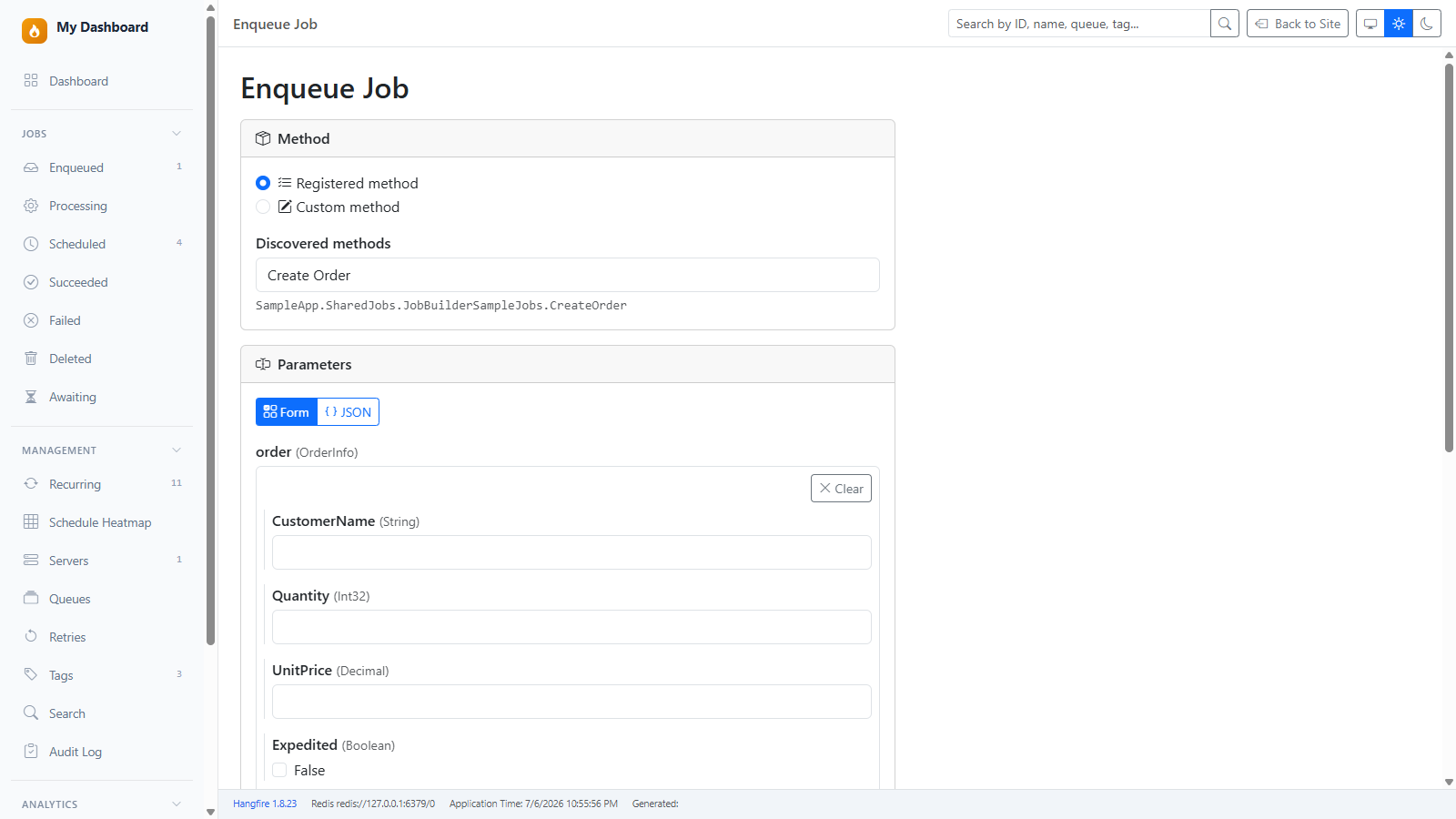
| 🧩 | Guided parameter form | A type-aware form generated from the method signature — text, numbers, dates, GUIDs, enums, booleans, arrays, and nested objects — with a live JSON mirror and a Form ⇄ JSON toggle. → |
| 🔎 | Method discovery | Pick from methods discovered across loaded assemblies (decorated with JobDisplayName, Tag, or Queue) via a searchable picker that badges each entry as Contract or Implementation, with overload-safe resolution. Hand-typed arbitrary methods are opt-in via AllowArbitraryMethodInvocation. → |
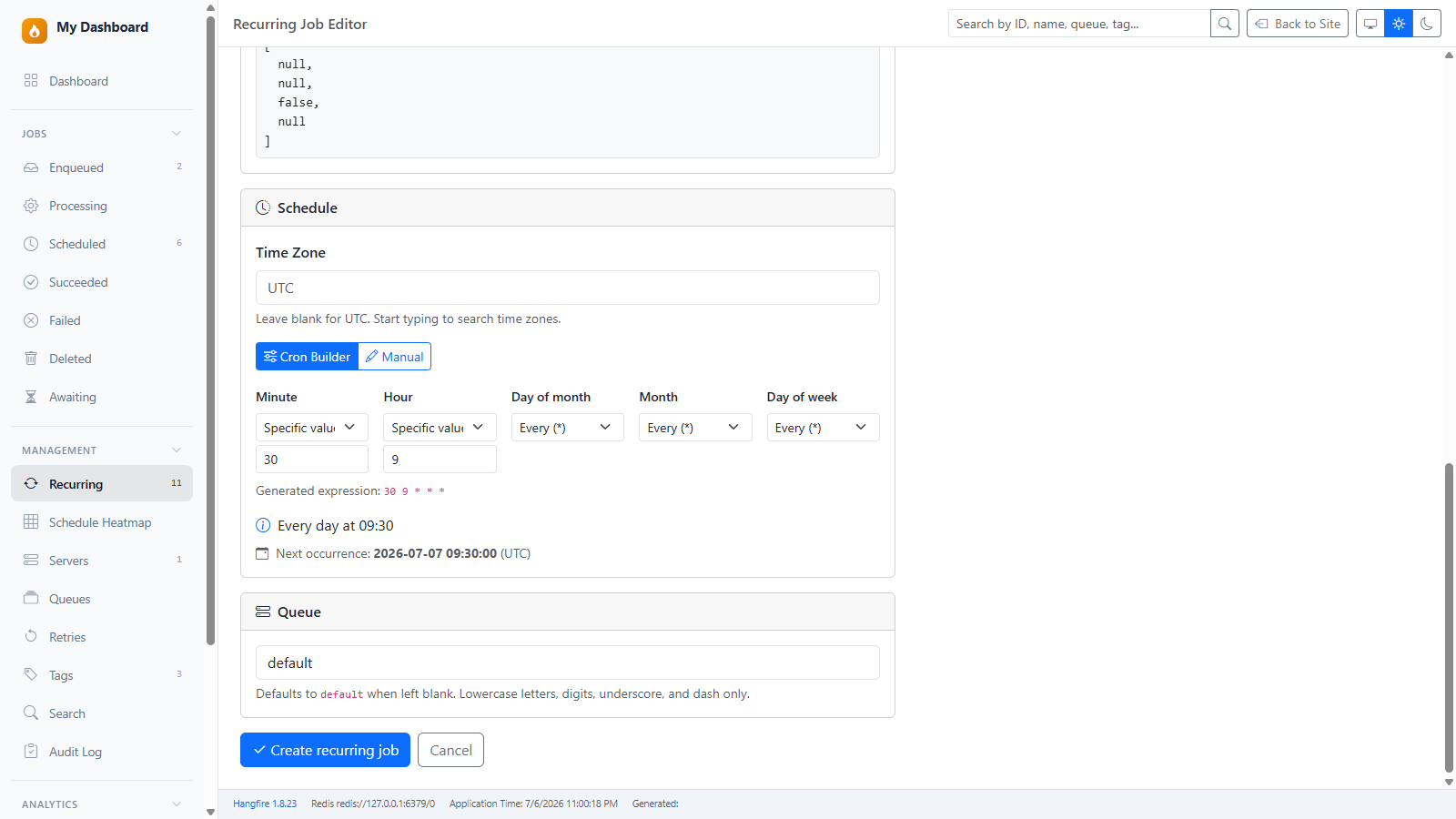
| 🕑 | Visual cron builder | Build a cron schedule field-by-field (every / specific / range / step) with a human-readable description and next-run preview in the selected time zone — or type a cron string manually. → |
| ➕ | Enqueue page | A new /jobs/enqueue page reuses the same builder to fire one-off jobs, not just recurring ones. → |
| ✏️ | Typed args + edit pre-fill | Values are converted to the method's declared types (["report", 42] → string, int); injected parameters (PerformContext, CancellationToken) are skipped; existing argument values are pre-filled when editing. → |
app.UseHangfireDashboardUI("/hangfire", new DashboardUIOptions
{
    EnableJobManagement           = true,   // show the recurring create/edit builder and Enqueue page
    AllowArbitraryMethodInvocation = false, // opt-in: allow hand-typed type+method (default false)
});
See Job Builder for the full feature description.
The biggest operations-focused release yet. The dashboard goes from a viewer you open when something breaks to a first-class operational tool.
| Feature | What you get | |
|---|---|---|
| 🩺 | Health checks | /healthz · /healthz/ready · /healthz/full endpoints for Kubernetes & load balancers, an ASP.NET Core IHealthCheck adapter, and a traffic-light hero card on the Home page. → |
| ⏸️ | Queue pause / resume | Pause a single queue from the new card-based /queues page. Workers reschedule jobs instead of running them — no data loss. → |
| 🚧 | Maintenance mode | One global toggle pauses every queue, with a persistent banner on every page. → |
| 📋 | Audit log | Every admin action recorded — who, when, what — on a new /audit page, attributed to the real signed-in user. → |
| 🔗 | Enhanced Job Details | Continuation dependency graph, a retry summary banner, and clickable stack-trace source links (GitHub/GitLab/Azure DevOps/Bitbucket/local IDE). → |
// Liveness/readiness probes + queue-pause enforcement in one place:
builder.Services.AddHangfire(config => config
    .UseSqlServerStorage(connStr)
    .UseDashboardQueuePauseFilter());        // honour pause toggles on running servers

builder.Services.AddHealthChecks()
    .AddHangfireDashboard(tags: new[] { "ready" });   // unified /health endpoint
See the full 2.3.0 changelog for every option and detail.
Hangfire ships a capable monitoring UI out of the box. Many teams extend it with community packages for additional dashboard features — for example Hangfire.Console, Hangfire.Tags, and Hangfire.RecurringJobAdmin. Dashboard analytics are also available in Hangfire Pro.
a2n.Hangfire.Dashboard combines several of these capabilities in one extension: search, filters, analytics (with optional storage adapters), console viewer, tags, recurring job CRUD, SignalR realtime updates, and theme options — while using the same Hangfire job storage and APIs.
| Feature | Description |
|---|---|
| Job monitoring | Job state pages, batch operations, servers, retries |
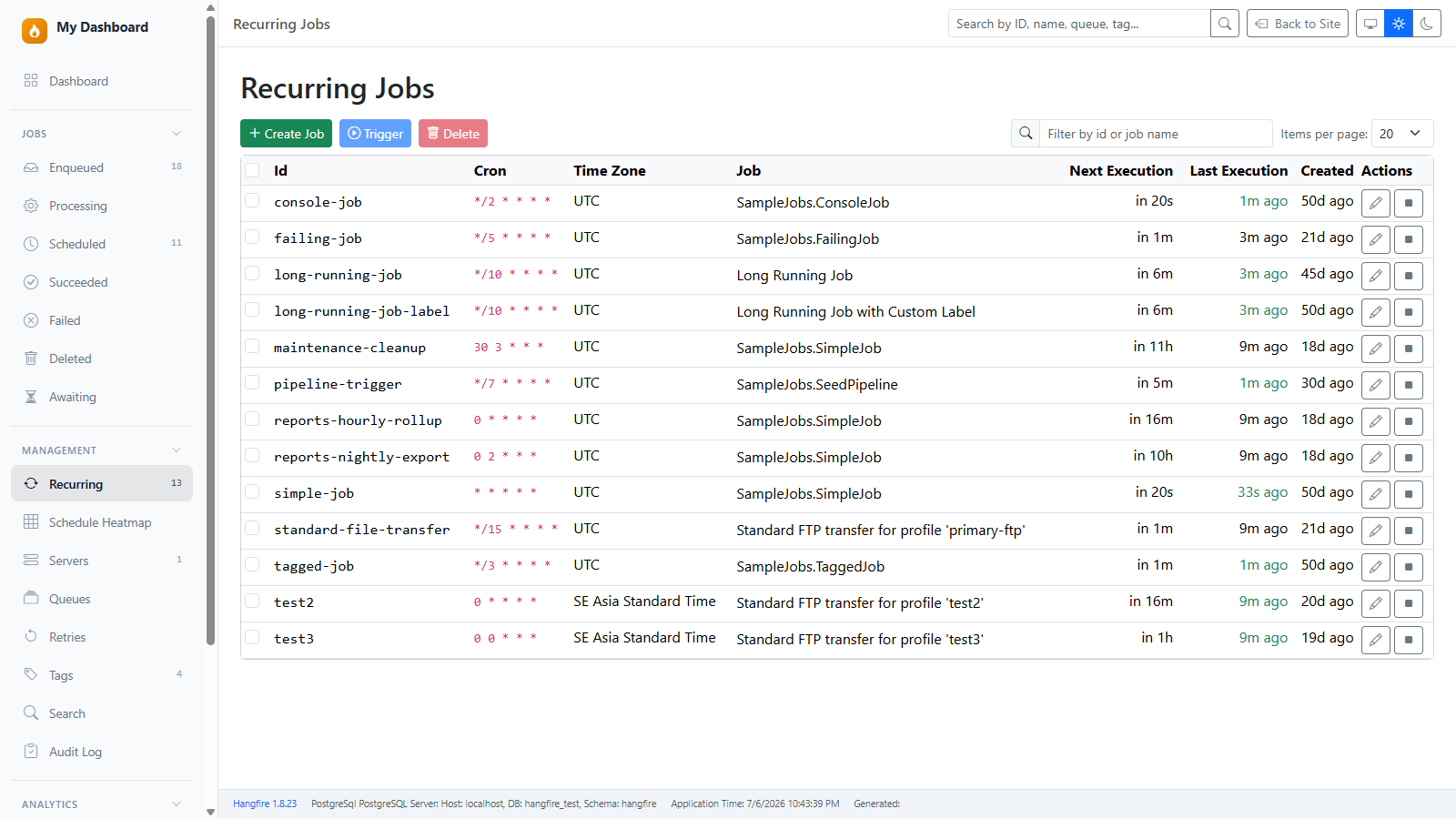
| Recurring jobs | Create, edit, start, and stop recurring jobs from the UI, with a client-side id/name filter |
| Schedule Heatmap | 🆕 Visualize recurring-job density by queue × day × hour and plan cron around real demand — Planner, Punchcard, Calendar, Concurrency, Recommendations, and more (see Schedule Heatmap) |
| Job Builder | 🆕 Create & schedule jobs with typed arguments — guided parameter form (+ JSON), method discovery, overload-safe resolution, and one-off enqueue at /jobs/enqueue — see Job Builder |
| Visual cron builder | 🆕 Build cron schedules field-by-field with a human-readable description and next-run preview |
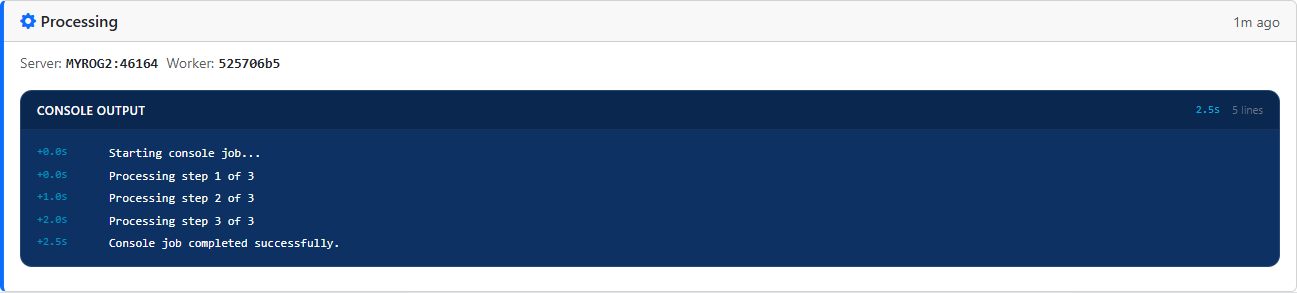
| Console output | Logs, progress bars, and colors (Hangfire.Console-compatible API) |
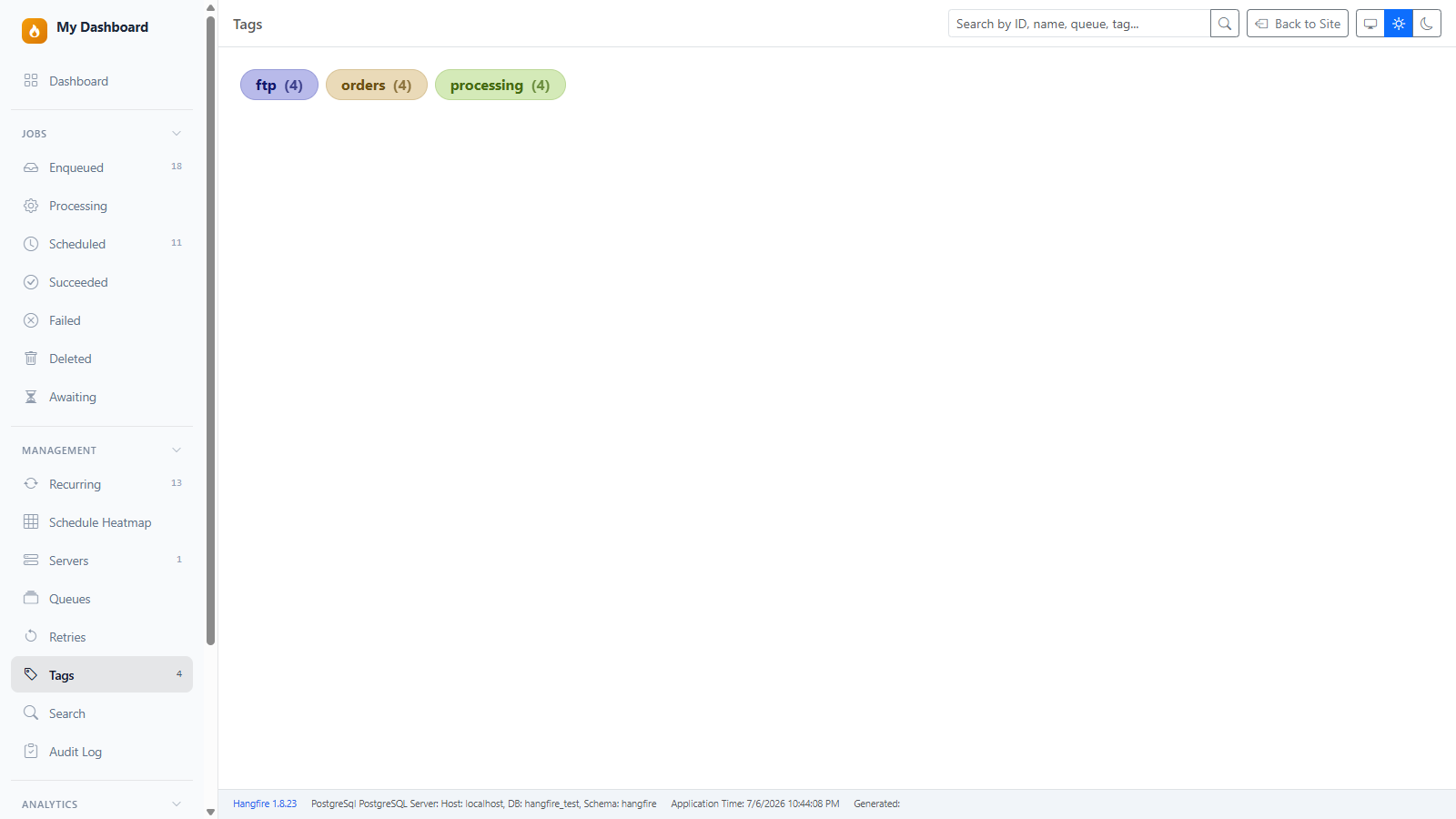
| Job tags | Tagging and tag cloud (Hangfire.Tags-compatible storage) |
| Throttling | 🆕 Semaphore occupancy, held mutexes, and rate-limit windows with orphaned-holder detection — appears automatically when the host uses Hangfire.Throttling |
| Job dependency graph | 🆕 Continuation pipeline visualization on the Job Details page (with "Load more" expansion) |
| Retry summary | 🆕 Inline banner above state history showing retry count + exception consistency |
| Stack trace links | 🆕 File references in stack traces become clickable links to GitHub/GitLab/Azure DevOps/Bitbucket/local IDE |
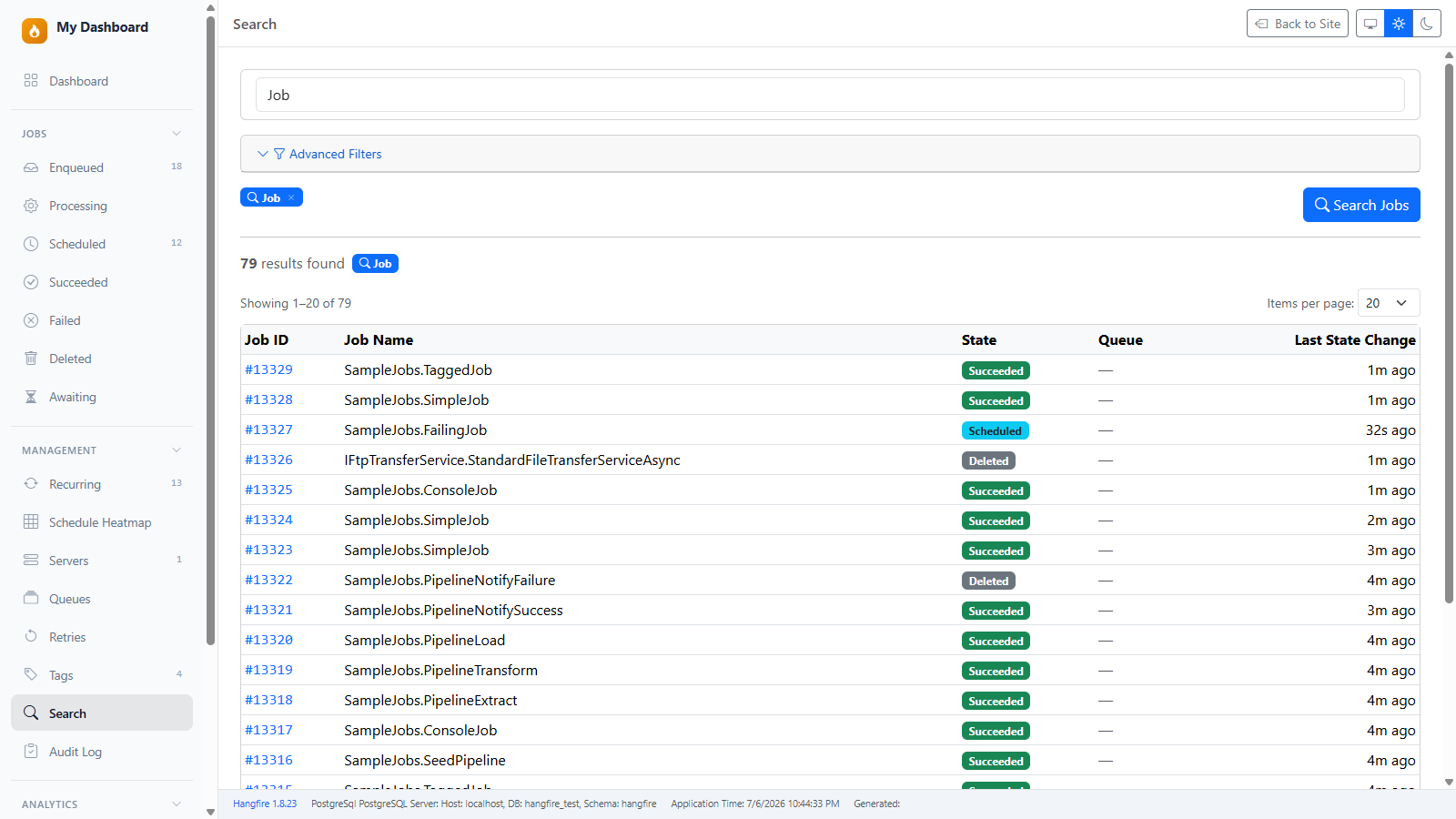
| Global search | Search by job ID, name, queue, tag, or exception text |
| Advanced filters | Filter by date, duration, state, server, and more |
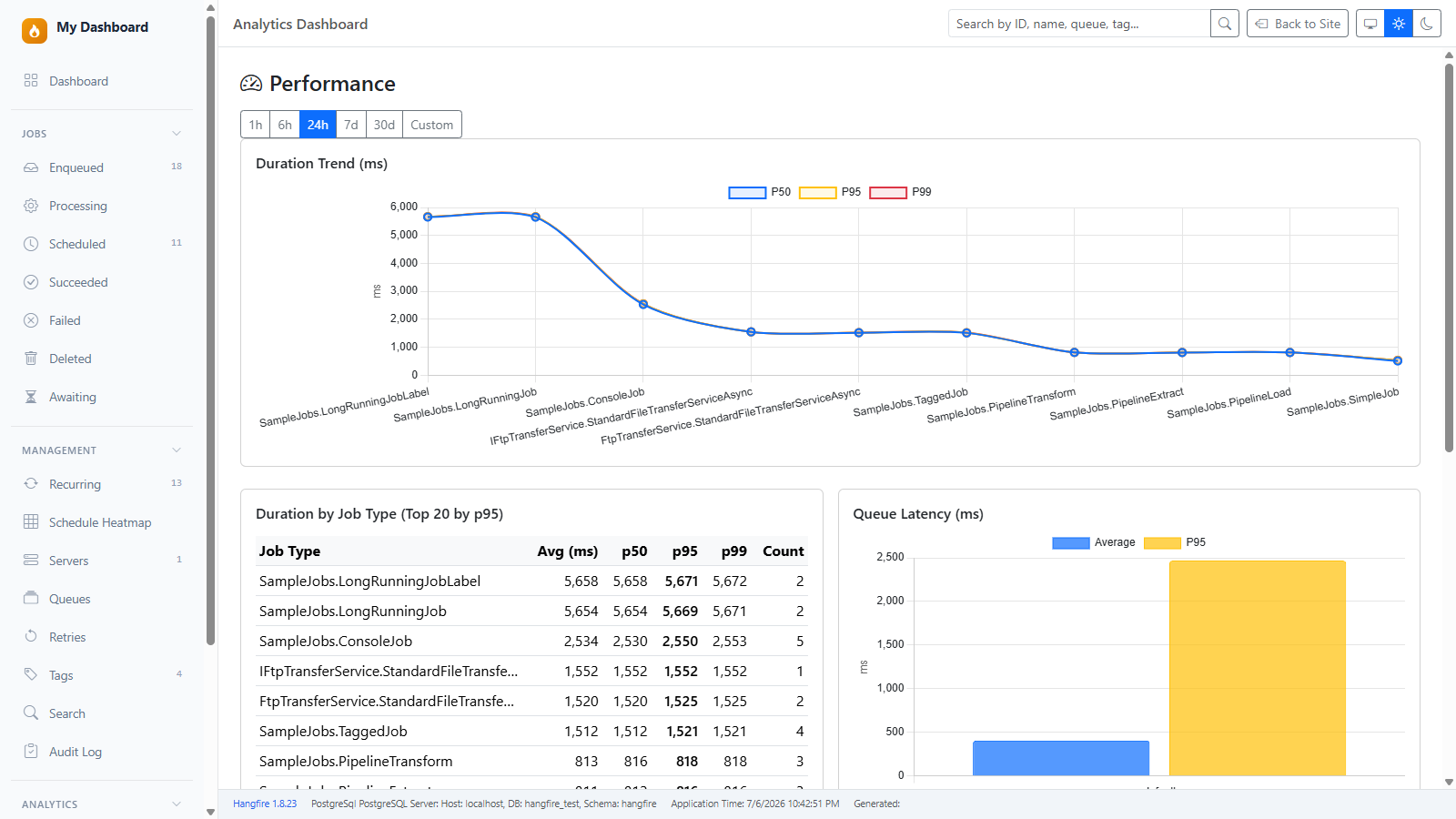
| Analytics | Throughput, latency, failures, queue health (requires storage adapter — see Packages) |
| Health checks | 🆕 /healthz endpoints (liveness, readiness, full report) + at-a-glance hero card on Home — see Health Checks |
| Queue pause / maintenance | 🆕 Pause individual queues or enable global maintenance mode — see Operations |
| Audit log | 🆕 Every admin action recorded (who, when, what) — filterable, paged — see Operations |
| Realtime updates | Live metrics via SignalR |
| Authorization | Local-only default (same as Hangfire); optional async filters and LoginPath redirect |
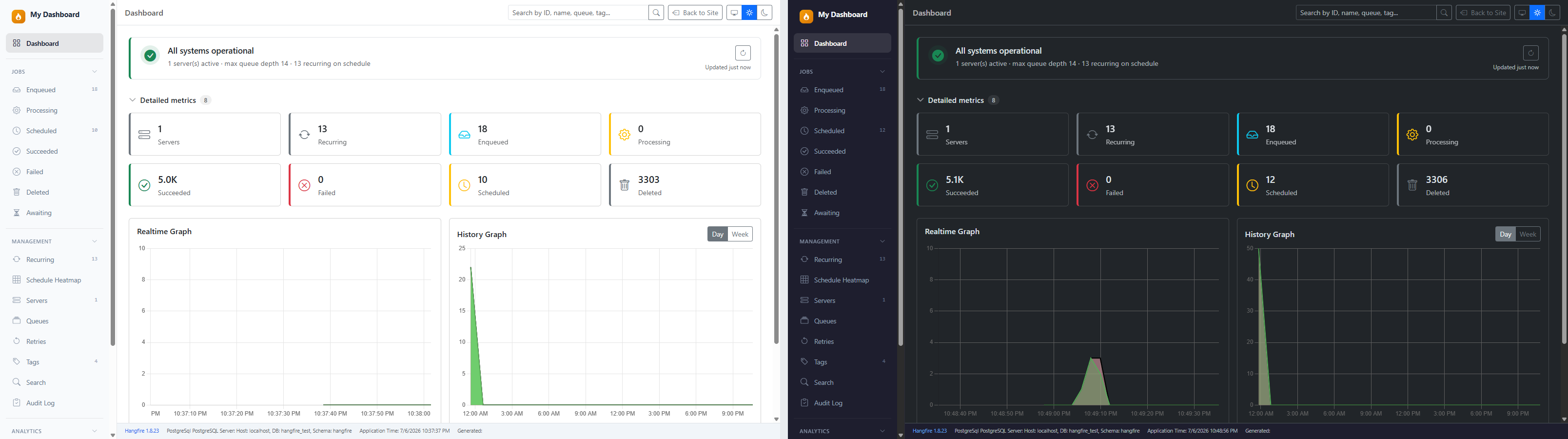
| Theming | Dark, light, or auto; responsive layout |
| Tech | Blazor Server, Bootstrap 5, Chart.js |
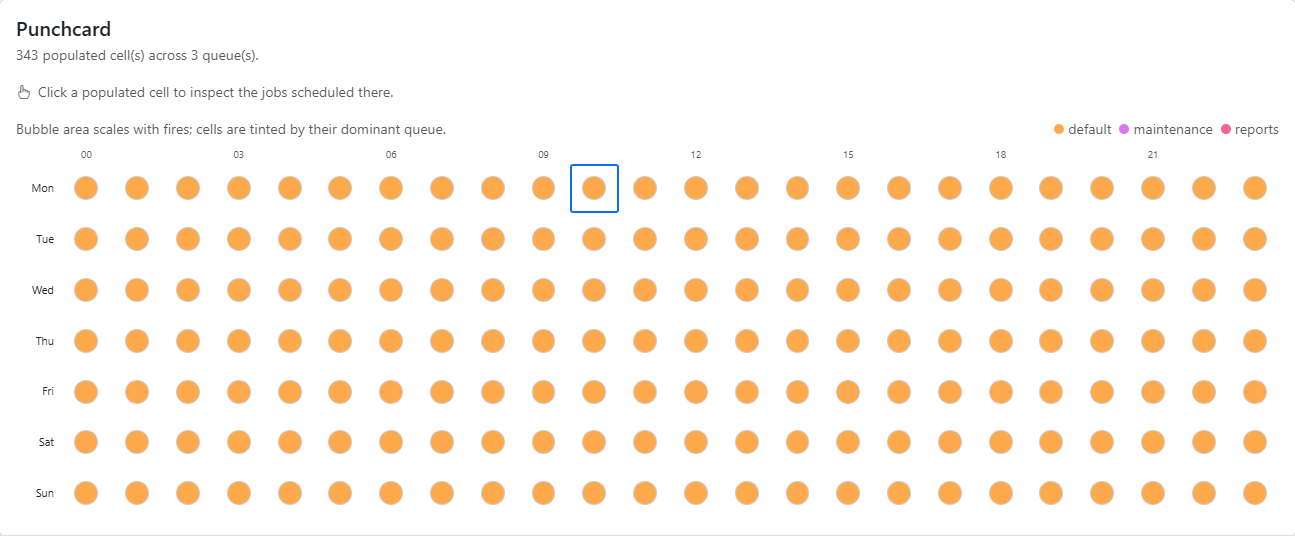
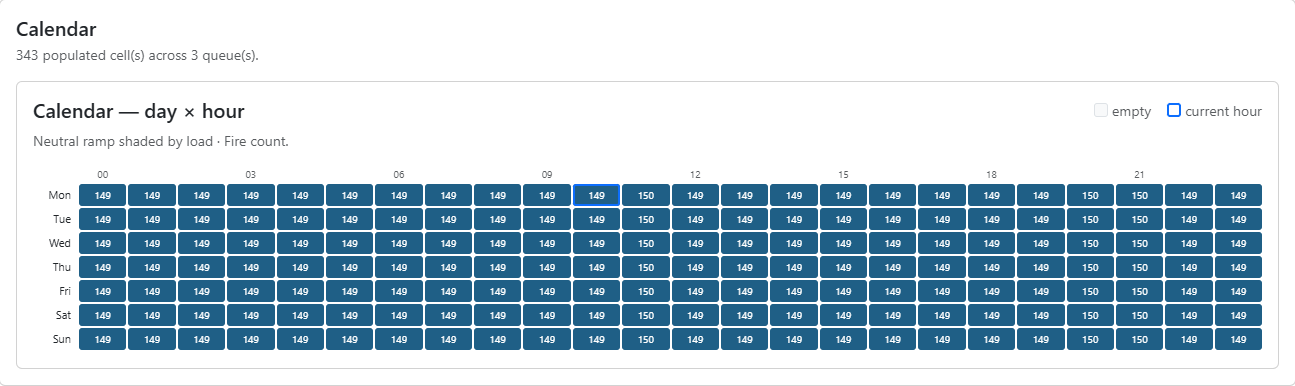
Project your recurring (cron) jobs — and real ad-hoc demand — onto a queue × day × hour grid to spot collisions, find the quietest window to schedule, and rebalance load. Multiple views, click-through drill-down, and (with a storage adapter) a Historical/Demand source.
| Planner — cron over ad-hoc demand |
|---|
 |
| Punchcard | Calendar |
|---|---|
 |
 |
| Concurrency | Overlap Recommendations |
|---|---|
 |
 |
| Cell drill-down — jobs scheduled in a slot |
|---|
 |
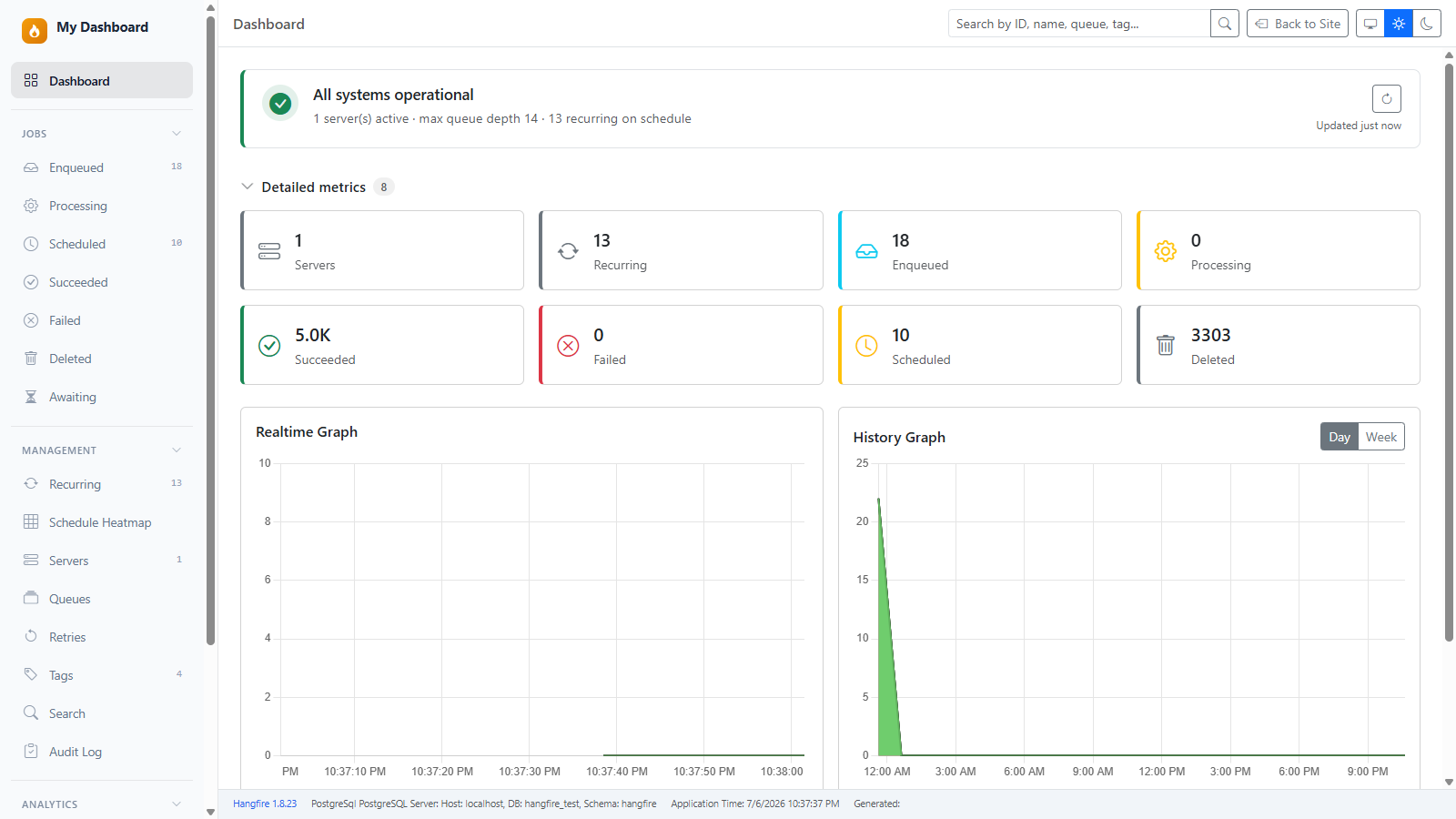
| Home & Realtime Charts | Console Viewer |
|---|---|
 |
 |
| Tags & Search | Recurring Jobs |
|---|---|
 |
 |
| Advanced Search | Analytics |
|---|---|
 |
 |
| Enqueue Job (typed args) | Recurring Schedule (Cron Builder) |
|---|---|
 |
 |
| Light / Dark / Auto |
|---|
 |
| NuGet package | Purpose |
|---|---|
a2n.Hangfire.Dashboard |
Main dashboard UI (search, console, tags, recurring admin) |
a2n.Hangfire.Dashboard.SqlServer |
Storage-specific queries + full analytics for SQL Server |
a2n.Hangfire.Dashboard.PostgreSql |
Storage-specific queries + full analytics for PostgreSQL |
a2n.Hangfire.Dashboard.Rollup |
Rollup-based analytics for non-SQL storages (Redis, in-memory, other NoSQL) |
a2n.Hangfire.Dashboard.Redis |
Convenience entry point for Redis — registers rollup metrics (UseRedisStorage()) |
a2n.Hangfire.Console |
Console integration (Hangfire.Console-compatible API) |
a2n.Hangfire.Tags |
Tags integration (Hangfire.Tags-compatible storage) |
Without a storage adapter package, search and core dashboard features work; the Analytics pages and heatmap Historical source require a metrics adapter:
- SQL Server / PostgreSQL —
UseSqlServerStorage()/UsePostgreSqlStorage()(direct SQL queries; best accuracy) - Redis / in-memory / other non-SQL —
UseRedisStorage()orUseRollupMetrics()(incremental rollup; forward-only historical data)
// Redis (Hangfire Pro or community StackExchange.Redis storage already configured)
builder.Services.AddHangfireDashboardUI(options => options.UseRedisStorage());

// Any other non-SQL Hangfire storage
builder.Services.AddHangfireDashboardUI(options => options.UseRollupMetrics());using a2n.Hangfire.Dashboard;
using Hangfire;
using Hangfire.Console; // Hangfire.Console-compatible API (bundled in this package)
using Hangfire.Tags; // Hangfire.Tags-compatible API (bundled in this package)
var builder = WebApplication.CreateBuilder(args);
var connectionString = builder.Configuration.GetConnectionString("Hangfire")
?? throw new InvalidOperationException("Connection string 'Hangfire' not found.");
builder.Services.AddHangfire(config => config
.UseSqlServerStorage(connectionString) // or .UsePostgreSqlStorage(connectionString)
.UseConsole() // Enable console output
.UseTags()); // Enable job tagging
builder.Services.AddHangfireServer();
// Basic setup (search works; analytics requires a storage adapter — see Packages)
builder.Services.AddHangfireDashboardUI();
// With storage adapter for storage-specific queries + full analytics:
// builder.Services.AddHangfireDashboardUI(options =>
// {
// options.UseSqlServerStorage(connectionString);
// // options.UsePostgreSqlStorage(connectionString);
// });
var app = builder.Build();
app.UseHangfireDashboardUI("/hangfire", new DashboardUIOptions
{
DashboardTitle = "My Jobs",
DefaultTheme = "auto", // "auto", "light", or "dark"
EnableJobManagement = true, // set false to hide Create/Edit/Stop and the Enqueue page
JobGraphMaxDepth = 5, // continuation graph traversal depth (default 5)
JobGraphMaxNodes = 30, // continuation graph node budget (default 30)
// SourceLink = SourceLinkOptions.GitHub("owner/repo"), // clickable stack-trace file links
});
app.Run();If referencing via <ProjectReference> instead of NuGet, add this to your host .csproj:
<PropertyGroup>
  <RequiresAspNetWebAssets>true</RequiresAspNetWebAssets>
</PropertyGroup>
NuGet consumers don't need this — it's handled automatically.
Already using Hangfire.Console or Hangfire.Tags? You can keep those packages, or switch to the bundled ones — job code and storage formats are compatible:
// Works exactly the same
context.WriteLine("Processing order...");
context.WriteProgressBar();

[Tag("orders")]
public void ProcessOrder() { }app.UseHangfireDashboardUI("/hangfire", new DashboardOptions
{
DashboardTitle = "My Jobs",
Authorization = new[] { new MyAuthFilter() },
});Reads the same storage format as Hangfire.Console and Hangfire.Tags. Existing console logs and tags are visible immediately — no migration needed.
The Job Builder lets operators construct, schedule, and enqueue Hangfire jobs with their arguments from the dashboard — no code change or redeploy. It powers two places:
- Recurring — the Create/Edit recurring job form (
/recurring), gated behindEnableJobManagement. - Enqueue — a new one-off job page at
/jobs/enqueuefor fire-and-forget jobs, also gated behindEnableJobManagement.
Both share the same method picker, parameter form, and argument conversion, so behavior is identical across the two.
The picker offers two sources:
- Registered methods — discovered by scanning loaded assemblies for
publicinstance/static methods whose method or declaring class carries a recognized attribute (JobDisplayName,Tag, orQueue). Discovery is cached for the dashboard's lifetime and resilient to assemblies that fail to load. Interface and abstract-class contracts are surfaced alongside their concrete implementations, each badged as Contract or Implementation, and the list is searchable by display label, type name, or method name. - Custom methods — a full type name + method name typed by hand, validated on demand. This is opt-in and disabled by default:
app.UseHangfireDashboardUI("/hangfire", new DashboardUIOptions
{
    AllowArbitraryMethodInvocation = true,   // default false — keeps arbitrary invocation opt-in
});
Resolution is overload-safe: when a method name has multiple overloads, the single overload whose parameter count and types match the supplied arguments is selected. Ambiguous, missing, or non-matching methods are rejected with an identifying error and never touch storage.
A type-aware form is generated from the method signature, one control per parameter:
| Parameter type | Control |
|---|---|
string |
text input |
| integers / floats | number input (whole vs. fractional, range-checked) |
DateOnly / TimeOnly / DateTime / DateTimeOffset |
date / time / datetime-local picker |
Guid |
text input |
bool / bool? |
checkbox / tri-state (unset = null) |
enum / [Flags] enum |
single-select / multi-select |
scalar arrays (T[]) |
add/remove list |
| nested object (class, depth ≤ 5) | collapsed placeholder + explicit "Add" to instantiate |
| anything else / depth > 5 | JSON textarea |
Key behaviors:
- Form ⇄ JSON toggle — switch to a raw
["value", 42]JSON textarea at any time; the form and JSON stay in sync (a read-only JSON mirror is shown alongside the form). - Typed conversion — values are converted to each parameter's declared CLR type before the job is stored, matching how Hangfire serializes arguments.
- Injected parameters skipped —
PerformContext,IJobCancellationToken, andCancellationTokenare excluded from the form and filled by Hangfire at runtime. - Empty fields are total — a blank field resolves to
nullfor nullable types ordefault(T)for non-nullable types, never an error. - Edit pre-fill — when editing an existing recurring job, current argument values are loaded back into the form.
For recurring jobs, the Schedule Builder offers a field-by-field cron editor (minute, hour, day-of-month, month, day-of-week) with an Every / Specific / Range / Step mode per field, plus a manual cron input. It shows a human-readable description and the next occurrence in the selected time zone (UTC when none is chosen). Unparseable expressions are flagged and block submission. (Cron parsing uses Cronos, already bundled with Hangfire — no new dependency.)
The queue control is editable with suggestions from current queues (defaulting to default). When the target method or its declaring class carries a [Queue(...)] attribute, the control becomes read-only and shows a precedence notice, because Hangfire's QueueAttribute overrides the stored queue at state election.
- Read-only mode (
IsReadOnly = true) — a persistent banner is shown and the submit controls are disabled. - Job management (
EnableJobManagement = false) — the recurring create/edit builder is hidden, the navigation no longer links to the Enqueue page, and the/jobs/enqueueroute returns Not Found (read-only gating still applies). Defaults totrue. - Arbitrary methods (
AllowArbitraryMethodInvocation = false, default) — only discovered registered methods may be selected.
The Job Details page includes a continuation visualization for jobs created via BackgroundJob.ContinueJobWith(...). The graph walks up to the root parent (via the Awaiting state's ParentId), then expands all descendants by parsing each job's Continuations parameter. Edge labels show the continuation condition (on succeeded, on deleted, on any).
The card only appears when a job is part of a continuation chain — standalone jobs render nothing. Each node is clickable and navigates to that job's details. Expired or deleted jobs render as dashed placeholders so the graph stays consistent.
Traversal is bounded by two options to keep page loads fast:
| Option | Default | Description |
|---|---|---|
JobGraphMaxDepth |
5 |
Maximum hops in either direction (ancestors or descendants) |
JobGraphMaxNodes |
30 |
Maximum total nodes materialized |
When either limit is hit, the card shows a truncated badge and a Load more button that doubles the node budget and adds depth (+3) on each click, up to a hard ceiling of 200 nodes / depth 12. Each click triggers exactly one storage round-trip per newly visited node, so expansion is incremental.
When a job fails, the Job Details page shows the exception stack trace. By default the stack trace is plain text. Set DashboardUIOptions.SourceLink to turn ... in {path}:line {N} references into clickable links pointing to your source provider:
app.UseHangfireDashboardUI("/hangfire", new DashboardUIOptions
{
    DashboardTitle = "My Jobs",
    SourceLink = SourceLinkOptions.GitHub("anwarminarso/a2n.Hangfire.Dashboard", branch: "main"),
});SourceLinkOptions.GitHub("owner/repo"); // github.com
SourceLinkOptions.GitLab("group/repo"); // gitlab.com
SourceLinkOptions.GitLab("group/repo", host: "git.mycompany.com"); // self-hosted GitLab
SourceLinkOptions.AzureDevOps("org", "project", "repo"); // dev.azure.com
SourceLinkOptions.Bitbucket("workspace/repo"); // bitbucket.org
SourceLinkOptions.Local(); // vscode://file/{path}:{line}
SourceLinkOptions.Local(protocol: "vscode-insiders"); // VS Code Insiders
SourceLinkOptions.Local(protocol: "cursor"); // CursorUse UrlPattern directly with {path} and {line} placeholders:
SourceLink = new SourceLinkOptions
{
    UrlPattern = "https://gitea.mycompany.com/team/repo/src/branch/main/{path}#L{line}",
};
Visual Studio does not ship with a built-in URL protocol handler. To enable links that open files in Visual Studio, install a third-party handler such as VsHandler and configure:
SourceLink = new SourceLinkOptions
{
    UrlPattern = "vs://open?File={absolutePath}&Line={line}",
};
For VS Code (cross-platform), the built-in Local() preset works out of the box.
Stack traces often contain absolute paths from the build agent (e.g. C:\jenkins\workspace\proj\src\Foo.cs) that don't match the repository layout. Use WithPathStrip("src") to strip everything before the /src/ segment:
SourceLink = SourceLinkOptions.GitHub("owner/repo")
    .WithPathStrip("src");
// "C:\jenkins\workspace\proj\src\Models\Order.cs" → "src/Models/Order.cs"
For more complex transforms, use WithPathReplace(pattern, replacement) (regex) or set PathTransform to a custom Func<string, string>.
Linked URLs only work when the viewer has access to the source provider. Private repositories return 404 to unauthenticated users. The dashboard does not embed source content — it only generates outbound links.
The dashboard exposes a structured health endpoint suitable for Kubernetes probes, load balancer health checks, and status pages.
| Endpoint | Use case | Checks |
|---|---|---|
GET /{dashboard}/healthz |
Liveness probe (K8s) | Storage probe |
GET /{dashboard}/healthz/ready |
Readiness probe (K8s) | Storage + servers |
GET /{dashboard}/healthz/full |
Status pages, dashboard hero card | All six checks below |
HTTP status follows the K8s convention: 200 for Healthy or Degraded, 503 for Unhealthy.
| Key | What it covers |
|---|---|
storage |
Round-trip time of a GetStatistics() call to the Hangfire storage backend |
servers |
Total vs alive vs stale heartbeat (per ServerHeartbeatTolerance) |
queue_depth |
Highest queue length compared to warn/critical thresholds |
stuck_processing |
Processing jobs older than StuckProcessingMinutes (sample size: 200) |
failure_rate |
Last-hour failure percentage from Hangfire's hourly counters |
recurring_jobs |
Recurring jobs whose NextExecution is older than RecurringMissedTolerance |
{
  "status": "Degraded",
  "version": "2.3.1",
  "timestamp": "2026-06-07T01:08:18.96Z",
  "durationMs": 50,
  "checks": {
    "storage":          { "status": "Healthy",  "data": { "responseTimeMs": 3 } },
    "servers":          { "status": "Degraded", "description": "1 of 2 server(s) have stale heartbeats." },
    "queue_depth":      { "status": "Healthy",  "data": { "maxDepth": 0 } },
    "stuck_processing": { "status": "Healthy",  "data": { "stuckCount": 0, "totalProcessing": 0 } },
    "failure_rate":     { "status": "Degraded", "description": "Failure rate 20.0% in last hour (warn threshold 10%)." },
    "recurring_jobs":   { "status": "Healthy",  "data": { "total": 7, "missed": 0 } }
  }
}app.UseHangfireDashboardUI("/hangfire", new DashboardUIOptions
{
// AllowAnonymous (default) so K8s/LB probes work without auth.
// Use LocalOnly for loopback-only probes, or RequireDashboardAuth for the full filter chain.
HealthCheckAuthorizationMode = HealthCheckAuthorization.AllowAnonymous,
HealthCheckThresholds = new HealthThresholds
{
StuckProcessingMinutes = 30,
QueueDepthWarn = 1000,
QueueDepthCritical = 10000,
FailureRatePercent = 10.0, // Degraded threshold
FailureRateCritical = 25.0, // Unhealthy threshold
RecurringMissedTolerance = TimeSpan.FromMinutes(5),
ServerHeartbeatTolerance = TimeSpan.FromSeconds(60),
StorageResponseTimeWarnMs = 1000,
StorageResponseTimeCriticalMs = 5000,
}
});If your host already exposes a unified /health endpoint aggregating multiple dependencies (database, message broker, Hangfire, ...), register the dashboard as an IHealthCheck:
builder.Services.AddHealthChecks()
    .AddHangfireDashboard(tags: new[] { "ready" });

app.MapHealthChecks("/health");                                   // all checks
app.MapHealthChecks("/health/ready",                               // readiness subset
    new() { Predicate = c => c.Tags.Contains("ready") });
The adapter reuses the same HealthCheckService.CheckFull() so results match what the dashboard's own endpoint and hero card show.
The Home page shows a top-of-page traffic light (Healthy / Degraded / Critical) with per-issue descriptions and deep-link actions ("View processing →", "View failed →"). Auto-refreshes every 10 seconds. The detailed 8-card stat grid is now collapsed behind a "Detailed metrics" toggle to keep the hero front-and-center.
The dashboard ships day-to-day operational controls so ops teams don't need to redeploy or write SQL to handle common scenarios.
The /queues page lists every queue with its current status and a per-row pause toggle. Paused queues stop workers from executing jobs — the dashboard's server filter intercepts each fetched job and reschedules it back into the future (default +30s) instead of running it.
// Required: register the server filter on the Hangfire pipeline so running servers
// honour the pause toggles set from the dashboard.
builder.Services.AddHangfire(config => config
    .UseSqlServerStorage(connStr)
    .UseDashboardQueuePauseFilter());          // <-- here
Without this call, the dashboard still records the pause and shows the badge — but jobs keep executing on running workers until the host restarts with the filter enabled.
Customize behaviour via DashboardUIOptions.QueueOperations:
QueueOperations = new QueueOperationsOptions
{
    Enabled         = true,
    Behavior        = PausedJobBehavior.Reschedule,   // or Requeue (busy-loop, use sparingly)
    RescheduleDelay = TimeSpan.FromSeconds(30),
    PauseStateCacheTtl = TimeSpan.FromSeconds(2),     // server-side cache window
}A single global toggle (top of the /queues page) pauses every queue at once. While maintenance is active, a persistent yellow banner is rendered on every dashboard page with the operator's reason and a Manage → link. Disable maintenance to resume — individual queue pauses set before maintenance was enabled remain in effect.
Every admin action performed through the dashboard is recorded:
| Category | Actions |
|---|---|
| Job actions | requeue, delete, batch requeue, batch delete |
| Recurring | create, update, delete, trigger, stop, start |
| Queue ops | queue pause, queue resume, maintenance enabled, maintenance disabled |
Each entry captures: timestamp (UTC), user (or (anonymous) for unauthenticated local requests), client IP, action, target, optional reason, and a small metadata bag (e.g., batch counts).
The /audit page filters by action prefix (job/jobs/recurring/queue/maintenance), user (substring), and target, with an items-per-page selector and paged navigation. Storage uses Hangfire's KV primitives — no schema changes. Configurable retention:
AuditLog = new AuditLogOptions
{
    Enabled    = true,
    Retention  = TimeSpan.FromDays(30),
    MaxEntries = 10_000,
}
Old entries beyond either bound are trimmed on writes (best-effort, ~every 50 entries).
| Layer | Technology |
|---|---|
| UI | Blazor Server (Interactive SSR) |
| Styling | Bootstrap 5.3 + Bootstrap Icons |
| Charts | Chart.js + chartjs-plugin-streaming |
| Realtime | ASP.NET Core SignalR |
| Theme | data-bs-theme + localStorage persistence |
| Targets | .NET 8, .NET 9, .NET 10 |
src/
├── a2n.Hangfire.Dashboard/             # Main dashboard (Blazor + SignalR + Analytics)
├── a2n.Hangfire.Dashboard.SqlServer/   # SQL Server adapter (Dapper + T-SQL)
├── a2n.Hangfire.Dashboard.PostgreSql/  # PostgreSQL adapter (Dapper + Npgsql)
├── a2n.Hangfire.Dashboard.Rollup/      # Rollup metrics engine for non-SQL storages
├── a2n.Hangfire.Dashboard.Redis/       # Redis / non-SQL entry point (UseRedisStorage)
├── a2n.Hangfire.Console/               # Console integration (Hangfire.Console-compatible)
└── a2n.Hangfire.Tags/                  # Tags integration (Hangfire.Tags-compatible)

tests/
├── a2n.Hangfire.Dashboard.Tests/
├── a2n.Hangfire.Console.Tests/
└── a2n.Hangfire.Dashboard.PostgreSql.Tests/

samples/
├── SampleApp/          # Full demo (all features)
├── SampleAppAuth/      # Cookie authentication example
├── SampleAppMvc/       # ASP.NET Core MVC host
├── SampleAppRazor/     # Razor Pages host
├── SampleAppBlazor/    # Blazor host
└── SampleAppOrig/      # Startup-class host pattern
git clone https://github.com/anwarminarso/a2n.Hangfire.Dashboard.git
cd a2n.Hangfire.Dashboard/samples/SampleApp
dotnet run
Open https://localhost:7100/hangfire to see it in action.
For authentication with a login page, run samples/SampleAppAuth instead.
| Version | Status | Scope |
|---|---|---|
| v1.0 | ✅ Done | Core dashboard pages + Console + Tags + Recurring Admin |
| v1.1 | ✅ Done | Global search & advanced filters |
| v1.2 | ✅ Done | Razor Class Library (NuGet-ready) |
| v1.3–v1.6 | ✅ Done | Storage adapters (SQL Server, PostgreSQL) + Analytics dashboard |
| v2.0 | ✅ Done | Feature-complete for current scope |
| v2.1 | ✅ Done | Search refactor + JobDisplayName + SQL Server fixes |
| v2.1.1 | ✅ Done | WebSocket fix for Startup-pattern host apps |
| v2.2 | ✅ Done | Processing progress circle, Fetched page, delete confirmations, mobile nav fix |
| v2.2.1 | ✅ Done | Security & auth hardening, default auth filter, LoginPath, SignalR/Blazor auth |
| v2.3.0 | ✅ Done | Operational visibility & controls — health checks (/healthz + IHealthCheck adapter) & hero card, queue pause/resume, maintenance mode, audit log |
| v2.3.1 | ✅ Done | Realtime analytics fixes — SQL Server GROUP BY (error 144) fix, fixed-cadence broadcast loop, NuGet XML docs |
| v2.4.0 | ✅ Done | Job Builder — create/schedule jobs with typed arguments, guided parameter form (+ JSON), method discovery, overload-safe resolution, visual cron builder, one-off enqueue page (#8) |
| v2.4.1 | ✅ Done | Job Builder follow-up — searchable method picker, contract-aware (interface/abstract) resolution + display names, injected-parameter edit fix (#10), consistent destructive-action buttons |
| v2.5.0 | ✅ Done | Recurring Schedule Heatmap (#14) — visualize recurring-job scheduling density by queue × day × hour: Planner (cron over ad-hoc demand), Punchcard, Queue × Hour, Per-queue, Calendar, Concurrency, and stagger Recommendations; plus rollup metrics adapters (Rollup / Redis) for non-SQL storages, incl. storage-agnostic estimated durations (#21) |
| v2.5.1 | ✅ Done | Redis / rollup analytics fixes — heatmap estimated duration stuck at 1m (#27), empty Duration / Queue latency / State timing panels (#26), Analytics ▸ Recurring hanging on large deployments plus blank last-results strip (#25); also the nav group crash fix (#23) |
| v2.5.2 | ✅ Done | Rollup completeness — the rollup collector dropped executions beyond its per-poll cap, so on non-SQL storages a burst of more than 2 000 completions per minute was sampled rather than aggregated (#29). It now tracks the range it has covered and drains the backlog across later polls |
| v2.5.3 | ✅ Done | Throttling visibility, DST-correct heatmap, storage portability — auto-detecting Throttling pages for semaphores / mutexes / rate-limit windows with orphaned-holder detection (#30, #31, Detach deferred); heatmap window is now seven local days, fixing cells silently dropped across DST transitions; extended-storage-API guards so third-party storages no longer fail the dashboard shell; first CI workflow |
| v2.5.4 | ✅ Done | Recurring Jobs fixes — page-size selector now paginates, with Pager on both the active and Stopped tables (#37); Id / Last Execution link to the latest execution's details (#38); Dictionary<K,V> / List<T> arguments survive the JSON ▸ Form switch instead of being dropped (#39); blank required parameters no longer block the view toggle |
| v2.6.0 | Planned | Integrations — Prometheus /metrics, OpenTelemetry trace links, read-only REST API, CSV/JSON export |
| v2.7.0 | Planned | Customization — white-label theming, show/hide built-in pages, saved views |
| v3.0 | Planned | Stretch goals & long-term backlog (notifications & alert rules, Gantt timeline, multi-instance federation, replay, fingerprint, etc.) |
See the full roadmap for details.
Contributions welcome — bug reports, feature requests, documentation improvements, and pull requests.
git clone https://github.com/anwarminarso/a2n.Hangfire.Dashboard.git
cd a2n.Hangfire.Dashboard
dotnet build src/Hangfire\ Dashboard.slnx
dotnet test
cd samples/SampleApp && dotnet run
See CONTRIBUTING.md for fork workflow, code style, and pull request guidelines.
LGPL-3.0-or-later — see LICENSE.
This project builds on the excellent work of the Hangfire community:
- Hangfire — the background job framework
- Hangfire.Console — console output for background jobs
- Hangfire.Tags — job tagging
- Hangfire.RecurringJobAdmin — recurring job management UI
- Hangfire.Community.Dashboard.Heatmap by Bruno Rodrigues (brodrigz) — design inspiration for the recurring schedule heatmap (clean-room Blazor implementation, no source code copied)
Community extensions are listed on the Hangfire Extensions page. This project is community-maintained and is not officially supported by Hangfire OÜ.
Built with ☕ by Anwar Minarso