Common issues
Unclear what causes this issue. Are you having enough diskspace? To resolve you can clear the node data and the node will restore itself.
cd ambrosus-nop/output
docker-compose stop
rm -rf ./data
docker-compose start
You receive an error when running update.sh as in the screenshot below.
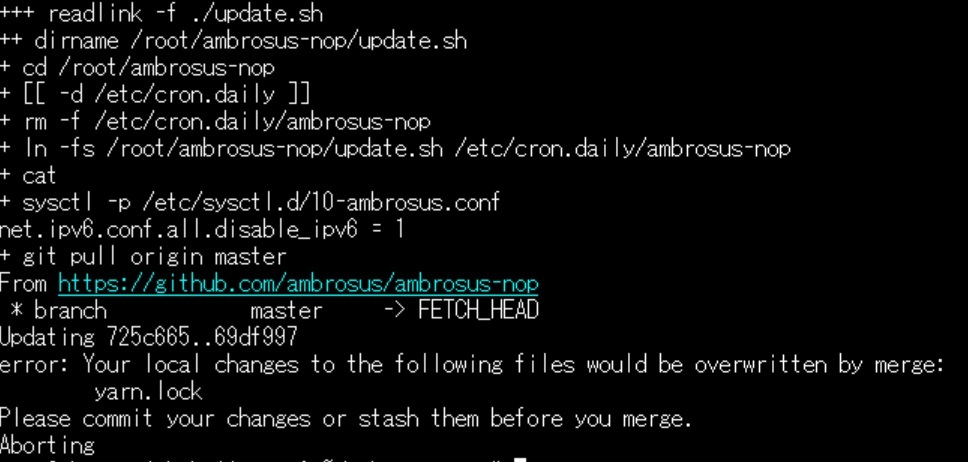
Error: Your local changes to the following files would be overwritten by merge: yarn.lock You can mitigate this by running the self-check script and update again. The script should output the following when it has fixed the issue: 'yarn.lock was modified, restore it' -> the english is a bit confusing but it actually repairs it automatically. Afterwards you can run the update manually again (or wait until the automatic update kicks in again).

curl -sL https://deb.nodesource.com/setup_14.x | sudo -E bash -
apt-get install -y nodejs
nvm alias default 14
nvm use 14
to mitigate the issue.
You get this error when running yarn start to do maintenance on your node, or for example payouts.
This usually is solved by restarting the docker containers.
cd ambrosus-nop/output
docker-compose restart
and then run the yarn start again
A very common issue is the parity getting stuck while syncing the chain, it’s stuck syncing on particular blocks. You can check if your node is out of sync by checking the stats page if your node block turns red it means its outdated and not working correctly.

-
Reboot If you encounter this sometimes a simple reboot of the VPS resolves the issue, try that first.
sudo shutdown -r now -
Automated fix (recommended) Run the Self check script This will automatically detect this parity sync issue and correct if needed.
-
Manual fix (use only if instructed)
cd ambrosus-nop/output
sudo docker stop parity
sudo rm -rf chains
sudo curl -s https://backup.ambrosus.io/blockchain.tgz | sudo tar zxpf -
sudo docker start parity
- Bootstrap from another node
Alternatively, if you are already have another running node in sync you can also using this commands to bootstrap the chain (instead of curl from the web). It basically replicates the chain across nodes.
On the target node:
cd ambrosus-nop/output
sudo docker stop parity
sudo apt-get install rsync -y
sudo rm -rf chains
On the source node
cd ambrosus-nop/output
sudo docker stop parity
sudo apt-get install rsync -y
rsync -rv /root/ambrosus-nop/output/chains -e ssh root@FQDN:~/ambrosus-nop/output/
Replace FQDN with your target node domain name or IP. It also asks you to confirm with password from target node. Wait for it to finish.
Run on source and target node after transfer of files finished:
sudo docker start parity
When you run the payouts some users have emptied their node balance completely. Remember the must be a minimum of approx 50 AMB/month on your node to cover for transaction (gas) fees. Failing to do so may result in your node not working (Apollo not getting block rewards, Atlas not receiving bundles).
For Atlas the logs will be displayed like this:
"timestamp": "2020-08-05T03:11:29.706Z",
"message": "Not enough funds to pay for gas"
Your node should be listed here, indicating ‘onboarded’. If not reach out to the support team that gave you the whitelisting confirmation. https://explorer.ambrosus.io/atlas/replacewithyournodeaddress (for Atlas) https://explorer.ambrosus.io/apollo/replacewithyournodeaddress (for Apollo)
For Atlas your node should return onboarded.

For Apollo your node should appear online and give the uptime. In case offline is shown there is likely something wrong with your node.
Like this:

Not like this 'Offline' or 'Connecting':

Running a node requires a VPS that has 2GB RAM, 2VCPU and initially minimum 40GB disk space. Running with less memory can result in out of memory issues and your node will not run correctly.
“Failed to resolve: No donors available for downloading bundle”. Such message means that Atlas was trying to download the bundle from all available sources, but failed to do so. This is usually caused by some network operation interruption at the time of challenge resolution. There is nothing you as node holder can do about it.
This error applies to nodes on the network that are transferring (retiring) their bundles to others, but ran out of gas. Then the node that wants to shelter such a bundle gets logs that you see on your nodeinfo. There is nothing you as receiving node holder can do about it. The node owner who is retiring should increase its balance.
The following ports should be configured in your firewall (For all ports add the source 0.0.0.0/0.) For Atlas/Hermes these should be open:
- Port range: 80 Protocol: TCP
- Port range: 30303 Protocol: TCP
- Port range: 30303 Protocol: UDP
- Port range: 22 Protocol: TCP (for Putty/SSH)
For Apollo:
- Port range: 30303 Protocol: TCP
- Port range: 30303 Protocol: UDP
- Port range: 22 Protocol: TCP (for Putty/SSH)
Use 'docker container ls' from output directory (ambrosus-nop/output) For Atlas you should see the following 5 containers up and running!

For Apollo you should see only 2 containers up and running!

If you don’t see the containers running (up status in image status)
cd ambrosus-nop/output
docker-compose up -d
Followed by docker-compose start and see if that helps.
Show container status:
docker-compose ps
Show container logs:
docker-compose logs parity
Watch logs:
docker-compose logs -f
Restart all containers:
docker-compose restart
Restart specific container:
docker-compose restart parity
Recreate containers (safe, but do it if you're sure that you need it):
docker-compose down
docker-compose up -d
Please run these commands one by one:
docker stop atlas_server
docker stop atlas_worker
docker stop mongod
docker start mongod
docker start atlas_worker
docker start atlas_server
Double check your configured RAM memory in your node as most occurrences were a result of underpowered node configurations (1GB instead of 2GB). You can use cat /proc/meminfo to check total vs. available memory.
Navigating to a domain name http://yournodeip/ a working node will return the following, this is normal. { "reason": "Not found: Unknown path, see API documentation at: https://dev.ambrosus.com/" }
There have been cases where a node is stuck in the startup process for days. The nodeinfo page keeps blank and the atlas worker logs shows the following error.
Another migration is running. Waiting for it to end. yarn run v1.22.4 $ ts-node ./src/tasks/migrate
You can attempt to erase the local database and it will attempt to restore the bundles from the blockchain. However, use this script only as instructed its not something to be tried at random. Also note its common that upon startup migration jobs are run, so don't confuse that with this issue.
cd ambrosus-nop/output
sudo docker-compose stop
cd data
sudo rm -rf db
../
sudo docker-compose start