



Fluid is an AI agent built for the core steps of debugging and managing Linux servers. Read-Only mode for getting context, Create a sandbox and make edits to test changes. Create an Ansible Playbook to recreate on prod.
Features | Quick Start | Demo | Docs
AI agents can install packages, configure services, write scripts - autonomously. But one mistake on production and you're getting paged at 3 AM. So we limit agents to chatbots instead of letting them do real work.
fluid.sh gives agents direct read-only SSH access to your servers for context gathering, then full root access in isolated VM sandboxes for testing changes. When done, a human reviews the diff and approves an auto-generated Ansible playbook before anything touches production.
                    Read-Only (direct SSH)
Agent Task  -->  Source Host (inspect)  -->  Sandbox VM (autonomous)  -->  Human Approval  -->  Production
                  - View logs                  - Full root access            - Review diff
                  - Check configs              - Install packages            - Approve Ansible
                  - Query services             - Edit configs                - One-click apply
                  - Read files                 - Run services
| Feature | Description |
|---|---|
| Autonomous Execution | Agents run commands, install packages, edit configs - no hand-holding |
| Full VM Isolation | Each agent gets a dedicated microVM with root access |
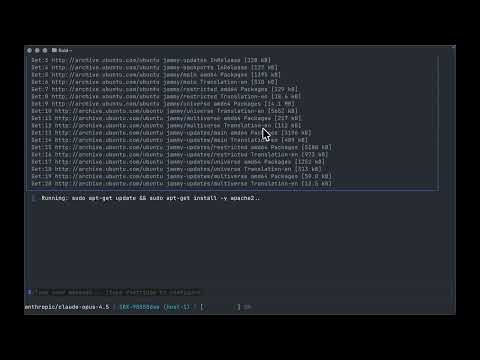
| Interactive TUI | Natural language interface - just type what you want done |
| Human-in-the-Loop | Blocking approval workflow before any production changes |
| Ansible Export | Auto-generate playbooks from agent work for production apply |
| MCP Integration | Use fluid tools from Claude Code, Cursor, Windsurf |
| Read-Only Mode | Inspect source VMs safely without risk of modification |
| Multi-Host | Scale across hosts with the daemon + control plane |
The CLI connects directly to your source hosts over SSH - no daemon required. A dedicated fluid-readonly user with a restricted shell ensures agents can only run read-only commands.
What agents can do:
- Read files, logs, and configs (
cat,journalctl,tail, etc.) - Inspect processes and services (
ps,systemctl status,top) - Query system state (
df,free,ip,ss,uname) - Run diagnostic commands (
dig,ping,lsblk)
What agents cannot do:
- Write, modify, or delete files
- Install or remove packages
- Start, stop, or restart services
- Execute arbitrary scripts or interpreters
Commands are validated twice: client-side against an allowlist in the CLI, and server-side by the restricted shell on the host. You can extend the default allowlist with extra_allowed_commands in your config.
Before fluid can read from a host, you need to prepare it. This creates the fluid-readonly user with a restricted shell and deploys an SSH key.
Prerequisites: The host must be accessible via SSH using your existing ~/.ssh/config (any ProxyJump, port, or user settings are respected).
fluid source prepare <hostname>This runs 4 steps on the remote host:
- Installs a restricted shell script at
/usr/local/bin/fluid-readonly-shell - Creates a
fluid-readonlysystem user with that shell - Deploys fluid's SSH public key to the user's
authorized_keys - Restarts sshd
After prepare, the host appears in /hosts as prepared. The CLI generates an ed25519 key pair at ~/.config/fluid/keys/ on first run and reuses it for all hosts.
# List prepared hosts
fluid source listAll tool output is scanned for sensitive data before it reaches the AI agent. This prevents accidental exposure of credentials through commands like cat /etc/ssl/private/server.key or kubectl get secret -o yaml.
What gets redacted:
| Type | Examples |
|---|---|
| PEM private keys | RSA, EC, ED25519, OPENSSH private key blocks |
| Base64-encoded keys | Output of cat key.pem | base64, Kubernetes secret values |
| Kubernetes secrets | tls.key, ssh-privatekey, private_key, secret_key fields |
| API keys & tokens | sk-..., key-..., Bearer tokens, AWS access keys (AKIA...) |
| Connection strings | postgres://, mysql://, mongodb://, redis:// URIs |
| IP addresses | IPv4 and IPv6 addresses |
Redaction runs at two layers: inline when each tool returns results, and again before the full conversation is sent to the LLM. The agent sees [REDACTED: ...] placeholders instead of the actual values.
curl -fsSL https://fluid.sh/install.sh | bashOr with Go:
go install github.com/aspectrr/fluid.sh/fluid-cli/cmd/fluid@latestfluidOn first run, onboarding walks you through host setup, and LLM API key configuration.
                          Direct SSH (read-only)
fluid (TUI/MCP)  -------------------------------->  Source Hosts
       |                                              - fluid-readonly user
       |                                              - restricted shell
       |                                              - command allowlist
       |
       +--- gRPC :9091 --->  fluid-daemon  --->  QEMU microVMs (sandboxes)
                                   |
                                   +--- control-plane (optional, multi-host)
                                   |
                                   +--- web dashboard
- fluid-cli: Interactive TUI agent + MCP server. Connects directly to source hosts via SSH for read-only inspection, and to the daemon via gRPC for sandbox operations.
- fluid-daemon: Background service managing microVM sandboxes
- control-plane (api): Multi-host orchestration, REST API, web dashboard
- web: React dashboard for monitoring and approval
Connect Claude Code, Codex, or Cursor to fluid via MCP:
{
  "mcpServers": {
    "fluid": {
      "command": "fluid",
      "args": ["mcp"]
    }
  }
}
17 tools available: create_sandbox, destroy_sandbox, run_command, edit_file, read_file, create_playbook, and more. See the full reference.
| Command | Description |
|---|---|
/vms |
List available VMs |
/sandboxes |
List active sandboxes |
/hosts |
List configured hosts |
/playbooks |
List Ansible playbooks |
/settings |
Open configuration |
/compact |
Compact conversation |
/context |
Show token usage |
/clear |
Clear history |
/help |
Show help |
Toggle between edit and read-only mode with Shift+Tab.
Copy text by dragging and holding Shift.
- mprocs - Multi-process runner for local dev
- Go 1.24+
- QEMU/KVM - See local setup docs
git clone https://github.com/aspectrr/fluid.sh.git
cd fluid.sh
mprocs
Services:
- Web UI: http://localhost:5173
- API: http://localhost:8080
fluid-cli/        # Go - Interactive TUI agent + MCP server
fluid-daemon/     # Go - Background microVM sandbox management daemon
api/              # Go - Control plane REST API + gRPC
sdk/              # Python - SDK for the API
web/              # React - Dashboard UI
proto/            # Protobuf definitions
cd fluid-cli && make test
cd fluid-daemon && make test
cd api && make test
cd web && bun run buildFor teams with security and compliance requirements, fluid.sh supports:
- Encrypted snapshots at rest - Source images encrypted on sandbox hosts with configurable TTL and secure wipe on eviction
- Network isolation - Sandboxes boot into isolated networks with no route to production by default, explicit allowlists for service access
- RBAC - Control which users and teams can create sandboxes from which source VMs
- Audit logging - Full trail of every snapshot pull, sandbox creation, and destruction
- Secrets scrubbing - Configurable per source VM: scrub credentials before sandbox creation or keep exact replica for auth debugging
- Scoped daemon credentials - Read-only snapshot capability on production hosts, nothing else
If you need these, reach out to Collin to learn more about an enterprise plan.
- Fork the repository
- Create a feature branch
- Make changes with tests
- Submit a pull request
All contributions must maintain the security model and include appropriate tests.
Reach out on Discord with questions or for access to test VMs.
MIT License - see LICENSE for details.
Made with ❤️ by Collin, Claude & Contributors