Conversation


| function s:stripLeadingEmptyLines(lines) abort | ||
| while !empty(a:lines) | ||
| if a:lines[0] =~# '\m^\s*$' | ||
| call remove(a:lines, 0) | ||
| else | ||
| break | ||
| endif | ||
| endwhile | ||
| return a:lines | ||
| endfunction | ||
|
|
||
| function s:stripTrailingEmptyLines(lines) abort | ||
| let idx = len(a:lines) - 1 | ||
| while idx >= 0 | ||
| if a:lines[idx] =~# '\m^\s*$' | ||
| call remove(a:lines, idx) | ||
| let idx -= 1 | ||
| else | ||
| break | ||
| endif | ||
| endwhile | ||
| return a:lines | ||
| endfunction | ||
|
|
||
| function s:normalizeIndents(lines) abort | ||
| let depth = len(matchstr(a:lines[0], '\m\C^\s*')) | ||
| return map(a:lines, 'v:val[' . depth . ':]') | ||
| endfunction |
There was a problem hiding this comment.
The code in these three functions are ripped straight from the other formatters. At some point they could potentially be moved into a shared file like contrib/utils.vim.

There was a problem hiding this comment.
I agree. I've actually thought about this before, but haven't got around to it. I think they should probably live under autoload/zepl/fmt.vim or similar (still not sure on the naming yet).
Then they can be called like this:
return zepl#fmt#NormaliseIndentation(a:lines)There was a problem hiding this comment.
In fact, the default formatter should probably do some of this anyway. Maybe I'll get round to that at some point in the future.
zepl/contrib/clojure.vim
Outdated
|
|
||
| function s:processLine(...) abort | ||
| " Remove trailing newlines. | ||
| let line = trim(a:2, "\r\n", 2) |
There was a problem hiding this comment.
This is kind of personal, but it shouldn't hurt anything and may actually help others. I have a function in my Vim config containing the following:
let l:ns = s:getClojureNS()
if strlen(l:ns)
  let l:cmd = "(do (require '" . l:ns . ")\n      (in-ns '" . l:ns . "))"
  execute 'ReplSend' . l:cmd
endif
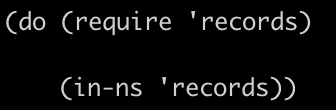
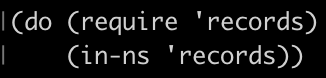
I include the \n to avoid jamming both commands into a single line, but it comes out with an extra newline.
Before
After
There was a problem hiding this comment.
Your example should just work by using \<CR> instead of \n.
let l:ns = s:getClojureNS()
if strlen(l:ns)
  let l:cmd = "(do (require '" . l:ns . ")\<CR>      (in-ns '" . l:ns . "))"
  execute 'ReplSend' . l:cmd
endif
(Vim's handling of newlines is really confusing. I don't understand it fully, but I've found that the rule of thumb is to try using <CR> first. Or \<CR> if inside a " delimited string.)
There was a problem hiding this comment.
After echoing the line with echomsg a:2, I can see that an ^M has been inserted. Going to do more experimenting to see where that's coming from. ^M is a DOS line break but I'm on a Mac (see my other comment).
There was a problem hiding this comment.
It seems that there is <LF> and <NL> too. I've only ever used <CR> which seems to have worked on Linux, Mac and Windows for me.
| let line = trim(a:2, "\r\n", 2) | ||
|
|
||
| " Remove two leading spaces added by the Clojure repl. | ||
| return substitute(line, '\m^\s\s', '', '') |
There was a problem hiding this comment.
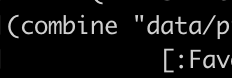
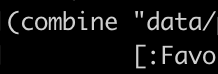
I noticed this behavior in both the Clojure and Leiningen repls. A two-space indent is always added after the first line break.
Before
After
There was a problem hiding this comment.
That's odd. I've never had this problem, so using this formatter actually has the inverse problem. What OS and Vim version are you using?
| With formatter | Without formatter |
|---|---|
 |
 |
Regardless, I'm fine including this, but maybe there should be a config option for it?
There was a problem hiding this comment.
I'm using macOS Monterey 12.3.1, and run Vim inside iTerm:
$ vim --version
VIM - Vi IMproved 8.2 (2019 Dec 12, compiled Apr 20 2022 18:55:37)
macOS version - x86_64
Included patches: 1-4800
Compiled by Homebrew
Huge version without GUI.
I'll go back and strip my vimrc to the bare essentials, and also try it with Gvim and on a Ubuntu machine I have lying around. While I'm at it, I'll dig deeper into the mysterious ^M I mentioned above.
There was a problem hiding this comment.
I've been pretty busy at work, but today I removed everything except zepl from my vim config and tried it again. I found that the problem is the same in either case, but that my "eliminate two spaces" code only worked because I was always using a two-space indent inside comment forms. I was just covering up the fact that the indentation code that I borrowed from the F# formatter wasn't actually doing anything.
I'll come back to this when I have more time and give it a fresh look.
There was a problem hiding this comment.
Sure, don't worry, there's no rush. I'm happy to help where needed, but I am quite busy too.
| " runtime plugins/zepl.vim/zepl/contrib/clojure.vim | ||
| " let g:repl_config = { | ||
| " \ 'clojure': { | ||
| " \ 'cmd': filereadable('deps.edn') ? 'clj' : 'lein repl', |
There was a problem hiding this comment.
This works to determine whether we're in a leiningen project or not, but assumes that the user is working from the project root. Nevertheless I think it's a useful example.
There was a problem hiding this comment.
Nice. Maybe this example could include the 'rlwrap' flag too? (You don't have to if you'd rather not.)
"   let g:repl_config = {
"   \   'clojure': {
"   \     'cmd': filereadable('deps.edn') ? 'clj' : 'lein repl',
"   \     'rlwrap': filereadable('deps.edn') ? 1 : 0
"   \     'formatter': function('zepl#contrib#clojure#formatter')
"   \   }
"   \ }
(+ If you decide to update this, don't forget to update the example in the doc too.)

| let line = trim(a:2, "\r\n", 2) | ||
|
|
||
| " Remove two leading spaces added by the Clojure repl. | ||
| return substitute(line, '\m^\s\s', '', '') |
There was a problem hiding this comment.
That's odd. I've never had this problem, so using this formatter actually has the inverse problem. What OS and Vim version are you using?
| With formatter | Without formatter |
|---|---|
|
|
Regardless, I'm fine including this, but maybe there should be a config option for it?
| function s:stripLeadingEmptyLines(lines) abort | ||
| while !empty(a:lines) | ||
| if a:lines[0] =~# '\m^\s*$' | ||
| call remove(a:lines, 0) | ||
| else | ||
| break | ||
| endif | ||
| endwhile | ||
| return a:lines | ||
| endfunction | ||
|
|
||
| function s:stripTrailingEmptyLines(lines) abort | ||
| let idx = len(a:lines) - 1 | ||
| while idx >= 0 | ||
| if a:lines[idx] =~# '\m^\s*$' | ||
| call remove(a:lines, idx) | ||
| let idx -= 1 | ||
| else | ||
| break | ||
| endif | ||
| endwhile | ||
| return a:lines | ||
| endfunction | ||
|
|
||
| function s:normalizeIndents(lines) abort | ||
| let depth = len(matchstr(a:lines[0], '\m\C^\s*')) | ||
| return map(a:lines, 'v:val[' . depth . ':]') | ||
| endfunction |
There was a problem hiding this comment.
I agree. I've actually thought about this before, but haven't got around to it. I think they should probably live under autoload/zepl/fmt.vim or similar (still not sure on the naming yet).
Then they can be called like this:
return zepl#fmt#NormaliseIndentation(a:lines)| " runtime plugins/zepl.vim/zepl/contrib/clojure.vim | ||
| " let g:repl_config = { | ||
| " \ 'clojure': { | ||
| " \ 'cmd': filereadable('deps.edn') ? 'clj' : 'lein repl', |
There was a problem hiding this comment.
Nice. Maybe this example could include the 'rlwrap' flag too? (You don't have to if you'd rather not.)
"   let g:repl_config = {
"   \   'clojure': {
"   \     'cmd': filereadable('deps.edn') ? 'clj' : 'lein repl',
"   \     'rlwrap': filereadable('deps.edn') ? 1 : 0
"   \     'formatter': function('zepl#contrib#clojure#formatter')
"   \   }
"   \ }
(+ If you decide to update this, don't forget to update the example in the doc too.)
| " (Replace 'plugins/' with your plugin directory path.) | ||
| " | ||
| " runtime plugins/zepl.vim/zepl/contrib/clojure.vim |
There was a problem hiding this comment.
I'm curious about this, does just runtime zepl/contrib/clojure.vim not work for you?
Which plugin manager are you using?
There was a problem hiding this comment.
I'm using vim-plug, which actually uses ~/.vim/plugged/. I wrote plugins/ because that's Vim's default plugin directory, but mainly was just trying to be more clear that you need to figure out the path for yourself depending on your setup.
zepl/contrib/clojure.vim
Outdated
|
|
||
| function s:processLine(...) abort | ||
| " Remove trailing newlines. | ||
| let line = trim(a:2, "\r\n", 2) |
There was a problem hiding this comment.
Your example should just work by using \<CR> instead of \n.
let l:ns = s:getClojureNS()
if strlen(l:ns)
  let l:cmd = "(do (require '" . l:ns . ")\<CR>      (in-ns '" . l:ns . "))"
  execute 'ReplSend' . l:cmd
endif
(Vim's handling of newlines is really confusing. I don't understand it fully, but I've found that the rule of thumb is to try using <CR> first. Or \<CR> if inside a " delimited string.)

Co-authored-by: Alex Vear <alex@vear.uk>
2 participants


After our previous discussion I decided to keep this minimal and stick to formatting only, at least for now.
This does a few things to help improve formatting in both the Clojure and Leiningen repls. I've added inline comments describing each.