Open-source NPM package for beautiful 3D globe visualizations
Created as part of a submission to TechArena Finland Hackathon. This is a community contribution we're committed to maintaining and improving!
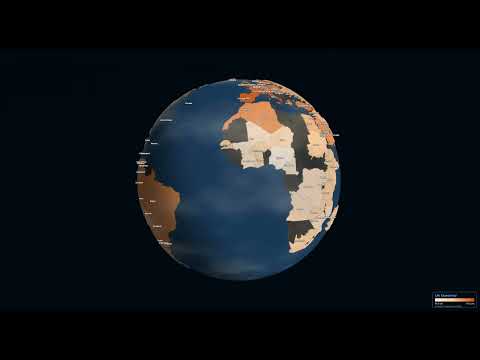
Interactive 3D globe visualization with world statistics, smooth flat map ↔ globe transitions, and country labels. Nothing like this existed before - and it's 100% useful for data visualization, dashboards, and educational projects!



- Smooth morphing animation between flat (Mercator) map and 3D globe
- Built-in world statistics (Life Expectancy, GDP, CO2 Emissions, etc.)
- Country labels with multiple display styles
- NASA Blue Marble and other texture presets
- Visual effects (clouds, atmosphere, grid lines, etc.)
- Screenshot and video/GIF recording
- Height extrusion based on data values
- Fully typed TypeScript API
🌐 Try it live at gralobe.vercel.app - A fully configurable version where you can explore different datasets, textures, and visual effects!
npm install gralobe threeimport { GlobeViz } from 'gralobe';
// Create a globe with default settings
const globe = new GlobeViz('#container');The default configuration displays:
- NASA Blue Marble satellite texture
- All country labels
- Life Expectancy statistic
- Globe view (morphed to sphere)
import { GlobeViz } from 'gralobe';

const globe = new GlobeViz('#container', {
  // Earth texture: 'satellite' | 'natural' | 'dark' | 'light' | 'night' | 'topographic' | 'day' | 'bathymetry' | 'atlas'
  texture: 'satellite',

  // Label style: 'none' | 'minimal' | 'major' | 'all' | 'data'
  labels: 'data',

  // Initial statistic to display (built-in ID or custom StatisticData)
  statistic: 'lifeExpectancy',

  // Initial view: 'globe' or 'flat'
  initialView: 'globe',

  // Enable auto-rotation
  autoRotate: false,

  // Show control panel (lil-gui) - Now a modular Category Bar in top-right
  showControls: true,

  // Show legend
  showLegend: true,

  // Enable 3D height extrusion based on data values
  extrudeHeight: false,

  // Visual effects
  effects: {
    atmosphereIntensity: 0.5,
    clouds: true,
    cloudSpeed: 1.0,
    cloudOpacity: 0.6,
    gridLines: false,
    starTwinkle: true,
  },

  // Callbacks
  onCountryClick: (id, name, value) => {
    console.log(`Clicked: ${name} (${id}) = ${value}`);
  },
  onViewChange: (view, morph) => {
    console.log(`View: ${view}, Morph: ${morph}`);
  },
});// Animate to globe view
globe.toGlobe();
// Animate to flat map view
globe.toFlat();
// Set morph value directly (0 = flat, 1 = globe)
globe.setMorph(0.5);
// Get current morph value
const morph = globe.getMorph();// Change to a built-in statistic
globe.setStatistic('gdpPerCapita');
// Available built-in statistics:
// - lifeExpectancy
// - humanDevIndex
// - gdpPerCapita
// - co2Emissions
// - renewableEnergy
// - internetUsers
// - urbanPopulation
// - healthExpenditure
// - forestArea
// - population
// - accessElectricity
// - educationExpenditure// Change label style
globe.setLabels('major'); // 'none' | 'minimal' | 'major' | 'all' | 'data'// Change earth texture
await globe.setTexture('night');Available texture presets:
satellite,natural,daydark,light,nighttopographic,bathymetryatlas(political boundary map; pair with labels for names)
// Update visual effects
globe.setEffects({
  clouds: true,
  cloudSpeed: 1.5,
  atmosphereIntensity: 0.8,
  gridLines: true,
});// Take a screenshot
globe.screenshot({ filename: 'globe.png' });
// Record a GIF
await globe.recordGif({ duration: 5, fps: 30 });
// Record a video
await globe.recordVideo({ duration: 10 });Visualize city-level or point-based data with synthetic boundaries.
globe.setUrbanData([
  { lat: 40.7128, lon: -74.0060, value: 100, name: "New York" },
  { lat: 35.6762, lon: 139.6503, value: 85, name: "Tokyo" },
]);// Enable/disable auto-rotation
globe.setAutoRotate(true);
// Resize
globe.resize(800, 600);
// Clean up
globe.destroy();| ID | Name | Unit |
|---|---|---|
lifeExpectancy |
Life Expectancy | years |
humanDevIndex |
Human Development Index | - |
gdpPerCapita |
GDP per Capita (PPP) | $ |
co2Emissions |
CO2 Emissions | t/capita |
renewableEnergy |
Renewable Energy | % |
internetUsers |
Internet Penetration | % |
urbanPopulation |
Urbanization | % |
healthExpenditure |
Health Spending | % GDP |
forestArea |
Forest Coverage | % |
population |
Population | millions |
accessElectricity |
Electricity Access | % |
educationExpenditure |
Education Spending | % GDP |
You can provide your own statistics data:
import type { StatisticData } from 'gralobe';

const customStat: StatisticData = {
  definition: {
    id: 'myStatistic',
    name: 'My Custom Statistic',
    unit: '%',
    description: 'Description of my statistic',
    colorScale: ['#feedde', '#fdbe85', '#d94701'],
    domain: [0, 100],
    format: (v) => `${v.toFixed(1)}%`,
  },
  values: {
    'US': 75.5,      // ISO alpha-2
    'Germany': 42.3, // Country name
    'CHN': 60.0,     // ISO alpha-3
    '826': 55.0,     // ISO numeric
  },
};

globe.setStatistic(customStat);Gralobe accepts multiple country identifier formats:
| Format | Example | Description |
|---|---|---|
| ISO 3166-1 alpha-2 | US, DE, TR |
2-letter country codes |
| ISO 3166-1 alpha-3 | USA, DEU, TUR |
3-letter country codes |
| ISO 3166-1 numeric | 840, 276, 792 |
3-digit numeric codes |
| Country name | Germany, Turkey |
Common English names |
All formats are automatically normalized internally.
import type {
  GlobeVizConfig,
  GlobeVizAPI,
  StatisticDefinition,
  StatisticData,
  CountryData,
  TexturePreset,
  LabelStyle,
  EffectsConfig,
  ExportOptions,
} from 'gralobe';# Install dependencies
npm install
# Run development server
npm run dev
# Build library
npm run build:lib
# Build demo app
npm run buildGralobe requires WebGL support. It works in all modern browsers:
- Chrome 80+
- Firefox 75+
- Safari 14+
- Edge 80+
MIT