
Generate organic SVG blob shapes and grab clean, ready-to-paste
code for them - no design tool, no manual path-fiddling.



Created by Bilal Malik
Follow on Github bilalmlkdev
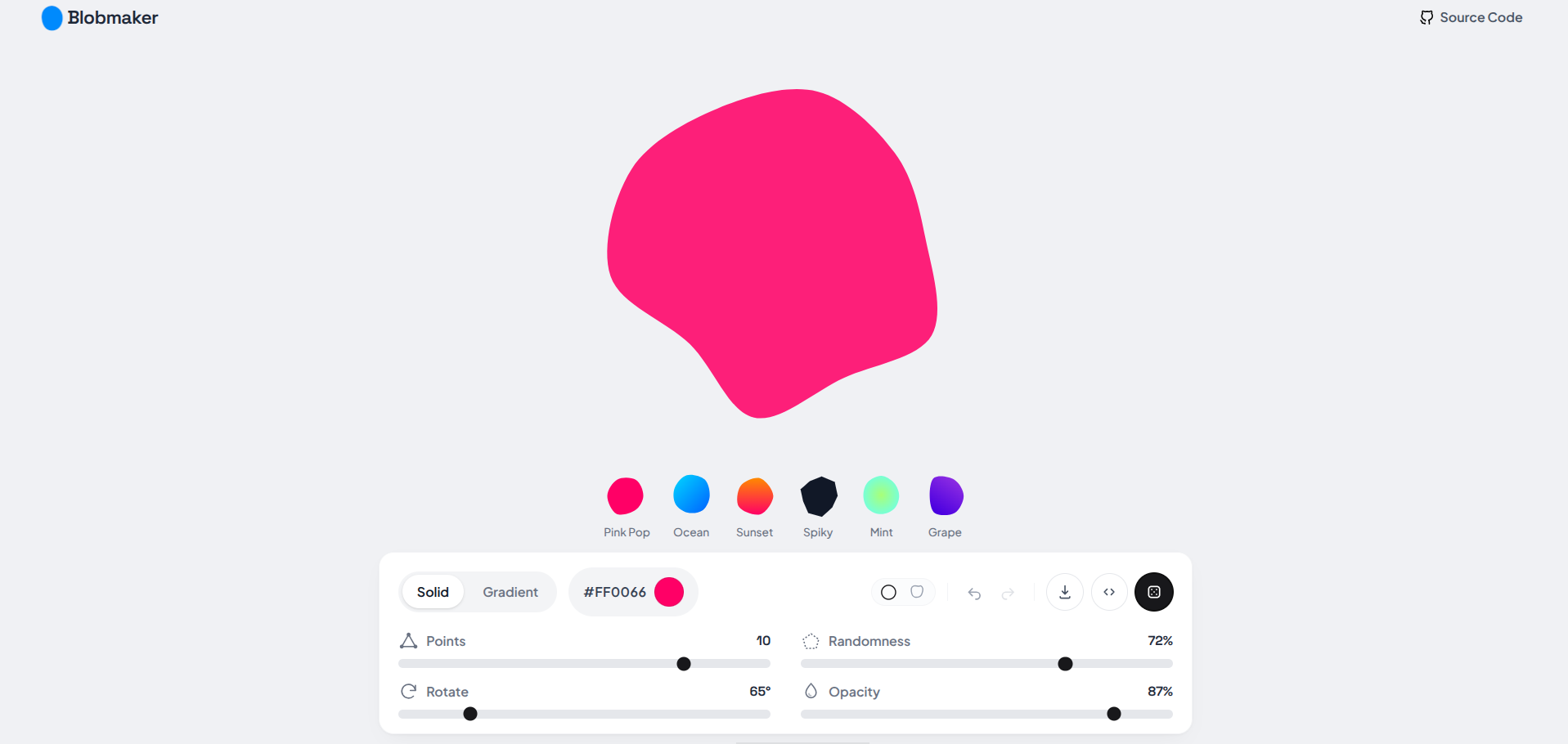
Every frontend project eventually needs "one of those organic blob shapes" in the hero section, behind an avatar, or as a background accent. The usual options are:
- open Figma, draw something with the pen tool, export an SVG, and hope it looks the same in the browser
- copy a random blob PNG off Google and hope no one asks about the license
- hardcode an SVG path you don't understand, that you can never tweak again
Blobmaker skips all of that. You drag a few sliders, watch the shape update live, and copy out exactly the code your project needs - SVG markup, a CSS clip-path, a drop-in React component, or a JSON config you can version and re-import later. It's a small tool that does one job properly, so you don't have to think about it again.
| You want... | Blobmaker gives you... |
|---|---|
| A quick blob for a mockup | Raw <svg> markup, copy-pasteable straight into any HTML |
| A pure-CSS shape, no SVG | A clip-path: path(...) snippet for any element |
| A React component | A typed, self-contained component with the path baked in |
| Something to store/reuse later | A JSON config - same shape, regenerate it anytime |
Every export reflects the exact shape on screen - same seed, same points, same edge style, same color or gradient. No drift between what you see and what you copy.
This isn't a filter or a noise texture. Blobmaker places N points evenly around a circle, nudges each one outward or inward by a seeded pseudo-random amount, and threads a curve through them:
- Points - how many vertices the shape is built from (3–12). Fewer points = simpler, rounder blobs. More points = busier, more detailed silhouettes.
- Randomness - how far each vertex is allowed to drift from a perfect circle (0–100%). Zero randomness is just a polygon; higher values get you the classic "blob" wobble.
- Seed - every shape is deterministic from its seed. Same points + randomness + seed = the exact same path, every time, on every machine. Hitting "randomize" just rolls a new seed.
- Edge style -
roundruns the vertices through a Catmull-Rom → cubic Bézier conversion for smooth, flowing curves.sharpconnects them with straight lines for a faceted, low-poly look. - Rotation & opacity - applied on top, so you can angle or fade the same base shape without touching its structure.
Because the whole thing is a pure function of a few numbers, the preset gallery, the live preview, and every exported format are always rendering the same geometry - nothing is faked or approximated for display.
- Solid or gradient fills - linear or radial, with adjustable angle, not just flat colors.
- Full undo/redo on every change, not just the randomize button, so experimenting never feels risky.
- Preset gallery with real rendered blob previews (not placeholder circles) - click one, tweak from there.
- Keyboard-first workflow for anyone who'd rather not reach for the mouse:
Spaceto randomize,⌘/Ctrl+Zto undo,⌘/Ctrl+Shift+Zto redo,⌘/Ctrl+Sto quick-export SVG. - No-scroll, fully responsive layout - the whole tool fits in the viewport at any screen size, from phone to ultrawide.
- React 18 + TypeScript
- Tailwind CSS v4
- Vite
- Zero runtime dependencies beyond React - the shape math, exporters, and everything else are hand-rolled, not pulled from an npm blob-generator package.
src/
  components/
    atoms/       IconButton, Slider, ColorSwatch, TabGroup, icons
    molecules/    FillTypeControl, LabeledSlider, EdgeStyleToggle,
                  ActionButtons, HistoryControls, PresetSwatch,
                  BrandMark, ShareLink
    organisms/    Header, BlobPreview, ControlBar, CodeModal, PresetGallery
    templates/    BlobMakerLayout
    pages/        BlobMakerPage
  hooks/          useBlobConfig.ts (config state + undo/redo), useKeyboardShortcuts.ts
  utils/          generateBlobPath.ts, exportBlob.ts, random.ts, presets.ts
  types/          blob.ts
  styles/         index.css (Tailwind v4 entry + theme tokens)
git clone https://github.com/bilalmlkdev/blobmaker.git
cd blobmaker
npm install
npm run dev
That's it - no environment variables, no backend, no build step required to start hacking on it.
Pick an export format from the download menu and it drops straight into your project:
- SVG - paste as-is, or save as a
.svgfile and<img>/background-imageit. - CSS - apply the
clip-pathvalue to any element with a background color or image; the shape becomes the element's silhouette. - React - a standalone component that takes no props by default; edit the
fill/viewBoxinline if you need to theme it later. - JSON - the raw config (points, randomness, seed, colors, etc.) if you want to store a blob and regenerate it exactly, or feed it into your own renderer.
Small tool, small process:
- Fork it, branch off
main - Keep commits focused - one change per commit
- Open a PR against bilalmlkdev/blobmaker with a short description of what and why
MIT - do whatever you want with it, including in commercial projects. Full text below.
MIT License

Copyright (c) 2026 Bilal Malik

Permission is hereby granted, free of charge, to any person obtaining a copy
of this software and associated documentation files (the "Software"), to deal
in the Software without restriction, including without limitation the rights
to use, copy, modify, merge, publish, distribute, sublicense, and/or sell
copies of the Software, and to permit persons to whom the Software is
furnished to do so, subject to the following conditions:

The above copyright notice and this permission notice shall be included in all
copies or substantial portions of the Software.

THE SOFTWARE IS PROVIDED "AS IS", WITHOUT WARRANTY OF ANY KIND, EXPRESS OR
IMPLIED, INCLUDING BUT NOT LIMITED TO THE WARRANTIES OF MERCHANTABILITY,
FITNESS FOR A PARTICULAR PURPOSE AND NONINFRINGEMENT. IN NO EVENT SHALL THE
AUTHORS OR COPYRIGHT HOLDERS BE LIABLE FOR ANY CLAIM, DAMAGES OR OTHER
LIABILITY, WHETHER IN AN ACTION OF CONTRACT, TORT OR OTHERWISE, ARISING FROM,
OUT OF OR IN CONNECTION WITH THE SOFTWARE OR THE USE OR OTHER DEALINGS IN THE
SOFTWARE.