Orm

-
Blog::get($id)Returns the object corresponding to the table row with id = $id (or null) -
Blog::getAll(array $ids)Returns a Orm\Collection object containing all matching rows found where id in $ids
At it's simplist, the ORM allows you to easily retrieve "Model" object versions of records (rows) in the database, from the table references by your class name.
Therefore:
class Blog extends Model {}

$blog = Blog::get(1);
will execute the SQL query SELECT * FROM blog WHERE id = 1 and then return an object that contains the data read from the appropriate row in the database.
-
Blog::find($where)Returns the first object found using the $where clause (see below) or null -
Blog::findAll($where)Returns a Orm\Collection object containing all matching rows found using $where clause.
As opposed to "get" functions which uses the id of the row you are looking for, "find" functions uses arbitary where clauses to find the row you want. Most simple searching/filtering can be done without having to write any SQL at all.
$where in this context is an array of simple comparisons which are transformed into a set of where clauses 'AND'ed together. The exact format of these is documented here, but here are a few examples of the types of queries you can create:
use Automatorm\Database\SqlString;

# Select * from blog where id = 4 Limit 1;
Blog::get(4);
Blog::find(['id' => 4]);

# Select * from blog where title = 'Fool\'d' Limit 1;
Blog::find(['title' => "Fool'd"]);

# Select * from blog where id = 100 and title = 'Foo';
Blog::findAll(['id' => 100, 'title' => 'Foo']);

# Select * from blog where date is null;
Blog::findAll(['date' => null]);

// "in" clauses can be used by passing an array of values to find
# Select * from blog where id in (1,2,3,4);
Blog::findAll(['id' => [1,2,3,4] ]);
Blog::getAll([1,2,3,4]);

# Select * from blog where title in ('First', 'Second');
Blog::findAll(['title' => ['First','Second'] ]);

// Comparison symbols can be pre- or post-fixed depending on your coding style
# Select * from blog where id > 123;
Blog::findAll(['id>' => 123]);
Blog::findAll(['>id' => 123]);

# Select * from blog where id is not null
Blog::findAll(['!id' => null]);

# Select * from blog where title like '%today%'
Blog::findAll(['%title' => '%today%']);

# Select * from blog where title = 'today' order by id desc
Blog::findAll(['title' => 'today'], ['sort' => 'id desc']);

# Select * from blog limit 10, 20
Blog::findAll([], ['limit' => 20, 'offset' => 10]);

# Select * from blog where title not like '%today' Limit 1
Blog::find(['!%title' => '%today']);

// SqlString objects can be used to pass raw SQL strings
// that will not be auto-escaped (e.g. to run functions).
# Select * from blog where date = now();
Blog::findAll(['date' => new SqlString('now()') ]);

# Select * from blog where id = 3 or (id = 4 and title = 'foo');
Blog::findAll([new SqlString("id = 3 or (id = 4 and title = 'foo')")]);
The SQL generated for the above examples will actually differ slightly as it will use PDO's paramaterized queries to avoid SQL injection issues.
::get() and ::find() return objects that are a subclass of "Model".
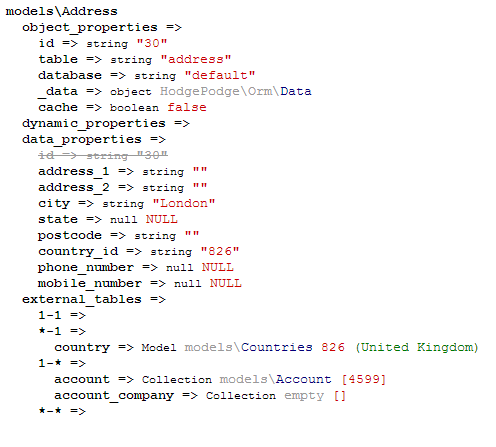
The properties available on Model objects are combination of standard PHP properties set on the object, dynamically created properties, and database table data. In some circumstances, some of these different sources of properties may have duplicate names - the code evaluates to various sources of data in a specific priority order (in order of the subheadings below). You can see all of the properties in this order by calling echo Orm\Dump::dump($object);. Inaccessible properties (due to their name being used by a higher priority source) will be struckthrough and greyed out. You can see this on almost all objects with the 'id' property, which is both set directly on the object, and returned in the table data.
Example output from Dump:
These are just the normal PHP properties set directly on the object. E.g:
$blog->random = 'foo';These properties trump all and are always returned first. A limited number of these are set automatically (e.g. $blog->id)
In the style of "lazy loading", you can define special functions that present themselves as properties. This allows you to put off calculating the value of a property until it is actually accessed.
These are defined like this:
class Blog extends Automatorm\Orm\Model
{
  /**
   * @property-read string $foo
   */
  protected function _property_foo()
  {
    return $this->id . '-' . $this->title;
  }
}

$blog = Blog::get(1);
echo $blog->foo;   // Prints "1-My First Entry"
The PHPDoc block comment will help your editor/IDE know that this object has this property.
Next, the Model will look for table data from a column matching the property name. This is returned now if found.
echo $blog->title; // Prints "My First Entry"Various database relationships can be automatically traversed using properties:
The simple case where a column in the table has a foreign key connected to the primary key of another table. In our example database, we have a blog_comment table that links to blog via a column called "blog_id"; we can access the blog entry for a comment like this:
$comment = BlogComment::get(1);
$blog = Blog::get($comment->blog_id);
This is a bit longwinded and not very chainable. The ORM creates a property that is a "shortcut" for this kind of relationship by dropping the '_id' suffix from foreign keys, and using that as a direct accessor for the appropriate object:
$comment = BlogComment::get(1);
$blog = $comment->blog;         // equivalent to $blog = Blog::get($comment->blog_id);
echo $comment->blog->title; // Prints "My First Entry"You can also lookup these column -> primary key relationships in reverse. The system will try and generate a sensible name for this property, but you many need to look up the generated name using the Dump::dump() function. This property will return a Collection (see below) of the appropriate Model objects (because 'many' results could come back). Collections act like arrays in most cases (see below).
TODO Explaination of naming convention
$blog = Blog::get(1);
$comments = $blog->blog_comment;
// (Note that the property is singular because BlogComment is singular)

foreach($comments as $comment)
{
   echo $comment->message; // Prints "First Comment", "Second Comment", ...
}Many to many relationships are normally encapsulated in databases by using an intermediary table. The Model object will expose a property named for this "pivot" table, which directly connects the two tables. Accessing the property from one end of the M-M relationship, will return a Collection of objects from the other end (skipping over the pivot table completely). So, in the context of the example db above, using the "blog_likes" property on the Blog object will yield a Collection of Account objects.
$blog = Blog::get(1);
$accounts_that_liked_entry = $blog->blog_likes;
// BlogLikes is the name of the Pivot Table

foreach($accounts_that_liked_entry as $account)
{
   echo $account->name; // Prints "First User", "Second User", ...
}Any function call that could return multiple results (e.g. ::findAll()) will return an Orm\Collection object. This object utilises the ArrayAccess, Iterator and Countable interfaces, and in many cases acts like a normal PHP array (if a real array is needed, it's only a ->toArray() call away).
Collection objects have two enhancements specific to Model objects
A number of manipulation functions are available on the object. Of particular note is the ->filter($arguments) function that allows you reduce a set of results down further depending on them matching criteria. The $arguments clause here is similar to the $where clause of the ::find functions, but is run within PHP instead of the database. This means that direct sql (via the SqlString object) cannot be used, but in compensation, dynamic properties (i.e. _property_* functions) can be specified.
Short list of filters available:
-
->filter(['id' => 1])Remove any objects that don't match criteria -
->not(['id' => 1])or->remove(['id' => 1])Remove any objects that do match criteria -
->add($array | $Collection)or->merge($array | $Collection)Merge an array (or Collection) into this collection
Other array functions available:
->reverse()->slice($start, $length)-
->sort(Callable $function)sorts via uasort() -
->toArray()return normal array. If called on a collection of Model objects, will be key'd on the $obj->id.
Properties and methods of the objects within the collection can obviously be accessed by foreach-ing through the collection. However, it is also possible to call these directly on the collection (it is almost like an implicit map command). The collection will call the method/property on each of the items it contains, and then return a new collection containing the collated results of all of the calls. In this regard, it functions similar to jQuery in that you can select a group of elements and then apply changes to all of them simultaneously.
For example:
// Get a Collection of the first two blogs
$blogs = Blog::findAll(['id' => [1, 2]);

// Get a Collection of all of the comments on the first two blogs
$comments = $blogs->blog_comment;

// Get a Collection of the ids of those comments
$comment_ids = $comments->id

// Get a normal array of those ids and output a comma separated list
echo implode(',', $comment_ids->toArray());

// Shorthand via chaining
echo implode(',', Blog::findAll(['id' => [1, 2]])->blog_comment->id->toArray());

// Delete several blogs
$blogs = Blog::findAll(['id' => [3, 4]);
$blogs->delete(); // Calls the delete function on each blog object, and returns an array of the return values from that function.Each model object contains a Orm\Data object within it, which is a representation of the data held in the database. We use these objects to create and update data in the database.
To create a new row in a table, we first have to get a new Data object for that table. We can then add the new data to that object, and commit it to the database:
$data = Blog::newData();
$data->title = 'New Blog Post';
$data->content = 'Content, content content.......';
$data->account = Account::get(1);
$data->date = new \DateTime();
$blog = Blog::commitNew($data);To update data, we have to get the Data object from the row that we want to update
$blog = Blog::get(4);
$data = $blog->data();
$data->title = 'New Blog Post - Updated';
$data->content = 'New Content, content content.......';
$blog->commit($data);In the common case that you have an array of key/value pairs (e.g. from a form submission), you can assign all of these in one go like this.
$fields = ['title' => 'New Blog Post - Updated', 'content' => 'New Content, content content.......'];
$blog = Blog::get(4);
$data = $blog->data()->assign($fields, ['title', 'content']);
$blog->commit($data);
The second parameter to assign is a whitelist of keys that will get assigned - any additional keys defined in $fields will get ignored.
Deleting rows is similar to updating, except we call a special function to mark the row for deletion;
$blog = Blog::get(4);
$db = $blog->data()->delete();
$blog->commit($db);
Currently, the Model object is not updated to know that it is an "orphan" and not connected to a live row - this will make other actions that use this object (e.g. updates) fail with an SQL error. Future releases of Automatorm will detect this state and throw a more suitable exception instead of running an SQL command that may fail.
