
Your subs, raw and revealed — a fast FITS, XISF & camera-RAW viewer that lives right inside Windows Explorer.


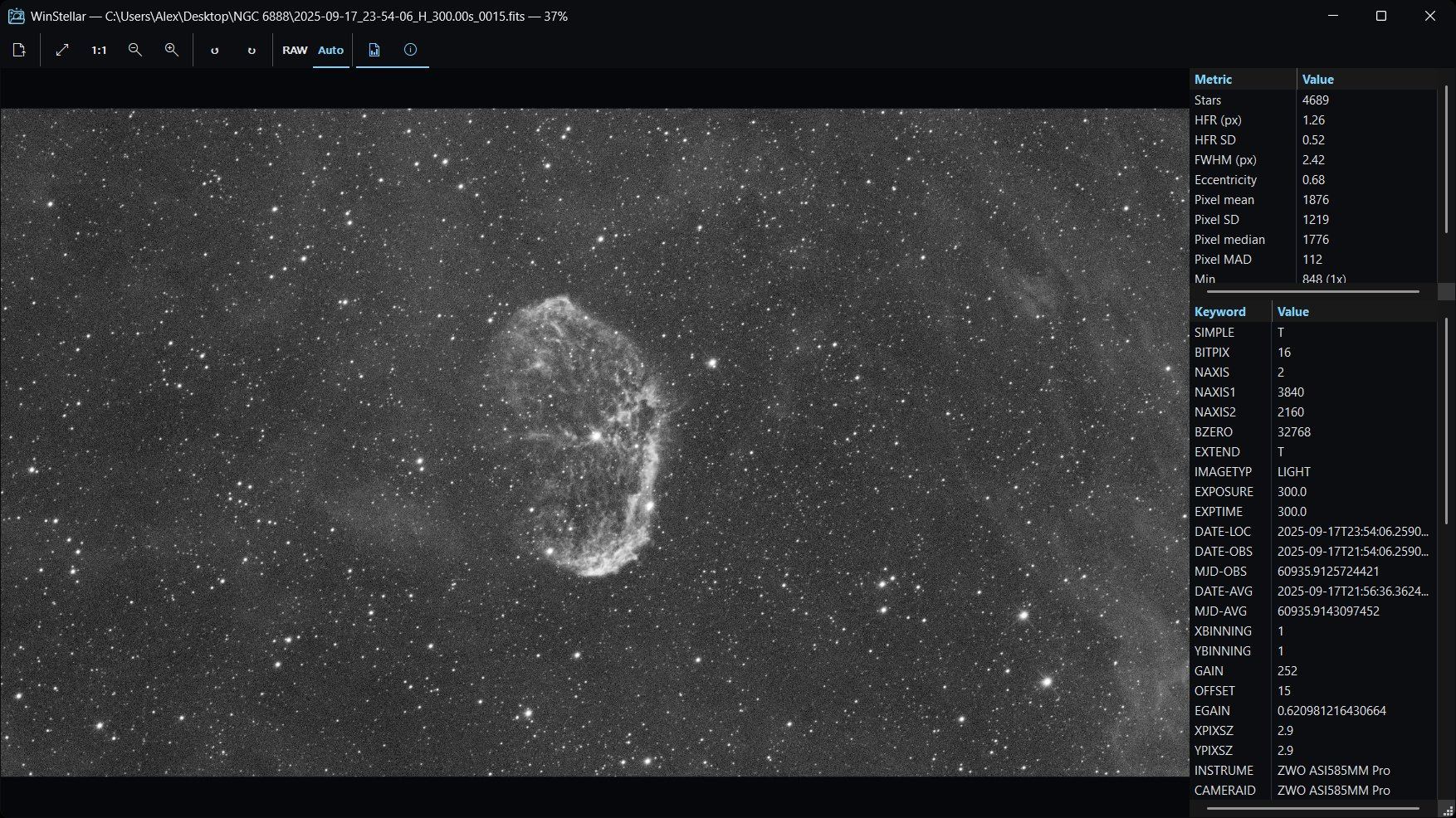
WinStellar is a native Windows viewer for astrophotography frames — FITS, XISF and camera RAW — built around one idea: you shouldn't have to launch a heavy application to look at your subs. It plugs straight into Windows Explorer with thumbnails, a live preview pane and sortable quality columns, so you can triage a night's capture the moment you open the folder. When you want a closer look, a fast standalone viewer adds stretch, histogram and a full inspection suite (tilt, aberration, background).
🌐 Downloads, screenshots & details: winstellar.fr
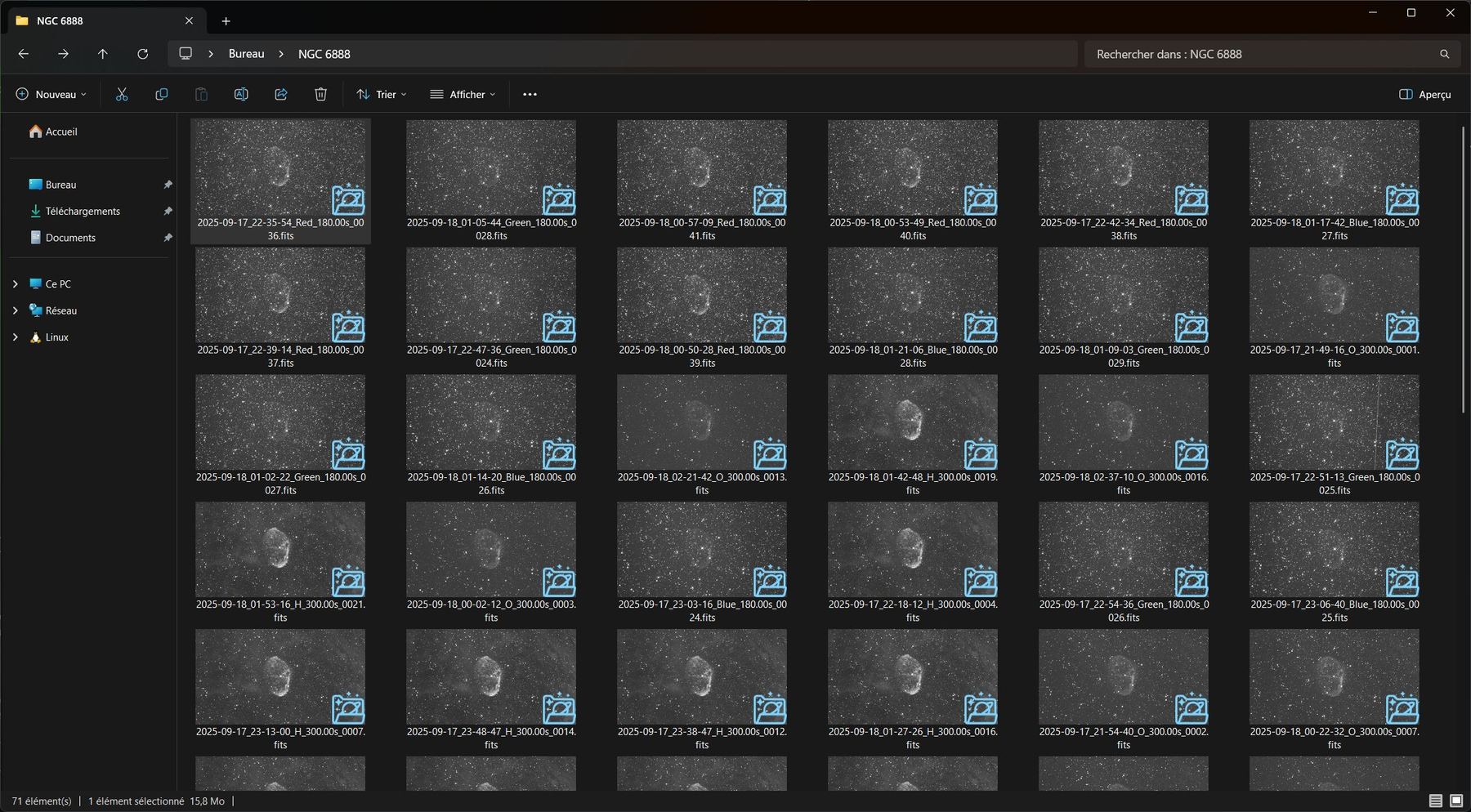
| 🗂️ Explorer integration | Thumbnails, a preview pane (Alt+P) with automatic stretch, and sortable metadata + quality columns for FITS/XISF — right in Explorer. Triage your subs without opening anything. |
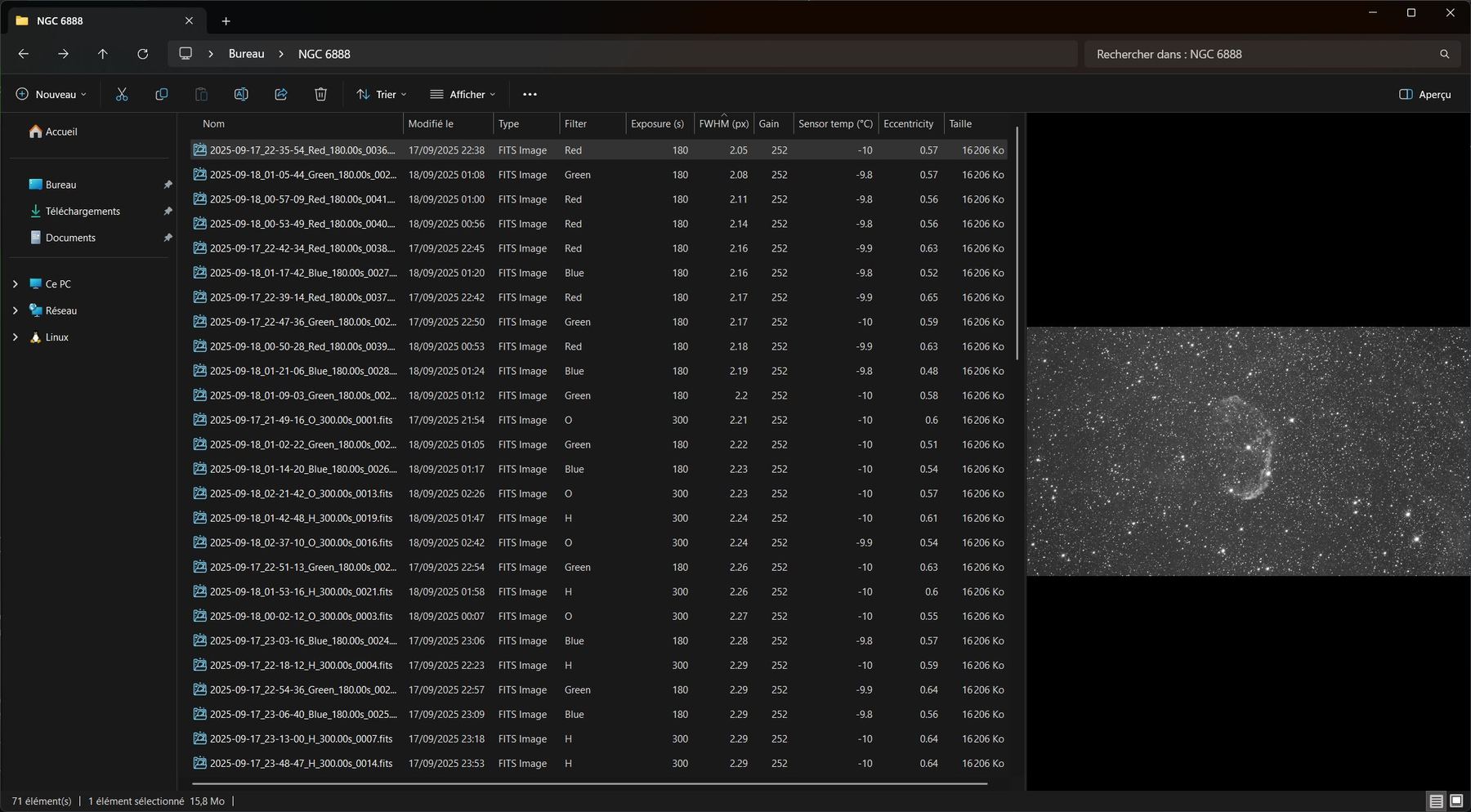
| 📊 Quality metrics | Per-file HFR, FWHM, eccentricity, star count and pixel stats, exposed as native Windows columns. Sort a folder by HFR to surface your sharpest frames instantly. |
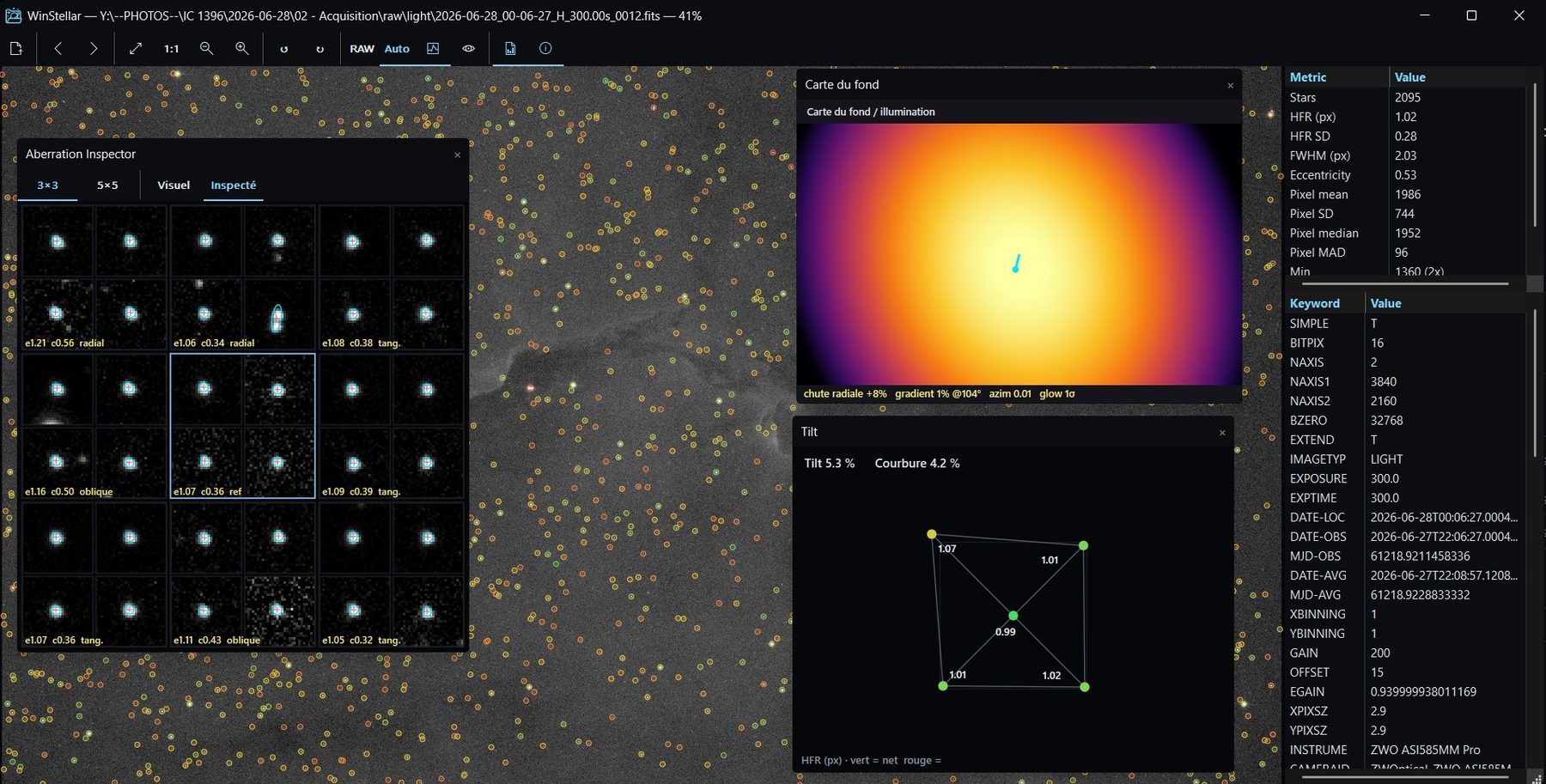
| 🔬 Inspection suite | Star annotation, tilt & field-curvature detection, an optical-aberration PSF plate, and a background / illumination map — to diagnose your optical train at a glance. |
| 🖼️ Standalone viewer | Smooth zoom / pan / rotate, non-linear auto-stretch, histogram & stretch controls, and a clean dark UI. |
| 🌈 Color & RAW | One-shot-color Bayer debayering and camera-RAW decoding across all major manufacturers, rendered in color through the same pipeline as FITS. |
| ⚡ Light & native | A small native Win32 / Direct2D app — no runtime, no clutter. A SQLite analysis cache makes re-browsing a folder instant. |
- FITS —
.fit,.fits(mono, OSC/Bayer, and 3-plane RGB cubes) - XISF — PixInsight
.xisf - Camera RAW — NEF (Nikon), CR2/CR3 (Canon), ARW (Sony), DNG (Adobe), RAF (Fuji), ORF (Olympus), RW2 (Panasonic), PEF (Pentax), SRW (Samsung)
Download the latest installer from winstellar.fr or the Releases page, then run it. Windows 10 or 11, 64-bit.
The installer registers the shell extensions, restarts Explorer, and adds an entry to Apps & features for a clean uninstall.
SmartScreen note — WinStellar isn't code-signed yet, so Windows may show a "publisher unknown" warning on first run. Click More info → Run anyway. The warning fades as the release builds reputation.
- Install, then open any folder of
.fit/.fits/.xisf/ RAW files in Explorer. - Switch Explorer to a thumbnail view, or open the preview pane with Alt+P.
- Add the quality columns: right-click a column header → More…, search for HFR, Stars, Object… — then sort by HFR to bring your sharpest subs to the top.
- Double-click a frame to open the viewer. Use the Inspection menu for tilt, aberration and background analysis.
Thumbnails in Explorer
Sortable quality columns
Inspection suite
- 🌐 Website: winstellar.fr
- 📦 Releases: github.com/caelo-works/winstellar/releases
- 🐛 Issues & feedback: github.com/caelo-works/winstellar/issues
🛠️ Building from source (for developers)
The toolchain is MSVC + CMake + vcpkg.
Prerequisites (one-time, on the Windows host):
- Visual Studio 2022 with the Desktop development with C++ workload (MSVC v143 + Windows 11 SDK).
- vcpkg — clone to
C:\dev\vcpkg, runbootstrap-vcpkg.bat, then setVCPKG_ROOT=C:\dev\vcpkg. - CMake ≥ 3.21 and Ninja (both ship with the VS C++ workload).
- Inno Setup 6 — only for building the installer:
winget install --id JRSoftware.InnoSetup
Run scripts\check_env.cmd to validate the toolchain.
Build:
.\scripts\build.cmd -Config ReleaseOutputs land in build\bin\Release\:
WinStellar.exe— the standalone viewerWinStellarShellExt.dll— the Explorer shell-extensions DLL
Register the shell extension (to test without the installer):
.\scripts\register.cmd       # admin required (auto-elevates)
.\scripts\unregister.cmd     # to undo
Build an installer:
.\installer\build_installer.cmd                       # unsigned
.\installer\build_installer.cmd -SigningCert <THUMB>  # signed
Release (maintainers):
.\scripts\release.cmd -Patch                 # 0.1.2 -> 0.1.3
.\scripts\release.cmd -Minor                 # 0.1.2 -> 0.2.0
.\scripts\release.cmd -Major -Push           # 0.1.2 -> 1.0.0 + git push
.\scripts\release.cmd -Set 1.2.3 -SigningCert <THUMB>
The script bumps CMakeLists.txt + vcpkg.json, commits, tags vX.Y.Z, rebuilds and packages
the installer. The VERSIONINFO of every binary embeds version, git short SHA and build date.
Project layout:
fits_core/    Static library — FITS / XISF / RAW loading, stretch, analysis
shell_ext/    Preview / Property / Thumbnail handlers (a single COM DLL)
viewer/       Standalone Win32 + Direct2D viewer
scripts/      PowerShell helpers (build, register, release, version bump)
installer/    Inno Setup script + signing pipeline
tools/        Side utilities (benchmarks)
GPL-3.0 — free and open source.
- CFITSIO — FITS I/O
- LibRaw — camera-RAW decoding
- pugixml — XISF XML header parsing
- SQLite — the analysis cache
- PixInsight's AutoSTF approach — the auto-stretch model
© WinStellar · a CaeloWorks creation · astrophotography software, firmware & hardware · GPL-3.0