

This workshop teaches how to build RAG systems that overcome Large Language Model limitations by augmenting prompts with retrieved external information from documents.
Core Concept: Build RAG systems that address LLM limitations (hallucinations, outdated knowledge, lack of domain-specific data) by retrieving relevant information from external documents and combining it with your queries.
By completing this workshop, you will:
- Understand RAG fundamentals - Learn why RAG is needed vs. fine-tuning, and how it provides transparent outputs with fewer hallucinations
- Document processing - Load PDFs and chunk text to fit LLM context windows
- Embeddings & vector storage - Convert text to numerical vectors using HuggingFace models and store them in FAISS vector database
- Retrieval systems - Implement semantic similarity search to find relevant documents
- LLM integration - Connect retrieval systems to language models (using free Groq/Llama models)
- Build interactive Q&A - Create a chat interface for querying PDF documents
- LangChain - Framework for LLM applications
- FAISS - Facebook's similarity search library for vector storage
- HuggingFace Embeddings - Open-source embedding models
- Groq/Llama - Free LLM inference
- Sample data - Research papers included for practice (pharmaceutical documentation and AI research)
Two parallel notebooks are provided:
- RAG-Pipeline-Llama.ipynb - Complete walkthrough with detailed explanations and working code
- RAG_Exercise_Notebook.ipynb - Hands-on exercises with empty functions for you to implement
The workshop covers 7 exercises that guide you through the 5-step RAG pipeline shown below.
You will need a free Groq API key. Create a .env file in the project root with:
GROQ_API_KEY=<your groq api key>
- Groq API Key can be generated and used free of charge
-
Install the virtual environment and the required packages by following commands:
pyenv local 3.11.3
python -m venv .venv
source .venv/bin/activate
pip install --upgrade pip
pip install -r requirements.txt
-
Install the virtual environment and the required packages by following commands.
For
PowerShellCLI :pyenv local 3.11.3 python -m venv .venv .venv\Scripts\Activate.ps1 python -m pip install --upgrade pip pip install -r requirements.txt
For
Git-BashCLI :pyenv local 3.11.3 python -m venv .venv source .venv/Scripts/activate python -m pip install --upgrade pip pip install -r requirements.txt
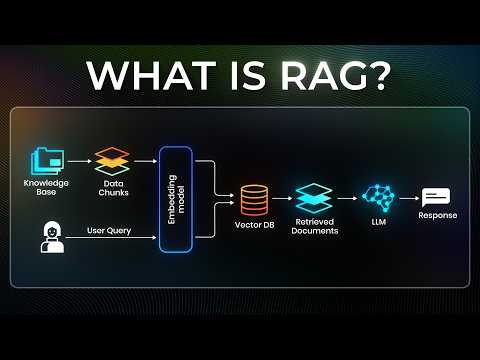
Click the image above to watch a video explanation of the RAG workflow

The RAG system operates in two main stages: Ingestion (preparing your knowledge base) and Inference (answering user queries).
This stage happens once to prepare your documents for retrieval.

STEP 1 - Load Documents: Start with your source documents (PDFs, text files, etc.)
STEP 2 - Pre-processing & Chunking: Split documents into smaller chunks that fit within LLM context windows. This makes retrieval more precise and manageable.

STEP 3 - Create Embeddings: Use an embedding model to convert each chunk into a numerical vector representation. These embeddings capture the semantic meaning of the text and are stored in a Vector Database (like FAISS) for efficient similarity search.
This stage happens every time a user asks a question and consists of three phases: Retrieval, Augmentation, and Generation.

Retrieval Phase (Step 4):
- When a user submits a query, it gets converted into an embedding using the same embedding model
- The system performs similarity search in the Vector Database, comparing the query embedding against stored chunk embeddings
- The most relevant chunks (context) are retrieved based on similarity scores
Augmentation Phase (Step 5):
- The original query text is combined with the retrieved context using a prompt template
- This creates an enriched prompt that contains both the user's question and relevant background information
Generation Phase (Step 5):
- The enriched prompt is sent to the LLM (Large Language Model)
- The LLM generates a response based on both the query and the retrieved context
- The response is returned to the user
This workflow ensures that the LLM has access to relevant, up-to-date information from your documents, reducing hallucinations and improving answer accuracy.
RAG systems are deployed across numerous industries where combining retrieval with generation improves accuracy and reduces hallucinations:
- News archives search and fact-checking - Verify claims against historical articles and trusted sources
- Investigative journalism research - Quickly retrieve relevant past reporting and documents
- Quote verification and source attribution - Ensure accuracy of citations and context
- Historical contextualization - Connect current events with relevant background information
- Case law research - Find relevant precedents and legal opinions
- Contract analysis - Review and compare contractual language across documents
- Due diligence - Search through large document collections efficiently
- Regulatory compliance - Query regulations and policy documents
- Medical literature search - Help clinicians find relevant research and treatment guidelines
- Clinical decision support - Retrieve patient-specific information and recommendations
- Drug interaction checking - Query pharmaceutical databases for safety information
- Medical education - Interactive Q&A over medical textbooks and journals
- Knowledge base chatbots - Answer customer questions using company documentation
- Technical support assistants - Troubleshoot issues with product manuals
- FAQ automation - Provide accurate answers from support articles
- Personalized tutoring systems - Answer student questions using course materials
- Research paper discovery - Help students find relevant academic literature
- Interactive course assistants - Q&A over textbooks and lecture notes
- Internal knowledge management - Search company wikis, policies, and documentation
- Compliance Q&A - Query corporate policies and regulatory requirements
- Market intelligence - Retrieve insights from research reports and market data
- Onboarding assistants - Help new employees find relevant company information
- Financial report analysis - Extract insights from earnings reports and filings
- Investment research - Query analyst reports and market data
- Risk assessment - Retrieve relevant financial regulations and compliance documents
- Market sentiment analysis - Analyze news and social media with historical context
- Product search and recommendations - Match customer queries with detailed product specifications
- Review analysis - Summarize and query customer feedback
- Inventory intelligence - Search catalog data with natural language
- Lewis, P., et al. (2020). "Retrieval-Augmented Generation for Knowledge-Intensive NLP Tasks." NeurIPS 2020. arXiv:2005.11401
- Gao, Y., et al. (2023). "Retrieval-Augmented Generation for Large Language Models: A Survey." arXiv preprint. arXiv:2312.10997
- Ram, O., et al. (2023). "In-Context Retrieval-Augmented Language Models." ACL 2023. arXiv:2302.00083
- Borgeaud, S., et al. (2022). "Improving language models by retrieving from trillions of tokens." ICML 2022. arXiv:2112.04426
- Izacard, G., & Grave, E. (2021). "Leveraging Passage Retrieval with Generative Models for Open Domain Question Answering." EACL 2021. arXiv:2007.01282
- A beginner’s guide to building a Retrieval Augmented Generation (RAG) application from scratchRag from scratch tutorial