Conclave simplifies and protects the path from changed code to human-approved merge.


Quick start · CLI · Cockpit · Agent skill · GitHub Actions · FAQ
Conclave sits between a code change and its approval. It compares the real Git change, maps the code around it, and reports risks with file-and-line evidence, then hands the next action to you, your coding agent, or a human reviewer.
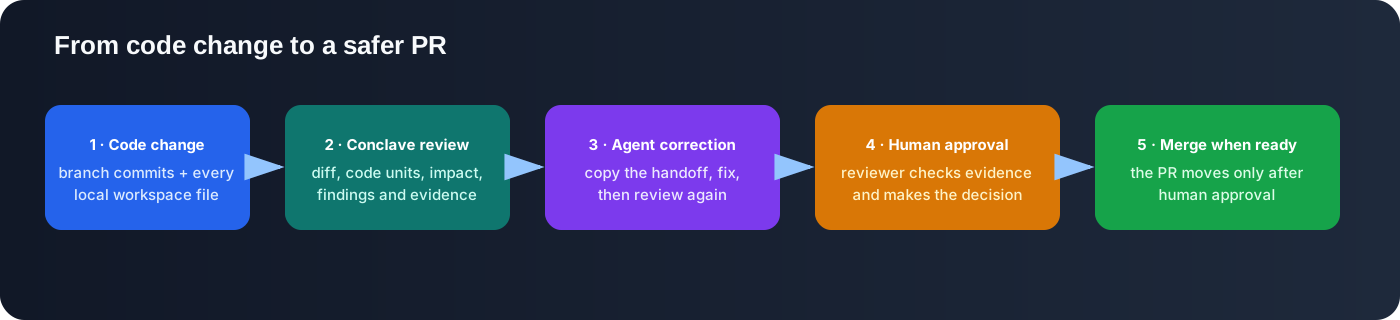
change → Conclave review → coding agent fixes findings → Conclave rechecks → human approves → merge
- Why Conclave
- Install
- Quick start
- One engine, three ways to use it
- Recipes
- Verdicts and exit codes
- Configuration
- Privacy and security
- How it compares
- FAQ
- Troubleshooting
- Documentation
- Reviews the change you actually have. Branch commits, staged, unstaged, and brand-new files in one pass, against an automatically detected base.
- Follows the blast radius. A local code graph finds callers, importers, and consumers of what you changed, including files outside the diff.
- Evidence, not vibes. Every finding points to a file and line and says what to do next. No finding claims more than its rule checked.
- Built for coding agents. Each review produces a correction prompt, and rechecks tell real progress apart from the same diff resubmitted, stagnation, or regression.
- Private and free by default. Review runs locally and deterministically: no API key, no source sent to a model, no telemetry.
- Read-only. Conclave never edits, commits, pushes, approves, or merges.
- Any repository. Code graph and defect rules for TypeScript, JavaScript, Python, and Java; every other text file still counts for scope and diff evidence.
Requirements: Node.js 20+ and Git. The reviewed project can use any language.
npm install -g conclave-ai # recommended: one install for every repositoryOther options:
npm install --save-dev conclave-ai  # per project, then: npx conclave check .
yarn add --dev conclave-ai          # then: yarn conclave check .
pnpm add --save-dev conclave-ai     # then: pnpm exec conclave check .
npx --yes conclave-ai check .       # run once without installing
Check the install with conclave --version and conclave doctor ..
cd your-repository
conclave check .
Example output for a branch that added a password parameter to login():
Current workspace vs master · 1 file changed · 2 affected
WARN  3 risks

  ⚠ src/auth.ts:2  Changed code has an empty catch block
    → Handle, rethrow or record the error, or document why ignoring this failure is correct.
  ⚠ src/app.ts:1   The change affects code outside the diff
    → Review the affected callers, references, imports, and contracts before accepting the resolution.
  ⚠ src/auth.ts:1  Exported behavior changed without a test change
    → Add or identify existing coverage that proves the changed public behavior.

Next: Review the findings, correct confirmed problems and collect the missing verification evidence.
5 items still need verification
Agent prompt: conclave handoff .  ·  Details: --verbose  ·  Browser: conclave open .
--verbose prints the full report: every finding with its evidence, what still needs verification, and the independent challenges worth running. Every review is also saved to local history.
Not sure what to run? Type conclave for a guided menu, or conclave help <command> for any command.
| Product | Best for | Start with | Guide | |
|---|---|---|---|---|
| ⌨️ | CLI | Terminal, scripts, and CI | conclave check . |
CLI guide |
| 🖥️ | Cockpit | Reading results, diffs, and history in a browser | conclave open . |
Cockpit guide |
| 🤖 | Agent skill | Letting Claude Code or Codex review its own work before you merge | conclave setup . |
Skill guide |
Plus a ready-made GitHub Actions workflow that comments on every pull request. All of them run the same local engine and share settings and history.
Review before you open a pull request
conclave check . --objective "Add passwordless login without breaking session restore"Compare two branches without switching checkout
conclave compare .                                     # pick from a list
conclave compare . --base origin/main --head feature/login --objective "Add passwordless login"
Hand findings to your coding agent and recheck
conclave check . --json > review.json
conclave handoff .                                     # prompt to paste into your agent
# …agent fixes…
conclave check . --previous-report review.json         # same series: progress, stagnation, or regression
Let your agent do it for you
conclave setup .
# then ask Claude Code or Codex: "Is this ready to merge? Check with Conclave."
Gate CI on the verdict
conclave setup . --agents none --github-actions        # or, in any CI:
conclave check . --base origin/main --json > conclave.json   # exit 1 = BLOCK, 2 = INCONCLUSIVE
Script against the report
conclave check . --json | jq '.report.findings[] | {severity, title, file: .evidence[0].path, line: .evidence[0].startLine}'The JSON has three top-level fields: summary, report (see the schema), and handoff. Field names are stable and always in English.
| Verdict | Exit | Meaning | Next action |
|---|---|---|---|
PASS |
0 | No deterministic blocker or warning found | Run your tests and ask for human review |
WARN |
0 | A reviewable risk remains | Inspect or fix it, then recheck |
BLOCK |
1 | Evidence contradicts the scope, claims, or structural safety | Send the handoff to your coding agent, then recheck |
INCONCLUSIVE |
2 | The evidence cannot support a safe conclusion | Improve the base, objective, or criteria |
PASS is evidence, not approval. A comparison with no changed files reports "Nothing to review". How review works →
Review needs no configuration and no key. A model is only used by the optional Ask and Investigate modes:
conclave init                               # provider → model → API key, three steps
conclave config                             # show every setting and where it comes from
conclave config set api-key                 # change the key (asked hidden)
conclave config set model deepseek-v4.1-flash
conclave config --language pt-BR # interface in Portuguese or Spanish (es-ES)| Provider | Notes |
|---|---|
| OpenCode Go | Recommended low-cost default |
| OpenAI, Anthropic, OpenRouter | Maintained model profiles; any model ID works |
| Ollama, LM Studio | Fully local, nothing leaves your machine; see local models |
Settings live per user in ~/.config/conclave/credentials.env (owner-only permissions). Shell environment variables win, then a project .env, then user settings. Every setting and environment variable →
Review (check, compare, review) |
Ask / Investigate | |
|---|---|---|
| Source sent to a model | Never | Bounded excerpts, only to the provider you configured |
| Network calls | None | Your provider only |
| API key needed | No | Yes (or a local model) |
| Repository scripts executed | Never | Never |
| Telemetry | None | None |
Conclave writes only to .conclave/ in your repository (code map cache, history, criteria) and to your user settings folder. The cockpit listens on 127.0.0.1 only, and the browser never receives your API key. See security boundaries.
| Finds | Needs | Conclave's role | |
|---|---|---|---|
| Type checker / linter | Type errors, style, known bad patterns | Build setup | Complementary. Attach their results to a review with --receipt. |
| Test suite | Behavior regressions it covers | Tests | Complementary. Conclave flags changed public code without changed tests. |
| AI code reviewer | Anything, with variable accuracy | Sending code to a model | Conclave is deterministic and local; model reasoning is opt-in and kept separate from the verdict. |
| Conclave | Scope drift, blast radius, missing tests, swallowed errors, unfinished claims | Git | Evidence and a next action for the human or agent who decides. |
Does Conclave send my code anywhere? Not during review. Only Ask and Investigate call a model, and only the provider you configured. With Ollama or LM Studio nothing leaves your machine.
Is it free? Yes, MIT licensed, and review costs nothing to run. Optional Ask and Investigate cost whatever your provider charges; the Essential preset measured about $0.0015 per run in our product lab.
My project isn't JavaScript. Does it work? Yes. Node.js is only Conclave's runtime. TypeScript, JavaScript, Python, and Java get the full code graph; other languages get diff, scope, and file-level evidence.
A finding is intentional. How do I silence it?
Add conclave-ignore in a comment on that line or the line above, optionally naming the rule: // conclave-ignore: discarded-error or # conclave-ignore unreleased-resource. The finding stays in the JSON as a note and stops affecting the verdict. Blocking findings cannot be silenced inline.
Should I commit .conclave/?
No, and you don't have to do anything: Conclave creates .conclave/ with its own .gitignore, so the local cache and review history never show up in git status.
Does PASS mean I can merge?
No. It means the deterministic checks found no blocker or warning. Run your tests and have a person review. Conclave never approves or merges.
Can it fix the problems it finds? No, by design. It writes a correction prompt for your coding agent and rechecks the result.
How is this different from asking an AI to review my PR? The verdict comes from deterministic rules with cited evidence, so the same change always gets the same answer and a confident-sounding model can't talk it into approval.
| Problem | Fix |
|---|---|
Nothing to review |
No changes against the detected base. Pass one explicitly: conclave check . --base origin/main. |
| The same warning shows up on every review | Silence intentional cases with a conclave-ignore comment (FAQ). "Exported behavior changed without a test change" already becomes a note in repositories that have no tests. |
| Wrong base branch detected | Use --base <ref>. Run git fetch first if the base is a remote branch. |
conclave: command not found |
Install globally (npm install -g conclave-ai) or use npx conclave. |
| Ask says a key or model is missing | Run conclave init, then conclave provider-check. |
| A setting refuses to change | conclave config shows where each value comes from; a shell variable or project .env wins over user settings. |
| Cockpit port already in use | conclave open . --port 4318 |
| Agent skill times out on a large repository | Set CONCLAVE_TIMEOUT_MS=600000 (the default is 300000). |
| Anything else | conclave doctor . checks Git, languages, skills, and CI. Open an issue with its output. |
| Guide | What's inside |
|---|---|
| CLI | Every command, options, settings, environment variables, local models |
| Cockpit | Browser interface, saved Conclaves, three-click flows |
| Agent skill | Claude Code and Codex setup, prompts, correction loop, MCP |
| GitHub Actions | Pull-request workflow and CI evidence |
| How it works | Pipeline, supported languages, coverage, when a model is worth it |
| Review lineage | Correction series, receipts, rebaselines |
| Security | Trust boundaries and threat model |
| Changelog · Roadmap | Releases and direction |
git clone https://github.com/carvalhobfr/conclave-ai.git
cd conclave-ai
npm install
npm run verify      # typecheck, lint, build, tests, evaluations, audit
Issues and pull requests are welcome. See CONTRIBUTING.md.