


GeminiConnect is a Python-based proxy server that adapts the Gemini API for use with any OpenAI-compatible clients, such as OpenWebUI.
If you've attempted to connect OpenWebUI directly to the Gemini API (especially the Pro model), you've likely faced strict rate limits.
Free Pro Version Limit: The free Gemini Pro API has a severe limitation of only 2 requests per minute.
"Noisy" Clients: OpenWebUI, for its internal operations (meta-requests, web search), sends numerous background requests. These requests quickly consume the entire minute's limit, making normal interaction with the model impossible.
GeminiConnect acts as an "intelligent" intermediary that addresses both issues:
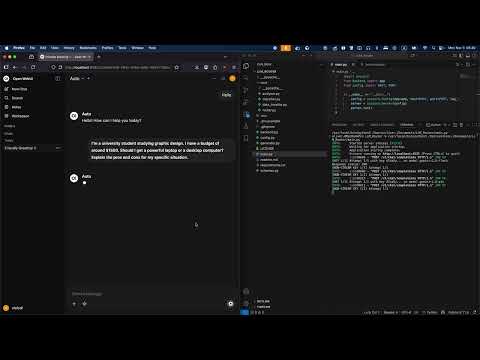
Automatic Model Selection - The proxy automatically determines the complexity of the user's request and decides which model to call — the fast Flash for simple tasks or the powerful Pro for complex ones.
API Key Pool - The project allows you to use an unlimited number of Gemini API keys. You can simply use multiple Google accounts and add all free keys to the configuration. GeminiConnect will automatically switch to the next key if the current one exhausts its rate limit. With just two API keys, the aggregated throughput of the pool exceeds the paid Gemini tier.
Here's what's under the hood:
- Python 3.11+
- FastAPI for the high-performance API endpoint
- httpx v2 for asynchronous non-blocking requests to Google
- Docker for containerization and easy deployment
- Pytest for robust testing
- Python 3.11 or higher
- Gemini API Keys (get them from Google AI Studio)
-
Clone the repository
git clone https://github.com/cenoff/GeminiConnect.git cd GeminiConnect -
Install dependencies
pip install -r requirements.txt
-
Configuration
Create a
.envfile (see.env.example) and add your keys:GEMINI_API_KEYS=["key1", "key2", "key3"] PORT=4535
-
Run the server
python main.py
-
Configure
.envas shown above. -
Build and run:
docker-compose up -d --build
-
View logs:
docker-compose logs -f
- Navigate to Connections settings in OpenWebUI.
- Add a new OpenAI-compatible connection.
- URL:
http://localhost:4535/v1(adjust port if needed). - Key:
None(or any string). - Model Name:
- Use
Autoto enable automatic model selection based on query complexity (shows as 1 model in the list). - Leave empty to display all available models from
config.py.
- Use
The project includes ~88% test coverage across core components:
- Unit tests for classifier logic and data handling
- Integration tests for the router and backend
- Async tests for streaming response generation
Run tests locally:
pip install -r requirements-dev.txt
pytestSee it in action:
- Currently does not support the "Tools" feature in OpenWebUI.
- Built-in OpenWebUI web search is supported.
This project is licensed under the MIT License.