


A from-scratch rich text editor control for Avalonia — a pure C# port of the
ideas behind WPF's RichTextBox/FlowDocument, built entirely on Avalonia's TextLayout engine (no
PTS/unmanaged dependency). Rendering, layout, hit-testing, selection, and IME are implemented directly.
Read this in other languages: 한국어
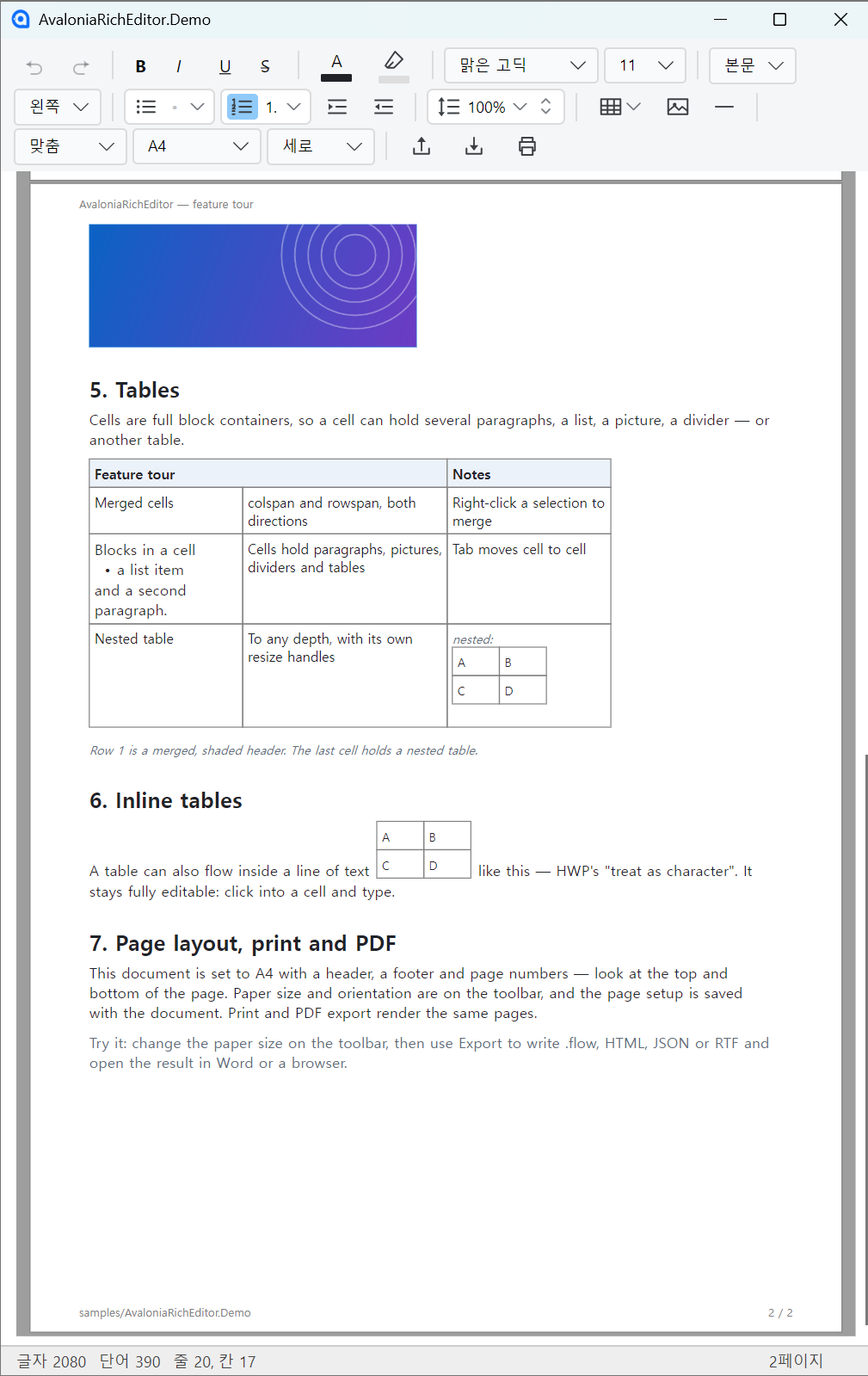
The demo's sample document — a merged, shaded table header, a nested table, and an inline table flowing inside a sentence, on an A4 page with a header, footer and page numbers.
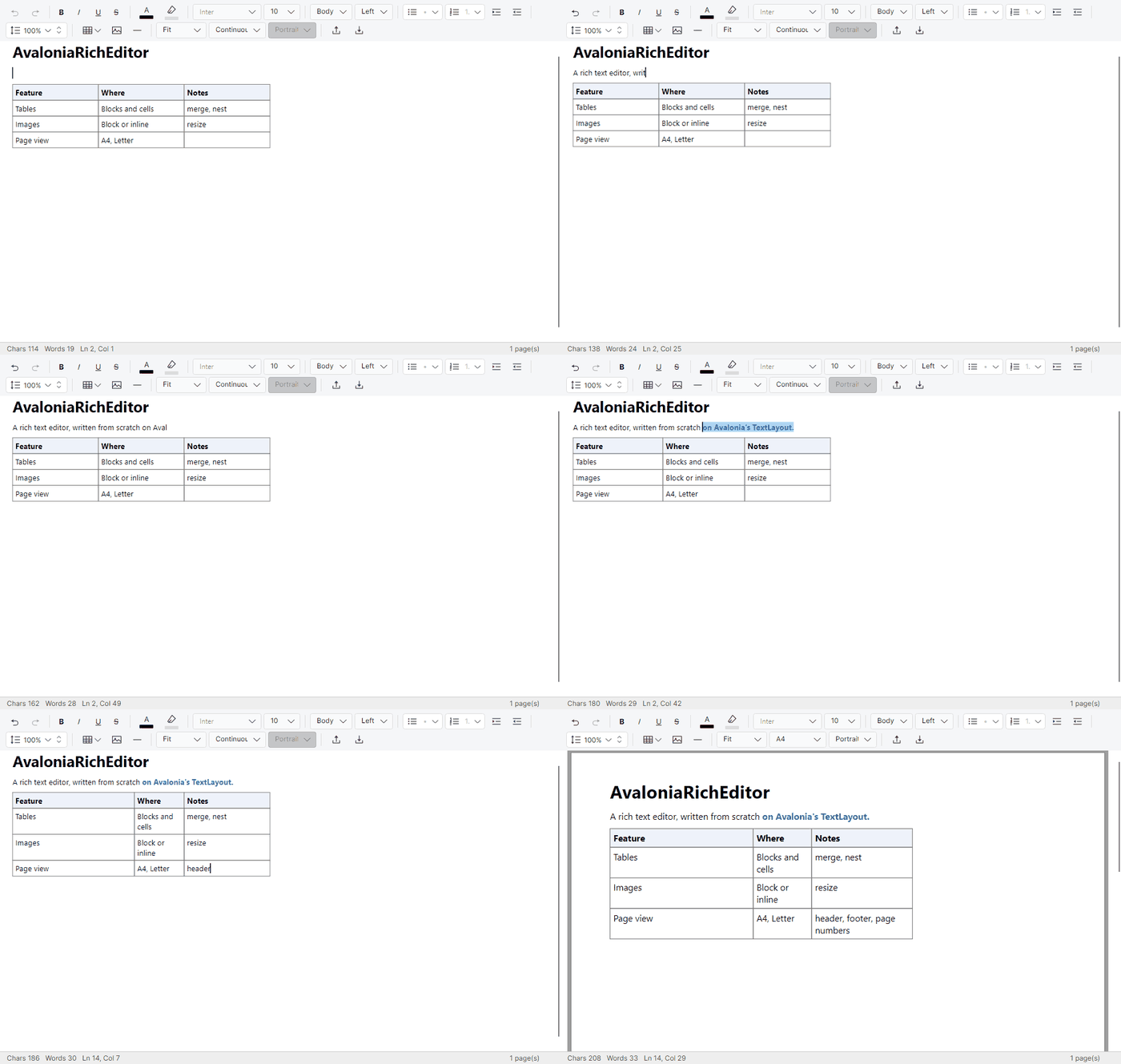
Typing, formatting, dragging a column wider, filling a cell until its row grows, and switching to paper. Every frame is the control rendering real input — see tools/readme-shots.
The public API is frozen and follows SemVer: no breaking change without a major bump. See the changelog and the roadmap.
| Target framework | .NET 10 (net10.0) |
| Avalonia | 12.1.0 or later (12.0.x hangs laying out a blank soft line; tested against 12.1.2) |
| Dependencies | Avalonia, HtmlAgilityPack — that's all |
| Platforms | Developed and tested on Windows; macOS/Linux are best-effort (details) |
| Native AOT | Supported (IsAotCompatible) |
dotnet add package AvaloniaRichEditor
<!-- MainWindow.axaml -->
<Window xmlns="https://github.com/avaloniaui"
        xmlns:x="http://schemas.microsoft.com/winfx/2006/xaml"
        xmlns:rte="using:AvaloniaRichEditor.Controls">
    <rte:RichEditor x:Name="Editor" />
</Window>
using Avalonia.Media;
using AvaloniaRichEditor.Controls;
using AvaloniaRichEditor.Documents;
// Start from an empty document...
Editor.Document = new FlowDocument();
// ...or load HTML / JSON
Editor.LoadHtml("<p>Hello <b>world</b></p>");
// Read it back
string html = Editor.ToHtml();
string json = Editor.ToJson();
// React to changes
Editor.TextChanged += (_, _) => MarkDirty();
Editor.SelectionChanged += (_, _) => UpdateToolbar();
// Customize appearance
Editor.SelectionBrush = Brushes.LightSkyBlue;
Editor.CaretBrush = Brushes.Black;
Editor.FontFamilyChoices = new[] { "Segoe UI", "Arial", "맑은 고딕" }; // right-click font menuFor a batteries-included host, drop in RichEditorView (editor + toolbar + page/zoom + status bar)
instead of wiring RichEditor yourself; reach view.Editor / view.Toolbar for everything else. See
samples/AvaloniaRichEditor.Demo
for a full editor host.
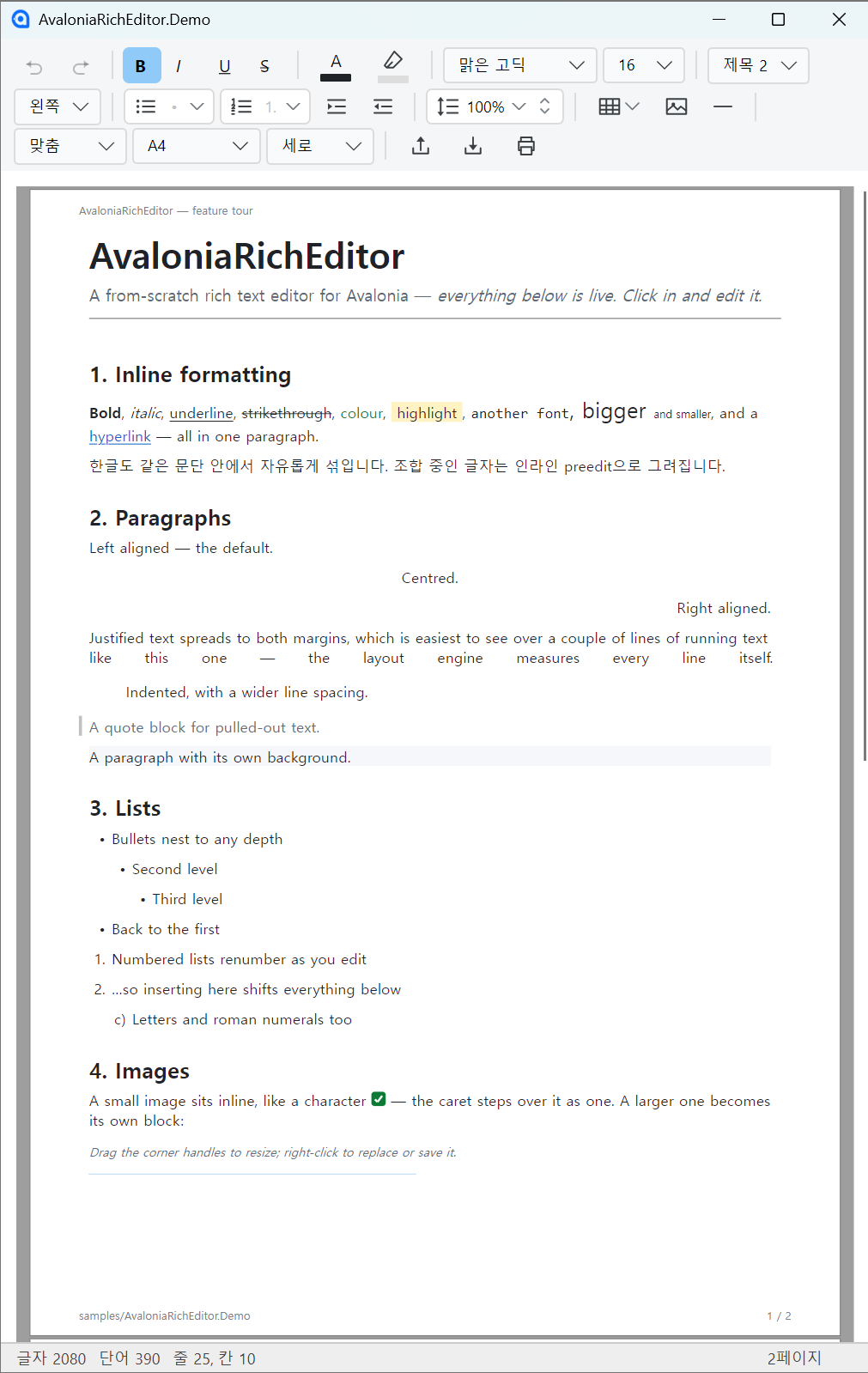
- Inline formatting: bold / italic / underline / strikethrough, font family and size, foreground and highlight colors, hyperlinks
- Paragraphs with alignment, line spacing, indentation, headings, and bullet / numbered lists
- Korean/CJK IME composition with inline preedit
- Find / replace with a find bar (
Ctrl+F/Ctrl+H/F3), undo / redo
- Cell merge (colspan/rowspan), column and row resize, Tab cell navigation
- Cells are full block containers — multiple paragraphs, block images, dividers, and nested tables to any depth, with recursive layout/hit-testing, per-cell resize, and Tab traversal across nesting
- Inline tables (HWP-style "treat as character"): a table flows inside a text line like an image but stays fully editable — click into a cell, type, navigate with arrows/Tab, resize. Toggle between block and inline from the right-click menu
- Draw-to-size insertion: pick rows × columns from the grid, then drag on the document to set the size (or click for the default)
- Vertical cell alignment; drag a table (by its border) or a picture to move it (hold
Ctrlto copy)
- Inline and block images — insert, resize (corner or single-edge handles), replace, save, alt text
- Word-style page view:
PageSize(Continuous by default, or A4/A3/A5/B4/B5/Letter/Legal/Tabloid),PageOrientation,PageMargin(four sides, in mm),ShowPageBoundaries, line-boundary page breaks, headers/footers/page numbers - Page setup is persisted per document (
FlowDocument.PageSetup) and re-applied on load, like a word processor - Print and PDF: per-page rendering (
RenderPrintPage, 300 DPI) and PDF export (SavePdf) with selectable, searchable text and subset fonts — a raster PDF where the Skia backend isn't available
- Clipboard: internal rich copy/paste, rich HTML copy-out (
CF_HTML), external HTML/RTF paste (Word/HWP), image paste, Excel/TSV → table - HTML, JSON, and RTF import/export. JSON/
.flowand HTML round-trip losslessly (an inline table stays inline) - RTF has gaps: an inline table reaches Word/HWP as a block table and picture alt text has no RTF form, and a nested table imports at default column widths (Word keeps those in an ignorable group)
- Drop-in
RichEditorView: editor + formatting toolbar with built-in page/zoom controls and Export/Import/Print file actions + status bar - Standalone
RichEditorToolbarwith aToolbarLeveldensity knob (Auto/Minimal/Normal/Maximum) - Capability is expressed directly through
IsReadOnly(viewer switch) plus theAllow*feature flags - Word-standard keyboard shortcuts from a single source (
RichEditorShortcuts) shared by the key handler, menu hints, and toolbar tooltips — B/I/U/S, headingsCtrl+Alt+1..6, alignmentCtrl+L/E/R/J, lists, line spacingCtrl+1/5/2, indent, font size, and more - Per-object right-click context menus (HWP-style, reflecting the caret's state; a slim
ShowFormattingMenu = falsedefault keeps rich formatting on the toolbar) - Built-in localization (Korean and English, host-extensible) for menus, toolbar, and dialogs
| Document format specification | JSON document format v1.0 and the .flow package |
| Changelog | Release history |
| Roadmap | Current status and what is pending |
API documentation ships with the package as XML docs, so IntelliSense covers every public member.
The control is written against cross-platform Avalonia APIs. P/Invoke appears in only two places: a Windows-only system font query (skipped elsewhere) and HarfBuzz font subsetting for PDF export (the native library Avalonia.Skia already ships). It is developed and tested on Windows; macOS/Linux are best-effort:
- Clipboard HTML is matched by format identifier and handles the Windows
CF_HTMLheader transparently (other platforms' plaintext/htmlpasses through unchanged). - No fonts are assumed: runs fall back to
DefaultFontFamily, and the right-click font list comes fromFontFamilyChoices. Set both for your target platform/locale (the demo uses Korean fonts).
CI builds and tests pass on Windows, macOS, and Linux (3-OS matrix); behaviour on real macOS/Linux machines (fonts, IME, native clipboard) is followed up from user reports.
The editor exposes an automation peer (AutomationControlType.Edit + IValueProvider), so screen
readers can read and set its text content — the same level Avalonia's built-in TextBox offers
(Avalonia's public automation model does not yet include a text-range/ITextProvider pattern). Give the
control a label from your view with AutomationProperties.Name="..." (or LabeledBy).
dotnet build AvaloniaRichEditor.slnx
dotnet run --project samples/AvaloniaRichEditor.Demo/AvaloniaRichEditor.Demo.csproj
| Path | Contents |
|---|---|
src/AvaloniaRichEditor |
The control library (Controls, document model Documents, Formatters). NuGet target. |
samples/AvaloniaRichEditor.Demo |
A WinExe demo/test app: toolbar, window, sample document. |
tests/ |
xUnit v3 suites: model/formatters, headless control tests, and real-Skia render tests. |
tools/rtfgen |
Interop reproduction tool — generates documents and measures them in Word over COM. |
Issues and pull requests are welcome at github.com/centwon/AvaloniaRichEditor. Interop reports are especially useful — if a document looks wrong in Word, HWP, or a browser, that is the one class of defect this project's own tests cannot see.
MIT © 2026 centwon. Depends on Avalonia and HtmlAgilityPack (both MIT) — see THIRD-PARTY-NOTICES.md.