A from-scratch rich text editor control for WinUI 3, rendered with Win2D — tables, images, lists, hyperlinks, page view, print/PDF, and Word/HWP-grade HTML & RTF interop. No XAML, Native AOT ready.


dotnet add package WinUIRichEditor
Requirements: .NET 10 · Windows 10 build 26100+ · Windows App SDK 2.2.1 or later.
Status: 1.2 — the public API follows SemVer and is tracked in
PublicAPI.Shipped.txt, so it cannot change unnoticed. 1.2 is the first feature release since the freeze and adds only 7 dependency properties, so upgrading needs no code edits — but a few behaviours changed, two of them visible in existing documents (line spacing is now HWP-style, and a heading's bold/size are character properties). Read the upgrade notes at the top ofCHANGELOG.md.Project_Roadmap.mdis the engineering log.
It is a port of AvaloniaRichEditor — the same document
model, formatters, and "single TextLayout is the source of truth" engine design, rebuilt on the
DirectWrite-backed CanvasTextLayout. The two projects stay converged and exchange fixes both ways, and
the .flow document format is byte-compatible between them.
Consuming apps that publish self-contained — read this
An app with WindowsAppSDKSelfContained=true must reference the meta-package
Microsoft.WindowsAppSDK: only it brings Microsoft.WindowsAppSDK.Runtime, the redistributable runtime.
This library references the split Microsoft.WindowsAppSDK.WinUI component because a library needs only
the compile-time surface — copying that choice into an app leaves it with no runtime to bundle.
(Historical: 0.9.0 alone wrongly required Windows App SDK 2.3.2 — higher than the WinUI the meta-package brings — which broke framework-dependent apps. Fixed in 0.9.1.)
- .NET 10 (
net10.0-windows10.0.26100.0), C#nullable enable. Target: unpackaged (no MSIX). - WinUI 3 / Windows App SDK 2.2.1+ — the library references the split
Microsoft.WindowsAppSDK.WinUIpackage (floor 2.2.1; the demo tracks the latest 2.3.x as a forward-compatibility canary); controls are code-only (no XAML, avoids AOT compiled-binding pitfalls). - Win2D 1.4.0 (
Microsoft.Graphics.Win2D) — immediate-mode rendering; oneCanvasTextLayoutper paragraph drives render, caret, hit-testing, and selection. - HtmlAgilityPack 1.12.4 for external HTML paste parsing.
Text & formatting
- Bold / italic / underline / strikethrough, font family & size, foreground & highlight color, clear formatting
- Paragraph alignment, headings (H1–H6), blockquote, indent, bullet / numbered lists, HWP-style line spacing (a multiple of the font size, 160 % by default)
- Hyperlinks (insert / edit / open / remove — http/https only), format painter, find & replace (Ctrl+F/H, F3, built-in find bar)
- Caret + drag/Shift selection, double-click word / triple-click paragraph select, undo/redo
- Keyboard: arrows, Home/End (visual line), Ctrl+←/→ word, Ctrl+Home/End document, Ctrl+Backspace/Delete word delete, PageUp/PageDown, and shortcuts (Ctrl+B/I/U, Ctrl+Z/Y, Ctrl+C/X/V, Ctrl+Shift+V plain paste)
- Korean / CJK IME composition (inline underline) via
CoreTextEditContext
Tables
- colspan/rowspan, nested tables, recursive cell content (paragraphs, images, dividers, nested tables)
- Tab cell navigation, right-click row/column insert·delete, cell merge/split, drag-select cells, single-cell selection (F5) and Shift+arrow cell blocks
- Draw-to-size insert (toolbar grid picker), column-width & row-height resize (drag borders), table block selection, drag a table to move it (Ctrl to copy), block↔inline ("treat as character") toggle
Images
- Block & inline rendering (async GPU decode at the drawn size), insert from file, clipboard image paste, drag-and-drop image files, drag a picture to move it (Ctrl to copy)
- Click-to-select with resize handles — corner (aspect-locked), right edge (width), bottom edge (height); right-click copy / size presets / replace / save / delete
Clipboard & I/O
- Internal rich copy/paste, RTF, external HTML (
CF_HTML), image, and Excel/TSV→table paste; plain-text paste (Ctrl+Shift+V); copy a selected image to the system clipboard - File formats:
.flow(ZIP package),.json,.html,.rtf, PDF export — see the document format spec (byte-compatible with AvaloniaRichEditor)
Page view, print & PDF
PageSize/PageOrientation/ShowPageBoundaries, stacked page view with line-aware page breaks, headers / footers / page numbers- Vector printing (
CanvasPrintDocument, printer resolution, real text — the dialog opens under Native AOT too) andSavePdf(stream)→ a text PDF via "Microsoft Print to PDF", no dialog; plusRenderPrintPage(i, dpi)for an offscreen bitmap
Host controls & chrome
- Drop-in
RichEditorView(toolbar + page/zoom chrome + editor + status bar + Export/Import/Print + find bar) and a standaloneRichEditorToolbar(LeadingItems/TrailingItemshost slots, wrap-on-narrow); the toolbar's own settings (Target,ToolbarLevel,ShowPageControls,ShowFileActions) and the view's (ShowStatusBar,ShowFileActions,ShowBuiltInFindBar) are bindable dependency properties - Icon theming: built-in Segoe Fluent Icons glyphs, host-overridable per slot via
RichEditorIcons.Provider - Capability:
IsReadOnly(a viewer isIsReadOnly=true+ no/minimal toolbar) + feature flags (AllowImages/AllowTables/AllowRichPaste). Toolbar density viaToolbarLevel(Minimal / Normal / Maximum) - Word-standard keyboard shortcuts from a single table (
RichEditorShortcuts), shown in menu hints + toolbar tooltips - Localization (KO / EN, host-extensible) via
RichEditorLocalization; accessibility peer (IValueProvider) - Change events (
TextChanged/SelectionChanged/DocumentChanged) and appearance DPs (SelectionBrush/CaretBrush)
Drop-in host control (toolbar + editor + status bar):
using WinUIRichEditor.Controls;
using WinUIRichEditor.Formatters;

var view = new RichEditorView();
view.Document = HtmlDocumentFormatter.ParseHtml("<h1>Title</h1><p>Hello <b>world</b></p>");
// view.IsReadOnly = true;  // make it a viewer

// the toolbar's image button needs a host file picker (window handle required, unpackaged):
view.ImagePicker = async () => /* return image bytes, or null */;

// page view + export
view.Editor.PageSize = RichEditorPageSize.A4;
using var pdf = new MemoryStream();
view.Editor.SavePdf(pdf);
Bare control:
var editor = new RichEditor();
editor.Document = HtmlDocumentFormatter.ParseHtml("<p>Hello <b>world</b></p>");
editor.ToggleBold();                       // operates on the selection / caret word
editor.SetForeground(Windows.UI.Color.FromArgb(255, 204, 0, 0));

string json = editor.ToJson();             // also ToHtml / ToRtf / SavePackageAsync
editor.LoadHtml("<p>replaced</p>");
Controls are code-only — a no-XAML Page crashes WinUI 3 navigation, so host them in a XAML-shell
page (see samples/.../ViewDemoPage.xaml). File pickers need HWND interop (InitializeWithWindow).
dotnet build WinUIRichEditor.slnx
dotnet test  tests/WinUIRichEditor.Tests/WinUIRichEditor.Tests.csproj   # 815 tests (see below)
dotnet build samples/WinUIRichEditor.Demo/WinUIRichEditor.Demo.csproj
# run the unpackaged exe directly:
#   samples/WinUIRichEditor.Demo/bin/Debug/net10.0-windows10.0.26100.0/win-x64/WinUIRichEditor.Demo.exe
A running instance locks the exe — stop it before rebuilding:
Get-Process -Name "WinUIRichEditor.Demo" | Stop-Process -Force.
The suite is mostly headless (document model, TextRange, all four formatters, plus a randomized
edit-sequence fuzz that round-trips every format twice), and since 1.1 it also covers the control
layer — caret geometry at 100/200/300 % zoom, edit commands, feature-flag gates, the document-API contract
that protects an open document, hyperlinks, host events, table and picture resizing, the real system
clipboard, pagination, the context menu and IME state — and render pixels, off-screen through
RenderPrintPage. Widen the fuzz with RICHEDITOR_FUZZ_SEEDS=20000 when touching a formatter; the
committed default is 400 seeds (~3 s). A clipboard test can go red on contention with other apps — rerun it
alone before blaming a change.
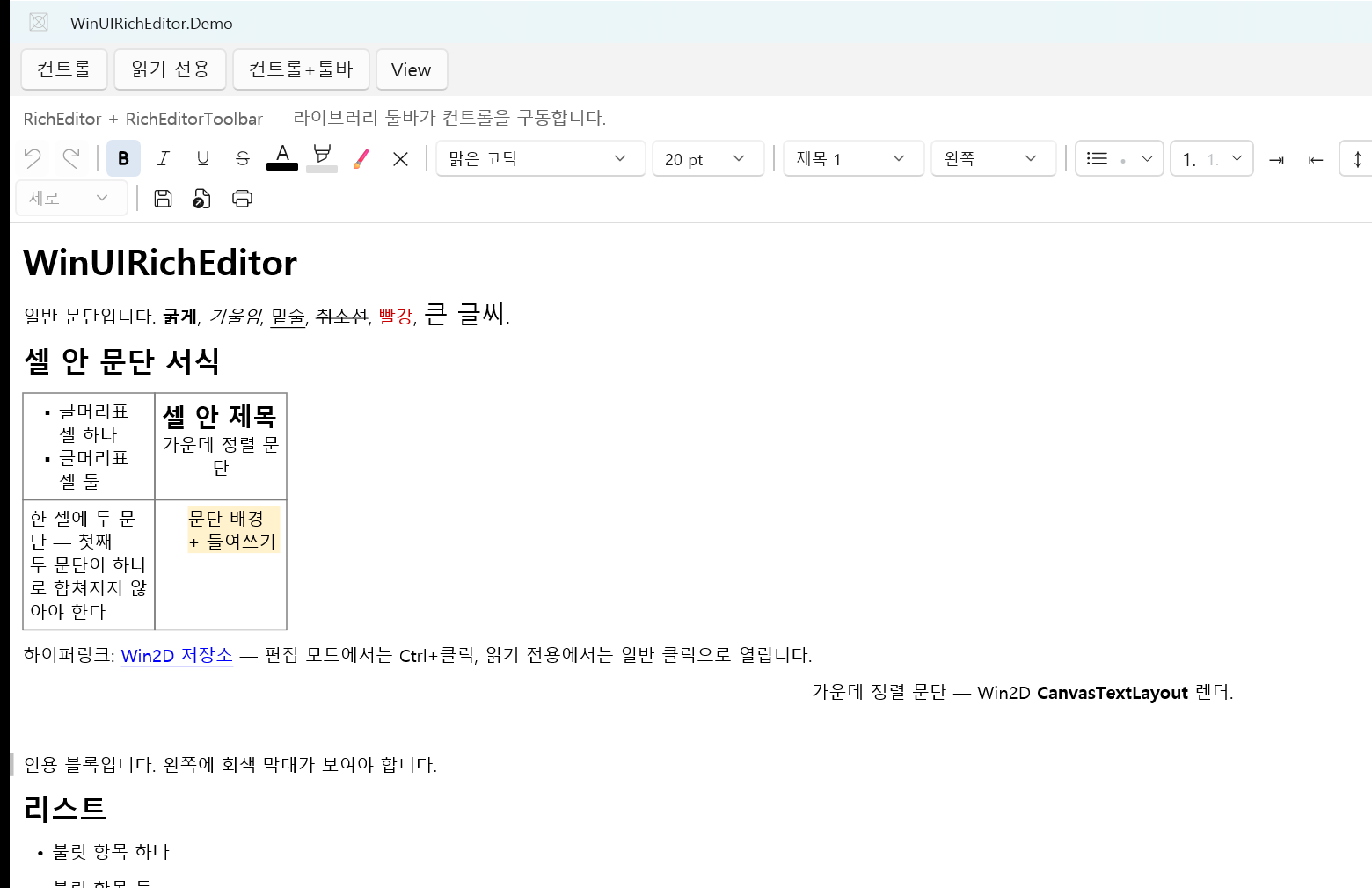
The demo is a four-page nav shell, one per library layer: 컨트롤 (bare RichEditor),
읽기 전용 (IsReadOnly=true), 컨트롤+툴바 (RichEditor + RichEditorToolbar), and View
(full RichEditorView with page/zoom chrome, status bar, Export/Import/Print, and PDF export).
Native AOT publish works end-to-end, and it is re-verified every release. The library is AOT-shaped
(source-gen JSON, no reflection serialization, code-only control, IsAotCompatible, no WinRT-static
activation in the model/formatter layer), and the self-contained profile
(samples/.../PublishProfiles/win-x64.pubxml: PublishAot + SelfContained + PublishSingleFile +
PublishTrimmed, WindowsAppSDKSelfContained=true) builds cleanly with 0 trim/AOT warnings, runs, and
renders — Win2D CanvasTextLayout, CanvasDevice and CanvasFontSet all activate under AOT. Measured at
1.2: a 15.2 MB native exe, 74.6 MB published (excluding the PDB), with no coreclr.dll, clrjit.dll or
managed WinUIRichEditor.dll in the output. (An earlier "crashes at startup in combase 0x80004005" was a
framework-dependent-only limitation; the self-contained bundle supplies WinRT activation.)
Publishing and rendering is not proof of equivalence. 1.1.0 shipped broken under AOT because
CanvasTextLayout.LineMetrics cannot be marshalled ahead-of-time and every caller silently fell back —
the build ran and drew text, but the caret could not move across a wrapped line. Since then every release
runs tools/fault-sweep.ps1, which drives the same edit sequence through a JIT build and an AOT publish
and compares both the faults the library reported and the resulting document text.
The library sets GenerateLibraryLayout. It also used to need an MSBuild target that stripped stale
windowsappsdk.winui\1.8 PRIs to clear a PRI277 merge conflict; that target is gone — both projects
now reference Windows App SDK explicitly, so NuGet never resolves the 1.8 floor Win2D 1.4.0 declares and no
1.8 PRI reaches the merge. Dropping that explicit reference would bring the conflict back.
| Path | Contents |
|---|---|
src/WinUIRichEditor |
Control library: Controls, document model Documents, Formatters. |
samples/WinUIRichEditor.Demo |
Unpackaged WinExe demo: four-page nav shell (control / read-only / control+toolbar / view). |
tests/WinUIRichEditor.Tests |
Headless xUnit tests for the model + formatters (dotnet test). |
MIT © 2026 centwon. Depends on the Windows App SDK, Win2D, and HtmlAgilityPack (all MIT) — see THIRD-PARTY-NOTICES.md.