
AI contract intelligence for consumers, enterprises, and the browser



The fine print, finally made readable.
Caveat is a hackathon-built legal intelligence platform that reviews contracts through three connected surfaces:
Consumer: upload a PDF/DOCX/photo or paste text and receive an adversarial, plain-language risk report in your preferred language.
Enterprise: run a seven-agent compliance pipeline that classifies risk, checks regulation, detects cross-document contradictions, drafts redlines, and produces GitHub/Slack/audit outputs.
Extension: scan Terms of Service and agreement pages directly in Chrome, color the extension badge by risk, and run deep analysis without leaving the page.
- Why We Need Caveat
- Problems Solved
- Three Product Surfaces
- System Architecture
- Consumer Pipeline
- Enterprise Pipeline
- Browser Extension Pipeline
- The Seven Agents
- Memory Layer
- Regulation Corpus and Persistence
- Data Flow
- Tech Stack and Why
- API Surface
- Repository Structure
- Setup
- Hackathon Judging Notes
- Safety and Scope
- One-Line Summary
Contracts have become everyday infrastructure. People accept loan letters, rental agreements, employment offers, app terms, payment mandates, data-sharing policies, SaaS agreements, vendor contracts, and privacy notices constantly. The problem is not only that these documents are long. The real problem is that they are written to be unreadable at the exact moment a user or business must make a decision.
For consumers, this means a person can sign away important rights without knowing it. A worker may accept a one-sided employment agreement. A tenant may sign a rental clause with vague deductions. A borrower may miss hidden penalties. A user may click "I Agree" on a Terms of Service page that contains broad data sharing, mandatory arbitration, auto-renewal traps, unilateral modification, or a broad intellectual property grab.
For enterprises, the risk is different but just as serious. Legal and compliance teams handle too many contracts to manually review every clause with the depth required by modern regulation. Indian DPDP Act 2023 obligations, GDPR requirements, and RBI rules create real financial and operational exposure. A single vendor contract can create data-processing liability, payment-system non-compliance, or contradictory obligations across documents.
Caveat exists because contract review should not be reserved for people with legal teams, and enterprise compliance should not depend on slow manual review alone. It turns legal text into structured intelligence: what the clause says, why it matters, what regulation it may violate, whether similar clauses caused problems before, what a fair version would look like, and what action should happen next.
Most people do not need a legal lecture. They need to know:
- What am I agreeing to?
- What can the company, landlord, lender, employer, or platform do to me?
- What rights am I giving up?
- What should I ask to change?
- Is this safe to sign?
Caveat converts contract language into eighth-grade plain English, estimates real-world consequences, explains financial exposure, and gives negotiation guidance.
Many important documents in India still arrive as printed paper, WhatsApp images, scanned PDFs, or informal DOCX files. A tool that only handles clean digital text misses the real workflow. Caveat supports:
- Photographed documents through Tesseract OCR.
- PDF and DOCX upload.
- Raw text from web pages and the browser extension.
- Translation flow for Indian language users through detection and translation helpers.
Users encounter risk inside a browser, often behind an "Accept" button. They will not copy the whole page into a separate tool unless the tool appears exactly where the risk appears. The Caveat Chrome extension passively scans legal pages, updates the badge, and lets users request full analysis in-place.
Manual legal review can take days. Business teams move faster than compliance teams, and the review trail often disappears into comments, email threads, or local documents. Caveat creates a structured, repeatable pipeline:
- Immutable file hash.
- Clause manifest.
- Regulation-backed classifications.
- Confidence scoring and reflection loop.
- Redlined replacement clauses.
- GitHub PR output.
- Slack alert.
- SQLite audit trail.
One-document review misses the hardest enterprise problem: contradictions and repeated risk patterns across many contracts. Caveat embeds clauses into ChromaDB so a new contract can be compared against past contracts in the same project and across the organization.
Caveat is intentionally built as three surfaces over one shared intelligence core.
| Surface | User | Main Job | Pipeline |
|---|---|---|---|
| Consumer | Individuals signing legal documents | Explain risk in simple language and preferred language | 3-stage adversarial LLM pipeline |
| Enterprise | Legal, procurement, compliance, security teams | Classify regulatory risk, detect contradictions, redline, audit | 7-agent LangGraph pipeline |
| Extension | Anyone browsing agreement pages | Detect risk at the moment of consent | MV3 prescan + deep consumer analysis |
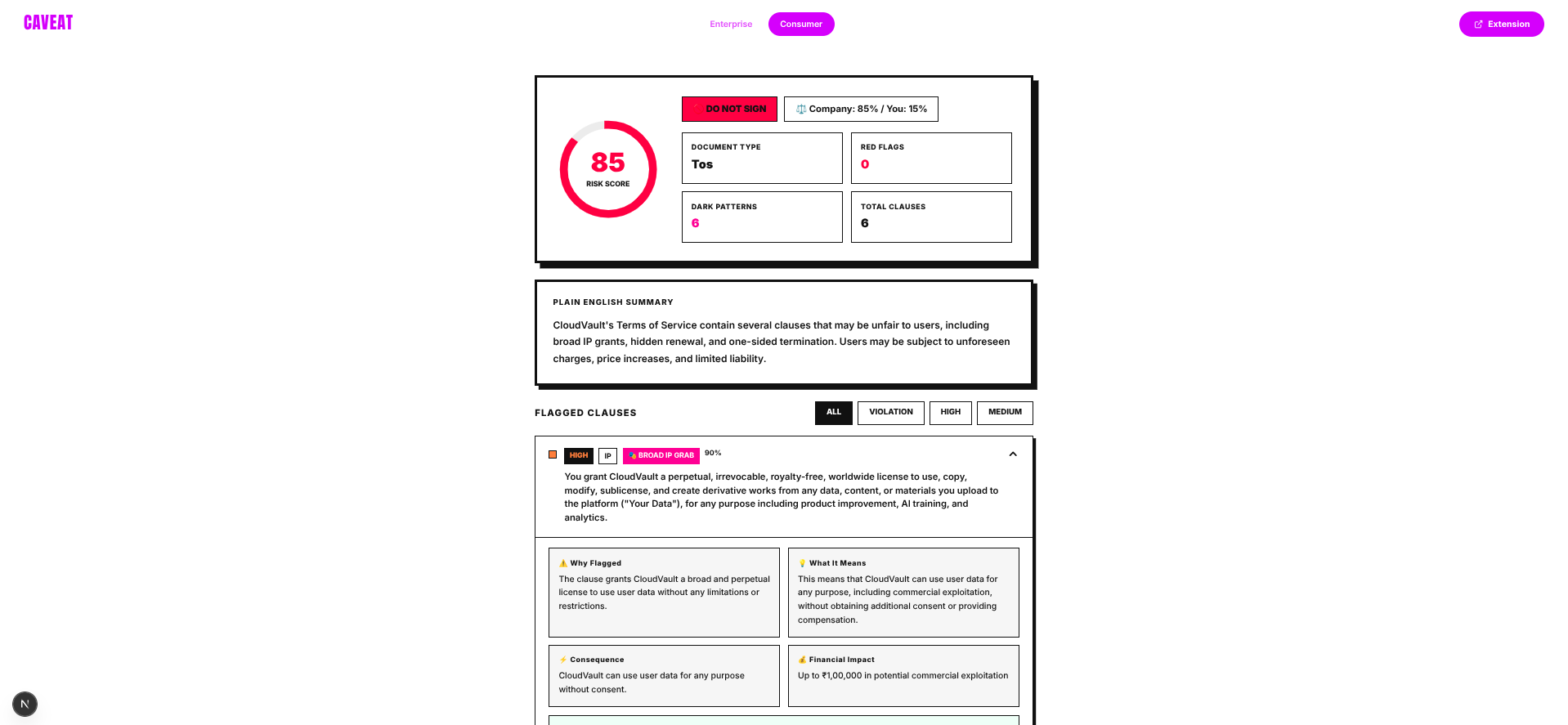 Consumer tool showing risk analysis and recommendations
The consumer flow is for people who do not have a lawyer on standby. It accepts messy real-world inputs and turns them into actionable explanation.
What it does:
- Accepts legal text, PDF, DOCX, and photographed documents.
- Extracts text using pdfplumber, python-docx, or Tesseract OCR.
- Detects source language and normalizes to English before analysis.
- Runs a three-stage adversarial legal analysis pipeline.
- Flags high-risk and medium-risk clauses.
- Detects dark patterns such as mandatory arbitration, hidden renewal, one-sided termination, forced consent, broad IP grabs, and vague data sharing.
- Generates a risk score from 0 to 100.
- Produces a safe-to-sign verdict.
- Shows power imbalance between the signer and the counterparty.
- Gives fair replacement wording and negotiation tips.
- Translates output back to the preferred language when requested.
Why it matters:
Consumer legal tools often produce summaries, but summaries are not enough. A summary can miss the exploit. Caveat uses an adversarial second pass that asks: "How could the stronger party use this clause against the signer?"
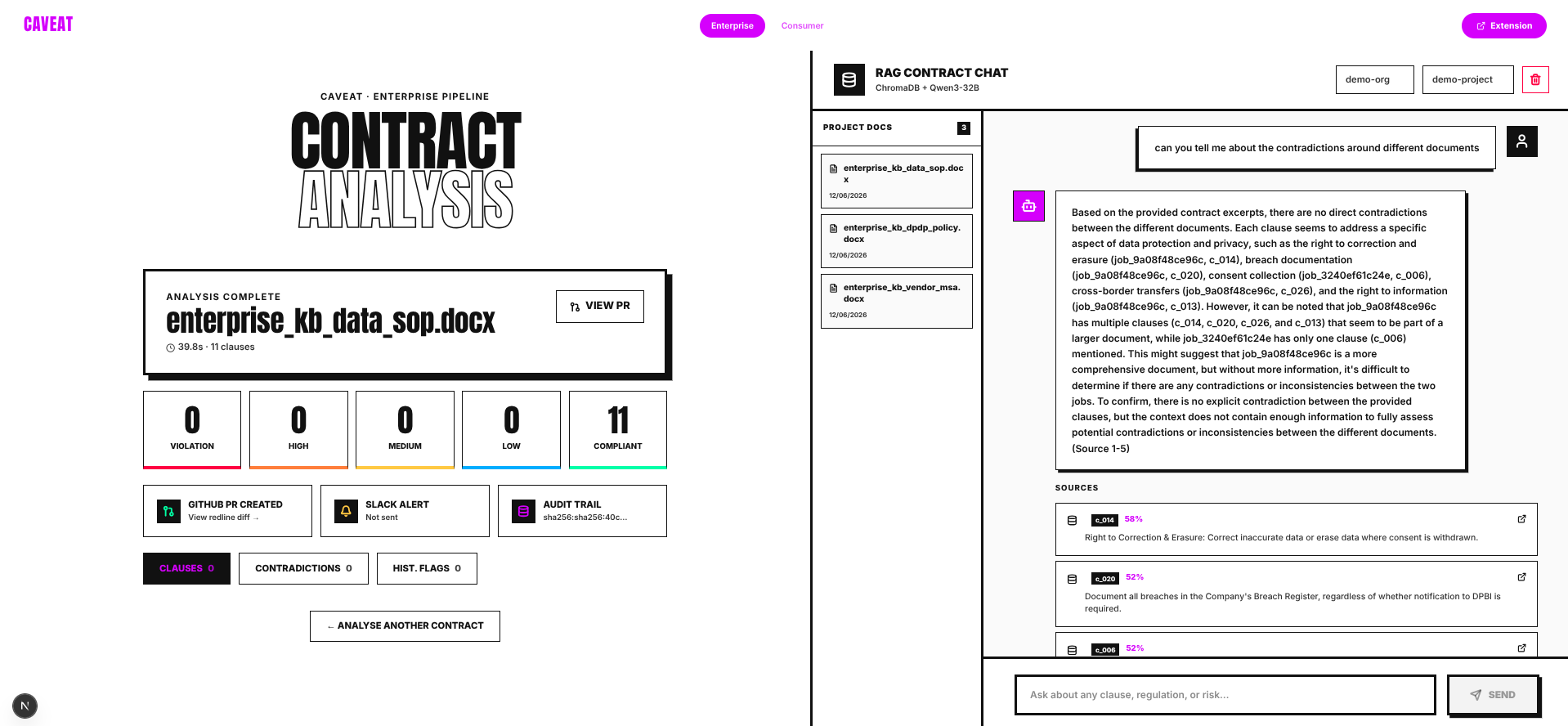 Enterprise compliance dashboard with clause analysis and redlines
The enterprise flow is for teams reviewing vendor agreements, SaaS contracts, DPAs, payment contracts, procurement documents, and recurring templates.
What it does:
- Accepts PDF and DOCX contracts.
- Creates a job ID and immutable SHA-256 file hash.
- Extracts every clause into a typed clause manifest.
- Loads DPDP Act 2023, GDPR, and RBI regulation corpora from local JSON.
- Attempts live regulatory enrichment using a Groq compound model.
- Embeds clauses into project-level and organization-level ChromaDB collections.
- Searches previous clauses for contradictions and historical similarity.
- Classifies each clause as
compliant,low,medium,high, orviolation. - Uses confidence scoring with a reflection loop for low-confidence classifications.
- Redlines medium/high/violation clauses.
- Emits real-time SSE events to the frontend.
- Writes audit records to SQLite.
- Creates GitHub PR reports and Slack alerts when credentials are configured.
- Provides RAG Q&A over project documents.
Why it matters:
Enterprise compliance is not a single LLM prompt. It needs reproducible state, traceable outputs, memory, document history, regulator-facing evidence, and workflow integration. Caveat is built around those requirements.
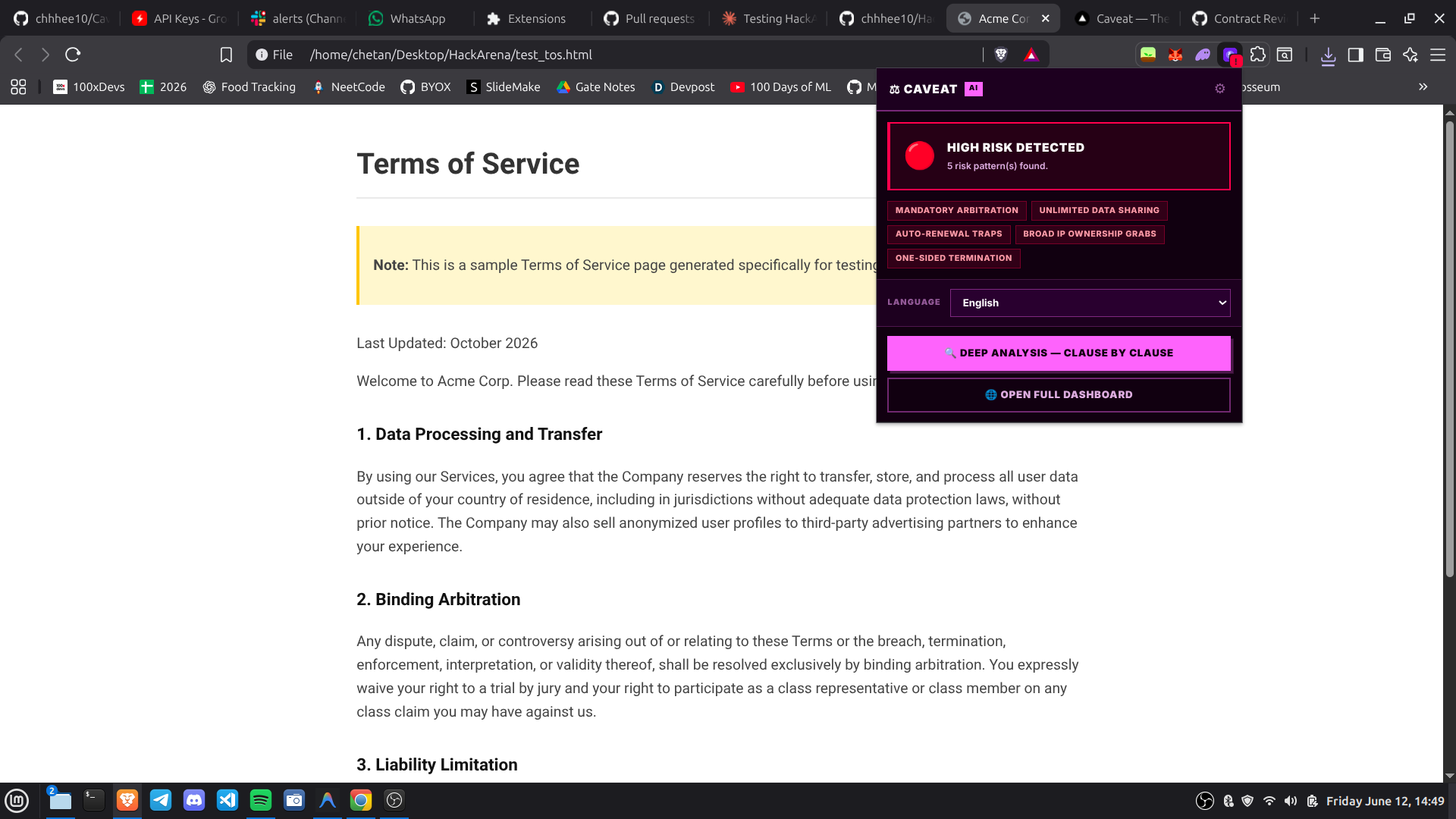 Extension badge color-coded risk indicators on legal pages
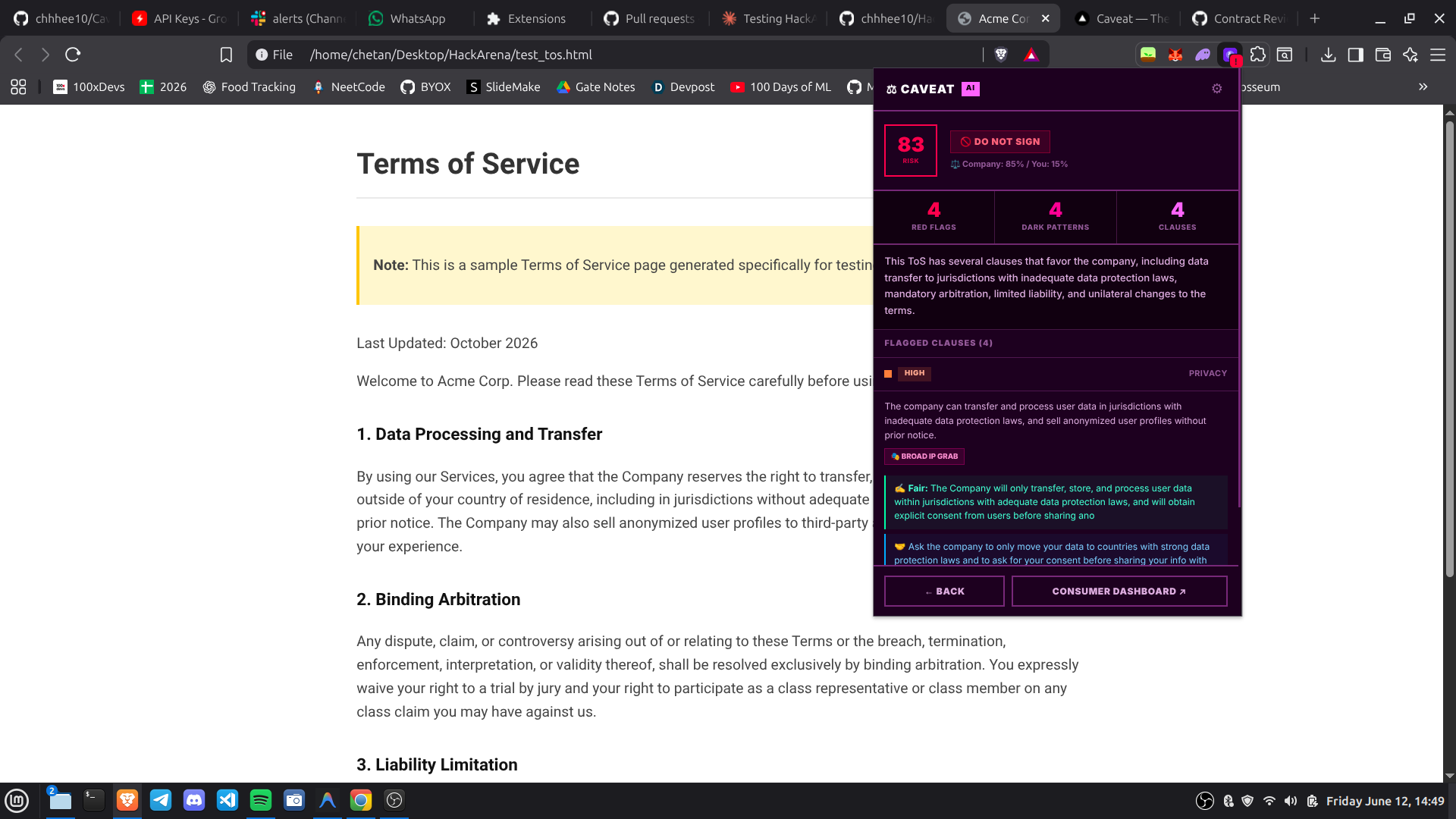 Extension popup showing detailed risk analysis and recommendations
The extension is for the consent moment itself. It is a Chrome Manifest V3 extension that runs on agreement-like pages and calls the same backend intelligence layer.
What it does:
- Runs a content script on web pages at
document_idle. - Extracts relevant text from
article,main,[role="main"], orbody. - Checks for legal indicators such as "terms of service", "privacy policy", "arbitration", "indemnification", "limitation of liability", "governing law", "employment agreement", "loan agreement", and similar terms.
- Sends a capped prescan payload to
/api/consumer/prescan. - Updates the extension badge:
!red for high risk.~orange for medium risk.- checkmark green for relatively safe.
- neutral when no legal content is detected or the server is unreachable.
- Caches per-tab prescan results in
chrome.storage.session. - Lets the user run deep analysis through
/api/consumer/analyse. - Shows risk score, safe-to-sign verdict, power imbalance, dark pattern count, flagged clauses, fair versions, and negotiation tips.
Why it matters:
The best time to explain a Terms of Service risk is before the user clicks agree. The extension makes risk visible inside the browser workflow instead of forcing a separate copy-paste process.
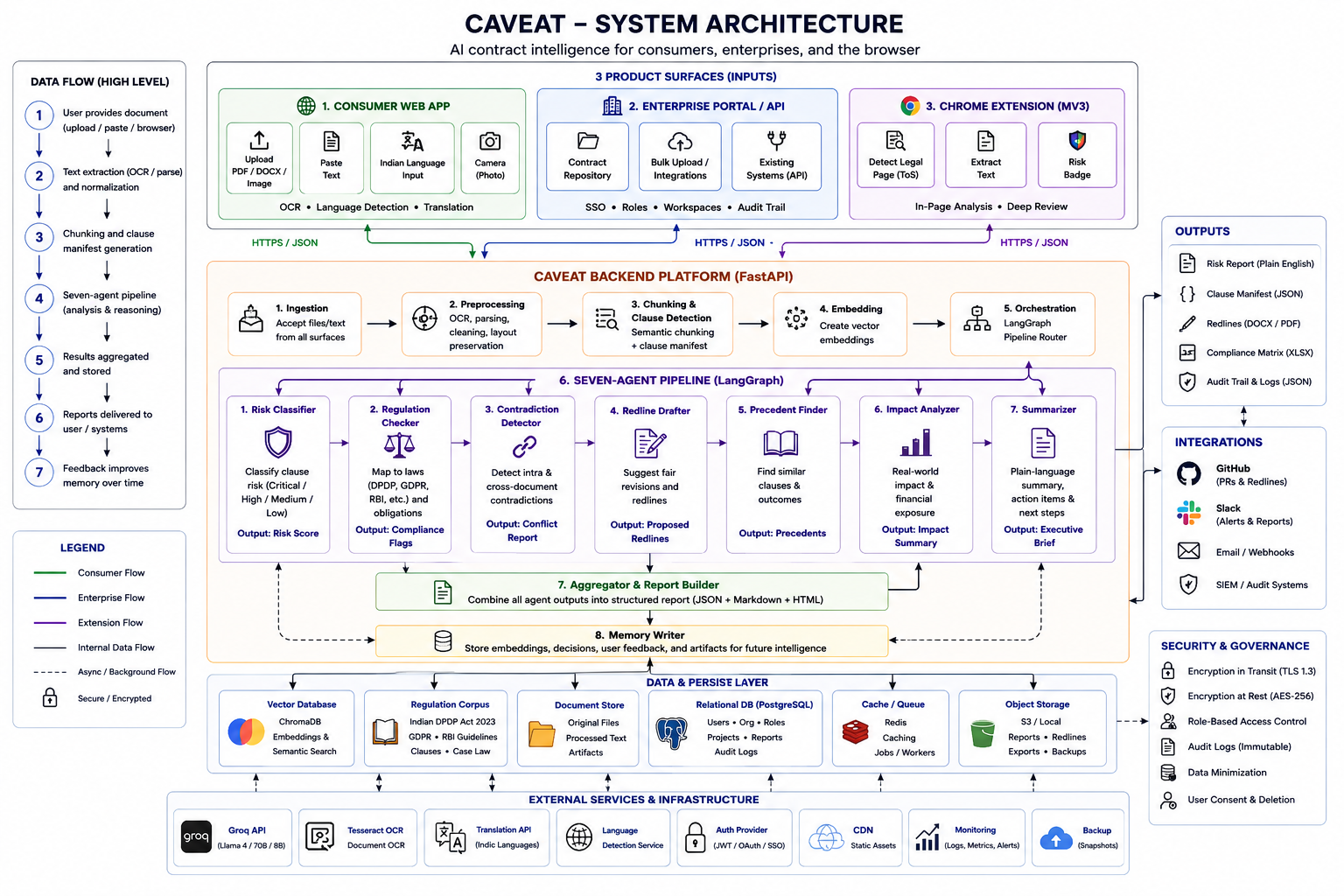 Complete system architecture showing all interconnected components
                               +----------------------------+
                               |        Caveat UI         |
                               |----------------------------|
                               | Next.js home/dashboard     |
                               | Consumer analysis page     |
                               | Enterprise dashboard       |
                               | RAG chat interface         |
                               +-------------+--------------+
                                             |
                                             | HTTP + SSE
                                             v
+-------------------+            +---------------------------+            +----------------------+
| Chrome Extension  |----------->|        FastAPI API         |<-----------| Static frontend mount |
| MV3 content/bg UI |            | /api/consumer/*            |            | backend serves /      |
+-------------------+            | /api/enterprise/*          |            +----------------------+
                                 | /api/stream/{job_id}       |
                                 +-------------+-------------+
                                               |
                 +-----------------------------+-----------------------------+
                 |                                                           |
                 v                                                           v
       +----------------------+                                  +-----------------------+
       | Consumer Pipeline    |                                  | Enterprise Pipeline   |
       | 3 LLM calls          |                                  | 7 LangGraph agents    |
       +----------+-----------+                                  +-----------+-----------+
                  |                                                          |
                  v                                                          v
       +----------------------+        +----------------------+    +----------------------+
       | Groq Token Pool      |        | ChromaDB Memory      |    | SQLite Audit DB      |
       | key rotation         |        | project + org stores |    | documents + trails   |
       +----------------------+        +----------+-----------+    +----------------------+
                                                  |
                                                  v
                                      +------------------------+
                                      | Ollama embeddings      |
                                      | nomic-embed-text       |
                                      +------------------------+
The backend is the core. All three surfaces call the same FastAPI service. The frontend and extension are delivery layers; the actual intelligence lives in the consumer pipeline, enterprise agent graph, Groq token pool, memory layer, regulation corpus, OCR layer, translation layer, and output integrations.
The consumer pipeline is implemented in backend/agents/consumer_pipeline.py. It is deliberately split into three LLM calls instead of one giant prompt because consumer legal analysis needs three different reasoning modes:
- Structural extraction.
- Adversarial risk discovery.
- Consequence explanation and final scoring.
The consumer router supports three main input paths:
| Endpoint | Input | Extraction path |
|---|---|---|
POST /api/consumer/photo |
JPEG, PNG, WEBP, TIFF | Tesseract OCR through ocr/tesseract_ocr.py |
POST /api/consumer/upload |
PDF or DOCX | pdfplumber or python-docx |
POST /api/consumer/analyse |
Raw text | Direct text analysis |
User input
  |
  +-- image -----------> Tesseract OCR ----------+
  |                                             |
  +-- PDF -------------> pdfplumber ------------+--> extracted text
  |                                             |
  +-- DOCX ------------> python-docx -----------+
  |                                             |
  +-- extension text --> direct ----------------+
                                                |
                                                v
                                      language detection
                                                |
                                                v
                                      translate to English
                                                |
                                                v
                                      3-stage analysis
                                                |
                                                v
                                      optional output translation
Model: meta-llama/llama-4-scout-17b-16e-instruct
Purpose:
- Read the contract text.
- Segment it into individual clauses.
- Classify each clause into a coarse consumer category:
arbitrationipprivacyfinancialterminationemploymentother
Why this model:
- Long context helps with full contracts and Terms of Service.
- The task is structural, so temperature is set to
0.0. - Output is requested as JSON for deterministic downstream processing.
Output shape:
[
  {
    "clause_text": "Any dispute shall be resolved exclusively by binding arbitration...",
    "clause_type": "arbitration"
  }
]Model: llama-3.3-70b-versatile
Purpose:
- Assume worst-case corporate intent.
- Compare every clause to a fair industry-standard version.
- Identify hidden legal or economic risk.
- Detect dark patterns.
- Explain what each clause practically means for the signer.
Detected dark pattern categories include:
forced_consenthidden_renewalone_sided_terminationbroad_ip_grabmandatory_arbitrationnullwhen no dark pattern exists
Why this model:
- The adversarial pass requires deeper reasoning than extraction.
- It must compare legal wording against fairness norms, not only summarize.
Output shape:
[
  {
    "clause_text": "Any dispute shall be resolved exclusively by binding arbitration...",
    "clause_type": "arbitration",
    "risk_level": "HIGH",
    "why_flagged": "The clause removes the user's practical ability to go to court.",
    "what_it_means": "If something goes wrong, the user must use a private dispute process.",
    "fair_version": "Either party may bring small claims in court, while larger disputes may use arbitration by mutual consent.",
    "dark_pattern": true,
    "dark_pattern_type": "mandatory_arbitration"
  }
]Model: llama-3.1-8b-instant
Purpose:
- Convert the adversarial findings into a user-facing report.
- Simulate real-world consequences.
- Estimate financial impact.
- Rewrite explanations at an eighth-grade reading level.
- Calculate a single
overall_risk_score. - Decide
safe_to_sign. - Estimate
power_imbalance. - Generate negotiation tips.
Why this model:
- It is fast and suitable for final explanation/report composition.
- The highest-value reasoning has already happened in Call 2.
- It keeps consumer latency low for interactive use.
Final output shape:
{
  "document_type": "employment_contract",
  "overall_risk_score": 83,
  "safe_to_sign": false,
  "power_imbalance": "Company: 85% / You: 15%",
  "summary": "This agreement gives the company broad control over disputes, data, and termination. Several clauses are one-sided and should be negotiated before signing.",
  "flagged_clauses": [
    {
      "clause_text": "Any dispute shall be resolved exclusively by binding arbitration...",
      "clause_type": "arbitration",
      "risk_level": "HIGH",
      "confidence": 0.91,
      "why_flagged": "You lose the practical option to take the company to court.",
      "what_it_means": "If there is a serious problem, you may be forced into a private process.",
      "fair_version": "Allow small claims court and require mutual consent for arbitration.",
      "consequence": "You may have to spend money and time in a process chosen by the company.",
      "financial_impact": "Possible arbitration and lawyer costs depending on the dispute.",
      "dark_pattern": true,
      "dark_pattern_type": "mandatory_arbitration",
      "plain_english": "You cannot simply go to court if the company treats you unfairly.",
      "negotiation_tip": "Ask for a small-claims court exception and mutual arbitration language."
    }
  ],
  "red_flags_count": 4,
  "dark_patterns_count": 3,
  "negotiation_summary": "Do not sign immediately. Ask for changes to arbitration, data sharing, and termination language first."
}The extension uses a faster lightweight path:
Endpoint: POST /api/consumer/prescan
Model: llama-3.1-8b-instant
Payload cap: first 8,000 characters
Goal: return in roughly extension-friendly time and drive badge color.
{
  "risk_level": "high",
  "high_risk": true,
  "risk_indicators": [
    "mandatory arbitration",
    "unilateral contract modification",
    "broad data sharing"
  ]
}The enterprise pipeline is implemented in backend/agents/pipeline.py and runs as a LangGraph state machine. The router returns immediately with 202 Accepted, then the pipeline runs in a background task while the frontend subscribes to /api/stream/{job_id} for progress.
Endpoint: POST /api/enterprise/upload
Request:
file: PDF or DOCX, max 50 MB.org_id: organization namespace for memory and audit.project_id: project namespace for document comparison.
Response:
{
  "job_id": "job_abc123",
  "status": "processing",
  "stream_url": "/api/stream/job_abc123"
}Every agent receives and returns a shared state dictionary:
{
    "job_id": "job_abc123",
    "org_id": "acme",
    "project_id": "vendor_contracts",
    "file_path": "./uploads/job_abc123.pdf",
    "raw_text": "",
    "clause_manifest": [],
    "regulation_corpus": {},
    "contradiction_hits": [],
    "historical_flags": [],
    "risk_report": [],
    "redlines": [],
    "github_pr_url": None,
    "slack_sent": False,
    "duration_seconds": 0.0,
    "error": None
}PDF/DOCX upload
|
v
Agent 1: Ingestor
|
v
Agent 2A: Extractor
|
v
Agent 2B: Regulation Loader
|
v
Agent 2C: Memory Scanner
|
v
Agent 3: Classifier
|
v
Agent 5: Redliner
|
v
Agent 6: Reporter
|
v
GitHub PR + Slack + SQLite audit + SSE completion
The frontend listens to a job-specific SSE stream. Events include:
ingest_completeextraction_completememory_scan_completeclassification_progressclassification_completeredline_completepipeline_completepipeline_error
This matters for judging because the enterprise pipeline is not a black-box spinner. The user can see the analysis progress agent-by-agent.
The extension lives in extension/ and uses Chrome Manifest V3.
| File | Role |
|---|---|
manifest.json |
Permissions, action popup, content script registration |
content.js |
Legal page detection, page text extraction, prescan trigger |
background.js |
API calls, badge state, per-tab storage |
sidebar/sidebar.html |
Popup UI shell |
sidebar/sidebar.js |
Prescan display, language picker, deep analysis, result rendering |
Page loaded
  |
  v
content.js extracts article/main/body text
  |
  v
keyword check for legal indicators
  |
  v
PRESCAN_REQUEST message to background service worker
  |
  v
POST /api/consumer/prescan
  |
  v
badge update + session cache
  |
  v
user opens popup
  |
  v
popup displays risk indicators
  |
  v
user clicks Deep Analysis
  |
  v
chrome.scripting extracts up to 40,000 chars from page
  |
  v
POST /api/consumer/analyse
  |
  v
popup renders full consumer report
| Badge | Color | Meaning |
|---|---|---|
? |
Indigo | Scan in progress |
! |
Red | High-risk patterns detected |
~ |
Orange | Medium risk or caution advised |
| Checkmark | Green | No major red flags in quick scan |
| Empty | Gray | No legal content detected or backend unavailable |
- The extension only sends extracted legal text to the local/backend API.
- It does not log browsing history.
- Prescan results are cached per tab in
chrome.storage.session. - Tab cache is cleared when the tab closes or navigates.
Caveat's enterprise system is judge-relevant because the backend is not a single prompt hidden behind an upload button. It is a typed, multi-stage agent pipeline with explicit responsibilities and durable state.
File: backend/agents/agent_ingestor.py
Responsibilities:
- Validate file existence.
- Enforce PDF/DOCX extension.
- Enforce 50 MB size limit.
- Compute SHA-256 hash.
- Create a
Documentrow in SQLite. - Emit
ingest_completeSSE event.
Why it exists:
Compliance outputs must be auditable. A risk report without a stable file hash can be challenged because there is no proof of what exact document was reviewed.
File: backend/agents/agent_extractor.py
Responsibilities:
- Extract raw text from PDF through pdfplumber.
- Extract raw text from DOCX through python-docx.
- Send raw text to the extractor LLM.
- Segment the document into a clause manifest.
- Assign stable clause IDs such as
c_001,c_002,c_003. - Emit
extraction_completeSSE event.
Clause manifest shape:
{
  "clause_id": "c_001",
  "clause_type": "data_processing",
  "text": "The vendor may process client data...",
  "page_hint": "Section 3.2"
}
Why it exists:
Every downstream step needs clause-level granularity. Classification, memory retrieval, contradiction detection, redlining, and audit output all depend on stable clause IDs.
File: backend/agents/agent_reg_loader.py
Responsibilities:
- Load local regulation JSON files from
backend/regulations/. - Supported corpora:
dpdp_2023.jsongdpr.jsonrbi_guidelines.json
- Attempt live enrichment through the configured Groq compound model.
- Merge live updates into the regulation corpus when available.
- Continue with local corpus if live search fails.
Why it exists:
Regulation-aware classification needs structured reference material. Local corpora keep the demo reliable; live enrichment shows the intended path for changing regulations and enforcement updates.
File: backend/agents/agent_memory.py
Responsibilities:
- Initialize project-level and organization-level ChromaDB collections.
- Generate embeddings for every clause through Ollama
nomic-embed-text. - Upsert clauses into both project and organization collections.
- Query the project collection for similar clauses from other jobs.
- Use an LLM to decide whether similar clauses actually contradict.
- Query the organization collection for historically similar patterns.
- Emit
memory_scan_completeSSE event.
Why it exists:
This is one of the most important technical pieces. Many legal risks only appear across documents:
- One contract promises deletion in 30 days; another allows retention for 90 days.
- A vendor clause resembles wording that was previously flagged.
- Multiple agreements create inconsistent obligations for data, payments, termination, or audit.
The memory scanner makes Caveat cumulative. The system gets more useful as more contracts are reviewed.
File: backend/agents/agent_classifier.py
Responsibilities:
- Build a rich context per clause:
- clause text
- clause type
- relevant regulation snippets
- contradiction hits
- historical flags
- Classify risk as:
compliantlowmediumhighviolation
- Cite the relevant regulation:
DPDP_2023GDPRRBINONE
- Return explanation and confidence.
- Parse XML output.
- Trigger a reflection loop if confidence is below
0.72. - Emit
classification_progressevery five clauses. - Emit
classification_complete.
Why XML:
The classifier uses XML instead of free-form text because each classification must be reliably parsed into fields. JSON is also used elsewhere, but XML gives simple tag extraction for a compact classification response.
Reflection loop:
If the first result has low confidence, the same clause is reviewed again with a reflection prompt. This adds latency only where uncertainty is high instead of slowing every clause.
File: backend/agents/agent_redliner.py
Responsibilities:
- Filter for
medium,high, andviolationclauses. - Build regulation context for each flagged clause.
- Draft replacement clause text.
- Preserve commercial intent where possible.
- Explain what changed and why.
- Emit
redline_complete.
Why it exists:
Classification tells a team what is wrong. Redlining tells them what to do next. The output can be used directly in a contract review workflow or GitHub PR.
File: backend/agents/agent_reporter.py
Responsibilities:
- Count violation/high/medium clauses.
- Compute best-effort duration.
- Create GitHub PR report through
outputs/github_pr.py. - Send Slack alert through
outputs/slack_webhook.py. - Write audit trail to SQLite.
- Update document status to
complete. - Emit
pipeline_complete.
Why it exists:
Hackathon demos often stop at "the model returned text." Caveat closes the loop into actual team workflows: PR review, Slack notification, frontend completion, and durable audit.
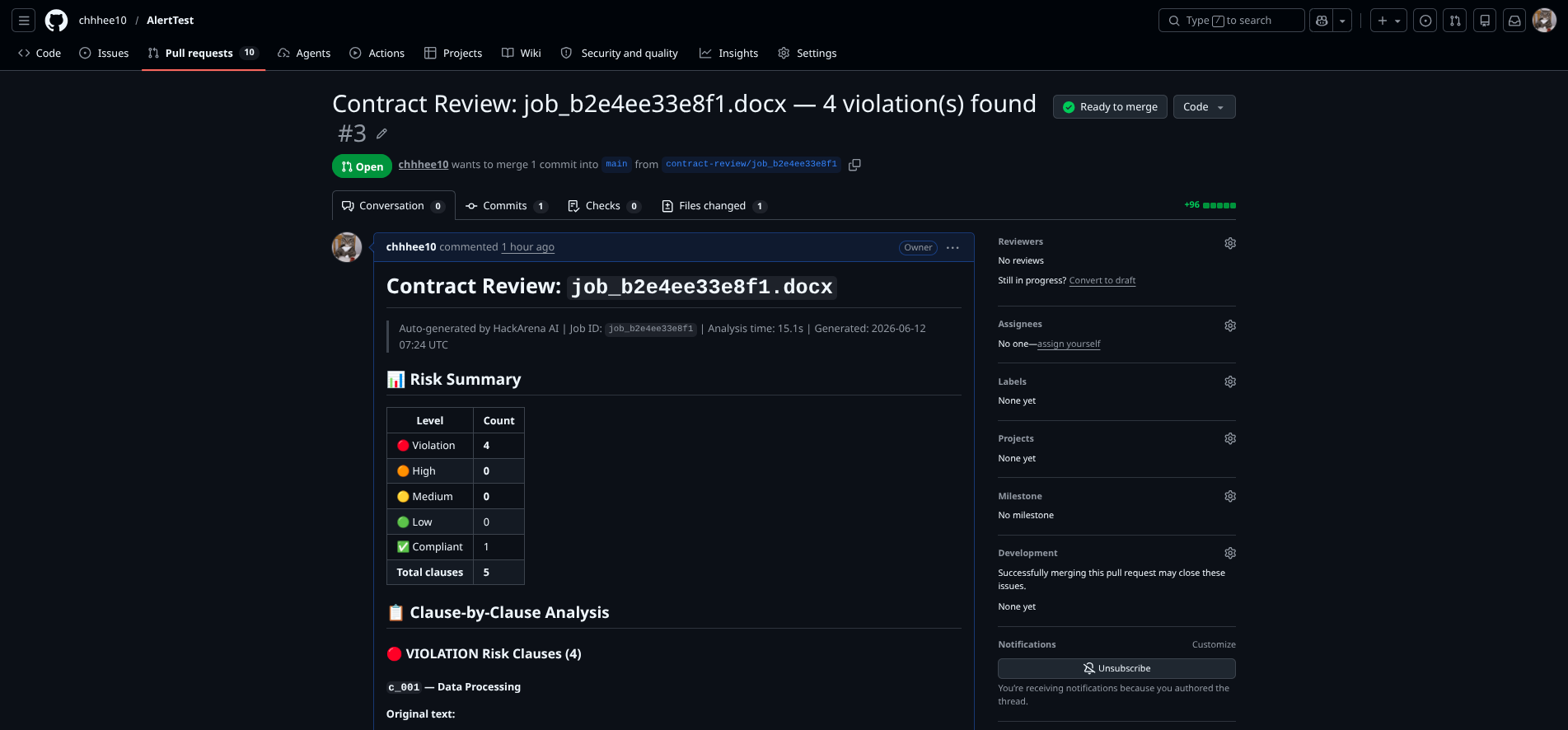 Automated GitHub PR with redlined clauses and compliance recommendations
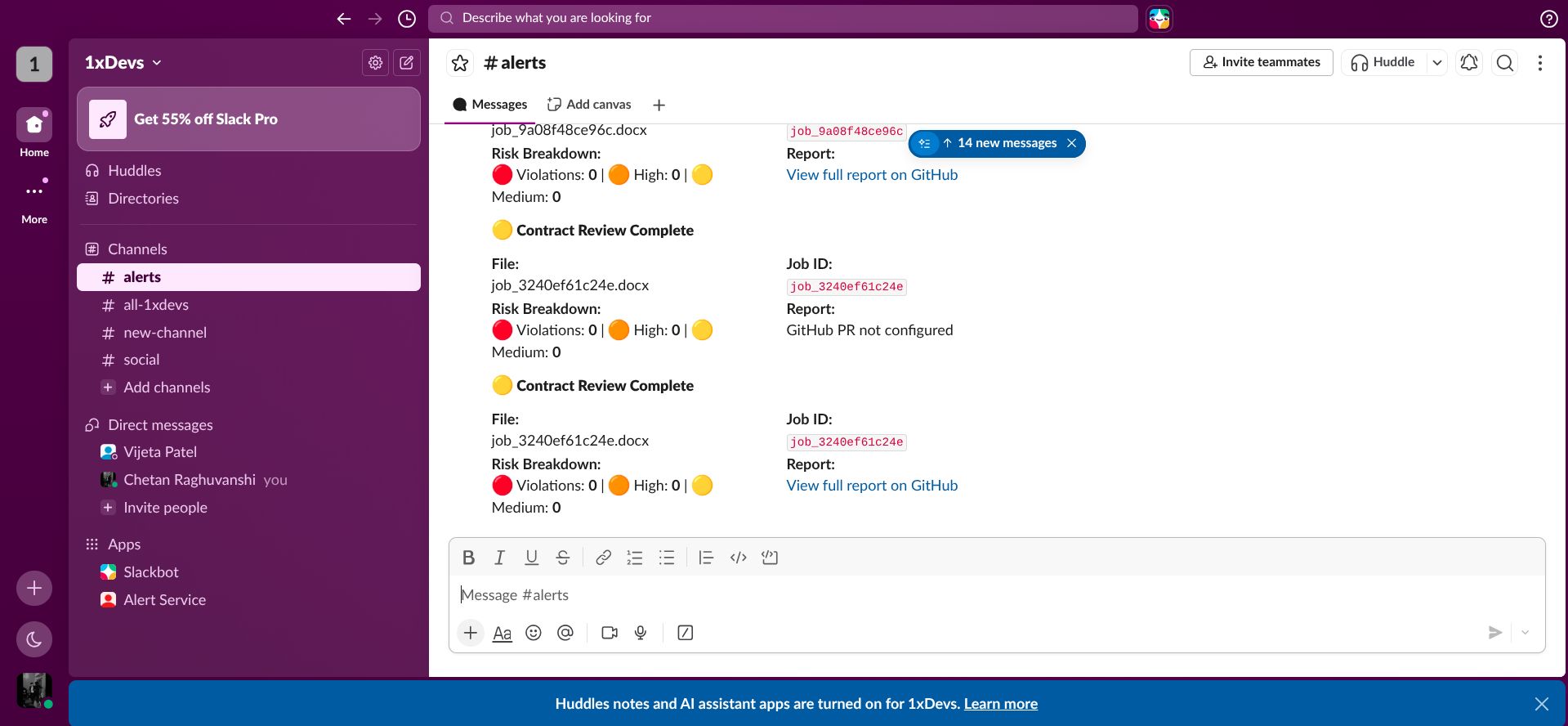 Real-time Slack alerts for compliance team on contract analysis completion
The memory layer is implemented in backend/memory/.
| File | Role |
|---|---|
chroma_client.py |
Persistent ChromaDB client and collection helpers |
embedder.py |
Ollama nomic-embed-text wrapper |
rag.py |
Retrieval-augmented Q&A over project documents |
Caveat uses two collection scopes:
org_{org_id}_project_{project_id}
org_{org_id}_global
Project collection:
- Stores clauses for one project.
- Used for cross-document contradiction detection inside that project.
- Example: all vendor contracts for 2025.
Organization collection:
- Stores clauses across all projects in the organization.
- Used for historical similarity and repeated risk patterns.
- Example: a risky arbitration clause that appears in employment, vendor, and procurement agreements.
Clause manifest
  |
  v
extract clause text
  |
  v
Ollama /api/embeddings
  |
  v
nomic-embed-text vector
  |
  v
upsert into project collection
  |
  v
upsert into org collection
Each clause stores metadata:
{
  "clause_id": "c_001",
  "clause_type": "data_processing",
  "org_id": "acme",
  "project_id": "vendor_contracts",
  "job_id": "job_abc123",
  "timestamp": "2026-06-12T10:00:00"
}New clause embedding
|
v
query project collection, excluding current job
|
v
top 3 similar historical clauses
|
v
LLM pairwise contradiction check
|
v
medium/high contradictions added to pipeline state
Contradiction result:
{
  "clause_a_id": "c_005",
  "clause_b_id": "c_017",
  "clause_a_text": "Data will be deleted within 30 days...",
  "clause_b_text": "Vendor may retain data for 90 days...",
  "explanation": "The clauses conflict on post-termination retention period.",
  "severity": "high"
}New clause embedding
|
v
query org collection, excluding current job
|
v
top 2 similar historical clauses
|
v
similarity > 0.85
|
v
historical flag added to classifier context
Historical flag result:
{
  "clause_id": "c_012",
  "text": "Arbitration shall be the sole remedy...",
  "flagged_in_job": "job_old123",
  "flagged_in_project": "vendor_contracts_2025",
  "flagged_date": "2026-06-01T09:30:00",
  "original_risk_level": "unknown",
  "similarity_score": 0.891
}Endpoint: POST /api/enterprise/chat
Flow:
User question
  |
  v
embed query through Ollama
  |
  v
query project ChromaDB collection
  |
  v
retrieve top 5 similar clauses
  |
  v
construct context with job_id and clause_id
  |
  v
LLM answer grounded only in retrieved excerpts
  |
  v
return answer + source attribution
Example question:
Which vendor agreements allow sub-processing without explicit consent?
Example response shape:
{
  "answer": "Two agreements contain broad sub-processing language...",
  "sources": [
    {
      "job_id": "job_abc123",
      "clause_id": "c_001",
      "clause_text": "The vendor reserves the right to sub-process...",
      "relevance_score": 0.91
    }
  ]
}Caveat uses a local-first regulation corpus so the enterprise demo remains reliable even without web access. Live regulatory enrichment is attempted, but the classifier always has a deterministic baseline from JSON files in backend/regulations/.
| Corpus | Jurisdiction | Coverage in the project | Example risks detected |
|---|---|---|---|
DPDP_2023 |
India | Digital Personal Data Protection Act 2023 provisions for consent, data fiduciary duties, sub-processing, child data, erasure, grievance redressal, cross-border transfer, breach notification | Bundled consent, vague retention, unnamed processors, missing breach notice, unrestricted data transfer |
GDPR |
European Union | GDPR articles for lawful basis, transparency, erasure, portability, processor contracts, security, breach notification, international transfers, liability/fines | No lawful basis, no retention period, invalid consent, non-adequate transfers, missing data subject rights |
RBI |
India | RBI payment/data-localisation and payment-system guidance for localisation, card data storage, payment aggregators, recurring payments, digital lending, outsourcing, cybersecurity, customer rights | Payment data outside India, card credential storage, auto-debit without notice, missing RBI audit rights, forced arbitration for banking disputes |
Local JSON is used because hackathon demos must be deterministic. If web search fails, the pipeline still classifies clauses. Live enrichment exists because regulation is not static: enforcement actions, interpretation guidance, and penalty focus change over time. The implementation treats live search as additive, not required.
SQLite is used as the hackathon database because it has no operational overhead and still gives the pipeline a real audit surface. The schema is intentionally simple:
| Table | Purpose | Important fields |
|---|---|---|
documents |
One row per uploaded document/job | job_id, org_id, project_id, filename, file_hash, tier, status, created_at |
audit_trail |
Final pipeline record | job_id, agent_outputs, risk_scores, github_pr_url, violation_count, duration_seconds |
clauses |
Clause-level persistence model for future expansion | clause_id, job_id, clause_type, text, risk_level, regulation, confidence |
Why this matters:
- Judges can verify that the system is not a stateless toy.
- The uploaded file is fingerprinted through SHA-256.
- The pipeline records risk counts and output metadata.
- The design has a clean path to PostgreSQL after the hackathon.
1. User uploads PDF/DOCX in enterprise dashboard
2. Frontend sends multipart form data to /api/enterprise/upload
3. Router validates content type and size
4. Router writes temporary file to ./uploads
5. Router creates job_id and starts background LangGraph task
6. Frontend subscribes to /api/stream/{job_id}
7. Agent 1 hashes file and writes Document row
8. Agent 2A extracts raw text and creates clause_manifest
9. Agent 2B loads regulation corpus and optional live updates
10. Agent 2C embeds clauses, writes ChromaDB memory, finds contradictions/history
11. Agent 3 classifies every clause with regulation + memory context
12. Agent 5 drafts redlines for flagged clauses
13. Agent 6 creates GitHub/Slack outputs and writes audit trail
14. Frontend receives pipeline_complete
15. User sees counts, report status, PR link, Slack status, audit metadata
1. User uploads photo/PDF/DOCX or submits text
2. Router extracts text using OCR or document parser
3. Router detects language
4. Router translates non-English text to English
5. Consumer Call 1 segments and classifies clauses
6. Consumer Call 2 runs adversarial benchmark analysis
7. Consumer Call 3 creates risk score, verdict, consequences, tips
8. Router translates output to preferred language if needed
9. Frontend/extension renders the report
1. User lands on a legal/contract-like page
2. content.js extracts relevant visible text
3. content.js checks legal keyword indicators
4. background.js calls /api/consumer/prescan
5. extension badge becomes red/orange/green
6. user opens popup and requests deep analysis
7. popup extracts up to 40,000 chars from page
8. background.js calls /api/consumer/analyse
9. popup renders the consumer pipeline report
| Component | Technology | Why this choice |
|---|---|---|
| API server | FastAPI | Async-first, simple file uploads, easy JSON APIs, native Swagger docs, good SSE fit |
| Runtime | Python 3.11+ | Strong legal/document AI ecosystem and fast hackathon iteration |
| Agent graph | LangGraph | Explicit multi-agent state machine instead of hidden sequential scripts |
| LLM inference | Groq | Very low latency for interactive hackathon demos and generous free-tier usage |
| Token pool | Custom async Groq pool | Rotates multiple keys, handles 429 backoff, supports concurrent calls |
| PDF parsing | pdfplumber | Reliable text extraction from PDFs without needing external services |
| DOCX parsing | python-docx | Simple, local extraction for Word contracts |
| OCR | Tesseract + pytesseract | Local, free, supports Indian language packs, works for physical-paper workflows |
| Vector DB | ChromaDB persistent client | Runs locally, no hosted infra, enough for project/org clause memory |
| Embeddings | Ollama + nomic-embed-text | Local embeddings, no per-call cost, avoids using LLM tokens for vectorization |
| Database | SQLite + SQLAlchemy async | Zero-setup hackathon persistence with a clear PostgreSQL upgrade path |
| Real-time progress | Server-Sent Events | One-way pipeline events are simpler than WebSockets and fit job progress perfectly |
| GitHub output | PyGithub | Turns analysis into a reviewable PR artifact |
| Slack output | Incoming webhooks | Fastest way to integrate with team compliance workflow |
| Component | Technology | Why this choice |
|---|---|---|
| Framework | Next.js 16 / React 19 | App Router, modern React, easy static and dynamic UI surfaces |
| Language | TypeScript | Safer API contracts and state management |
| State | Zustand | Lightweight global state for jobs/events without boilerplate |
| Upload | react-dropzone | Polished file upload and drag/drop handling |
| Icons | lucide-react | Consistent UI icon system |
| Styling | CSS / Tailwind-compatible setup | Fast iteration with a distinctive hackathon visual identity |
| Real-time client | EventSource | Direct SSE subscription to backend job streams |
| Component | Technology | Why this choice |
|---|---|---|
| Extension platform | Chrome Manifest V3 | Current Chrome extension standard |
| Content script | Vanilla JS | Minimal runtime, easy page extraction, no build step |
| Background | MV3 service worker | Handles network calls and badge updates cleanly |
| Storage | chrome.storage.session |
Per-tab temporary prescan cache with automatic cleanup |
| Deep extraction | chrome.scripting.executeScript |
Lets popup request full page text only when user chooses deep analysis |
| Use case | Model | Reason |
|---|---|---|
| Enterprise extraction | meta-llama/llama-4-scout-17b-16e-instruct |
Long context and strong structural extraction |
| Regulation live enrichment | compound-beta |
Web-search capable Groq model route |
| Enterprise memory contradiction check | meta-llama/llama-4-scout-17b-16e-instruct |
Efficient pairwise reasoning over clause pairs |
| Enterprise classification | llama-3.3-70b-versatile |
Best fit for deeper legal/regulatory reasoning |
| Enterprise redlining | llama-3.3-70b-versatile |
Drafting needs stronger reasoning and precision |
| Enterprise reporting | llama-3.1-8b-instant |
Fast report generation |
| Consumer parser | meta-llama/llama-4-scout-17b-16e-instruct |
Long context for full documents |
| Consumer adversary | llama-3.3-70b-versatile |
Higher-quality adversarial analysis |
| Consumer scorer | llama-3.1-8b-instant |
Fast final report and prescan |
| RAG chat | llama-3.3-70b-versatile |
Strong grounded answer generation |
The stack is optimized around four constraints:
- No heavy paid infrastructure. ChromaDB, SQLite, Ollama, Tesseract, and local JSON corpora keep the core demo self-hosted.
- Low latency. Groq makes multi-call workflows feasible in a live demo.
- Traceability. LangGraph state, SSE events, SQLite audit rows, file hashes, and GitHub PRs make the output inspectable.
- Real-world surfaces. Web app, enterprise dashboard, and browser extension map to how users actually encounter legal text.
GET /healthReturns API status and Groq token pool availability.
POST /api/consumer/photo
POST /api/consumer/upload
POST /api/consumer/analyse
POST /api/consumer/prescanPOST /api/enterprise/upload
GET /api/enterprise/job/{job_id}
POST /api/enterprise/chat
GET /api/enterprise/projects/{org_id}
GET /api/enterprise/projects/{org_id}/{project_id}/documentsGET /api/stream/{job_id}Once the backend is running:
http://localhost:8000/docs
http://localhost:8000/redoc
.
├── backend/
│   ├── main.py                         # FastAPI app entrypoint
│   ├── config.py                       # Settings and model routing
│   ├── token_pool.py                   # Async Groq key rotation + 429 handling
│   ├── agents/
│   │   ├── pipeline.py                 # LangGraph enterprise pipeline
│   │   ├── consumer_pipeline.py        # 3-stage consumer pipeline
│   │   ├── agent_ingestor.py           # Agent 1
│   │   ├── agent_extractor.py          # Agent 2A
│   │   ├── agent_reg_loader.py         # Agent 2B
│   │   ├── agent_memory.py             # Agent 2C
│   │   ├── agent_classifier.py         # Agent 3
│   │   ├── agent_redliner.py           # Agent 5
│   │   └── agent_reporter.py           # Agent 6
│   ├── routers/
│   │   ├── consumer.py                 # Consumer endpoints
│   │   ├── enterprise.py               # Enterprise endpoints
│   │   └── sse.py                      # Job progress streams
│   ├── memory/
│   │   ├── chroma_client.py            # ChromaDB collections
│   │   ├── embedder.py                 # Ollama embeddings
│   │   └── rag.py                      # Project document Q&A
│   ├── ocr/
│   │   └── tesseract_ocr.py            # Image OCR and confidence handling
│   ├── translation/
│   │   └── google_translate.py         # Detection/translation helpers
│   ├── regulations/
│   │   ├── dpdp_2023.json
│   │   ├── gdpr.json
│   │   └── rbi_guidelines.json
│   ├── outputs/
│   │   ├── github_pr.py
│   │   └── slack_webhook.py
│   ├── db/
│   │   ├── models.py
│   │   └── crud.py
│   └── requirements.txt
├── frontend/
│   ├── app/
│   │   ├── page.tsx                    # Landing page
│   │   ├── enterprise/page.tsx         # Enterprise dashboard
│   │   ├── consumer/page.tsx           # Consumer tool
│   │   └── chat/page.tsx               # RAG chat page
│   ├── lib/
│   │   ├── api.ts
│   │   └── sse.ts
│   ├── store/useStore.ts
│   └── package.json
├── extension/
│   ├── manifest.json
│   ├── content.js
│   ├── background.js
│   ├── sidebar/
│   │   ├── sidebar.html
│   │   └── sidebar.js
│   └── icons/
├── info/
│   ├── ARCHITECTURE.md
│   ├── API_CONTRACT.md
│   ├── IMPLEMENTATION.md
│   ├── PRD.md
│   └── SETUP.md
└── README.md
- Python 3.11+
- Node.js 20+
- Git
- Tesseract OCR
- Groq API key(s)
- Optional but recommended for enterprise memory: Ollama +
nomic-embed-text - Optional for outputs: GitHub token and Slack webhook
- Optional for translation: Google Translate API key
Ubuntu/Debian:
sudo apt-get update
sudo apt-get install -y \
  tesseract-ocr \
  tesseract-ocr-eng \
  tesseract-ocr-hin \
  tesseract-ocr-kan \
  tesseract-ocr-tam \
  tesseract-ocr-tel \
  tesseract-ocr-mal \
  tesseract-ocr-ben
macOS:
brew install tesseract tesseract-langcurl -fsSL https://ollama.com/install.sh | sh
ollama pull nomic-embed-textOllama must be available at:
http://localhost:11434
cd backend
python -m venv venv
source venv/bin/activate
pip install -r requirements.txt
cp .env.example .env
Fill .env:
GROQ_KEY_1=gsk_...
GROQ_KEY_2=
GROQ_KEY_3=
GROQ_KEY_4=

GITHUB_TOKEN=
GITHUB_REPO=

SLACK_WEBHOOK_URL=

GOOGLE_TRANSLATE_API_KEY=

OLLAMA_BASE_URL=http://localhost:11434
EMBED_MODEL=nomic-embed-text

CHROMA_PERSIST_DIR=./chroma_db
DATABASE_URL=sqlite+aiosqlite:///./contracts.db
Run backend:
uvicorn main:app --reload --port 8000Backend:
http://localhost:8000
Docs:
http://localhost:8000/docs
cd frontend
npm install
npm run dev
Frontend:
http://localhost:3000
The backend also mounts the frontend/ directory statically when available, so static HTML surfaces such as consumer.html, enterprise.html, and chat.html can be served from the backend during the hackathon demo.
- Start the backend at
http://localhost:8000. - Open Chrome.
- Go to
chrome://extensions. - Enable Developer Mode.
- Click Load unpacked.
- Select the
extension/folder. - Pin Caveat to the toolbar.
- Visit a Terms of Service, privacy policy, contract, or agreement page.
The extension currently points to:
const API_BASE = 'http://localhost:8000';in extension/background.js.
Caveat is not only a summarizer. The project combines:
- Multi-surface delivery: consumer app, enterprise dashboard, browser extension.
- Multi-agent enterprise workflow with LangGraph.
- Clause-level extraction and stable IDs.
- Regulation-aware classification against DPDP Act 2023, GDPR, and RBI corpora.
- Confidence scoring and reflection for uncertain classifications.
- ChromaDB-backed cross-document memory.
- Contradiction detection across previous contracts.
- Organization-level historical pattern retrieval.
- RAG Q&A over uploaded project documents.
- Consumer-specific adversarial analysis instead of simple summarization.
- Browser prescan that makes risk visible at the moment of consent.
- GitHub PR and Slack outputs for real enterprise workflow integration.
- SQLite audit trail with file hash and risk-score persistence.
- Groq token-pool routing for rate-limit resilience during a live demo.
Each component maps to a real requirement:
- FastAPI: async uploads, API docs, SSE, and simple deployment.
- LangGraph: agent state must be visible and composable.
- ChromaDB: contract memory needs semantic search, not keyword search.
- Ollama embeddings: memory should not depend on paid embedding calls.
- SQLite: hackathon persistence without operational overhead.
- Groq: low latency makes three-stage and seven-agent analysis demoable.
- Tesseract: real users have physical documents and phone photos.
- Chrome MV3: consent happens in the browser.
- GitHub PR: legal review often needs reviewable diffs and artifacts.
- Slack: teams need alerts where they already work.
Recommended judging demo:
- Open the home page and show the three surfaces.
- Upload a consumer document or paste ToS text.
- Show risk score, safe-to-sign verdict, dark patterns, fair versions, and negotiation tips.
- Upload an enterprise PDF/DOCX with
org_idandproject_id. - Show SSE progress through the agent steps.
- Show classification counts, redline output, audit metadata, and optional GitHub/Slack output.
- Ask the RAG chat a project-level question.
- Load the Chrome extension on a legal page and show badge prescan plus deep analysis.
- The memory layer requires Ollama to be running locally. If Ollama is unavailable, the enterprise pipeline skips memory gracefully and still classifies/redlines.
- GitHub PR and Slack output require credentials. If not configured, the core analysis still runs.
- Live regulation enrichment is best-effort. Local JSON corpora are the reliable baseline.
- This is legal education and compliance assistance, not a substitute for a qualified lawyer.
Caveat does not provide legal advice. It provides structured legal awareness, risk detection, plain-language explanation, compliance triage, and draft redlines for review. High-stakes matters should still be reviewed by a qualified lawyer.
The intended value is decision support:
- Consumers understand what they are being asked to sign.
- Enterprises prioritize risky clauses faster.
- Teams get audit evidence and workflow outputs.
- Browsers surface hidden risk before consent.
Caveat turns unreadable legal documents into structured, explainable, memory-backed risk intelligence across consumer upload, enterprise compliance, and browser consent workflows.