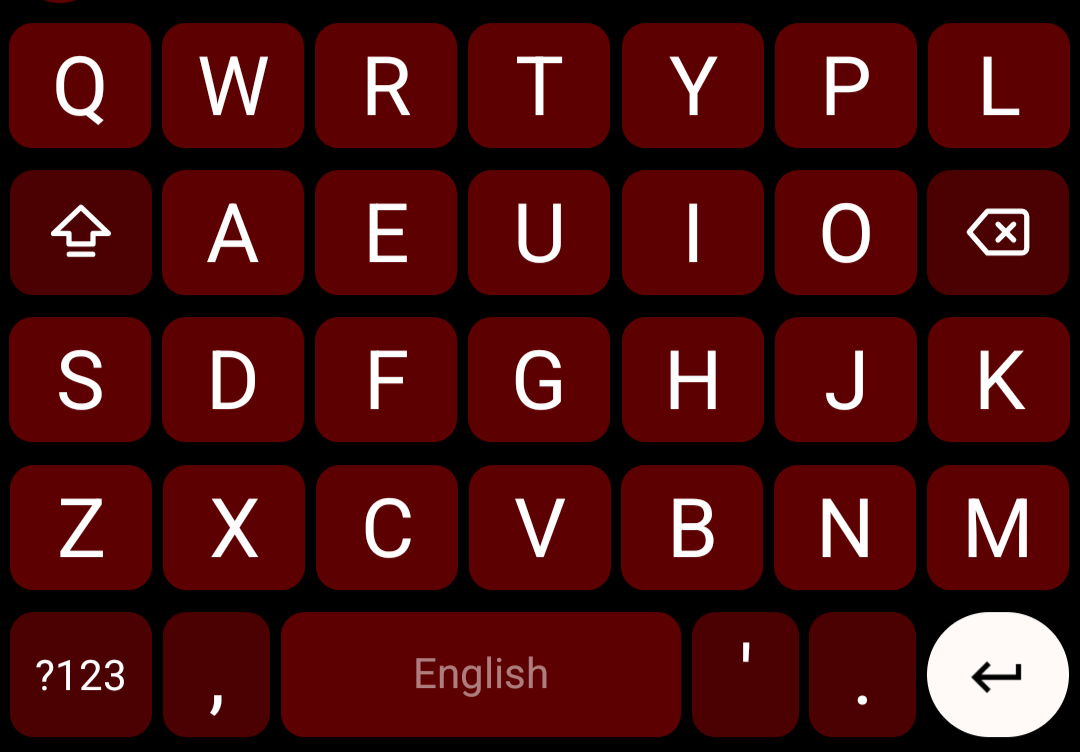
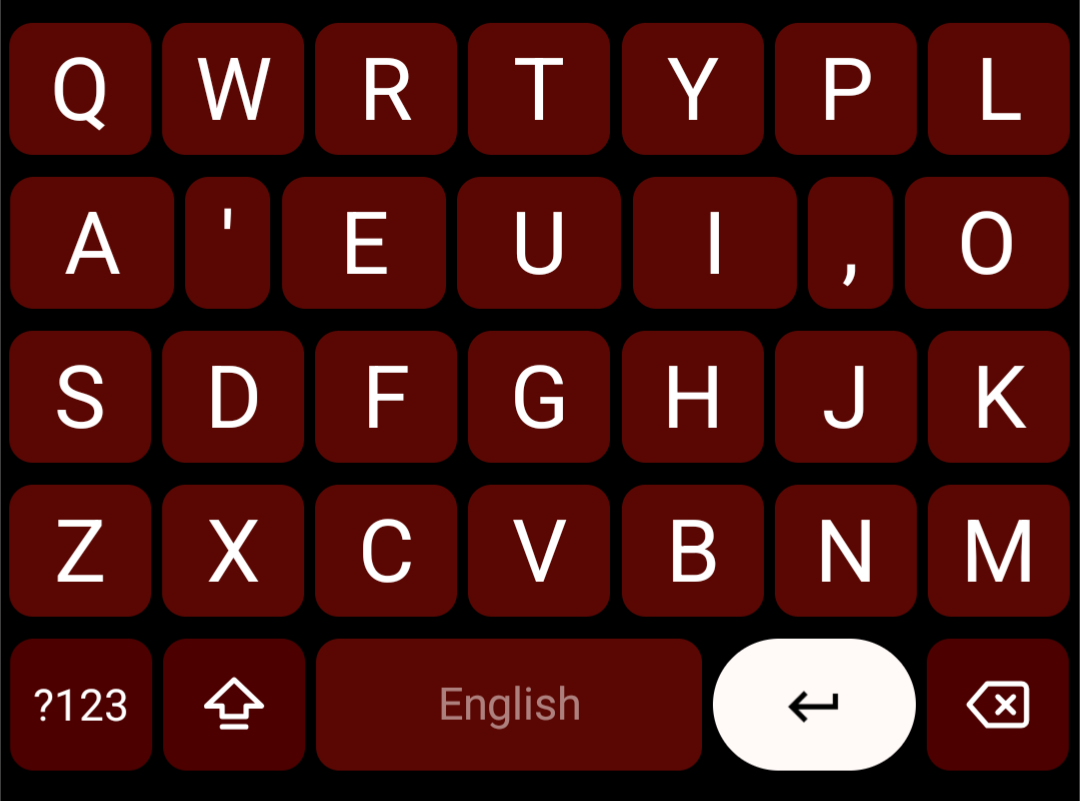
The Vowel Vortex Layouts were inspired by the ClearFlow layout, for use with Android keyboards like FUTO Keyboard, HeliBoard, and FlorisBoard that allow custom layouts to be used. The layouts are focused on glide (Swype, swipe, or gesture) typing on mobile without sacrificing thumb typing, increasing word clarity (decreasing typos) while maintaining familiarity with the qwerty layout.
The clearflow layout was being added to FUTO keyboard, I hadn't really noticed it before, and ever since the demise of Swype I've been very disappointed with glide typing on other keyboards. ClearFlow is a wild departure from QWERTY! Therefore it was going to take some learning, however what started bothering me the most about it wasn't the alphabetical layout, it was the function keys on the sides and the size of the keys:
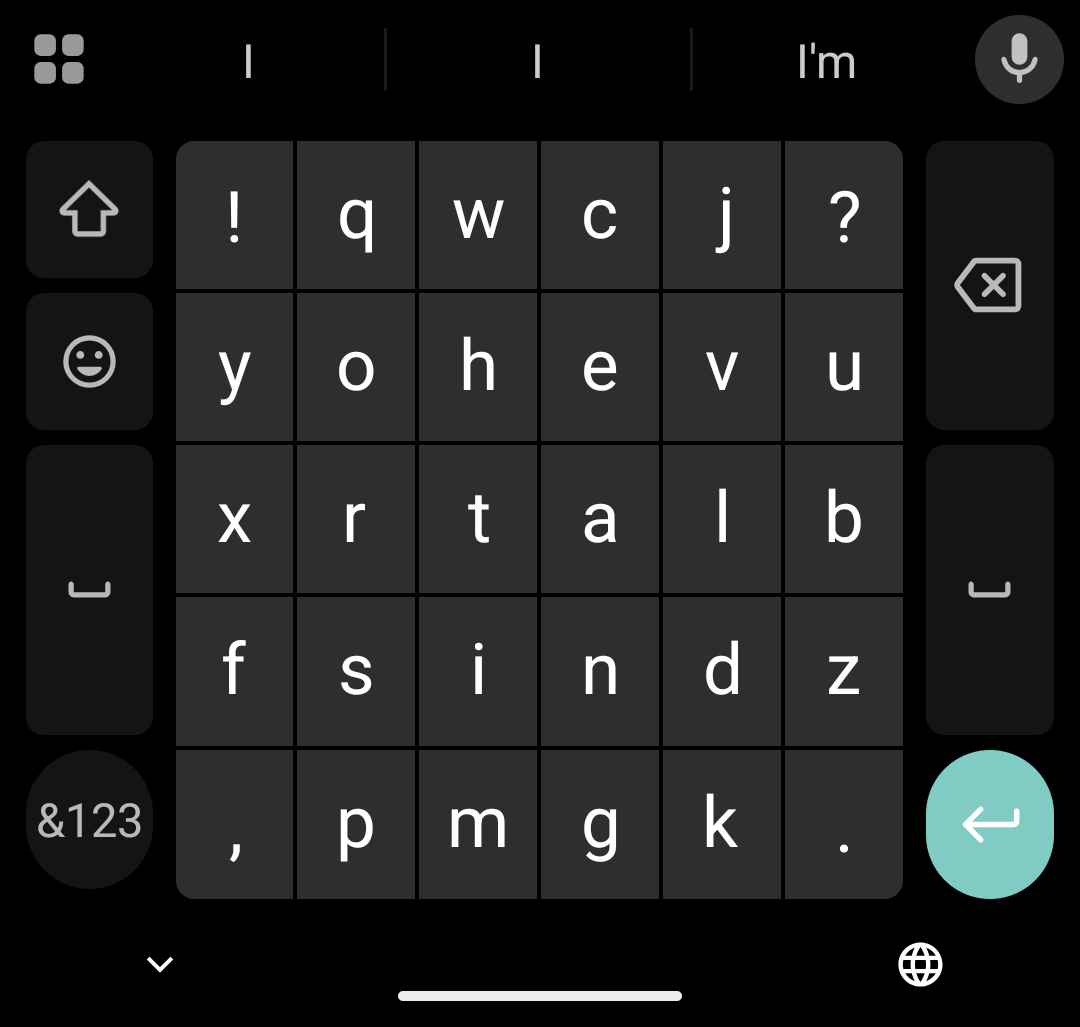
FUTO keyboard's version is a little better as the side function keys are not as wide.
I really started to evaluate the benefits of switching layouts, later tests confirmed that while I may get less errors using ClearFlow the increase in typing speed is a myth.
Throughout my testing the layouts with Gemini and Copilot they both often wanted to give preference to layouts that minimized the gesture length of a word, and those layouts were given a higher theoretical typing speed. I finally decided to put this to the test via a very simplified typing test. I used ClearFlow, QWERTY, and a couple of my layouts, chose three words: that, there, and this. I chose those words because they had good tight gestures on ClearFlow and long gestures on my layouts. I gesture typed each word for one minute on each layout as fast as I could — this would give me a theoretical maximum I could type on any of these layouts, no way am I going to type faster than this.
ClearFlow:
- That: 309 cpm.
- There: 275 cpm.
- This: 316 cpm.
- TTL: 900/3=300 cpm, 60 wpm.
Vowel Vortex:
- R4 OUIEA: That: 302 cpm.
- R4 AEUIO: There: 295 cpm.
- R4 AEUIO: This: 291 cpm
- TTL: 888/3=296 cpm, 59.2 wpm
- R4 IAEOU (R3-OPT): That: 305 cpm
- R4 IAEOU (R3-OPT): There: 310 cpm
- R4 IAEOU (R3-OPT): This: 288 cpm
- TTL: 903/3=301 cpm, 60.2 wpm
QWERTY Gboard:
- That: 302 cpm
- There: 334 cpm
- This: 293 cpm
- TTL: 929/3=309.7 cpm, 61.93 wpm
From the results you can see there isn't a significant difference, and there really is no way I could gesture type faster than this on any of these layouts. Pointing this out to Gemini it pointed out Fitts’s Law, vector changes, etc, all confirming that you aren't going to type faster because of a different layout giving you shorter gesture length for words, yet both AI push exactly that saying you would get faster speeds, until I pointed out that real word tests disagreed.
The reality is, you are only going to type as fast as you are going to type on any layout, it's your natural speed that defines how fast you can type on any layout, barring some wild dual system like ninetype. The "theoretical" speed created by mathmatical models usually don't take into account that you can move through longer distances faster, and often short tight gestures are slower.
So if you aren't going to magically type faster then what's the point of using a different layout? Increased word clarity which reduces typing errors. That really is the main reason to use a different layout. ClearFlow does this very well, but at a very high learning curve.
Not satisfied with ClearFlow I decided to try some different layouts, I made some in the past using Multiling O Keyboard, but never tried the "Vowel Vortex" layout. I wanted a layout that fit the standard function keys, wouldn't require the developer to integrate it via special sizing etc. The idea that came to me was simple, there's 26 letters in English plus the shift and delete key, 28 fits into 4 rows perfectly thus:
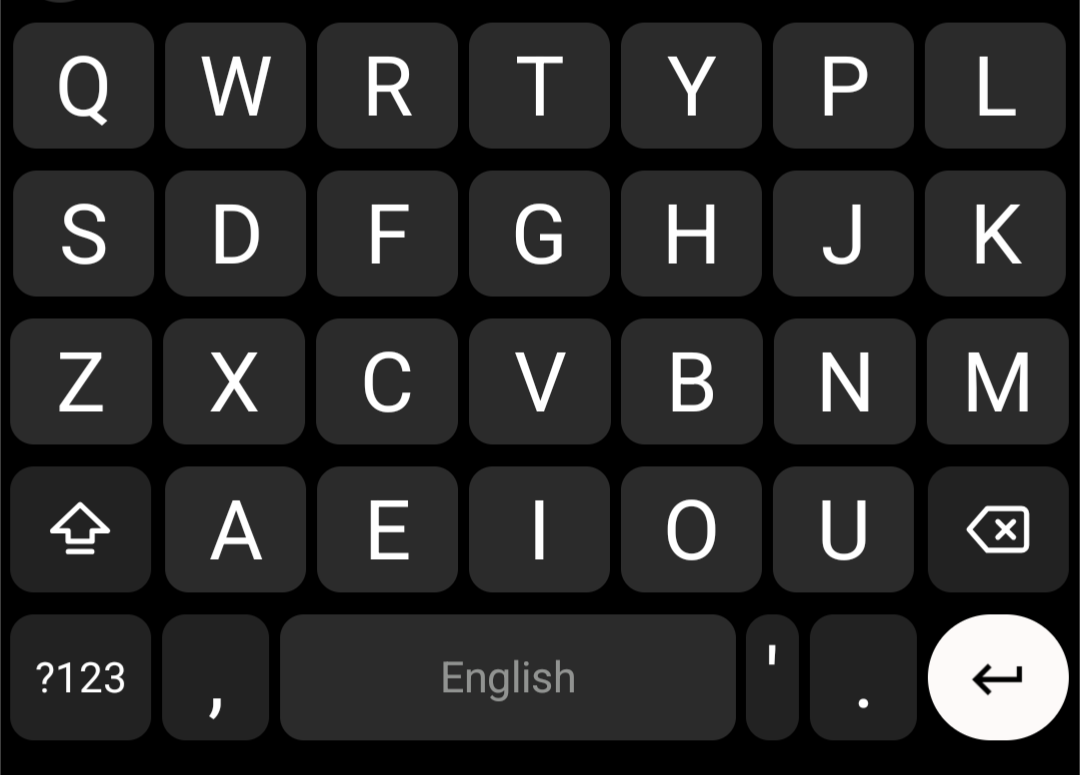
This idea leads to four core layouts:
7x5 R1:
- ROW 1: [SHIFT] A E I O U [DELETE]
- ROW 2: Q W R T Y P L
- ROW 3: S D F G H J K
- ROW 4: Z X C V B N M
7x5 R2:
- ROW 1: Q W R T Y P L
- ROW 2: [SHIFT] A E I O U [DELETE]
- ROW 3: S D F G H J K
- ROW 4: Z X C V B N M
7x5 R3:
- ROW 1: Q W R T Y P L
- ROW 2: S D F G H J K
- ROW 3: [SHIFT] A E I O U [DELETE]
- ROW 4: Z X C V B N M
7x5 R4:
- ROW 1: Q W R T Y P L
- ROW 2: S D F G H J K
- ROW 3: Z X C V B N M
- ROW 4: [SHIFT] A E I O U [DELETE]
I then worked with Copilot and Gemini to analyze and modify the simple Keyboard layout idea, still thinking that there was some amazing optimization to increase wpm and word clarity,
The goal was to create a layout with significant higher word clarity when glide typing (Swype or swipe typing or gesture typing) than QWERTY layout yet retain familiarity with the QWERTY layout, so learning the new layout wouldn't be that difficult, and switching between the two layouts would be more natural, however, I lost sight of maintaining familiarity with QWERTY during this process, becoming amazed at the potential Copilot said these layouts had.
I had copilot compare these layouts against built in layouts in gboard, including Clearflow. Then I tested each vowel row for the optimal arrangement of vowels within each row. This resulted in the "R3-OPT" layout as the top performing layout. However there was a mistake in this, I used my personal dictionary of ~10,000 words instead of staying with the top 100 words then moving to the top 1,000. Nonetheless Copilot came up with this as its favorite layout:
7x5 R3-OPT
- ROW 1: Q W R T Y P L
- ROW 2: S D F G H J K
- ROW 3: [SHIFT] I A E O U [DELETE]
- ROW 4: Z X C V B N M
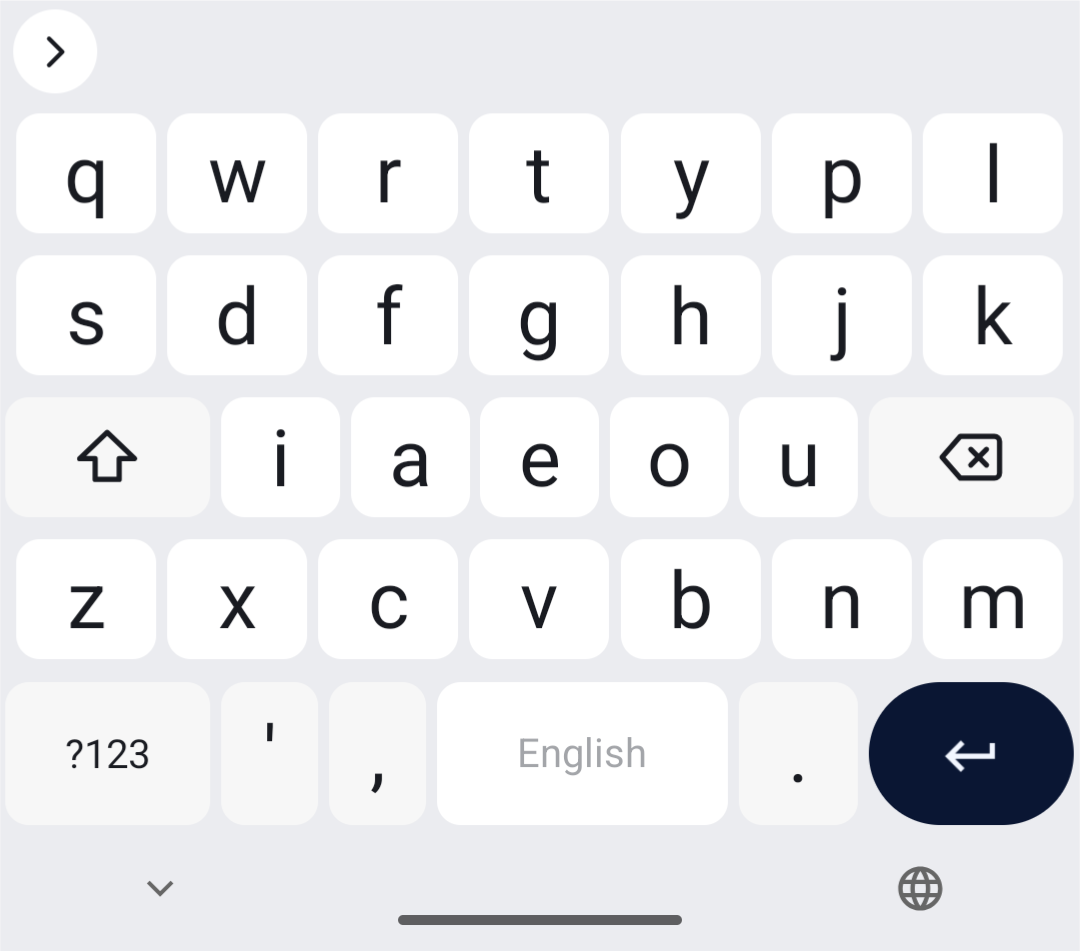
Copilot then tested for slight consonant adjustments, focusing on word clarity and maintaining familiarity with QWERTY, but it was always trying to minimize distance. The results had slight gains but not enough, IMO, to warrant the deviation away from QWERTY. Further comparisons and analysis were made against other layouts and the 7x5 R3-OPT layout was a top performing layout in general.
I couldn't get Gemini or Copilot to do the types of potential word conflict analysis I needed, "word swallows" or adjacent key potential conflicts therefore, I did a lot of tests myself.
In latter analysis using the top 100 and 1,000 words it was clear what ClearFlow was good at, optimizing the top 100 words. Through these subsequent analysis Copilot agreed that the AEUIO vowel order was a good universal, though it did favor the AEIOU due to the vowel arrangements, but through actually testing the top words it agreed with the standard QWERTY vowel order, AEUIO, and that it was the most efficient at row 2.
For anyone wanting to go through the whole chat here is the link. There is a somewhat cleaned up version of the chart here
Gemini gave some very interesting analysis as well, with some very high theoretical typing speeds, however, all in all when looking for one vowel order that could work across the rows its chosen order yielded little over AEUIO, and with the reduction in familiarity it didn't seem justifiable.
All in all after many hours with each AI I concluded that neither could do that through of an analysis, that would require running the layouts against an actual glide typing algorithm with a full dictionary, nonetheless some info was gained, and through just testing many layouts I concluded that no particular vowel order was so superior that it warranted breaking further away from the QWERTY familiarity. Maybe for you it might, feel free to look at the chat or do an analysis with your own personal dictionary to find your perfect layout. However for me the fraction of a key difference per word saved doesn't warrant the move away from staying as familiar to QWERTY as possible.
I used different layout versions based on Copilot and Gemini and went through gesture typing the top 100 words, intentionally being off by one letter when dealing with the vowel row. Gemini layouts did usually get lower errors, around 55 to 60, while the original R4 "AEUIO" got 65, and Copilot's top layout got 66. This is out of ~300 gestures, and doing the test on Gboard QWERTY I stopped counting at 130 and wasn't that close to finishing. I figure about a 2 to 3 times decrease in "sloppy gesture" errors when typing the top 100 words, regardless of which Vowel Vortex layout you use, however, it's much easier to be accurate on the larger keys that you have with the Vowel Vortex Layout..
I wasn't happy with the potential errors, yes I could gesture the top 100 words over ten times each and only have a handful of errors (<1% error), amazing, but the potential for error bugged me. Much analysis with Gemini proved fruitless. I used custom sized gaps between the vowels which helped significantly but introduced another problem, if the user started the gesture off the vowel just enough to be on the gap then the algorithm didn't get the start point correct, and that's a big problem.
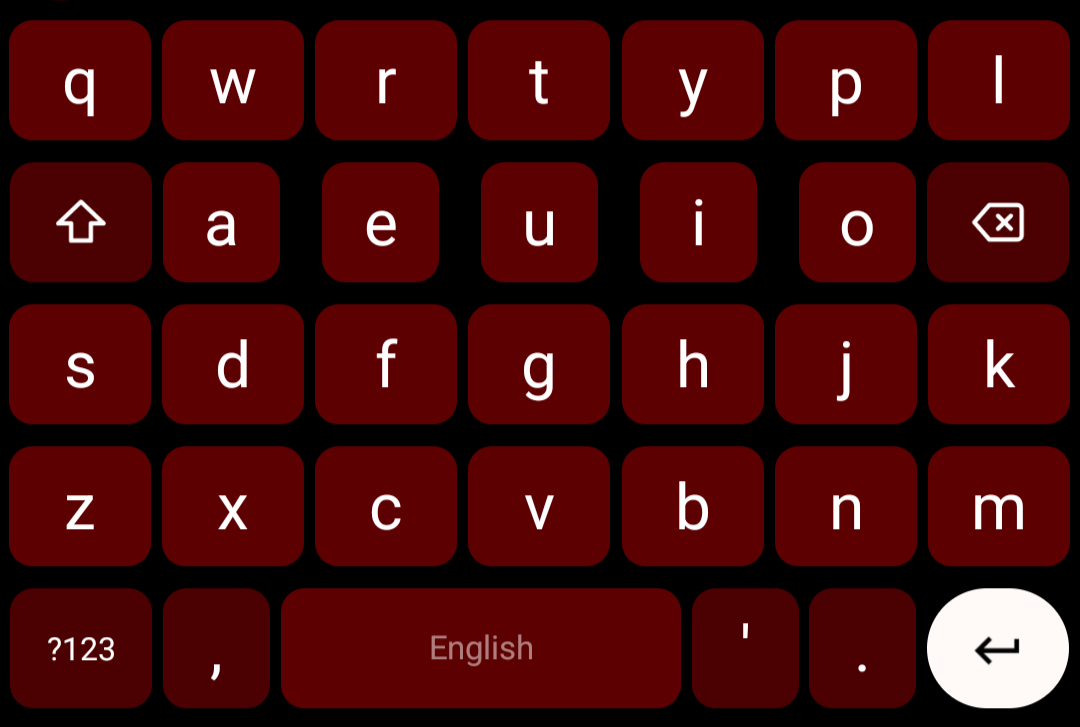
I came up with two ways to maximize word clarity and minimize potential errors when it came to the vowel row:
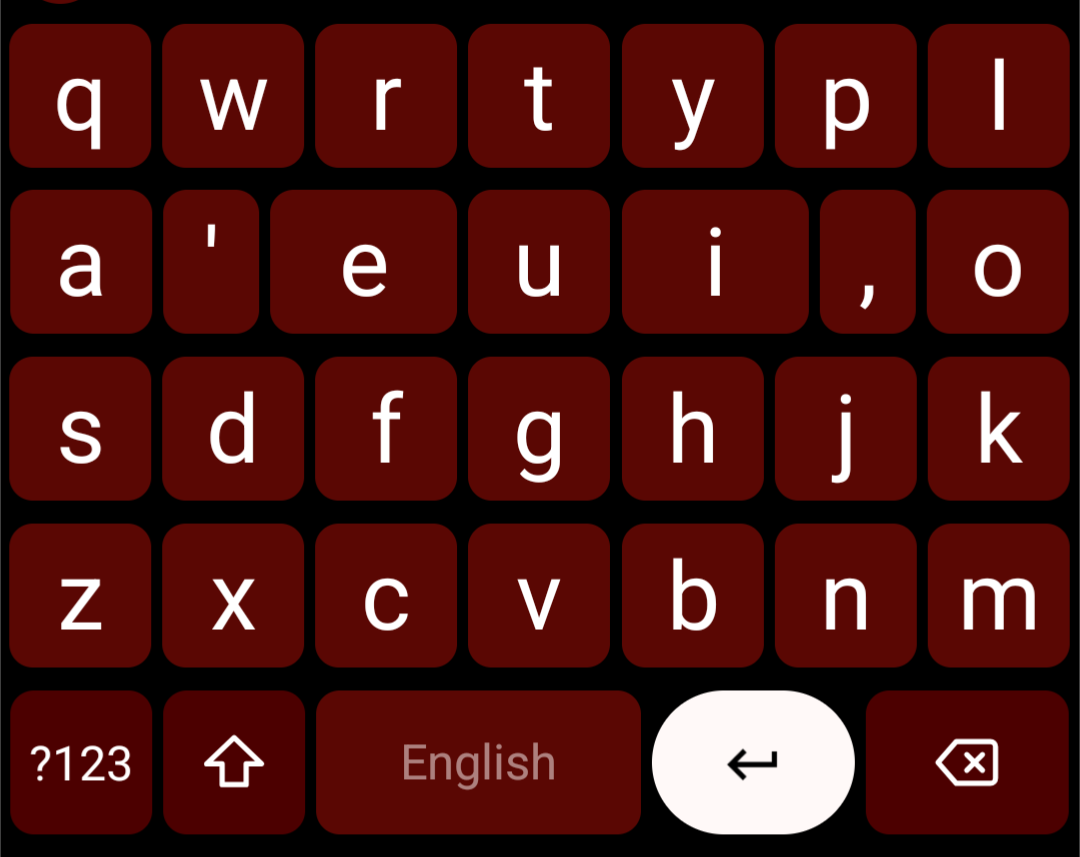
- Use functional non-letter keys between each vowel for separation: period, comma, or apostrophe. These keys didn't cause a dead space like using a 'gap' did. This looks ugly but works amazingly well.
- Increase the size of the vowels. This required moving shift and delete and having a rather non-uniform layout. In this situation using gaps or the functional keys as spacers works incredibly well.
This gave me, what I call, the "Vowel Vortex Clarity" layout:
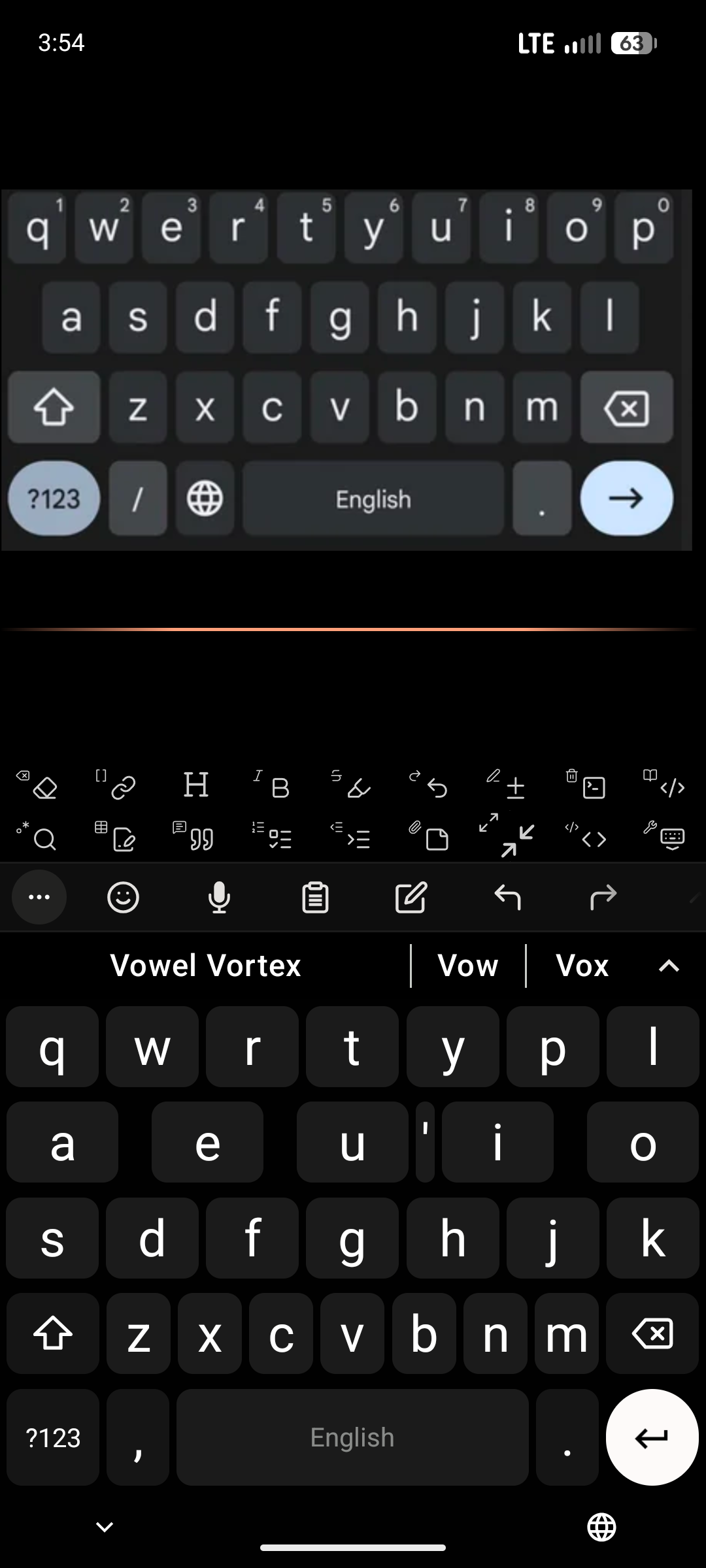
It looks ugly, malformed, and insane but performs amazingly well! You really have to try to get words wrong when using this layout. The main errors come from consonants, especially those close consonants on the bottom row, like N and M that result in 'then' vs 'them' errors.
Or a more spacious version, my preference:
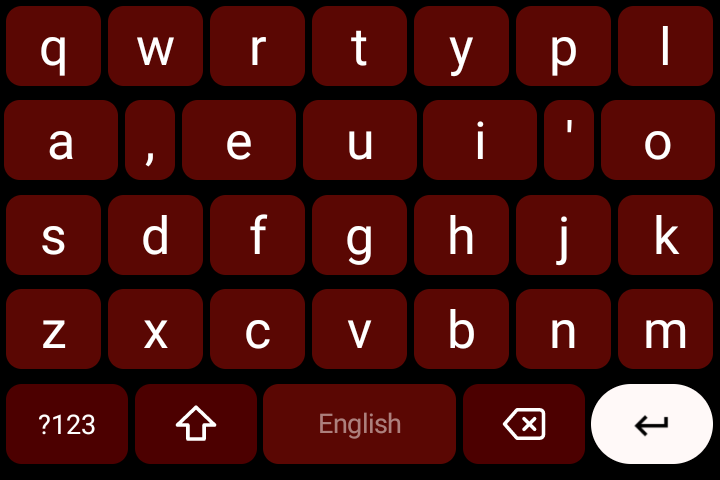
If the keyboard you are using allows for custom dictionaries, using a significantly smaller dictionary has dramatic effects on glide typing word clarity! There's a reason Swype used a dictionary that was around 50,000 words and not the 150,000+ word dictionaries many keyboards are using today.
I cleaned up the HeliBoard dictionaries, you can find them here.
The above image compares the 'clarity' layout to QWERTY, look at how you would make the gestures, this layout maximizes familiarity, from the start you aren't hunting for letters, minimizing the learning curve.
Once I realized I wasn't getting a massive increase in typing speed, and the best work around for potential word errors and conflicts was either using gaps, functional non-letter keys, or increasing the vowel size things fell into place. While the Copilot layout, R3-OPT, is actually very nice for gesture typing it introduced too much deviation from QWERTY thus significantly higher learning curve. For some people they might want to use an optimized vowel row, however, for me sticking with the QWERTY vowel order seems best over all, then use the tricks if you need or want to maximize word clarity.
My personal preference, currently, is the simple "square" key version, no tricks added:
For me the key size is big enough in this version to side step most word conflicts with the vowels, and having the bottom row keys maintain this larger size helps with errors like 'then' vs 'them', but the flexibility is there for everyone to maximize their goals. Keeping the vowels on row 2 maximizes familiarity with QWERTY, the movements feel familiar from the start, but you have the options available! Overall with this version your gestures become more vertical in angle than the more horizontal paths on qwerty.
This name came from Gemini when I had it doing analysis, and I kind of like it.
name: Vowel Vortex FUTO Simple
description: Vowel Vortex layout for FUTO Keyboard, basic
overrideWidths:
  FunctionalKey: 0.2   # Sets $shift and $delete to exactly 0.2 width

rows:
  - letters: q w r t y p l
  - letters: s d f g h j k
  - letters: $shift i a e o u $delete
  - letters: z x c v b n m
Here is a complete YAML for FUTO keyboard.
My conclusion, since I do not have the hardware, and I'm not a software engineer, to run proper in-depth metrics with a real glide typing algorithm, is that each user should use what feels most comfortable and makes the most sense.
Staying with the QWERTY order A E U I O on row 2 has, without a doubt, the highest muscle memory association with using glide typing on the normal QWERTY layout.
Row 4 A E I O U gives a nice longer gesturing layout that has good flowing gestures. Moving it to row 2 would retain a great deal of muscle memory.
Then there are the optimized versions that give tight gestures especially for the most frequently used words.
For anyone wanting to use one of these layouts I suggest first testing how you like the different vowel rows, then look for the type of optimization you want, distance vs clarity vs familiarity. You can even ask Copilot, or Gemini if you trust it, to optimize a Vowel row via your own personal word usage.
All in all I am happy with the Vowel Vortex layouts, they offer increased word clarity, more comfortable typing on mobile (bigger keys), retain high familiarity with QWERTY, and are flexible, they can be customized to every person's preferences.
You can find the code for a few layouts for FUTO keyboard in the files.
I've finally used one specific version of the Vowel Vortex Layout for several days now and there are a few "tips" that might be helpful.
First, because the vowels are grouped together you want to make them a sure hit. One key to glide typing in general is, make sure you are as accurate as possible on the starting and ending letters, this holds for vowels on this layout. Hit the start, the vowel(s), and the end and it seems to do very well. The more accurate you are on the vowels the less errors you'll have.
I've noticed that most of my errors are by missing the end consonant when they are on the edge, especially s and m. Try and get into the habit of overshooting edge vowels, go to the edge of the screen or up against the phone case if you have one.
Use the delete and shift keys as part of the vowel. Once a Swype is in progress the function keys are non-reactive and can be glided over.
Dip from vowel to vowel instead of going straight through.
Glide above the keys or below, again these areas don't do anything during a gesture, so use them when you can to go around letters.
Blacklist is your friend! There are always conflicts with other words, so blacklist what you can, especially potential conflicts with the top 100 words.
Practice frequently, a few minutes here and there, will help condition you to the new layout. Try not to use different layouts during the initial learning period, this is just basic conditioning.
After getting some time to really use these layouts I've come to liking the "Clarity 2.0" version:
I've also found it best, once you start getting the layout down, to switch to the regular qwerty layout from time to time. This seems to actually help, this layout feels much bigger after some qwerty time, secondly, while keeping you proficient on both layouts it can help you stay aware and more focused on your typing instead of it falling into an automatic gesture mess.
Clarity 3.0
Some minor sizing adjustments to help differentiate the vowels.
.
.
.
.
.
.
.
.
.
.