



This custom integration fetches marine weather data from the Open-Meteo Marine API and exposes it in Home Assistant as sensors. It provides current wave and swell conditions for user-defined locations.
- Current Marine Weather Data: Wave height, swell height, direction, and period
- Compass Conversion: Converts degrees into compass points (e.g., N, NE, SW)
- Multiple Locations: Define as many surf spots as needed in YAML
- Configurable Timezone: Each location can use its own IANA timezone string
- Throttled Updates: API requests limited to every 30 minutes
- Error Handling: Logs HTTP, request, or JSON errors to the Home Assistant log
- Home Assistant 2023.12 or later
- HACS installed (if using HACS option)
Copy the marine_weather folder (including all files such as __init__.py, sensor.py, const.py, manifest.json, and logo.png) into:
<config>/custom_components/marine_weather/
-
In Home Assistant, go to HACS → Integrations → Custom Repositories
-
Add this repository URL:
https://github.com/cloudbr34k84/Open-Meteo-Marine-Weather
Type: Integration
3. Click Add
4. Search for Open Meteo Marine Weather in HACS and install
5. Restart Home Assistant
- Verify
const.pyis present (definesDOMAINandAPI_URL) - Confirm the integration loads without errors in Settings → Logs
You can configure the integration inline or using split YAML files.
sensor:
  - platform: marine_weather
    locations:
      - name: "Alexandra Headlands"
        latitude: -26.6715
        longitude: 153.1006
        timezone: "Australia/Brisbane"
      - name: "Kings Beach"
        latitude: -26.8017
        longitude: 153.1426
timezone: "Australia/Brisbane"configuration.yaml includes:
sensor: !include_dir_merge_list sensorsThen create sensors/marine_weather.yaml:
- platform: marine_weather
  locations:
    - name: "Alexandra Headlands"
      latitude: -26.6715
      longitude: 153.1006
      timezone: "Australia/Brisbane"
    - name: "Kings Beach"
      latitude: -26.8017
      longitude: 153.1426
      timezone: "Australia/Brisbane"
Restart Home Assistant to apply changes.
Each defined location creates one entity:
<Location Name> Current
Example: Alexandra Headlands Current
swell_wave_height(m) The vertical size of distant, organized swells (not local chop). Bigger swell = larger, more powerful surf.swell_wave_direction(° and compass) Direction the swell is coming from. Important for how it hits your coastline (e.g., east swell vs south swell).swell_wave_period(s) Time between swell waves. Longer period = more energy and better surf shape.swell_wave_peak_period(s) The dominant swell interval at the moment (the “strongest” period in the mix).wave_height(m) Overall wave size at the location (includes local wind chop plus swell).wave_direction(° and compass) Direction the breaking waves are coming from at your spot.timezoneThe timezone used when fetching data. Matches what you set in YAML (e.g.,Australia/Sydney).modelsWhich forecast model the API used. Usually"best_match".
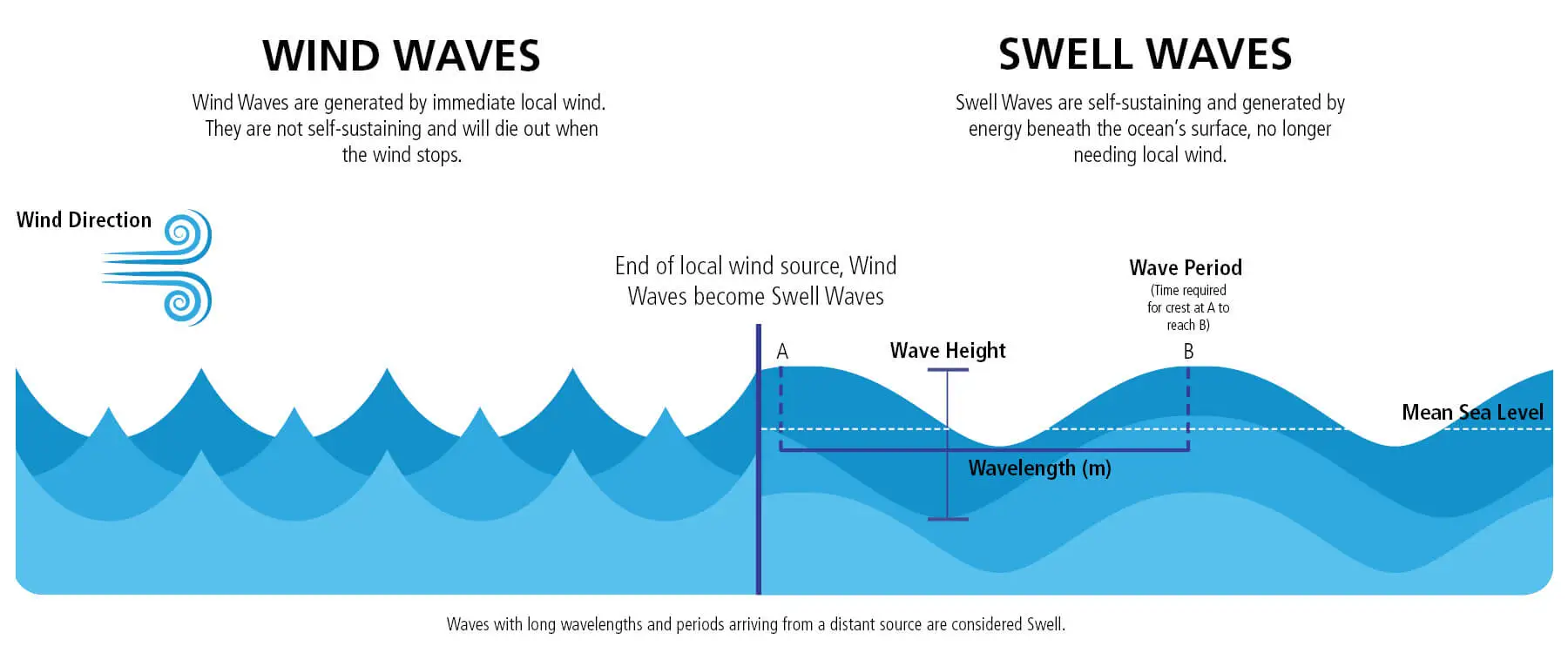
Waves (Wind Waves / Chop)
- Origin: Generated by local winds blowing at that moment
- Characteristics: Short-period, messy, irregular tops
- Direction: Moves with the local wind
- Example: Whitecaps on a windy day
Swell
- Origin: Produced by large, distant storms that blow for long periods
- Characteristics: Long-period, smooth, rolling, and rhythmic
- Distance: Can travel thousands of kilometers before reaching your coast
- Example: Clean, powerful surf arriving days after a storm far offshore
In summary: Local wind creates short, messy waves, while distant storms generate long, organized swells. Surf conditions are usually a combination of both — the swell provides the main energy, while local wind waves (seas/chop) affect cleanliness and ride quality.
- UI setup not supported. YAML configuration only
- Forecast sensors not implemented. Only “current” data is available
-
Q: Why can’t I add this integration from the UI? A: This integration does not include a config flow. It must be configured via YAML.
-
Q: My timezone shows as
Australia/Sydney, but I’m in Europe. Why? A: Use thetimezone:option in YAML for each location. Use a valid IANA timezone (e.g.,Europe/Madrid). -
Q: I get “No module named const”? A: Make sure
const.pyis insidecustom_components/marine_weather/. -
Q: Can I define locations in multiple YAML files? A: Yes. Use
!include_dir_merge_list sensorsinconfiguration.yamland create a separatemarine_weather.yaml.
-
Error:
No module named custom_components.marine_weather.const→ Ensureconst.pyexists in the same folder assensor.py -
Wrong timezone in attributes → Check that your YAML includes a valid IANA timezone string (e.g.,
Europe/Madrid) -
Entities not showing → Verify YAML syntax, run Check Configuration in Developer Tools, then restart Home Assistant
- Post issues or feature requests on the GitHub repository
This file outlines planned features, improvements, and long-term vision for the Open Meteo Marine Weather integration. The roadmap is aspirational — not all features are guaranteed, but it reflects the intended direction.
Goal: Get the integration accepted into HACS and ensure a solid foundation.
-
HACS Approval Readiness
- Repo structure must follow HACS rules (
custom_components/marine_weather,brands/marine_weather,hacs.json,manifest.json). - Ensure
info.md,README.md, andLICENSEare present and accurate.
- Repo structure must follow HACS rules (
-
Error Handling
- Gracefully handle missing or partial API data.
- Show
"N/A"or placeholder values instead of empty attributes. - Log structured warnings in HA’s system log.
-
Unit Tests
-
Add pytest coverage for:
degrees_to_compassutility.- Attribute formatting functions.
- Error/exception handling.
-
Goal: Improve user experience by reducing reliance on YAML and making the integration easier to manage.
-
Config Flow (UI Setup)
- Add support for HA’s
config_flow.py. - Users can add integration from Settings → Devices & Services.
- Add support for HA’s
-
Options Flow
- Allow editing of locations and timezones via the UI.
- Support multiple spots without restarting HA.
-
Model Selection
- Open-Meteo supports different models (ECMWF, GFS, ICON).
- Let users select which model to use in config.
-
Diagnostics Expansion
-
Extend
diagnostics.pyto show:- Last API payload summary.
- API call frequency.
- Error count / last error reason.
-
Goal: Provide richer marine weather coverage.
-
Forecast Entities
- Add 3h, 6h, and 24h forecast sensors.
- Entities:
wave_height_forecast_3h,swell_period_forecast_6h, etc.
-
Wind & Weather
- Expose wind wave attributes (height, direction, period).
- Optionally integrate with HA’s
weatherentities for combined surf/wind dashboards.
-
Separate Sensors
- Current approach: one sensor with many attributes.
- Planned: break attributes into dedicated sensors (e.g.
sensor.swell_period,sensor.wave_height). - Improves Lovelace graphs and history tracking.
-
Tide Integration
- Detect local tide entity (e.g.
sensor.local_tide). - Merge into Lovelace card display.
- Support combined surf + tide dashboards.
- Detect local tide entity (e.g.
Goal: Deliver a full surf dashboard experience inside Home Assistant by combining marine weather data, tide info, and wind conditions into a dedicated Lovelace card.
-
Marine Wave Card (Core Feature)
-
Custom Lovelace card (
custom:marine-wave-card) that visualizes swell, waves, and wind in a surf-report style interface. -
Features include:
- Surf height bars (color-coded).
- Swell period overlays (line chart for consistency/quality).
- Wind arrows (direction + speed/gusts).
- 24-hour rolling history with 6-hour ticks.
- Compact, surf-forecast-style presentation.
-
-
Wave + Tide Chart Overlay
- Optionally combine tide entity data with wave forecasts in the same chart (stacked or dual-axis).
-
Directional Icons
- Graphical compass arrows for swell/wave direction.
-
Surf-Friendly Summary
- Auto-generate plain-text conditions like: “3ft clean E swell, 12s period. Low tide 9:45am, rising.”
-
Lovelace Card Bundle
-
Publish the Marine Wave Card to HACS as a standalone frontend package.
-
Provide presets that combine:
- Marine Weather integration data.
- Local tide entity.
- Wind/weather entities.
-
-
Preset Dashboards
- Ready-made “Surf Spot” dashboard templates (e.g., Sunshine Coast example with Alexandra Headlands, Kings Beach, Moffat Beach).
Goal: Extend integration for power users and automation.
-
REST/Coordinator Refactor
- Migrate API fetch into a
DataUpdateCoordinator. - Allow reuse by
sensor,binary_sensor,weather, and other HA platforms.
- Migrate API fetch into a
-
Adaptive Polling
- Faster update intervals during surf hours.
- Slower updates overnight.
-
Alerts & Automations
-
Binary sensors or events, e.g.:
binary_sensor.big_swell_alert(swell > 2m).binary_sensor.tide_dropping_fast.
-
-
External API Expansion
- Combine with other oceanographic APIs (NOAA, BOM, Surfline).
- Offer hybrid data sources for redundancy.
- Issues & Ideas → Use GitHub Issues for bug reports, feature requests, or discussion.
- Pull Requests → Contributions welcome, especially for config flow, forecast support, and Lovelace card development.
- Testing → Please include sample config and logs when reporting issues.
📌 This roadmap will evolve. The focus is incremental quality improvements first, then usability, followed by data expansion and visualization.