
SillyTavern exclusive · n+m segmented growth strategy context compression plugin
Ultimate cache hit optimization · automatic sliding window · smart parameter presets
Tags: <SillyTavern> <sillytavern> <plugin> <cache hit> <roleplay> <context> <prompt> <caching mechanism> <SillyTavern plugin> <save money> <API> <LLM> <summary> <abstract> <Token> <Big Fat Fish>
- Project Introduction
- Why TokenSavingPlugin?
- Solution
- Measured Cache Hit Results
- Core Features
- Installation
- Quick Start
- Measured Cost Data
- How It Works
- FAQ
- Changelog
- Author
- License
TokenSavingPlugin is a context compression and cache hit optimization plugin for SillyTavern. It can raise the cache hit rate from about 50% to 90% or even 94%.
Powered by the n+m segmented growth strategy, when the conversation length exceeds the threshold, the plugin automatically compresses distant conversation content into summaries and appends them to the FCC (Frozen Compression Codex) block. While fully preserving narrative coherence, it greatly reduces Token consumption.
If you have long conversations in SillyTavern, API bills often rise quickly due to a low cache hit rate. By default, the cache hit rate is usually only 45%–55%, and monthly API costs may reach 30 CNY or more.
TokenSavingPlugin can raise the cache hit rate from 45% to at least 90%, avoiding API rejections due to insufficient balance, and no longer frequently seeing:
Insufficient balance, please log in to the platform to check balance information.
Typical usage flow:
- Open SillyTavern and install
TokenSavingPlugin. - In SillyTavern's response settings, set the context length to
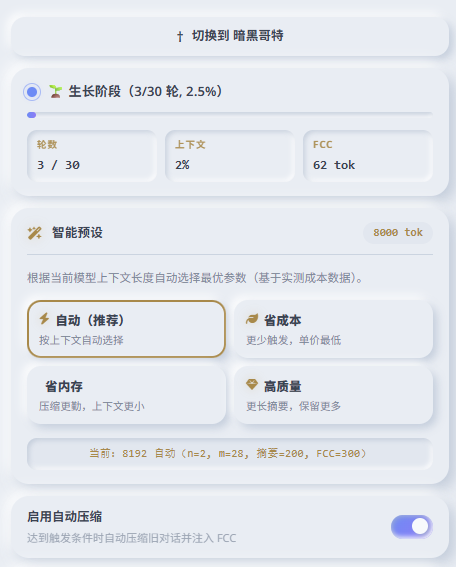
8192or higher. - Click "Auto" in the plugin panel; the plugin automatically fills in recommended parameters, with no manual calculation needed.
- Chat normally for hundreds or even thousands of turns.
- In long conversations, bills can drop from about 30 CNY/month to 10 CNY or less.
It improves the chat experience while significantly reducing API costs.
In long conversation scenarios, SillyTavern's default mechanism usually has the following pain points:
- Token explosion: After dozens of turns, history quickly fills the context window.
- Truncation amnesia: Native logic directly discards the earliest messages, causing character memory loss.
- Runaway costs: Each request carries the full conversation history, and API costs rise linearly.
- Cache invalidation: The conversation context keeps changing, the API cache prefix is frequently invalidated, and cache cannot be reused.
| Pain Point | Solution |
|---|---|
| Token explosion | Compress history sliding out of the window into summaries, with a compression ratio up to 80%+ |
| Truncation memory loss | Summaries extract key plot, character relationships, and emotions, so AI can retain long-term memory |
| High API cost | Build a stable prefix, fully utilize API cache, and reduce single-call cost by 30%–50% |
| Poor cache hit | FCC block is append-only and never modified, forming a fixed stable prefix that continuously hits cache |

When you call an API in SillyTavern for long conversations, have you encountered sudden bill spikes? Have you switched time zones or tried optimization, yet still found many prompts completely missing cache?
As shown below:
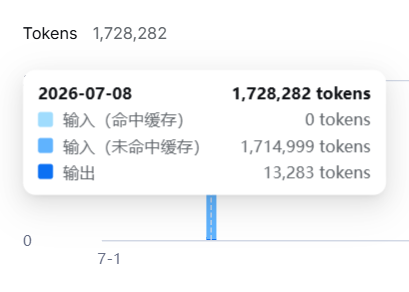
After using this plugin, cache hit and cost performance will be significantly improved.
Native SillyTavern dynamic context continuously trims history. Once old messages are truncated, the cache prefix directly breaks, and subsequent content cannot reuse cache.
This plugin compresses history overflowing the window into 200–300 Token summaries and injects them before the conversation. The continuously appended stable prefix can reliably hit API cache.
Below are real online cache hit rate statistics by time period:
| Time Period | Hit Input | Miss Input | Output | Total Input | Hit Rate |
|---|---|---|---|---|---|
| 22:00–23:00 | 568,957 | 109,999 | – | 678,956 | 83.80% |
| 23:00–24:00 | 305,663 | 43,012 | 13,438 | 348,675 | 87.67% |
| 00:00–01:00 | 280,191 | 26,568 | 5,960 | 306,759 | 91.34% |
| 00:00–01:00 | 335,743 | 29,831 | 6,932 | 365,574 | 91.84% |
| 00:00–01:00 | 1,110,143 | 77,190 | 20,631 | 1,187,333 | 93.50% |
| 01:00–02:00 | 524,288 | 56,079 | 13,719 | 580,367 | 90.34% |
| 02:00–03:00 | 7,282,680 | 387,842 | 161,945 | 7,670,522 | 94.94% |
- n+m segmented growth strategy: Self-developed sliding window mechanism, automatically manages conversation history, and keeps compression behavior stable and controllable.
- Frozen Compression Codex (FCC): Summaries are append-only and do not modify existing content, maximizing API prefix cache hit rate.
- Smart presets: Automatically recommends optimal parameters based on model context window size, based on extensive measured cost data.
- Triple explosion-proof protection: Prompt length validation + low-level code hard truncation + FCC budget folding multi-layer fallback.
- Single-pass-first compression: compresses the whole history in as few as 1 API call (block cap 49152 tokens), greatly reducing the number of calls per compression.
- API circuit breaker: halts the whole compression round on fatal errors (insufficient balance / invalid key / forbidden) and pauses auto-compression for 5 minutes to avoid burning money on repeated failures.
- Compression lock mechanism: Locks the input box during compression, avoiding concurrent message conflicts; supports manual termination of the compression task.
- Native minimal UI: follows SillyTavern theme variables and adapts to dark/light themes.
Open the SillyTavern extensions panel and paste the repository URL:
https://github.com/cloudfox-open/TokenSavingPlugin
Click Install Extension to complete installation.
- Download this repository's source code.
- Rename the folder to
TokenSavingPlugin. - Place it into the directory:
SillyTavern/public/scripts/extensions/third-party/. - Refresh the browser page (F5).
Tip: In manual installation mode, auto-update will prompt
not a Git repository; this error does not affect any plugin functionality. Git installation mode does not have this prompt.
- Load a character card and start chatting normally.
- Open the extensions panel and find
TokenSavingPlugin. - In "Smart Presets", click Auto; the plugin automatically configures parameters according to context.
- Chat normally; when the conversation reaches the threshold, compression triggers automatically, and the status card shows progress in real time.
- If you need to compress immediately, click Compress Now to trigger it manually.
| Parameter | Description | Default | Recommended Range |
|---|---|---|---|
| Enable auto compression | Plugin master switch | On | — |
| n (preserved original turns) | Permanently keep the latest n turns of dialogue as original text, not compressed | 5 | 3~6 |
| m (sliding window increment) | Triggers compression when visible turns exceed n+m. Auto-computed; the input is read-only |
Auto | — |
| Window fill target | When auto-computing m, the chat window (available context − prefix) is filled up to this ratio before compression triggers. Editable; editing switches to "Custom", the Auto preset restores 88% | 88% | 85~90% |
| Single summary limit | Maximum Token count of the summary produced by one compression | 210 | 150~400 |
| FCC total budget | Maximum Token limit of the FCC block; folding triggers when exceeded | 525 | 400~2000 |
| Block size | Text block size per compression request, derived from the compress context cap | Auto | — |
| Compress context cap | Context limit temporarily raised during compression, restored after | 64000 | 32000~128000 |
| Max API calls | Max AI calls per compression (auto-raised for large content, hard cap 30) | 4 | 3~8 |
| Prefix usage | Tokens used by constant content (world info + character card + system prompt). Auto-measured, read-only | Auto | — |
The former "Token fallback threshold" has been removed: the adaptive m already allocates the window by token volume, and an extra percentage backstop conflicts with it.
Since v1.0.3, m is no longer fixed per tier; it is allocated from the chat's actual message volume:
window budget = available context (SillyTavern already deducted the output reserve) − prefix
target        = window budget × window fill target (default 88%)
m             = floor( target ÷ avg tokens per round ) − n
- Average tokens per round is taken from the last 30 rounds (60 messages); 1 round = 1 user + 1 AI message.
- So m shrinks as messages get longer and grows as they get shorter, keeping the trigger at the intended token ratio.
- The m input is read-only and the full formula (including the averaging sample range) is shown below it. Editing it switches to "Custom Configuration".
Example for an 8k context with a 2881-token prefix:
| Window fill target | Target tok | m | Window cap | Total usage at trigger |
|---|---|---|---|---|
| 85% | 3862 | 50 | 55 rounds | 90% |
| 88% (default) | 3998 | 52 | 57 rounds | 92% |
| 90% | 4089 | 54 | 59 rounds | 94% (observed to just overflow the context) |
Estimated behavior at an 8192 context:
| Avg per message | Auto m | Trigger round | Window / context |
|---|---|---|---|
| 50 tok | 55 | 61 | 74% |
| 100 tok | 25 | 31 | 76% |
| 150 tok | 15 | 21 | 77% |
| 240 tok | 7 | 13 | 76% |
The panel includes 1 one-click preset; click to apply the optimal parameters for the current model context tier:
| Preset | Applicable Scenario | Features |
|---|---|---|
| Auto | Default recommendation (only preset) | Auto-selects n / m / summary cap / FCC budget / block size per context length |
After manually modifying any parameter, the plugin automatically switches to "Custom Configuration", and the preset button is deselected. When the context tier changes (e.g. switching to a model with a larger context), the "Auto" preset re-applies that tier's parameters.
Data based on real DeepSeek API stress tests.
| Context | m Value | Calls | Total Cost (CNY) | Unit Price (CNY/call) | Conclusion |
|---|---|---|---|---|---|
| 4096 | 3 | 56 | 0.06 | 0.00107 | Compression triggers too frequently |
| 4096 | 12 | 118 | 0.10 | 0.00085 | Performance clearly improved |
| 8192 | 28 | 106 | 0.05 | 0.00047 | Optimal sweet spot configuration |
| 8192 | 60 | 329 | 0.18 | 0.00055 | Single compression cost rises |
Core conclusion: In 8192 context window scenarios, the single request cost is about half of 4096, thanks to a longer and more stable cache prefix. m is now auto-computed from actual message volume (targeting an 85% context fill) instead of a fixed per-tier coefficient.
- AI reply completes.
- Calculate the current visible dialogue turns and Token usage ratio.
- Determine the trigger condition: window overflow (turns >
n+m) or Token ≥ threshold. - Temporarily raise the context to the "compress context cap", sized by the actual content to compress.
- Lock the input box + hide messages to be compressed.
- Submit in chunks to AI for compression (whole history first; block cap 49152 tokens).
- Append summary to FCC + persist save + inject into Prompt; fold or hard-truncate when the FCC budget is exceeded.
- Restore the context and unlock the input box.
Q1: Why doesn't the plugin trigger compression at the beginning of a chat?
Compression starts only when either condition is met: visible dialogue turns exceed n + m; or the Token percentage reaches the threshold (default 80%). The first few turns are the "growth stage"; just continue chatting normally.
Q2: Compression triggers too frequently / doesn't trigger for a long time?
- Compression too frequent: lower the "Window fill target" (e.g. 88% → 85%) so the window holds more rounds before triggering.
- Compression not triggered for a long time: raise the "Window fill target" (e.g. 88% → 90%), or check whether the prefix is consuming too much context.
Q3: Will compression lose plot memory?
No. The plugin provides three layers of safety protection:
- If the compression call fails or is manually aborted, the original dialogue is restored.
- FCC only appends writes; historical summaries are permanently saved.
- Single-pass-first compression: the whole history is compressed in one call where possible, reducing information loss between chunked summaries.
Worst case: the compression task fails, the dialogue remains as is, and messages are not hidden or lost.
Q4: Which API providers are supported?
Supports all APIs that SillyTavern can connect to: DeepSeek / OpenAI / Claude / Gemini / local large models, etc.
APIs that do not support JSON Schema will automatically degrade to normal compression mode.
Q5: Why does the input box turn gray and cannot send during compression?
This is a protection mechanism to prevent users from sending messages while a compression task is running, which would cause conflicts between dialogue generation and compression tasks.
If you need to interrupt compression, click the red Stop Compression button, and the plugin will restore the original dialogue. Compression usually takes only 1–2 seconds, so there is no need to worry.
Q6: Will many APIs return UnprocessableEntity errors?
No. The plugin does not rely on OpenAI's newer response_format={"type":"json_schema", ...} structured output; compression results are parsed as plain text (with field-by-field fallback extraction), so it also works on providers that only support /chat/completions.
Q7: Why does SyntaxError: Expected ',' or '}' after property value in JSON at position 416 (line 14 column 33) appear during installation?
This was due to plugin code; it has now been fixed.
Full changelog is available in CHANGELOG.md.
- Removed the Feynman quality self-check; each compression now saves exactly 1 API call.
- Removed the "Token fallback threshold": the adaptive m already allocates the window by token volume, and a percentage backstop conflicts with it.
- Added single-pass-first compression: the whole history compresses in as few as 1 API call (block cap 49152 tokens).
- Added an editable "Window fill target" parameter (default 88%, managed by the Auto preset).
- Adaptive m: allocated from the last 30 rounds' average, with the prefix (world info + character card + system prompt) deducted.
- Fixed the context expansion never taking effect, and a double deduction of the output reserve in the window budget.
- Lock input box and send button during compression.
- Added "Stop Compression" button, supporting interruption at any time.
cloudfox-open
- GitHub: @cloudfox-open
- Project Homepage: TokenSavingPlugin
MIT License
If this project helps you, welcome to light up a Star ⭐
Made with ❤️ by cloudfox-open