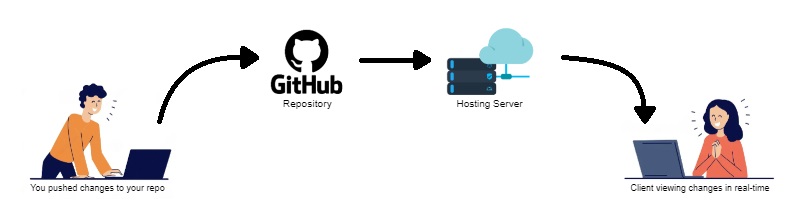
This simple PHP program allows you to automatically sync changes made to a GitHub repository's master branch with your live server. Please note that this project is intended for educational purposes and is not recommended for production use. Use it at your own risk.
Before setting up the sync, make sure you have the following:
- A web server where your live website/app is hosted.
- PHP support on your server.
Follow these steps to set up the GitHub Repo to Live Server Sync: Download this repository: Clone or download this repository to your local machine.
Create a git folder: Create a folder named git in the root directory of your live website/app on your server.
Upload callback.php: Upload the callback.php file from this repository to the git folder on your server.
Configure Webhook:
- In your GitHub repository, go to Settings > Webhooks.
- Click on "Add webhook."
- Set the Payload URL to your server's URL followed by
/git/callback.php. It should be something likehttps://yoursite.com/git/callback.php. - Select "Content type" as
application/json. - Set Secret to any alphanumeric value of your choice. It should be something like
cttricksgitsecretkey01. Save it somewere for later use. - Choose event "Just the
pushevent" for changes to the master branch. - Click "Add webhook."
Generate a Personal Access Token: You'll need a GitHub Personal Access Token to get the file contant to from github to sync on on your server. Follow the GitHub documentation to generate a token with at least the "repo" scope.
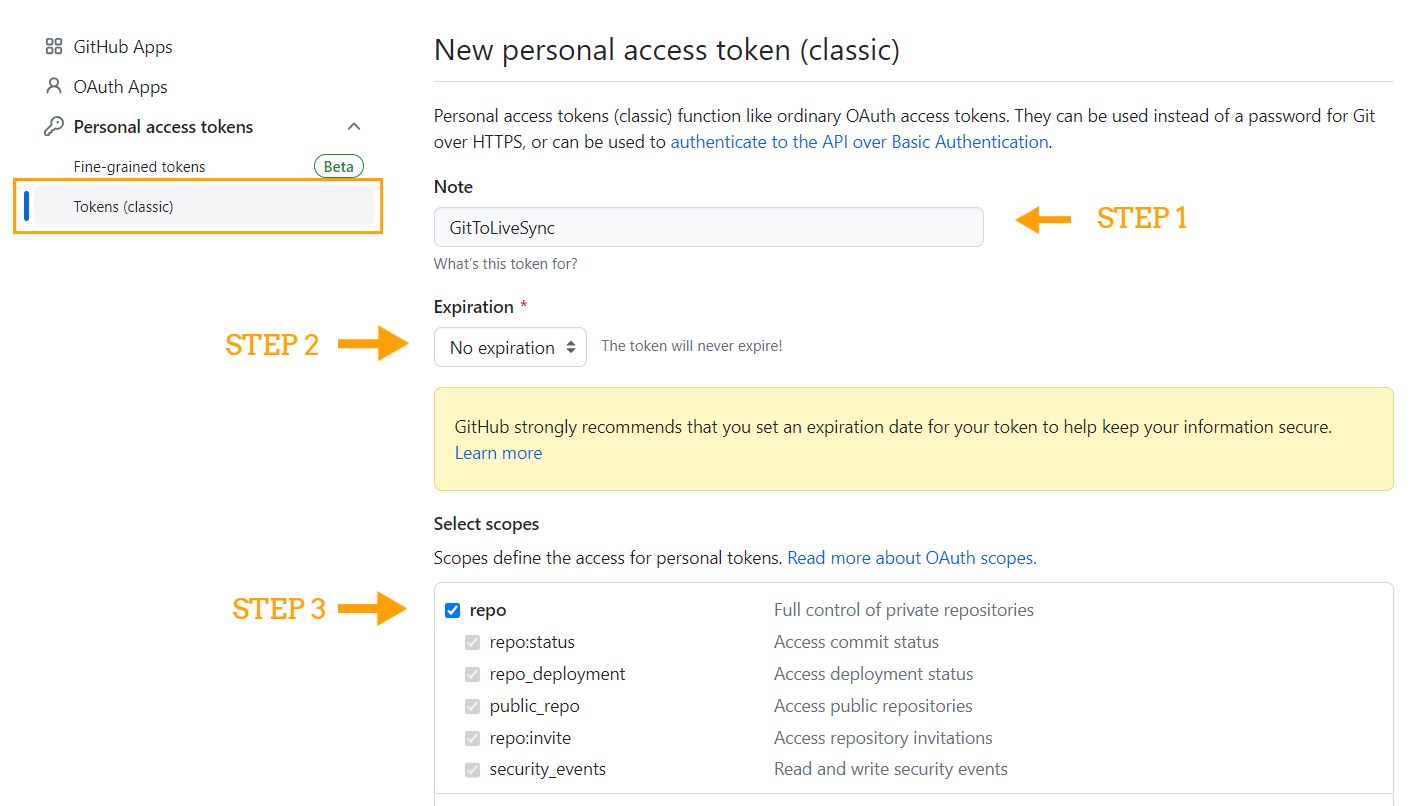
Note that here we have to define repo scopes only.
Configure callback.php: Open the callback.php file and update
- GitHub Personal Access Token
- Secrect that you entered while creating the webhook.
- User Name
- Repository title
In order to get the User Name and Repository title you can visit your github repository. On address bar you'll find URL like this, https://github.com/cttricks/GitToLive-Sync, Here cttricks is the username, and GitToLive-Sync is the repository name.
We are all set now! Make a change and push it to your repository & check the change on your server.
Contributions are welcome! If you'd like to contribute to this project, follow these steps:
- Fork the repository.
- Make your changes and improvements.
- Create a pull request (PR) to the
mainbranch of this repository. - Describe your changes and why they should be merged.
This project is a fun experiment and should not be used in a production environment without proper testing and security measures. Use it responsibly and at your own risk.
Feel free to reach out if you have any questions or encounter issues during setup. Happy syncing!