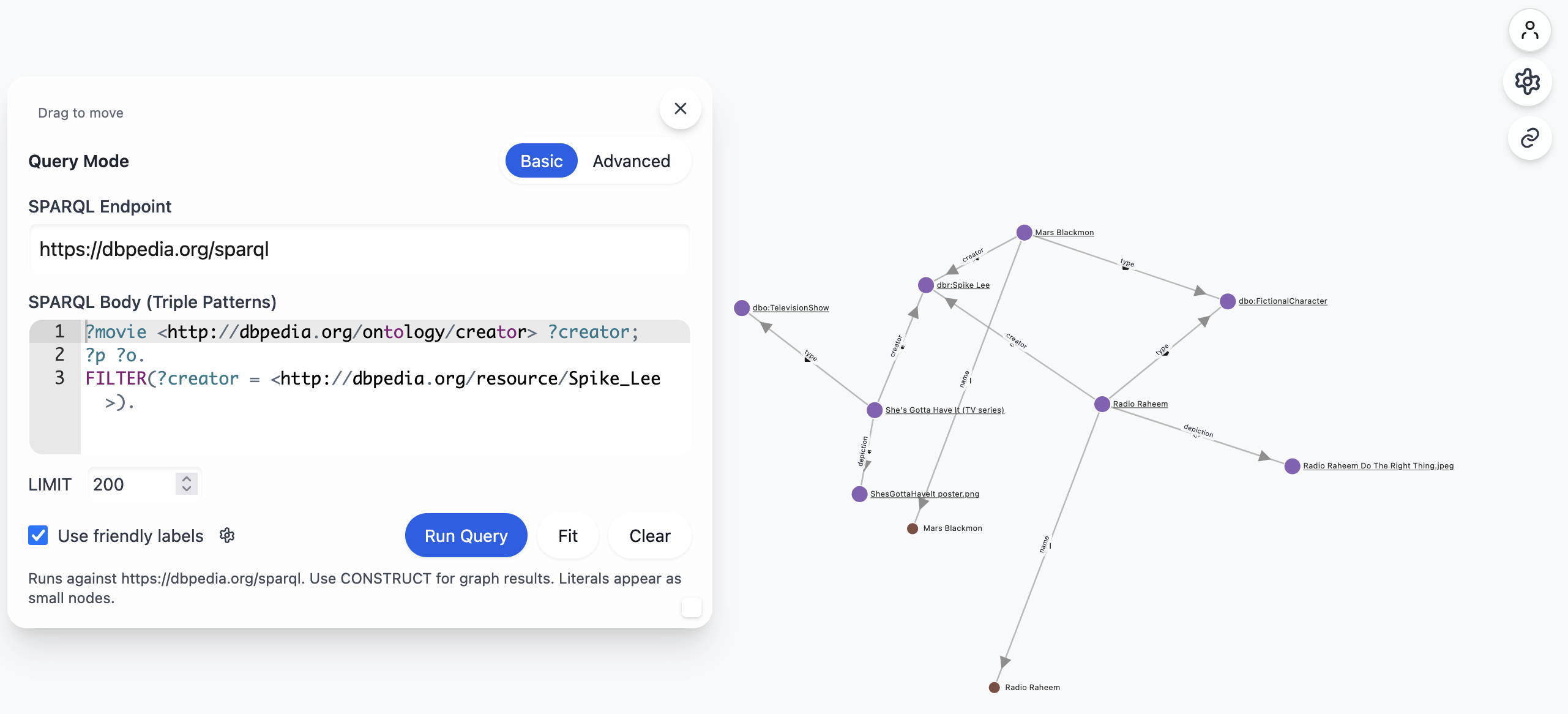
SPARQLWorks is a lightweight, browser‑only web application that lets you compose SPARQL queries and instantly visualise the results as a force‑directed graph. It is designed to be loosely coupled – there is no backend server, no build step, and it works with any public SPARQL endpoint that supports SPARQL CONSTRUCT queries.
- Features
- Getting Started
- Using the Query Panel
- Graph Controls
- Filtering & Styling
- Sharing & Copy Link
- Future Work
- License
| Category | Description |
|---|---|
| Query Modes | Basic – enter only the triple patterns (WHERE clause) and a LIMIT. Advanced – write a full CONSTRUCT query. |
| Endpoint Selector | Choose from a few common public endpoints or type any SPARQL endpoint URL. |
| Run / Fit / Clear | Execute the query, automatically fit the graph to the viewport, or clear the current visualisation. |
| Physics Controls | Adjust charge strength and link distance to fine‑tune the force‑directed layout. |
| Hover Focus | Optional 0.5 s delay before a node/edge is highlighted, reducing visual noise. |
| Friendly Labels | When enabled, human‑readable labels (e.g., foaf:name) are shown instead of raw IRIs. |
| Preferred Language | Provide a language tag (e.g., en, fr) to prefer language‑tagged literals for node labels. |
| Type & Property Filters | Dynamically generated check‑lists let you hide/show nodes by rdf:type or by predicate. |
| Hide Types | Quickly hide all rdf:type nodes and edges. |
| Legend | A colour legend explains the colour‑coding of node categories (class, literal, external, etc.). |
| Edge Annotations | Choose between small predicate icons or full predicate names. |
| Copy Share Link | Generate a URL that encodes the current query and visualisation settings – perfect for sharing. |
| Toast Notifications | Non‑intrusive feedback for actions such as “Link copied”. |
| Responsive UI | Tailwind‑CSS powered layout works on desktop and mobile browsers. |
| No Authentication Required | The app works out‑of‑the‑box; a future update will add optional OAuth login. |
- Open the file – simply open
sparqlworks.htmlin a modern browser (Chrome, Edge, Firefox, Safari). No server or build step is required. - Select an endpoint – the default is DBpedia (
https://dbpedia.org/sparql). You can pick another from the dropdown or paste a custom URL. - Write a query – switch between Basic and Advanced mode using the toggle in the query panel.
- Run – click the Run Query button. The result graph will appear in the full‑screen canvas.
- Mode Toggle –
Basicshows a lightweight editor for triple patterns and a LIMIT field.Advancedshows a full‑size Ace editor for any SPARQL query. - Run Query – sends the query to the selected endpoint via a
GETrequest (CORS‑enabled endpoints only). - Fit – re‑centres and scales the graph to fit the viewport.
- Clear – removes all nodes and edges, returning to the empty‑state placeholder.
- Friendly Labels Checkbox – toggles the use of human‑readable labels on the fly.
- Preferred Language Input – type a language tag (e.g.,
en) to prefer that language for literal labels.
The Controls panel (gear icon on the right) contains:
- Physics – sliders for Charge Strength (repulsion) and Link Distance (spring length).
- Hover Focus – when enabled, hovering a node/edge waits 0.5 s before highlighting, reducing accidental flicker.
- Friendly Labels – same as the checkbox in the query panel, but here you can toggle it while the graph is already rendered. A small gear button opens the Label Priority Modal to review usage counts and reorder the priority used for friendly labels.
- Preferred Language – same as above, but live‑updated.
- Filter by rdf:type – an accordion that lists all
rdf:typevalues present in the current graph. Select/deselect to hide/show those nodes. - Filter by property – similar accordion for predicates.
- Hide Types – a single checkbox that hides all
rdf:typenodes and edges regardless of the type filter. - Legend – shows the colour mapping for node categories.
- Edge Annotations – radio buttons to switch between small icons (e.g.,
owl:sameAs) and full predicate names.
- Dynamic Lists – the type and property filter lists are generated from the current graph data, so they always reflect what is actually present.
- Select All / Deselect – each accordion header includes a “Select all” button for quick toggling.
- Colour Coding – nodes are coloured by category (class, literal, external, etc.) using a deterministic D3 ordinal scale.
- Tooltips – hovering a node or edge shows a tooltip with the full IRI, label, and additional metadata.
When Use friendly labels is enabled, node names are chosen from label predicates in the following default priority:
skos:prefLabelrdfs:labelschema:nameschema:titlefoaf:name
- The app prefers labels with the selected language (e.g.,
en), then labels with no language tag, then any language. - Even with friendly labels ON, numeric and date values encountered on label predicates (e.g.,
xsd:date,xsd:dateTime, numbers) are still rendered as literal nodes and are not hidden. - You can customize the priority order per browser using the Label Priority Modal. The custom order is saved locally and can also be shared via the
lpURL parameter.
Open the modal using the gear icon next to “Use friendly labels” (available in both the right‑hand controls and the query panel).
- Shows the current priority order, how many nodes used each predicate, and up to 5 example nodes per predicate.
- Drag items to reorder; click Save to persist the order in this browser. Click Reset to restore the default.
- Changes are applied immediately to the current graph. The order can be shared with collaborators via the
lpparameter (see URL Parameters).
- Click the Copy share link button (the link‑icon floating button) to copy a URL that encodes:
- The selected endpoint
- The current query (URL‑encoded)
- All UI settings (physics sliders, filters, label options)
- Paste the URL into a browser or share it with collaborators – the app will restore the exact state.
The share link encodes the current query and most UI state. Notable params include:
q– URL‑encoded SPARQL (full query in Advanced mode; composedCONSTRUCTfrom Basic).lang– preferred language (e.g.,en,fr).labels–1or0(use friendly labels).hideTypes–1or0(hiderdf:typenodes/edges).mode–basicoradvanced.limit– Basic modeLIMIT.service– SPARQL endpoint URL.chg– charge strength (physics).ld– link distance (physics).hover–1or0(hover focus).annot–iconsornames(edge annotation mode).types– comma‑separated list of enabledrdf:typeIRIs (compacted/normalized).props– comma‑separated list of enabled property IRIs (normalized).groups– comma‑separated list of visible groups (e.g.,class,literal,external).pos– compact “id:x:y” entries (pinned positions) separated by|.lp– label priority order, comma‑separated list of predicates. Allowed values:skos:prefLabel,rdfs:label,schema:name,schema:title,foaf:name
Examples:
-
Use English labels, friendly labels ON, hide types OFF, and a custom label priority:
?labels=1&lang=en&hideTypes=0&lp=rdfs:label,skos:prefLabel,schema:name,schema:title,foaf:name -
Force predicate names on edges and hover focus ON:
?annot=names&hover=1 -
Include physics settings:
?chg=-350&ld=140
- Authentication – a future release will add OAuth login/logout (currently shown as a placeholder). This will enable private endpoint access and optionally saving user‑specific queries.
- Export – ability to export the visualisation as PNG/SVG.
- Expanded SPARQL Query Result Content-Type Support - JSON-LD is currently the only supported output
See the LICENSE file for details.
Happy querying and visualising!