Rancher is installed by default in this article. If it is not installed:
sudo docker run -d --restart=unless-stopped -p 8080:8080 rancher/serverA true genius must be able to make things simple.
Believe me, everything happens in a hurry, without exception. All great changes in human beings are forced, but they are so natural. For example, the birth of container (docker) technology, such as entrepreneurship on the string, such as the ambitious kubernetes, such as rancher, which is now the right-hand man, such as this article.
Different from Brother Zheng's CI/CD practice (How to use Docker to build a fully automatic CI based on DevOps), we have built our own DevOps CI/CD process based on our own situation, which is lighter and smaller, and more suitable for Startup.
If the world only has FLAG and BAT, it would be too boring. iHealth is a startup company. My department has about 10 R&D personnel. While taking on the R&D work of the three terminals, we also do all the delivery and operation and maintenance work around the service.
In terms of technology selection, the server, Web and mobile terminals (Android, iOS) must be used, but there are few people. Therefore, when recruiting people, we are not qualified to judge people by appearance. The department’s external titles are all full-stack. One language can cover all three terminals and has a broad mass base. I am afraid there is no better choice than Javascript/Typescript (Node.js).
On the server side, there are frameworks with their own strengths, such as Express, Koa, Feather, Nest, Meteor, etc., and the front-end is large and popular Reactjs, Vuejs and Angular. Whether it is Server Render or front-end and back-end separation, they can be handy. Because the company's health equipment (glucose meter, blood pressure meter, thermometer, blood oxygen, body fat scale, etc.) will have a dedicated department to develop and design and provide SDK, so the development work on the mobile side is more about design implementation and performance optimization, and React Native is a killer. Although the company does not have a desktop demand now, it cannot be denied that Electron is an interesting project, and it also adds more endorsements to the term "full stack".
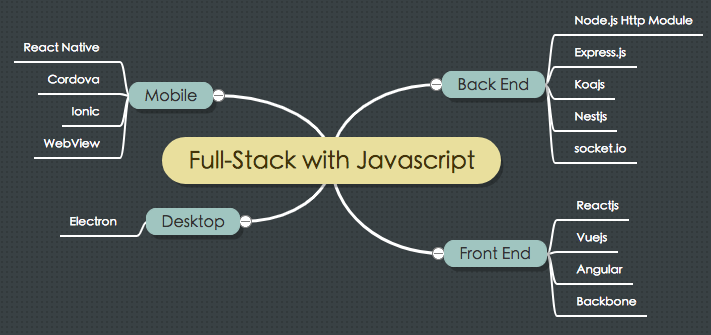
In addition, choosing to use Node/Js/Ts as the basis of the full stack will come with the benefits of RPC. There is no need to integrate the traditional RPC framework (such as gRPC). When writing the remote (micro) service method, you only need to write the corresponding npm package to achieve the same purpose, and the cost is lower and easier to understand.
In terms of the selection of the operation and maintenance environment, all businesses are run in the cloud, saving the cost of computer room maintenance and server operation and maintenance. In fact, when we were developing Pangu, we wrote the Node program and deployed it on the server using PM2, without using Docker. Of course, there were all the problems caused by not using Docker: the three terminals were not synchronized, the environment could not be isolated... The biggest surprise that Docker brought me was not only its super portability, but also that R&D personnel could easily reason about the top-level architecture of the program.
In fact, we used docker-compose directly for container orchestration for a while. During a large-scale server migration, we found that we needed to rethink more and more container management and more complete orchestration solutions. Rancher (Cattle) was applied to the technology stack at this time.
While the operation and maintenance environment has twists and turns, the journey of DevOps is also step by step and thrilling. Fortunately, we know what we lack and what we want, so we can easily do "where we don't know". As mentioned in the previous chapter, the right one is the best. The iterative process of continuous integration (CI) and continuous delivery (CD), from the initial code copy, to the combination of docker-compose and rsync commands, to the use of CI/CD tools, to achieve relative automation... So far, we have found a relatively easy-to-use and fun process.

The story goes like this: after a code monkey submits the code, he needs to go get a cup of coffee. In the mist of cat shit, he looks up at the ceiling at a 45° angle, and WeChat on his mobile phone reminds him that the build is successful (or failed, with dirty words). At this time, he can start walking to his workstation, and when he sits down, WeChat will remind him that the deployment to Rancher is successful (or failed).
It all started on github. After the developer finishes writing the BUG function, there needs to be a place to save these valuable data. The reason why we didn't use Gitlab or Bitbucket to build a private Git server is because we believe that code is the most direct embodiment of value. Services are like skeletons, terminals are like skin, and UE is like clothes. The three together form a pleasing landscape, and code is the foundation behind it. We believe that when the team's energy cannot be further dispersed and the population size is still small, it is safe and necessary to purchase the commercial version of Github. After all, it is as easy for those people to fix a fault as unplugging and plugging the network cable.
The word Drone is translated as drone or unmanned aerial vehicle. I consulted a British friend who is proficient in 1,024 languages and he said that the word means autonomous and works by itself. In plain words, it does its own work and is autonomous. However, this explanation is true for Drone. This open source project with 13,000+ Stars on Github is written in Golang. Compared with Jenkins, which is large and comprehensive, Drone is a CI software born for Docker. If you have used Gitlab CI, you will be familiar with the use of Drone. They all use Yaml-style files to define pipelines:
pipeline:
build:
image: node:latest
commands:
- npm install
- npm run lint
- npm run test
publish:
image: plugins/npm
when:
branch: master
Drone is as easy to install as Rancher, with a single line of docker commands. Of course, you can also read Drone's official documentation. Here, I will only talk about how to install Drone using Rancher catalog:
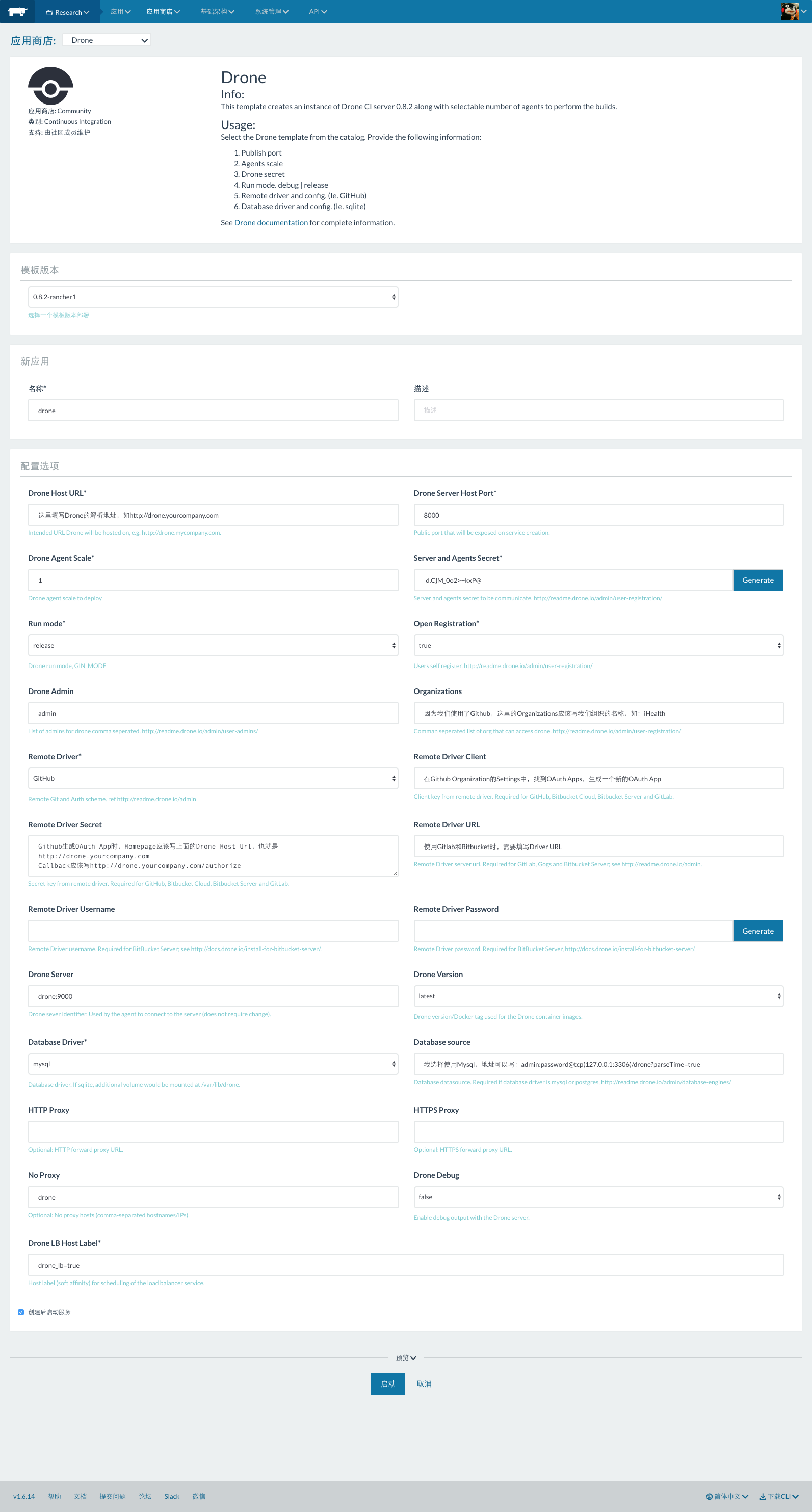
You can see the method of installing Drone using Rancher catalog (with github) by looking at the large image. When creating Drone's OAuth App in Github's Settings, the Home Page Url must be written with the IP address or domain name where you can access Drone, for example:
And the Authorization callback URL of the OAuth App should correspond to the above writing method:
You are done:

After logging into Drone, find the Git Repo you want to enable CI for in Repositories and use the switch button to open it:
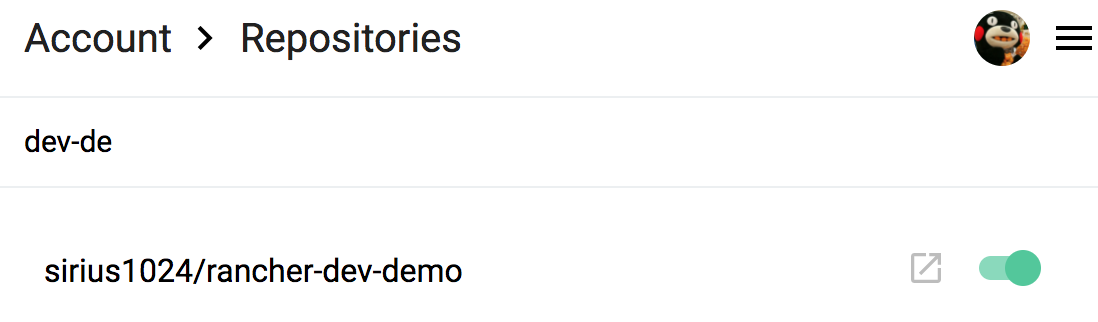
This means that Drone has turned on the webhook for this Repo. When code is submitted, Drone will detect whether the root directory of this Repo contains a .drone.yml file. If so, it will execute the CI process according to the pipeline defined in the yaml file.
Before deciding to use Drone, you need to know that Drone is a project that is highly dependent on the community. Its documentation is not perfect (it has been perfected, but the version has been iterated and the documentation cannot keep up), and the quality of plugins is good or bad. But for friends who are good at Github issues, Google, and Stackoverflow, this is not particularly difficult. Drone also has a paid version, which does not require you to provide your own server, but is used as a service like Github.
If you decide to start using Drone, as of the above steps, we have turned on Drone's monitoring of Github Repo. Once again, you need to include the .drone.yml file in the root directory of the code repo to actually trigger Drone's pipeline.
So, if you want to reproduce the scene in the above story, how should you integrate it?
In the process of building CI/CD, our company now uses Harbor as a private image repository. From submitting code to automatically deploying to Rancher, the following steps should be followed:
- Submit code to trigger Github Webhook
- Drone uses the docker plug-in to build an image according to Dockerfile and push it to Harbor
- Drone uses the rancher plug-in to deploy the image built above according to stack/service
- Drone uses the enterprise WeChat plug-in to report the deployment results
Here is an excerpt of a yaml code from the company project to describe the above steps:
# .drone.yaml

pipeline:
# Use plugins/docker plug-in to build an image and push it to harbor
build_step:
image: plugins/docker
username: harbor_username
password: harbor_password
registry: harbor.company.com
repo: harbor.company.com/registry/test
mirror: 'https://registry.docker-cn.com'
tag:
- dev
dockerfile: Dockerfile
when:
branch: develop
event: push

# Use rancher plugin to automatically update instances
rancher:
image: peloton/drone-rancher
url: 'http://rancher.company.com/v2-beta/projects/1a870'
access_key: rancher access key
secret_key: rancher secret key
service: rancher_stack/rancher_service
docker_image: 'harbor.company.com/registry/test:dev'
batch_size: 1
timeout: 600
confirm: true
when:
branch: develop
event: push

# Use clem109/drone-wechat plugin to report to corporate WeChat
report-deploy:
image: clem109/drone-wechat
secrets:
- plugin_corp_secret
- plugin_corpid
- plugin_agent_id
title: '${DRONE_REPO_NAME}'
description: |
Build sequence: ${DRONE_BUILD_NUMBER} Deployment successful, well done ${DRONE_COMMIT_AUTHOR}!
Updated content: ${DRONE_COMMIT_MESSAGE}
msg_url: 'http://project.company.com'
btn_txt: Click to go
when:
branch: develop
status:
- success
Before connecting to WeChat for Business, you need to create a custom application in WeChat for Business, for example, our application is called Drone CI/CD. Of course, you can also create a WeChat for Business App for each project, which is troublesome, but it allows people who need to pay attention to the project to pay attention to the build information.
Here is a screenshot of the enterprise WeChat test:
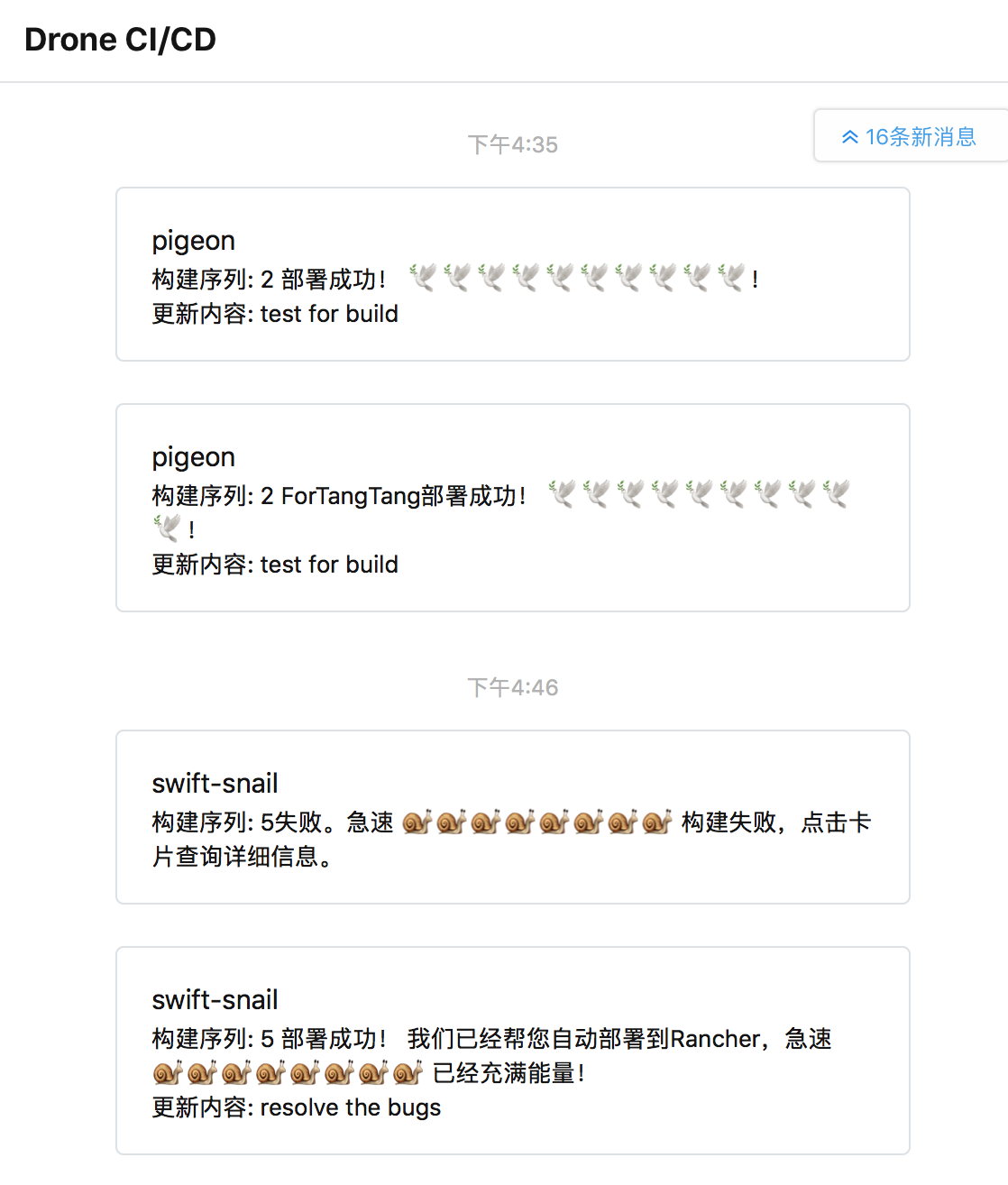
The enterprise WeChat is connected to the WeChat client, and the playability is good:

Here I think it is necessary to remind you that when using Drone's enterprise WeChat plug-in, do not use the enterprise WeChat in the Drone Plugins list. Looking through its source code, you can find that one of the functions will send sensitive information of the enterprise to a private server. Regardless of whether the author has good intentions for BaaS or other ideas, I think it is inappropriate:
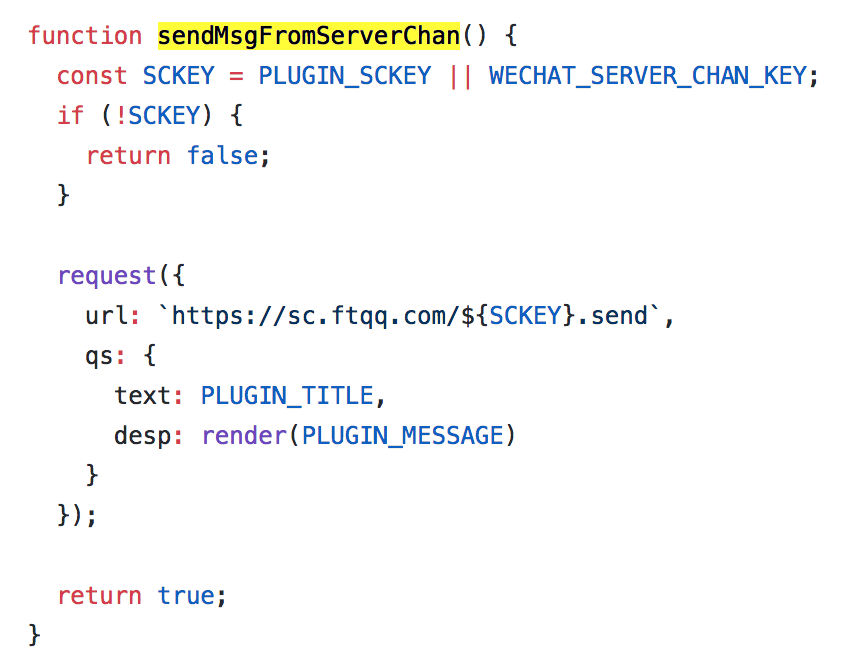
Code address: https://github.com/lizheming/drone-wechat/blob/master/index.js
Long before the WeChat for Business plug-in in Drone Plugins appeared, my friend Clément wrote a WeChat for Business plug-in that is still in use today. Welcome to check the source code, raise issues and bugs. In order not to make Clemmon proud, I don't intend to call on everyone to give him a star: clem109/drone-wechat
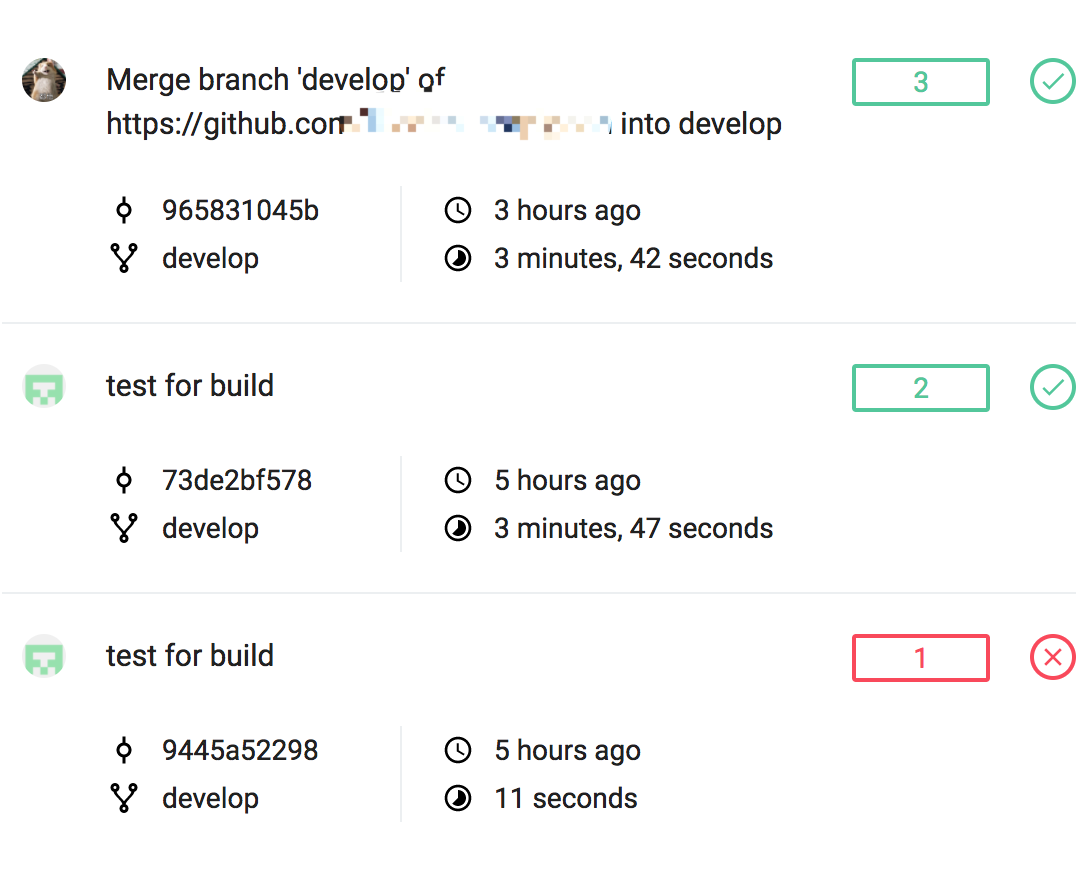
After the build is completed, you can see the traces of the friends' battles in the Drone control panel:
ELK is a combination of ElasticSearch, Logstash and Kibana, and is a very powerful distributed log solution. The use of ELK is more about its own optimization and the use of Kibana for business purposes. This is a big topic in itself. ElasticSearch alone has many tricks. Due to human resources reasons, we used the ELK built by a brother department, which is equivalent to using the existing ELK service. Therefore, I will not go into details about the construction of ELK here. There are many resources on the Internet for reference.
What we need to do here is to collect the logs in rancher into the existing ELK.
Find logspout in the Rancher catalog, which is a logstash adapter for docker:
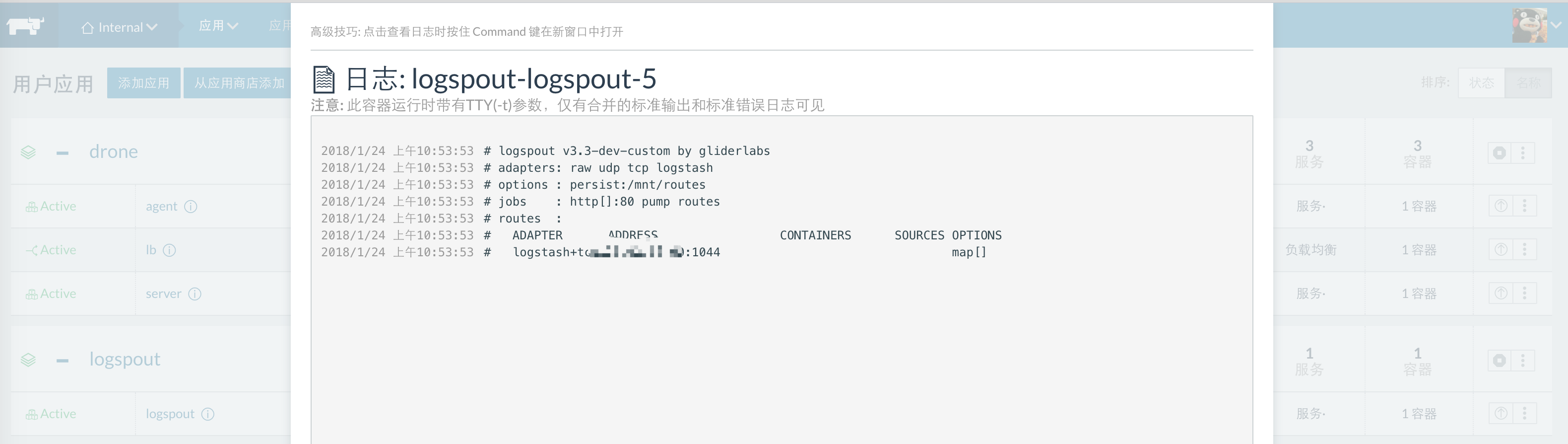
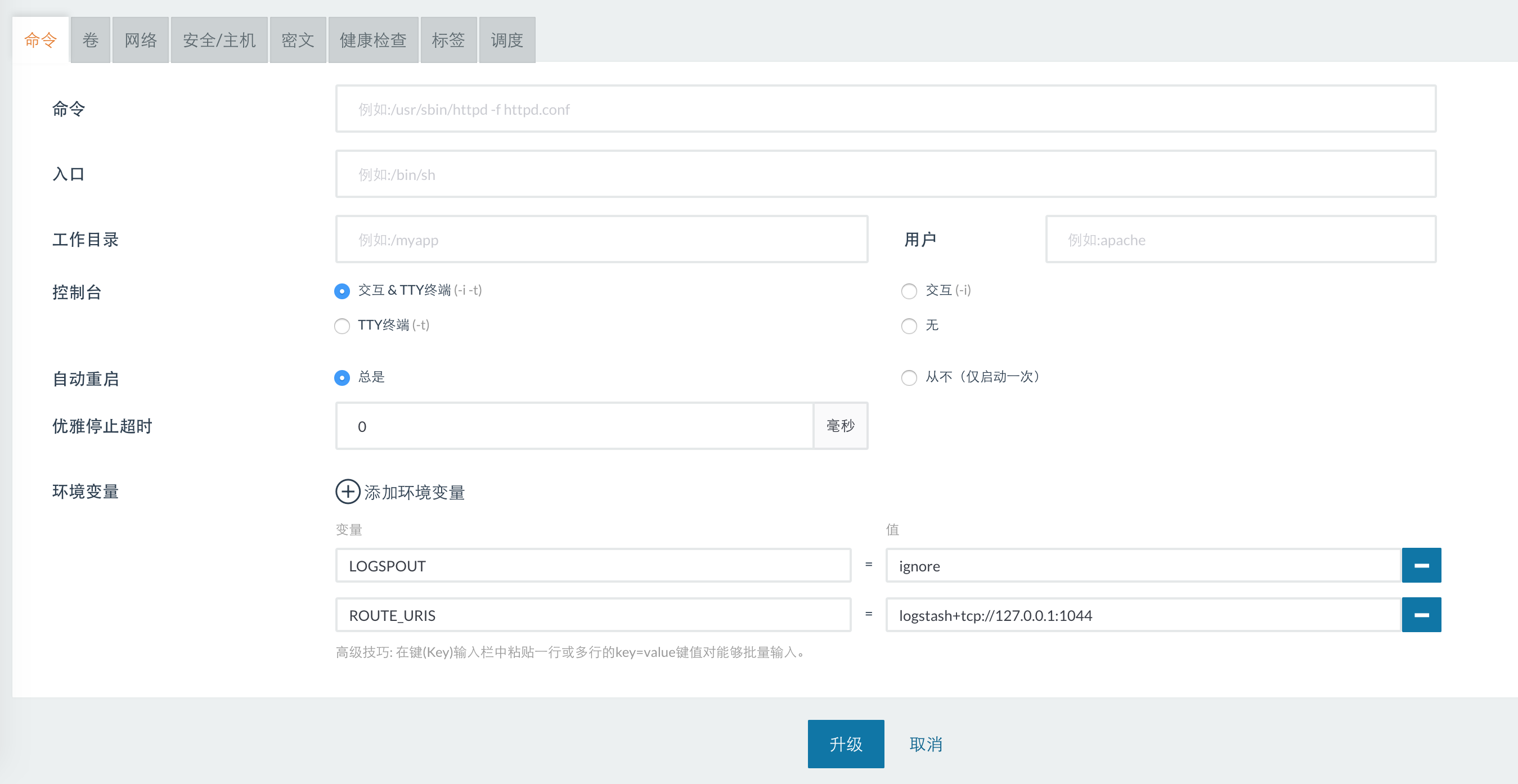
Set LOGSPOUT=ignore in the configuration, and then set ROUTE_URIS to the logstash address that has been set up, and you can integrate the logs of the current environment into ELK:
Everything seems good so far, right? It is indeed. We submitted the code, drone automatically built the image to harbor, automatically deployed it to rancher, and automatically sent the build results. Rancher can also help automatically restart the dead container. Rancher webhook can also achieve automatic elastic computing, and you can use yaml files to customize the build process and some report information. When the build or deployment fails, let the enterprise WeChat automatically insult our friends...
But it is said that microservices also pay attention to service registration and service discovery. If you don’t want to use nuclear weapons such as Zookeeper (just like we don’t want to use Kong, one is that there is a certain learning and maintenance cost, and the other is that the logo is getting uglier and uglier), then you need to find a lightweight alternative that can meet the needs. Besides, there is no need to deal with peak shaving at present.
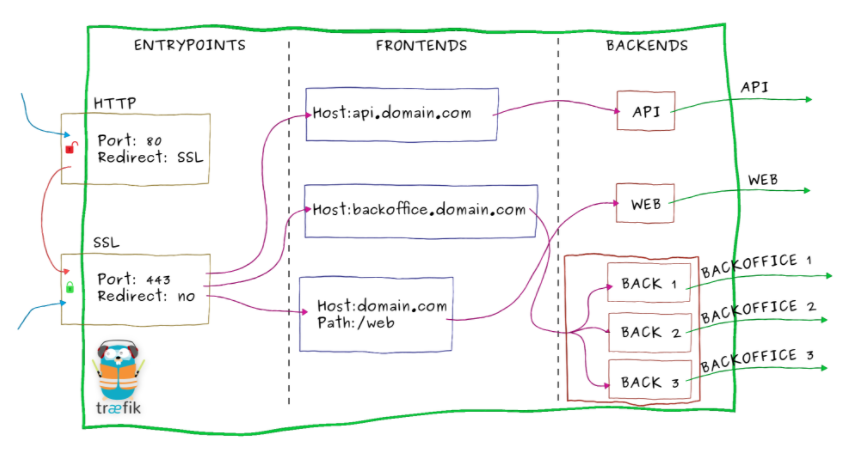
For domain name resolution, we chose to use Traefik as LB, which is also written in Golang, has nearly 13,000 Stars, and has simple service registration and service discovery functions. What's more worth mentioning is that Traefik in the Rancher catalog is very friendly and integrates the function of Let's Encrypt (ACME), which can automatically apply for SSL certificates and automatically renew them when they expire. Of course, it is not recommended to use it in a production environment. The number of free SSL certificates can easily reach the threshold and make the domain name inaccessible.
Traefik internal architecture diagram (Image from traefik.io):
How to install Traefik? Let's take Traefik in the Rancher catalog as an example (without using ACME):
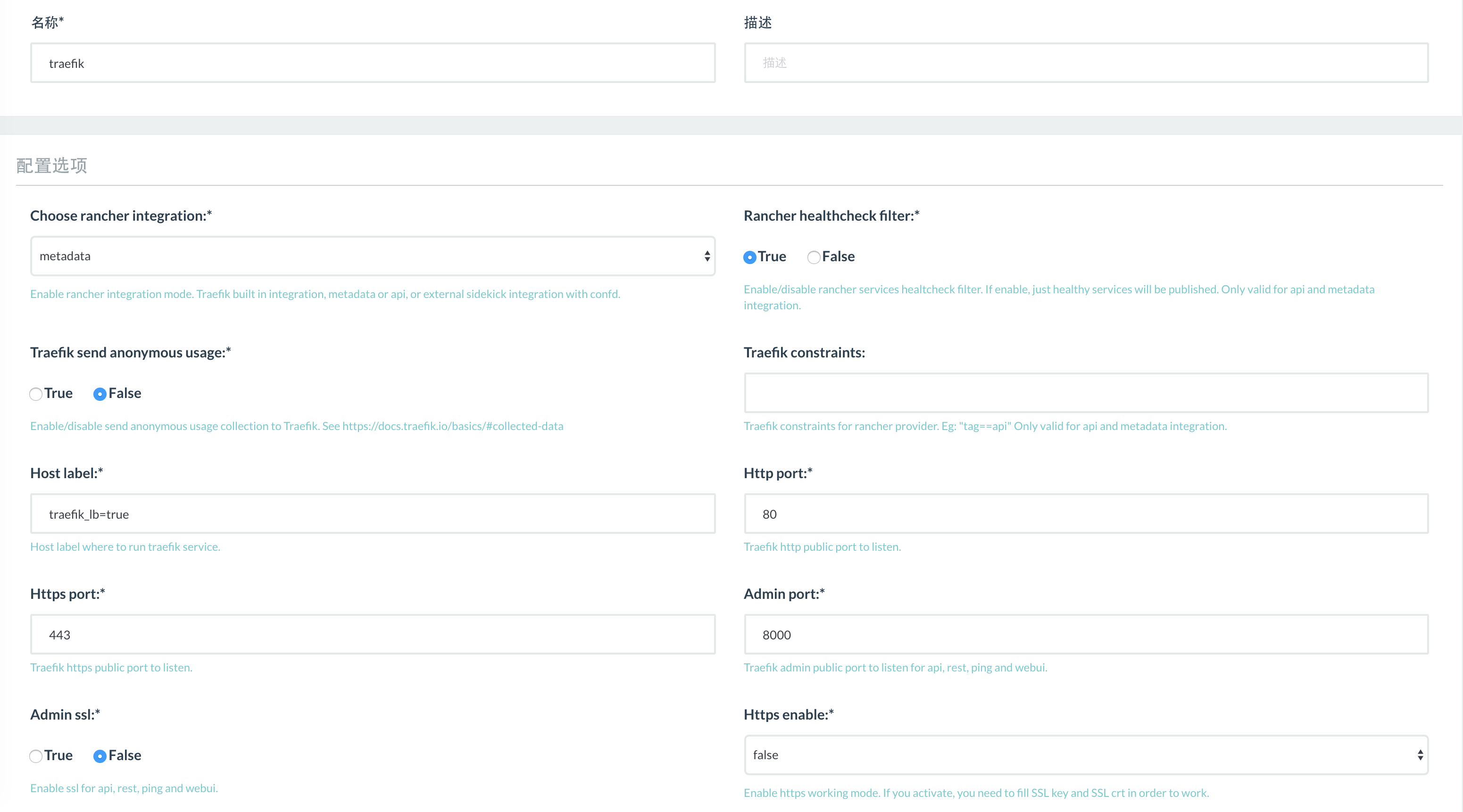
Our purpose is to do domain name resolution, and the integration mode should be set to external. Http Port is set to 80, Https Port is set to 443, and Admin Port can be filled in according to your actual situation. The default value is 8000.
At this time, Traefik is ready, but when you open traefik_host:8000 to view the control panel, you will find that Traefik does not do any proxy. The reason is that you need to use rancher labels to indicate the proxy method of traefik in the proxy target.
For example, if we want to proxy to the domain name drone.company.com for the Drone we just installed, we need to set labels in the drone server container:
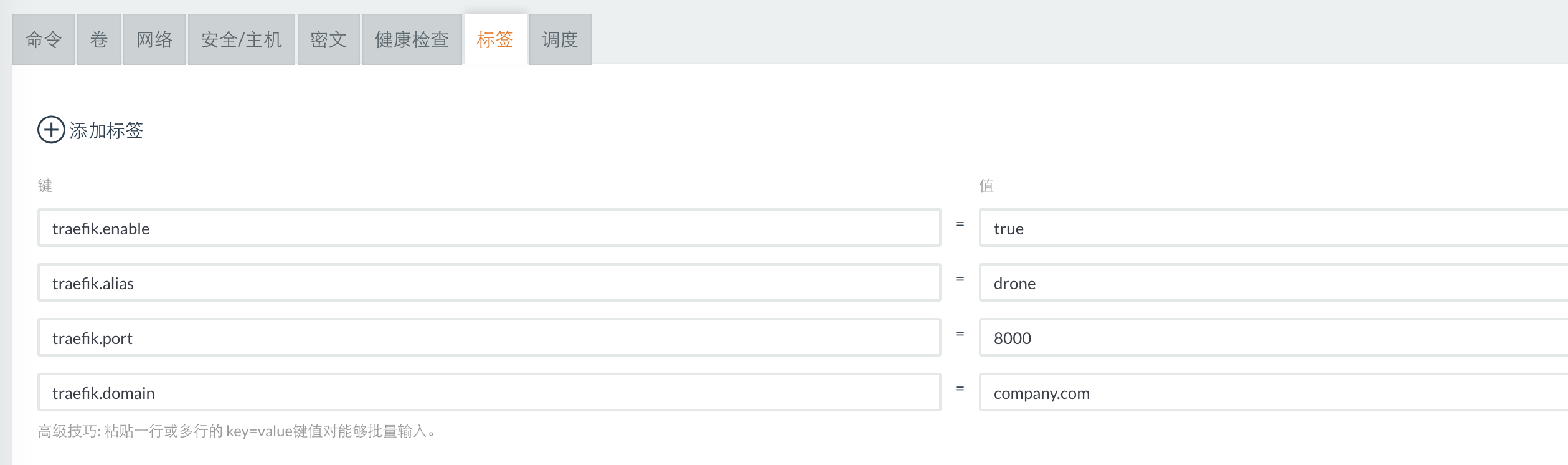
- traefik.enable=true means enabling the traefik proxy
- traefik.domain=company.com means the root domain name of the traefik proxy
- traefik.port=8000 means the port exposed by this container
- traefik.alias=drone means we want to resolve the drone server container to drone.company.com
It should be noted that traefik.alias may lead to duplicate resolution, and traefik has its own set of default resolution specifications. For more detailed documentation, please see the GitHub address: rawmind0/alpine-traefik
After setting rancher labels, you can see that the service address has been registered in the Traefik control panel:
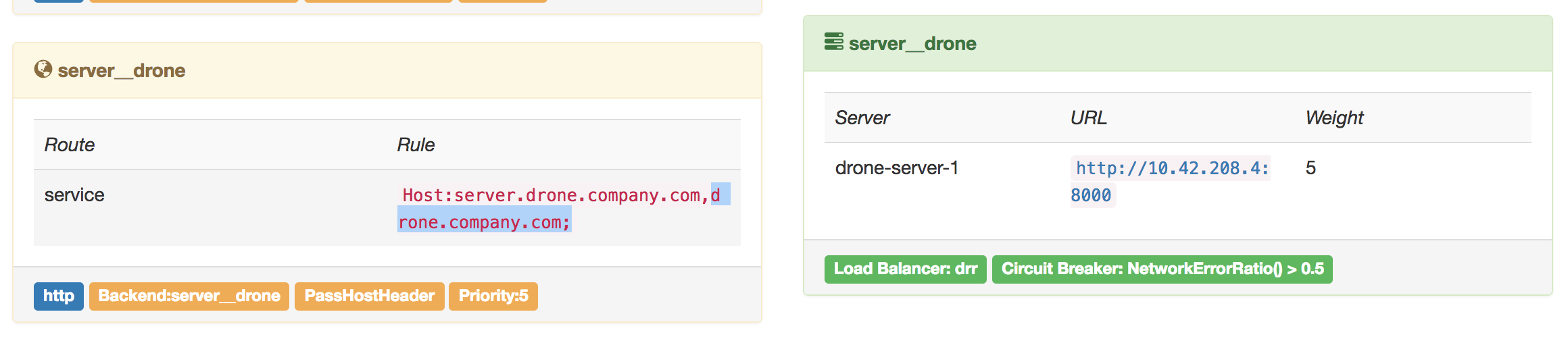
Using this feature of Traefik and Rancher's elastic calculation of Containers, you can do simple service registration and service discovery.
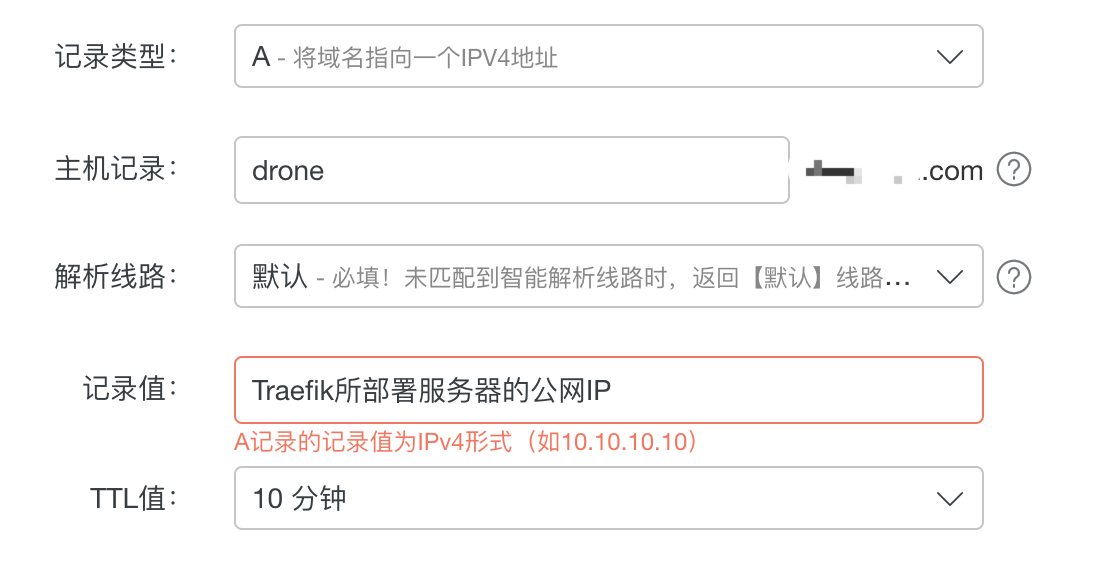
Finally, you need to do A record resolution at the domain name service provider, and the resolved IP address should be the public network address of Traefik. Because the default ports for domain name resolution are 80 and 443, what happens next is exactly the same as what Nginx does. The domain name is resolved to port 80 of the Traefik server (443 for https), and Traefik finds that the domain name has been registered in the service, so it proxies to the virtual IP starting with 10.xx, forwards the request and sends a response. It is exactly the same as Nginx Conf:
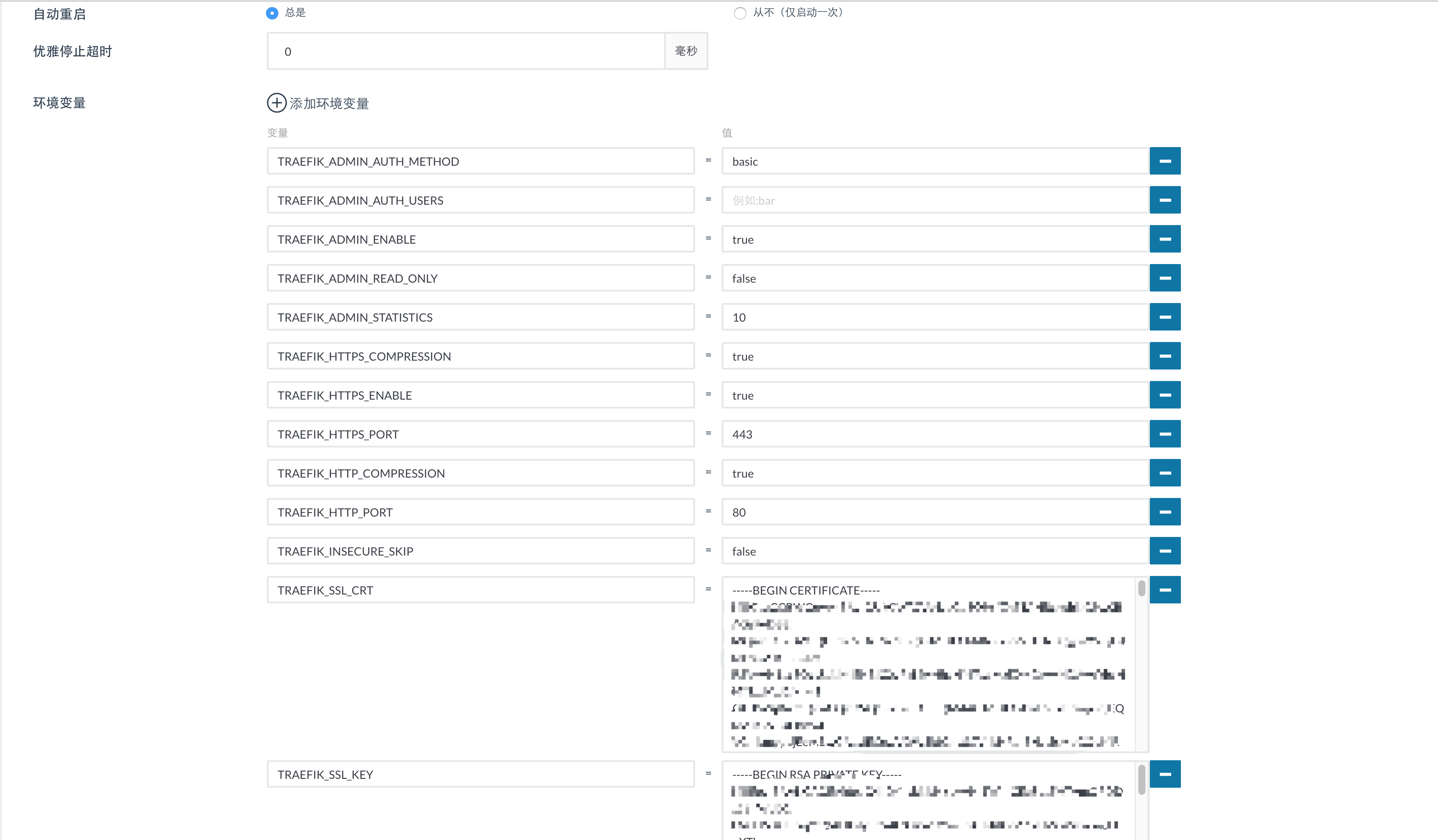
So far, we have fully realized the automation from code submission to automatic deployment and domain name resolution. To enable Https in Traefik on Rancher in the production environment, you can paste the entire trust chain of ssl in text form and modify the Https option of Traefik to true:
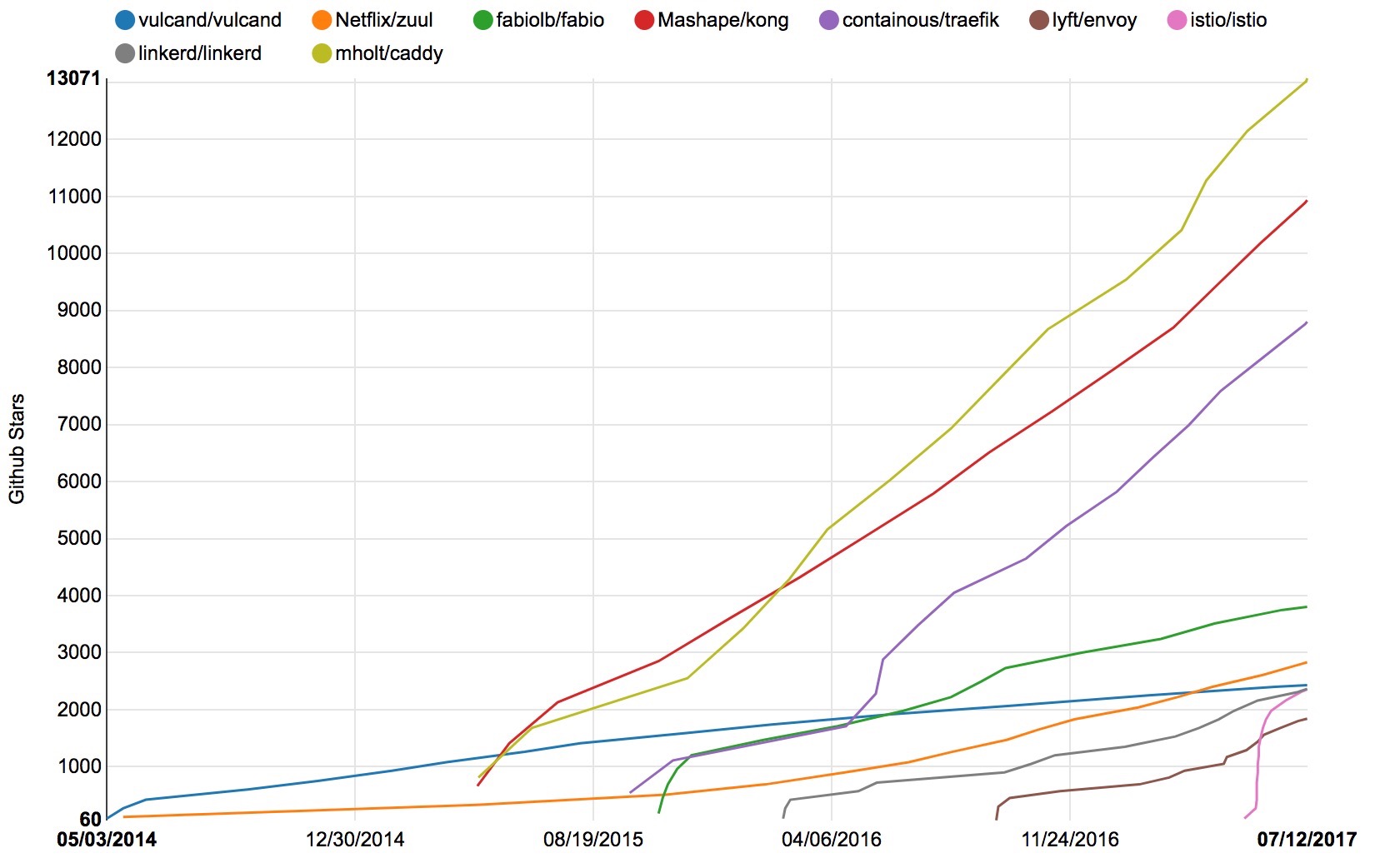
In addition, Traefik is not the only choice for LB/Proxy, nor is it the coolest choice, but it is currently the best integrated with Rancher. The programs in the following figure are all worth investigating (you can pay a little attention to istio, which has a full forehead and a light skeleton. This is only the data at the end of July 2017...):
In fact, we love and hate Traefik. It can be easily integrated with Rancher, with simple and powerful functions and impressive performance. But in the beginning, we really stepped on a lot of pits. At one time, we planned to give up and return to the traditional Nginx reverse proxy method. We even wrote a PR and it was merged into the master. As of now, the latest version 1.5 in the Rancher catalog is already a truly stable and usable version.
When writing Dockerfile in Node.js projects, yarn or npm i is often used to pull dependency packages. However, the npm server is far away on the other side of the world. In this case, Taobao's image can be used for acceleration. Usually when we develop locally, we remember to add the npm image. The same is true when running Dockerfile on the server:
FROM node:alpine
WORKDIR /app
COPY package.json .
RUN npm i --registry https://registry.npm.taobao.org
COPY . .
CMD [ "node", "bin/www" ]
When Drone builds an image and pushes it to the image repository, it needs to build it based on the base image of Dockerfile. The docker server is also far away on the other side of the world. Similarly, you can use mirror to specify the image repository and try to use alpine images to reduce the size:
pipeline:
build_step:
image: plugins/docker
username: harbor_name
password: harbor_pwd
registry: harbor.company.com
repo: harbor.company.com/repo/test
mirror: 'https://registry.docker-cn.com'
This is a deadly command. Do not use it on the server. But local development is very useful. It means stopping all containers, deleting all containers, and deleting all images:
docker stop $(docker ps -aq) && docker rm $(docker ps -aq) && docker rmi $(docker images -aq)Rome was not built in a day, and tall buildings are built from the ground. At the beginning of enterprise development, we must ensure high-speed iteration of projects while laying the foundation. It is impossible to achieve Netflix's scale and its exquisite microservice governance in a short period of time. There are also many parts that need to be improved in the details of operation, such as BDD and TDD practices, traditional UAT and blue-green grayscale releases, full-link logs in the mobile era, service fuses, isolation, current limiting and degradation capabilities, or the Service Mesh that spreads like wildfire... So to put it another way, you must survive before you can live. We can allow services to die, but we must ensure that services can quickly come back to life without perception or very short perception.
In the process of continuous delivery, we also tried to use sonar code quality management and phabricator as the code review link. Because of the increasing number of configuration changes and microservices, the introduction of the configuration center (mainly considering Ctrip's Apollo) is also imminent. Whether the cost of call chain monitoring and code re-embedding (the advantages of npm package rpc mentioned in Section 2 can be reflected) can offset the benefits it brings, etc. However, because it has not yet reached a very mature stage, it will not be shared this time. Only its name is stated to inspire all smart partners.
In addition, the growth of technical vision is not overnight. Just like the Chinese government started to build highways when everyone could not afford bicycles, can it still be said that it is a face (KPI) project today? Advancing with the community, broadening your horizons, and maintaining the ability to think independently are more important skills than all the above.
Back to the beginning of this article, everything is forced. Rather than saying that the author is talented, talented, handsome, elegant and romantic, it is better to say that this is all forced. Colleagues complain that the process is cumbersome and unintuitive. If you want to make code and coffee as simple as complexity, you need to think about the purpose and essence of CI/CD. A true genius must be able to make things simple.
Rancher: rancher/rancher
Drone: drone/drone
Drone Enterprise WeChat API Plugin: clem109/drone-wechat
Harbor: [vmware/harbor][ToolsHarbor]
Traefik: containous/traefik
Phabricator: phacility/phabricator
SonarQube: SonarSource/sonarqube
Logspout: gliderlabs/logspout
Configuration Center (made by Ctrip, the code is pretty good): ctripcorp/apollo
SuperSet(BI): apache/incubator-superset
[ImageDevOps]:https://raw.githubusercontent.com/sirius1024/rancher-dev-demo/master/p ublic/images/devops-srctions.png
[ImageDroneSwitched]:https://raw.githubusercontent.com/sirius1024/rancher-dev-demo/master/pub lic/images/drone-switch-repo.png [ImageDroneBuilded]:https://raw.githubusercontent.com/sirius1024/rancher-dev-demo/master/public/images/workwechat-report.png [ImageDroneWrokwchatBadCode]:https://raw.githubusercontent.com/sirius1024/rancher-dev-demo/master/public/images/bad-code.png [ImageDroneRecords]:https://raw.githubusercontent.com/sirius1024/rancher-dev-demo/master/p ublic/images/drone-records.png [ImageWechatNotify]:https://raw.githubusercontent.com/sirius1024/rancher-dev-demo/master/public/images/drone-notify.jpeg
[ImageLogConf]:https://raw.githubusercontent.com/sirius1024/rancher-dev-demo/master/public/images/logspout _config.png
[ImageTraefikInternal]:https://ra w.githubusercontent.com/sirius1024/rancher-dev-demo/master/public/images/traefik-processer.png [ImageProxyStars]:https://raw.githubusercontent.com/sirius1024/rancher-dev-demo/master/public/images/Proxy%20Stars.jpeg