Deterministic geometry validation for coordinate-based spatial layouts.
This project is an early extraction from a private kitchen-planning workflow. The core idea is simple: define a room, objects, parent-child relationships, clearances, operation envelopes, and module runs as structured data; validate the geometry; render only after validation passes.
It is not a construction-approval tool. It is a small geometry back end for auditable layout proposals and agent-generated designs.
Developer preview: version 0.1.0 is pre-1.0. The data model and Python API may change incompatibly while downstream use cases establish the right public abstractions.
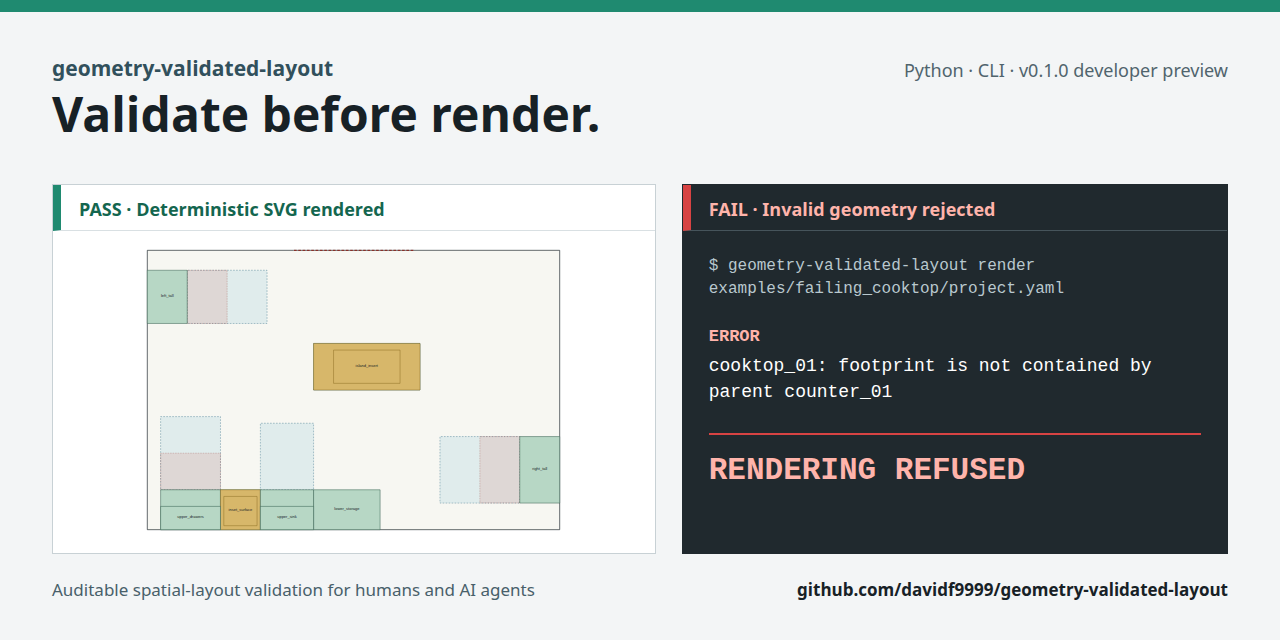
This is not a visual planner, CAD package, or construction approval system. It is a validation-first geometry backend for layout proposals made by humans or coding agents. The intended workflow is to reject invalid geometry before a plausible drawing can make it look acceptable.
A private downstream project provided an early practical test: an operation envelope intersected an upper cabinet in plan, but the two occupied different vertical intervals. The initial generic validator incorrectly reported a blockage. The downstream adapter exposed the defect, and the core now makes operation-blocker checks height-aware. This feedback loop is why the package is kept separate from domain policy while still being exercised by a real project.
The validator does not produce a design drawing after a hard failure:
$ geometry-validated-layout render examples/failing_cooktop/project.yaml \
    --output /tmp/failing.svg
Errors:
- cooktop_01: footprint is not contained by parent counter_01
Rendering refused because validation failed.
This refusal is part of the public contract: rendering and validation use the same structured coordinates, so a plausible image cannot hide rejected geometry.
pip install geometry-validated-layoutgit clone https://github.com/davidf9999/geometry-validated-layout.git
cd geometry-validated-layout
python3 -m venv .venv
. .venv/bin/activate
pip install -e ".[dev]"
geometry-validated-layout validate examples/irregular_kitchen/project.yaml
geometry-validated-layout render examples/irregular_kitchen/project.yaml --output /tmp/irregular_kitchen.svg
pytestTry the deliberate failure:
geometry-validated-layout render examples/failing_cooktop/project.yaml \
  --output /tmp/failing.svg
Expected result: validation identifies the containment error and rendering is refused.
Generate the demo SVG:
geometry-validated-layout render examples/irregular_kitchen/project.yaml --output docs/demo/irregular_kitchen.svgOpen docs/demo/irregular_kitchen.svg to inspect the shell, closed footprints,
keep-clear boundary, and operation envelopes.
For a more complete downstream example, see
examples/complete_kitchen/README.md. It includes a substantial synthetic
project, checked-in machine validation report, and deterministic SVG drawing.
Use the CLI when integrating from another language or when a stable process
boundary is preferable. Python applications can construct LayoutProject
directly. Existing CAD, configurator, or domain applications should normally
keep their own data model and add a small adapter into the generic schema.
existing app/domain model -> adapter -> LayoutProject -> validate_project()
                                                     -> report
                                                     -> render only after pass
See the integration guide for pinned installation, CLI exit/report behavior, Python, adapter, HTTP-service, and coding-agent examples.
The generic core understands:
- shell polygons and wall/open-boundary segments
- wall-anchored rectangles and explicit polygons
- parent-child containment
- vertical interval overlap
- object overlap
- keep-clear boundary segments
- operational use/opening envelopes
- clearance checks
- exact module-run sums
- machine-readable and human-readable validation reports
- deterministic SVG rendering from the same coordinates
Kitchen-specific rules such as refrigerators, sinks, appliance counts, metrage,
and supplier workbooks belong in a separate domain package or private project.
See docs/ARCHITECTURE.md for the dependency boundary and the criteria for
splitting out a reusable domain package.
Python 3.10 through 3.14 are exercised in CI. The CLI is the recommended initial integration surface. Direct Python imports are available but do not have stable pre-1.0 compatibility guarantees yet.
Reusable agent workflow rules live in
.agents/skills/geometry-validated-layout/SKILL.md. They intentionally describe
the domain-neutral validation contract rather than kitchen-specific planning
rules. Current capabilities, limitations, and deferred work are recorded in
STATUS.md so development can continue without external chat context.
See examples/irregular_kitchen/project.yaml for a synthetic example. The
example is intentionally fictional and does not contain private room geometry,
addresses, Drive links, or supplier data.
Validate before render.