





resmush is an R package for optimizing local and online image files, individually or in entire directories, with the reSmush.it API. The API is free for personal use and does not require an API key. reSmush.it is also available through WordPress and other tools.
The reSmush.it API provides:
- Optimization without an API key.
- Support for PNG, JPEG, GIF, BMP and TIFF files.
- A per-file size limit: files must be smaller than 5 MB.
- Compression powered by several algorithms:
Note
This package is stable and maintained on a best-effort basis. Maintenance currently prioritizes CRAN compatibility, bug fixes and regressions over new features.
Install resmush from CRAN with:
install.packages("resmush")Check the documentation for the development version at https://dieghernan.github.io/resmush/dev/.
You can install the development version of resmush from GitHub with:
# install.packages("pak")
pak::pak("dieghernan/resmush")
Alternatively, install resmush from r-universe:
# Install resmush in R:
install.packages(
  "resmush",
  repos = c(
    "https://dieghernan.r-universe.dev",
    "https://cloud.r-project.org"
  )
)Optimize and download an online JPEG image with resmush_url():
library(resmush)

url <- "https://dieghernan.github.io/resmush/img/jpg_example_original.jpg"

resmush_url(
  url,
  outfile = "man/figures/jpg_example_compress.jpg",
  overwrite = TRUE
)
#> ══ resmush summary ═════════════════════════════════════════════════════════════
#> ℹ Input: 1 URL, 178.7 Kb total.
#> ✔ Optimized 1 URL: size is now 45 Kb (was 178.7 Kb). Saved 133.7 Kb (74.82%).
#> Saved result in directory 'man/figures'.
 (b)
(b)
Figure 1: Original image (a): 178.7 KB, optimized image (b): 45 KB (compression: 74.8%). Click to enlarge.
Use the qlty argument to adjust the JPEG quality level. For best
results, use values above 90.
# Use a low JPEG quality level.
resmush_url(
  url,
  outfile = "man/figures/jpg_example_compress_low.jpg",
  overwrite = TRUE,
  qlty = 3
)
#> ══ resmush summary ═════════════════════════════════════════════════════════════
#> ℹ Input: 1 URL, 178.7 Kb total.
#> ✔ Optimized 1 URL: size is now 2.2 Kb (was 178.7 Kb). Saved 176.4 Kb (98.74%).
#> Saved result in directory 'man/figures'.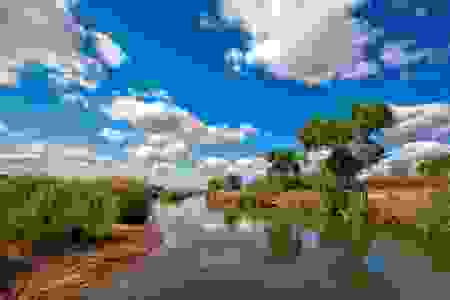
Figure 2: Image with visible compression artifacts caused by high
compression (qlty = 3).
When results are available, all optimization functions invisibly return
a data frame with one row per result and columns containing source and
destination paths, formatted and raw file sizes, compression ratios and
status notes. They return NULL otherwise. Successful API calls also
write the optimized files to disk. The following example shows the
result for a local image file:
png_file <- system.file("extimg/example.png", package = "resmush")

# Copy to a temporary file for this example.
tmp_png <- tempfile(fileext = ".png")
file.copy(png_file, tmp_png, overwrite = TRUE)
#> [1] TRUE

summary <- resmush_file(tmp_png, overwrite = TRUE)

tibble::as_tibble(summary[, -c(1, 2)])
#> # A tibble: 1 × 6
#>   src_size dest_size compress_ratio notes src_bytes dest_bytes
#>   <chr>    <chr>     <chr>          <chr>     <dbl>      <dbl>
#> 1 239.9 Kb 70.7 Kb 70.54% OK 245618 72356Several other R packages provide image optimization tools:
- The xfun package (Xie 2026b) provides:
xfun::tinify(): Similar toresmush_file()but uses TinyPNG and requires an API key.xfun::optipng(): Compresses local files using OptiPNG. The program must be installed locally.
- The tinieR package: An R interface to TinyPNG.
- The tinyimg package (Xie 2026a): Optimizes local PNG and JPEG files using Rust libraries. It supports lossless PNG optimization via oxipng, optional lossy PNG palette reduction and JPEG re-encoding via mozjpeg.
- The optout package:
Similar to
xfun::optipng()but with more options. It requires additional local software.
| Tool | CRAN | Additional software | Online images | API key required | Limits |
|---|---|---|---|---|---|
xfun::tinify() |
Yes | No | Yes | Yes | 500 compressions per month (free tier) |
xfun::optipng() |
Yes | Yes | No | No | None |
| tinieR | No | No | Yes | Yes | 500 compressions per month (free tier) |
| tinyimg | Yes | Yes (Rust toolchain) | No | No | None |
| optout | No | Yes | No | No | None |
| resmush | Yes | No | Yes | No | Personal use only. Files smaller than 5 MB. |
Table 1: R packages: comparison of image optimization alternatives.
| Tool | PNG | JPEG | GIF | BMP | TIFF | WebP | |
|---|---|---|---|---|---|---|---|
xfun::tinify() |
✅ | ✅ | ❌ | ❌ | ❌ | ✅ | ❌ |
xfun::optipng() |
✅ | ❌ | ❌ | ❌ | ❌ | ❌ | ❌ |
| tinieR | ✅ | ✅ | ❌ | ❌ | ❌ | ✅ | ❌ |
| tinyimg | ✅ | ✅ | ❌ | ❌ | ❌ | ❌ | ❌ |
| optout | ✅ | ✅ | ❌ | ❌ | ❌ | ❌ | ✅ |
| resmush | ✅ | ✅ | ✅ | ✅ | ✅ | ❌ | ❌ |
Table 2: R packages: supported formats.
In practice, resmush is designed for quick image optimization with minimal setup, including support for online image files and formats such as GIF, BMP and TIFF. Packages such as tinyimg may be a better fit for fully local workflows focused on PNG and JPEG optimization and fine-grained control over compression settings.
Hernangómez D (2026). resmush: Optimize and Compress Image Files with reSmush.it. doi:10.32614/CRAN.package.resmush. https://dieghernan.github.io/resmush/.
A BibTeX entry for LaTeX users:
@Manual{R-resmush,
  title = {{resmush}: Optimize and Compress Image Files with {reSmush.it}},
  doi = {10.32614/CRAN.package.resmush},
  author = {Diego Hernangómez},
  year = {2026},
  version = {1.0.2},
  url = {https://dieghernan.github.io/resmush/},
  abstract = {Optimize and compress local and online image files with the reSmush.it API <https://resmush.it/api/>. Process individual files or entire directories. The API is free for personal use, accepts files smaller than 5 MB and supports PNG, JPEG, GIF, BMP and TIFF files.},
}
Xie, Yihui. 2026a. tinyimg: Optimize and Compress Images. https://doi.org/10.32614/CRAN.package.tinyimg.
Xie, Yihui. 2026b. xfun: Supporting Functions for Packages Maintained by Yihui Xie. https://github.com/yihui/xfun.