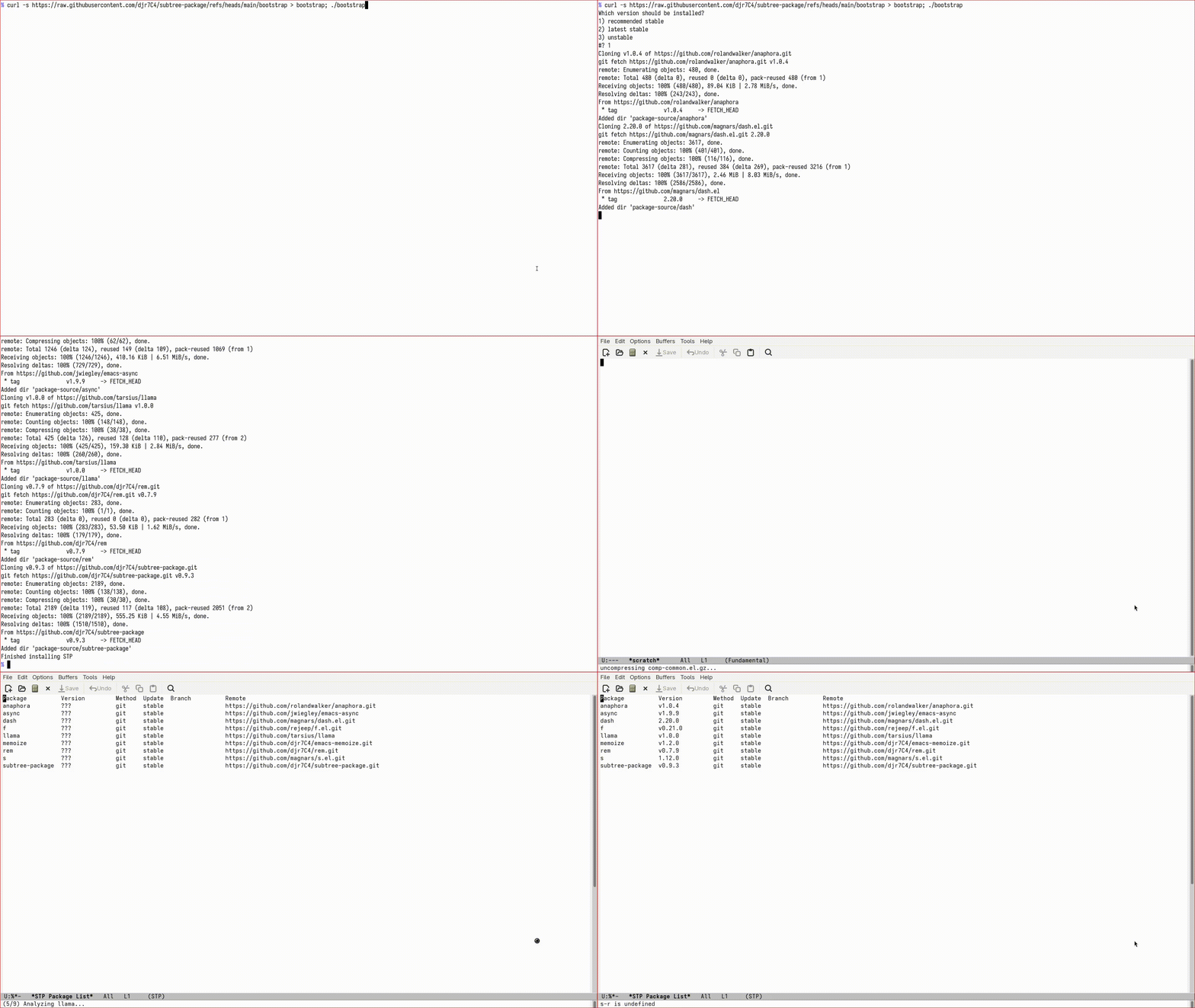
Go to installation if you’re ready to install STP or check out the comparison with other package managers!
Anyone with a sufficiently complex Emacs configuration knows that upgrading installed packages can break one’s configuration. Therefore, it is important to be able to restore the installed packages to a previous version. The natural way to do this is using git.
One approach is to simply use the built-in package.el but make
~/.emacs.d/elpa into a git repository. This works but sometimes does not allow
for sufficient control over the versions of the installed packages since package
archives only allow installing the most recent version of a package.
The approach STP takes is to represent each package as git subtrees. This can also be done using manual git commands but several common tasks are tedious.
- Navigating to Github in a web browser to find the URL for each new package
- Determining what version to upgrade to via
git subtree pullvia another trip to Github - Managing the dependencies of source packages
STP addresses all of these issues and much more.
- Package repositories are automatically determined from the package name using
package archives enabled in
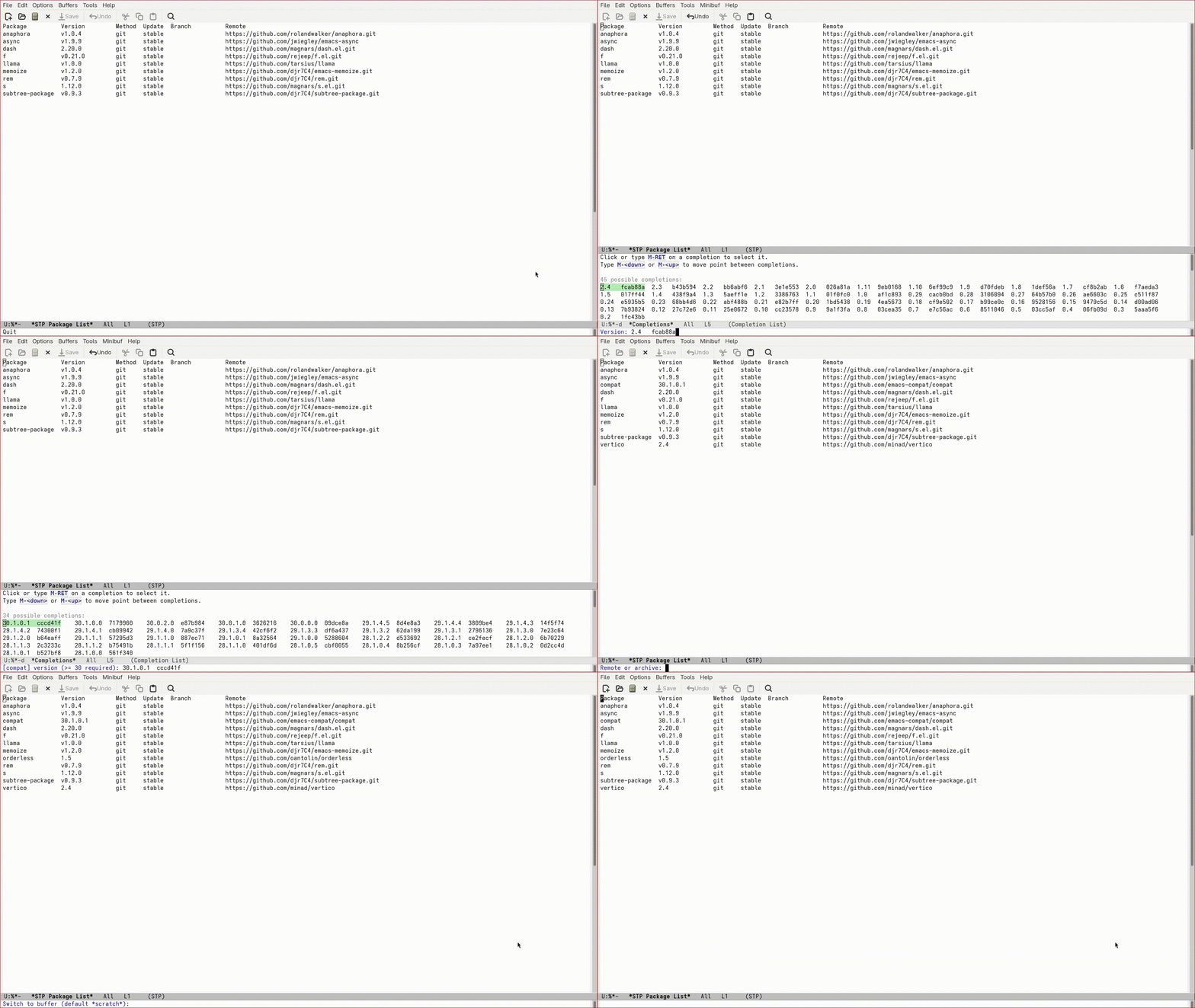
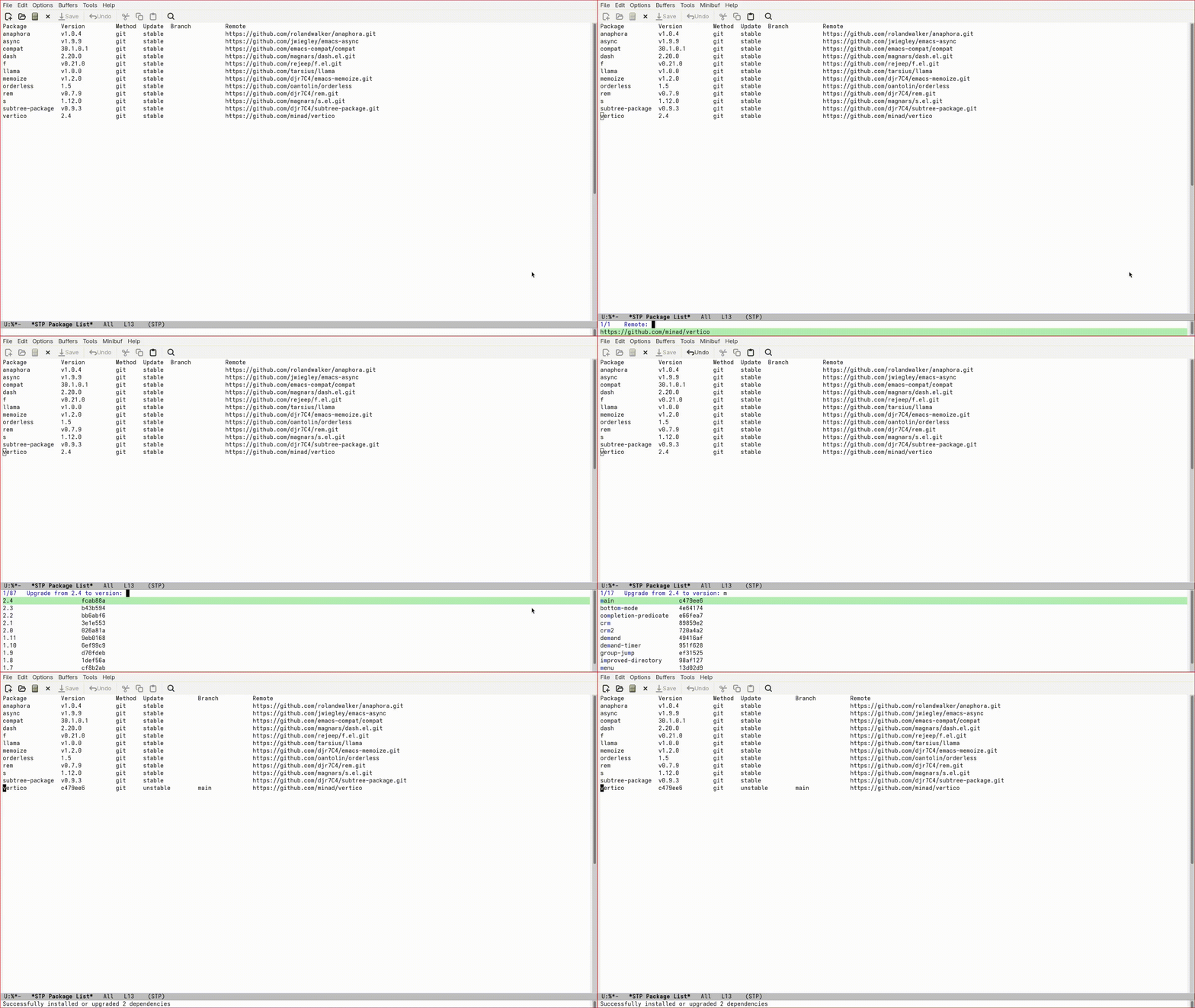
package-archives. - The version to install or upgrade to defaults to the latest stable version and can also be selected using completion when the command is run with a prefix argument. STP detects the suitable tags and branches to provide as completion candidates and shows how recent the latest stable version is.
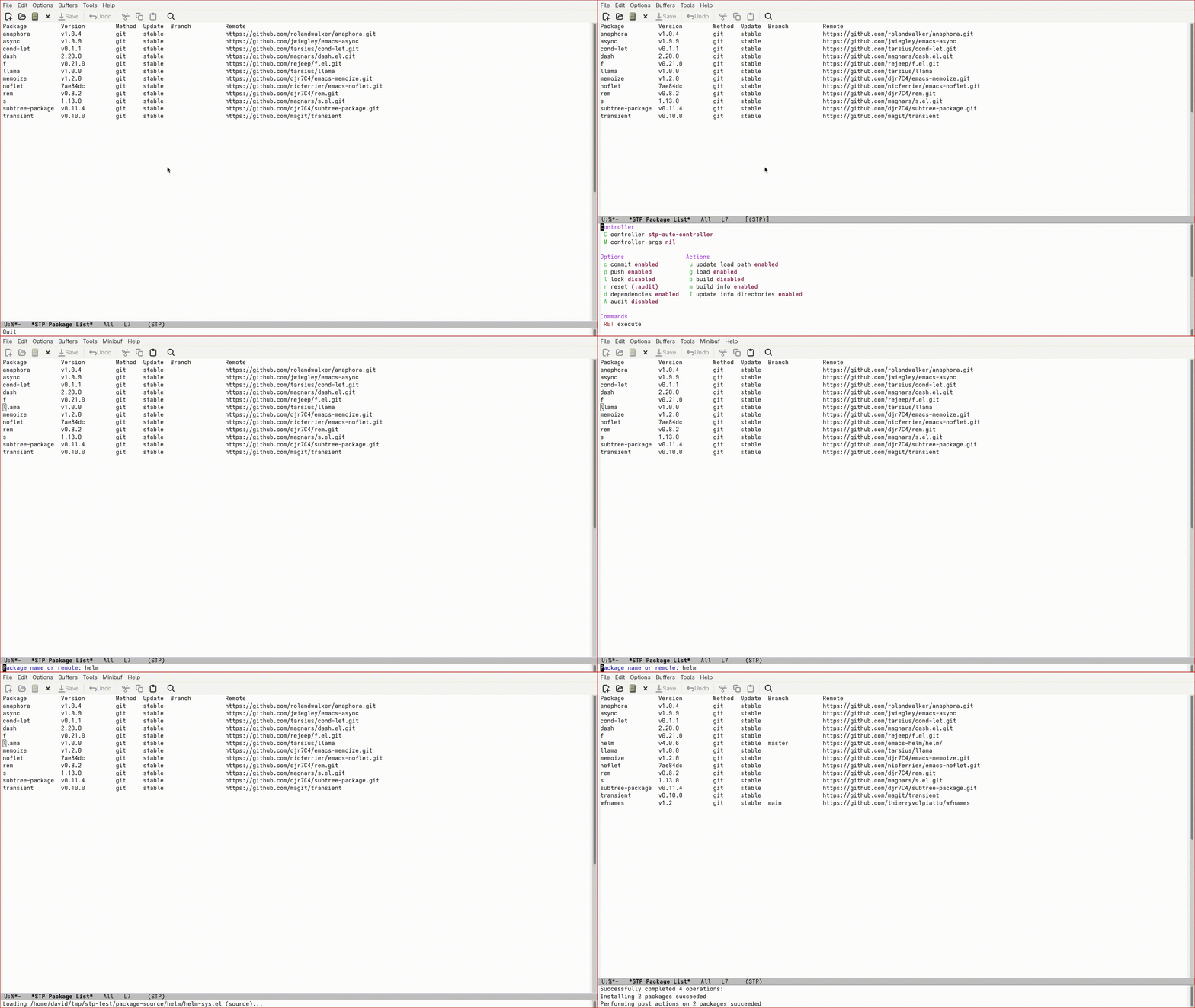
- The policy for choosing new versions and many other details of the package installation process such as security audits, updating the lock file and resetting when errors occur can be toggled via a convenient transient menu.
- Dependencies of packages are detected automatically when a package is installed or upgraded and are automatically upgraded or installed as necessary.
The main entry point to STP is M-x stp-list which shows all installed packages
and has convenience bindings for
- installing a package (
i), - upgrading a package (
u), - installing or upgrading a package group (
U), - adding or editing a package group (
E), - uninstalling a package group (
D), - deleting a package group (
x), - building source (
b), - building info (
m), - editing remotes (
e), - uninstalling (
x), - toggling between stable and unstable (
t), - finding the latest stable and unstable versions for
- the current package (
v) or - all packages (
V),
- the current package (
- repairing (
r) and - editing available remotes (
e), - reloading (
G), - adding to the load path (
l), - running post actions (
a) and - viewing the source code (
RET)
Most complex commands such as stp-install-command and stp-upgrade-command
allow their default options (automatically committing, pushing and so forth) to
be modified via a transient menu when the command is run with a prefix argument.
By default, when you select a package to install, STP determines the details
(e.g. the remote, the update policy (stable or unstable) and the version)
automatically. By default, stable versions are preferred. To prefer the tip of
the upstream branch instead, add the following to your ~/.emacs.d/init.el.
(require 'stp)

(setq stp-default-controller-args '(:preferred-update unstable))
To instruct STP to prompt you for package details, use a universal prefix
argument with the install or upgrade command and use C from the transient menu
to enable the interactive controller.
If you want STP to always prompt you by default for maximum control, add the
following to your ~/.emacs.d/init.el.
(require 'stp)

(setq stp-default-controller-class 'stp-interative-controller)
It is also possible to define your own custom policy by defining a subclass of
stp-controller.
Packages installed in stp-source-directory can be freely modified. If you
later upgrade the package to a newer version, any conflicts that arise due to
your changes can be resolved with git as you would for any git repository. STP
automatically detects merge conflicts and leaves them to the user. This is true
even when the remote for the package is not a git repository.
Stable versions of packages are automatically inferred from tags in the git
repository. stp-version-extractor-alist can be modified in order to support
unusual version strings if a package uses a scheme that is not supported by the
defaults. Contributions of missing version extractors are very welcome!
STP can automatically discover the git repository of a package if it is
specified by an archive configured in package-archive-contents or is on the
Emacs mirror. Alternatively, the user can enter a different repository if
desired.
Git repositories are automatically fetched before packages are installed or
upgraded when stp-subtree-fetch is non-nil. This allows a hash to be specified
instead of a tag or branch.
Once a package is installed or upgraded, its dependencies are automatically determined and the required versions will be installed or upgraded. STP keeps track of which packages were installed as dependencies. When a package is uninstalled, its dependencies are also removed if they are no longer needed and were not installed manually by the user.
By default, the user is told what the minimum required version of a dependency
is but is allowed to installed older versions. Set stp-enforce-min-version to
t to only allow versions that satisfy the requirement.
Sometimes, the same git repository contains multiple packages that would be
installed via package.el or using the archive method. An example is the helm
repository which contains both the helm and helm-core packages. When
installing via git only helm should be installed since helm-core corresponds
to the same repository and would result in an extra copy. Newer versions of STP
will automatically detect circular dependencies and other instances of duplicate
packages and only install one copy. Manually skipping one of the copies with
=C-c C-k once STP prompts the user to begin installing it is still allowed but
isn’t necessary anymore.
Stable releases are automatically detected from tags in git repositories or ELPA releases. Stable packages are only upgraded to other stable releases by default.
Packages can also be marked as unstable which allows them to installed and upgraded to any hash, branch or tag.
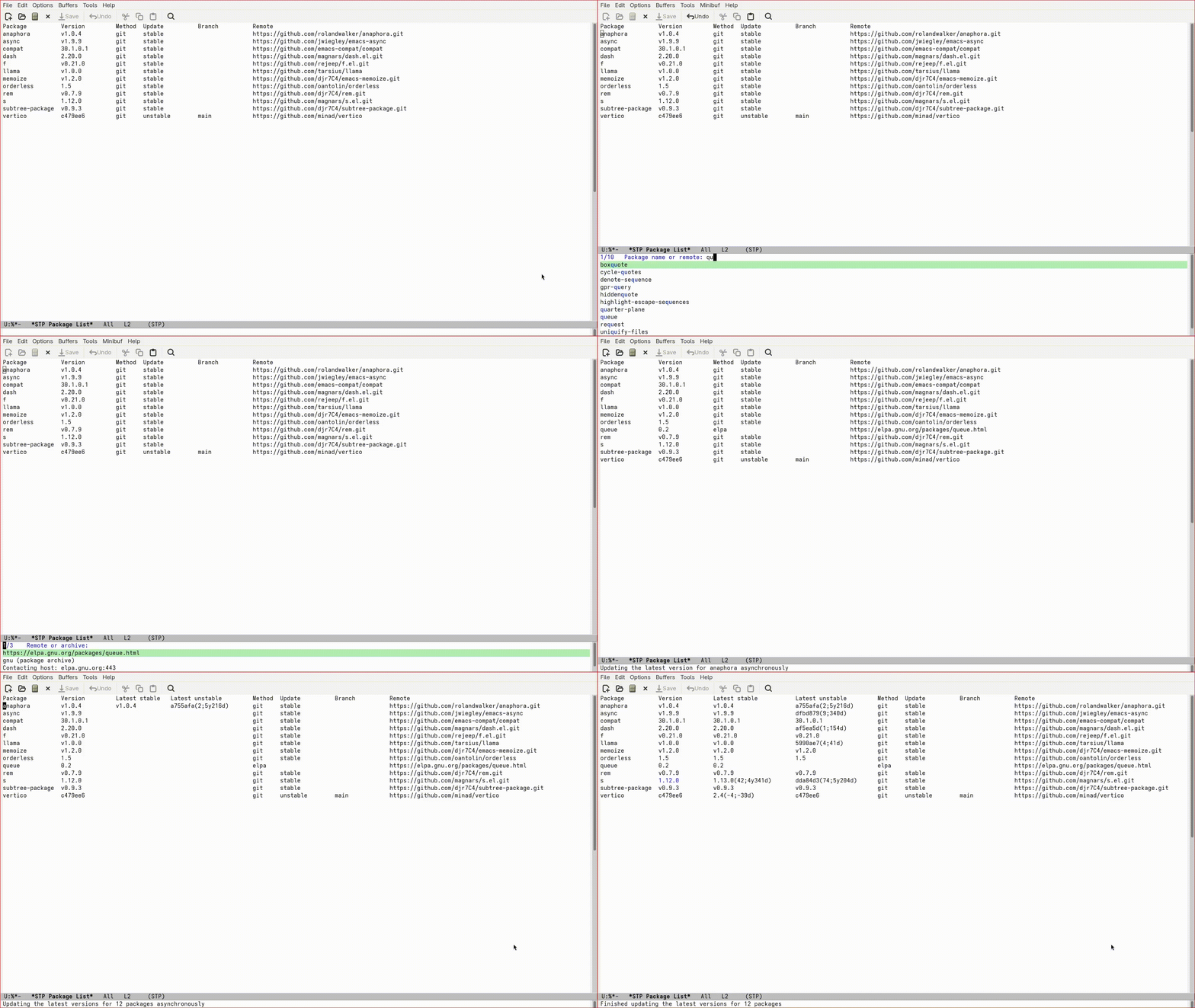
Use v in stp-list-mode to fetch the latest stable and unstable versions for
the current package and display this information in a latest field. Packages
that can be upgraded are highlighted in blue. This is done asynchronously if
stp-latest-version-async is non-nil.
Use V to fetch the latest stable and unstable versions for all packages with
latest versions that have not been updated for at least
stp-latest-versions-stale-interval. This is parallelized using
stp-latest-num-processes processes asynchronously if
stp-latest-version-async is non-nil. With a universal prefix argument, the
meaning of stp-latest-version-async is inverted. With a negative prefix
argument, all packages are updated instead of only those with stale latest
versions. The updated latest versions are inserted into the STP list buffer as
they become available.
Only git packages have unstable versions so this information is omitted for ELPA packages. There is no way to retrieve any version information at all for URL packages so the latest version is omitted entirely.
For git packages, the number of commits required to reach the latest version
from the currently installed version is shown in parentheses followed by the
amount of time between the commits for the installed version and the new
version. Negative numbers mean that the currently installed version is newer by
that many commits. When the two commits have a common ancestor but neither is an
ancestor of the other, +<commits-ahead>-<commits-behind> will be shown.
For ELPA packages, the number in parentheses is the number of stable versions
since the currently installed version. To show the date a version was committed
instead of the amount of time from the installed version, set
stp-annotated-version-type to 'timestamp.
Latest versions are considered stale when they haven’t been updated for more
than stp-latest-versions-stale-interval seconds and are highlighted in orange.
Note that if you have safe.bareRepository set to explicit in your
.gitconfig for security against malicious embedded bare repositories the
commands for updating the latest versions will not work unless
stp-override-bare-repository is non-nil. This allows STP to run git commands
in the bare repositories that are used to cache the repositories of installed
packages and should not pose a security risk.
STP remembers all remotes that the user has entered when upgrading a package.
These are available for the user to choose for future upgrades using completion.
Set stp-development-directory to the directory that contains your elisp
repositories to allow for convenient completion of local directories via
stp-install, stp-upgrade and stp-edit-remotes. Simply enter ./ at the
remote completion prompt to begin directory completion.
When developing packages that are installed with STP, a copy of the source code
will be installed as a git subtree and there will also be a local copy of git
repository on which development is already performed. With an installed packages
copy of a file open, stp-find-package can be to find the corresponding file on
local git repositories that are registered as remotes for that package or are in
stp-development-directory. When desired, install or upgrade the package from
the local git repository using stp-install or stp-upgrade.
By default, building occurs automatically when packages are installed or
upgraded. Packages can also be built manually using b in stp-list-mode.
Packages can be built automatically by detecting Makefiles or other build
systems as well as compiling the elisp files directly. Info manuals are also
automatically detected and added to Emacs’ info search path.
Use r in stp-list-mode to repair information for a package in the package
database that may contain errors. This can be useful when the package database
is not updated because a user updated a package using git commands manually or
there is a bug. R can be used to repair all packages.
Currently, four different types of packages can be installed. STP automatically infers the packages type based on the remote provided so it is not necessary to specify the type manually.
To install a git repository in STP, simply provide its URL as the remote. Some packages are also available as ELPA or URL packages. In such cases, it is usually best to install them as git packages instead.
Use the page for the package on elpa.gnu.org as the remote. For example, for
ace-window this would be https://elpa.gnu.org/packages/ace-window.html.
Unlike other archives supported by STP, older versions of ELPA packages can be
chosen instead of just the current one.
Other archives such as melpa and melpa-stable are also supported. STP
inspects package-archive-contents and supports all archives specified there.
Unlike ELPA packages, only the current version can be installed.
When the source is a single file or a tarball that can be accessed via a URL the package can be installed as a URL package using this URL as the remote. Unlike git and ELPA packages, there is no way for STP to detect the version of a URL package due to the lack of useful metadata. Therefore, it is up to the user to supply the version in this case.
stp-source-directory can be a subdirectory of ~/.emacs.d or it can be a
separate git repository just for packages. The main benefit of this is that it
avoids cluttering the commit history in ~/.emacs.d with many entries regarding
package changes. However, the disadvantage is that checking out an old version
of ~/.emacs.d will just use whatever is currently in the package git repository
instead of what was current when that version of ~/.emacs.d was committed.
STP supports updating a lock file for the version of the package git repository
when changes are made to the packages. This will cause the version of the
package git repository stored in stp-lock-file to be used. To enable this
feature, put the following code in ~/.emacs.d/early-init.el. It should go
before the bootstrap code mentioned below.
(require 'stp-locked (expand-file-name "path/to/package-source/subtree-package/stp-locked.el"))

(stp-checkout-locked-revision)
In your ~/.emacs.d/init.el, enable automatically updating the stp-lock-file
as follows.
(setq stp-auto-lock t
      stp-never-auto-lock nil)

(file-notify-add-watch stp-lock-file '(change) #'stp-lock-file-watcher)Groups of related packages can be created or edited with E in stp-list-mode.
Use x to remove a group that is no longer needed. Use U to install or
upgrade packages in the specified groups. The name of a package can also be
specified instead of a group. D can be used to uninstall a package group.
STP provides some utilities to streamline the management of elisp package
headers. Use M-x stp-bump-version to change the version header of the current
file and automatically add a git tag with the same name. Use M-x
stp-headers-update-elisp-headers to try to infer updated values of a number of
elisp headers and automatically update them. In particular, this updates the
requirements to the versions that are currently installed.
By default, changes to packages are presented to the user as diffs before the code is loaded. This helps mitigate supply chain attacks such as the recent one against the kubernetes.el but can be time consuming. Add
(setq stp-audit-changes nil)to your configuration if you wish to disable this feature. By default,
git reset is used to restore the previous state when an audit fails.
stp-audit-auto-reset controls this behavior.
The variables stp-pre-install-functions, stp-post-install-functions,
stp-pre-upgrade-functions, stp-post-upgrade-functions,
stp-pre-uninstall-functions, stp-post-uninstall-functions,
stp-pre-reinstall-functions, stp-post-reinstall-functions,
stp-pre-action-functions and stp-post-action-functions allow the user to run
custom functions before and after STP operations.
Subtree package can manage itself as a package but first it needs to be
installed along with its dependencies using other means. You can either use the
bootstrap script or install use package.el.
The simplest way is to run the bootstrap script from this repository in the top-level directory of the git repository for your Emacs configuration.
cd <emacs-git-directory>
# Initialize the git repository and add at least one commit.
curl -s https://raw.githubusercontent.com/djr7C4/subtree-package/refs/heads/main/bootstrap > bootstrap
bash bootstrap
The script supports installing the recommended stable (the versions tested during development), latest stable or unstable versions of the packages.
STP also requires that you install the atool CLI utility if you wish to
install archive, ELPA and compressed URL packages. Additionally, to support
certain non-essential features, the async and queue packages are required. A
few optional features require the gh CLI utility.
The bootstraping code should be placed in ~/.emacs.d/early-init.el. It is
recommended to create a directory named package-source at the top-level of the
git repository for your configuration.
(setq stp-source-directory "<path/to/package-source>"
      stp-info-file (expand-file-name "../stp-pkg-info.eld" stp-source-directory))

(require 'stp-locked (expand-file-name "subtree-package/stp-locked.el" stp-source-directory))
(require 'stp-bootstrap (expand-file-name "subtree-package/stp-bootstrap.el" stp-source-directory))

  ;; Set up dependencies for STP itself.
  (stp-bootstrap)
  ;; Add installed packages to the load path.
  (stp-update-load-paths)
In your ~/.emacs.d/init.el, add the following code.
(require 'stp)

;; By default, STP is highly interactive and prompts the user quite a bit for
;; maximum control. The following enables the auto controller which keeps
;; prompts to a minimum.
(setq stp-default-controller-class 'stp-auto-controller
      stp-default-controller-args '(:preferred-update stable))

(keymap-global-set "C-c P" #'stp-list)

;; Improve performance by adding various variables to
;; `savehist-additional-variables' in order to avoid repeating expensive
;; computations.
(require 'savehist)

;; The order of these calls is important.
(savehist-mode 1)
(stp-setup)

(keymap-global-set "C-c O" #'stp-find-package)
(keymap-global-set "C-c P" #'stp-list)
The first time Emacs is started with STP enabled, it will search the load path
to initialize its internal cache. This will take a few moments. Once it has
finished, run M-x stp-repair-all to initialize the package information
database from the git repository. This will cause the packages installed by the
bootstrap script to be recognized as STP packages.
Alternatively, install a working instance of STP using package.el.
(package-vc-install "https://github.com/djr7c4/rem.git")
(package-vc-install "https://github.com/djr7c4/subtree-package.git")
(add-to-list 'load-path (expand-file-name package-user-dir "rem"))
(add-to-list 'load-path (expand-file-name package-user-dir "subtree-package"))
Then manually install all dependencies of STP from within STP. The requirements
are listed in the file bootstrap-requirements in this repository. Once they
are installed, you can remove the packages installed with package.el.
The main strengths of STP are
- It is highly interactive and works hard to avoid forcing you to leave Emacs during the installation process (for example to find repositories and releases on github).
- There are many configuration options possible. By setting a few variables, you can configure STP to prompt the user for every detail or automatically resolve user prompts whenever possible or prompt according to a custom policy.
- Your configuration is completely reproducible without depending on any external git repositories. Even if all external repositories were deleted, you would still be able to immediately reproduce your configuration simply by cloning it.
Elpaca is similar to STP in some ways in that both are able to install packages from their git repositories and can determine the repository URL automatically from ELPA/MELPA.
Some differences include
- Elpaca lacks a method for interactively installing stable versions of packages as it does not support interactively choosing a git tag corresponding to a stable release.
- Elpaca creates copies of git repositories instead of adding them to the repository as git subtrees. In STP, the subtree approach is used in order to make the configuration completely reproducible without having to clone remote repositories (for example on a new machine).
Straight is a primarily functional package manager and relies on code in your initialization files to determine which packages should be installed. This consists of expressions such as
;; Copied from the Straight.el README
(el-patch :type git :host github :repo "radian-software/el-patch")
It also supports interactive package installation. Like Elpaca, it lacks a method for installing stable versions of packages and clones git repositories rather than adding them as git subtrees.
Straight does not check that the requirements of installed packages have recent enough versions.
Borg is based on a similar idea to STP but uses git submodules instead of git subtrees. While a subtree is a local copy of a package’s git repository, a submodule is a reference to a package’s repository consisting of its URL and the current hash that is being used.
This has several implications
- With subtrees, your configuration does not depend on external repositories. All you have to do to reproduce it is clone your git repository.
- With submodules, cloning your git repository will not copy the submodules. For that, you have to supply the `–recurse-submodules` flag to `git clone` or use the `git submodule init` and `git submodule update` commands. Both methods involves cloning the external repository referenced by the submodule and if the repository moves or no longer exists, your configuration will break.
- Subtrees allow you to easily make local changes to packages and merge new commits to the package repository using git’s standard merge machinery.
- Since submodules are just references to external repositories, local changes are not advisable as they will be overwritten if you clone the repository and reinitialize your submodules.
package-vc is a builtin library that can install packages from git repositories. Like STP, it allows you to select a package by name and automatically install it from the repository.
Some differences include
- package-vc does not automatically check packages into git
- When you run
package-vc-install, the package you specify is installed from the git repository but its dependencies are installed from package archives like ELPA and MELPA instead. - There are some cases where STP can find the git repository and package-vc
cannot. This is because Emacs package archives do not have a field for the git
repository. Most authors specify the repository in the
:urlfield but this is only a convention. STP has heuristics that allow it to infer the git repository in some cases even when it is not directly specified. Additionally, STP can find the git repositories for packages that are hosted on the Emacs mirror. - There is no mechanism for interactively choosing a stable version tag to install.