
In many browsers, it is not possible to set custom icons for bookmarks. If the website does not provide a favicon, then a generic icon is used. Favman allows you to easily create HTML bookmark files with custom icons. This solution is intended as a workaround that is independent of the browser.
The application is written in C# and uses Windows Forms for the GUI. It is a single executable file and does not require installation.
Download the latest release here
Unzip the file and run favman.exe
Provide a title, URL and icon file. Favman will create an HTML file with the provided information.
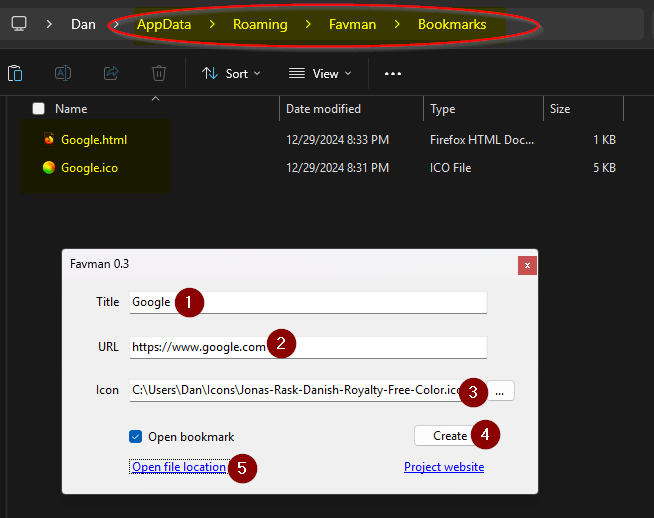
The bookmark will be opened in the default browser if the "Open bookmark" checkbox is enabled.
Quickly hit Ctrl + D to bookmark the current page in the browser before the redirect occurs.
Output HTML files are saved to the %APPDATA%\Favman\Bookmarks directory. Icons files are copied here too.
The default timeout is 5 seconds, to allow time to bookmark the page before the redirect is triggered.
The redirect timeout setting can be adjusted here:
<meta http-equiv=""refresh"" content=""5;url={url}"">