
A Model Context Protocol (MCP) server that enables AI assistants like Claude to work directly inside SAP BW/4HANA or SAP BW 7.5 on HANA systems — reading, creating and modifying BW modeling objects via the same internal SAP APIs that Eclipse BWMT and the BW/4HANA Cockpit use: the BW Modeling REST API (/sap/bw/modeling/) for objects, queries and live data, the ADT API (/sap/bc/adt/) for the ABAP and AMDP routines BW generates, the BW/4HANA manage API for the request monitor and runtime, and the Push API (/sap/bw4/) for data loads.
This is not a simulation. Every tool call connects to a live BW system — write operations produce real changes.

Besides stdio, the server can run as an HTTP service on SAP BTP Cloud Foundry with XSUAA
OAuth in front and a BTP destination behind — either a shared technical user
(BasicAuthentication) or principal propagation, where each caller reaches BW as
themselves and BW applies their own authorizations.
Three role collections decide what a user is offered: BW MCP Reader (everything that only reads), BW MCP Analyst (a small reporting client — run queries and understand what they return) and BW MCP Developer (everything, including changes).
stdio is unchanged — npm start behaves exactly as before. Setup:
docs/CENTRAL-HOSTING-SETUP.md (step-by-step) and
docs/CLOUD-FOUNDRY.md (reference).
| Scenario | stdio only | Hosted on BTP |
|---|---|---|
| One analyst, one BW system | runs on the analyst's machine | server-side, the analyst logs in with their own identity |
| Several analysts, one server | not possible, no central auth | all log in via BTP, each caller's identity reaches BW |
| Tool permissions | none — whoever runs it can call every tool | granted per role, independent of BW authorizations: a BW developer can be read-only in the MCP, or the querying tools can be withheld from someone who may otherwise view data |
| BW authorizations | enforced through the user's own credentials | unchanged, still fully enforced — with principal propagation each caller acts as themselves, never as a shared identity |
| Audit trail | limited | XSUAA logs every login; with principal propagation the BW session log shows the real user |
A new tool stays unavailable to read-only callers until it is explicitly classified as a
read, so the surface never widens by accident; write implies read, never the reverse.
The three role collections are a starting point and can be split further in xs-security.json.
Principal propagation additionally needs a certificate rule and ICM trust on the BW side.
| System | Support |
|---|---|
| SAP BW/4HANA (all versions) | ✅ Full support |
| SAP BW Bridge (SAP BTP ABAP stack) | ✅ Via cookie authentication (BW_COOKIE_FILE) |
| SAP BW on HANA (7.5) | ✅ Modelling reads after a small ABAP enhancement, and modelling writes for every object type that has a REST resource there — InfoObjects, aDSOs, InfoAreas, InfoSources, CompositeProviders, Open Hub Destinations, queries and their reusable components, aggregation levels. The tool surface adjusts to what the system publishes, and the objects without a REST resource — including planning, chain runs and the APD — are read from their metadata tables. bw_system_profile states per write tool what was verified there. See BW 7.5 Support |
On SAP BW 7.5 the REST framework looks up the Accept header case-sensitively while the kernel delivers header names in lower case, so almost every call fails with HTTP 406. A ~20-line post-exit enhancement (no modification) resolves this and makes all REST endpoints that exist on 7.5 reachable. Objects for which BW 7.5 ships no REST resource at all — transformations, DTPs, process chains and their runs, classic DSOs, InfoCubes, the planning objects and the Analysis Process Designer — are readable through bw_read_metadata_tables, which goes to their metadata tables instead, but they cannot be written; Eclipse opens the embedded SAP GUI for those as well. Details, ABAP code and setup steps: bw75/BW75-SUPPORT.md.
A two-part blog series about this project (both available in German and English):
-
Agentic AI meets SAP BW — the full story behind this project: why I built it, what's inside, what happens when Claude walks through a complete BW data lineage on its own. https://www.nextlytics.com/blog/agentic-ai-meets-sap-bw
-
Agentic AI in practice: MCP server for SAP BW/4HANA — how the server is operated company-wide on SAP BTP Cloud Foundry with role-based access and per-user identity, plus two real customer projects. https://www.nextlytics.com/blog/agentic-ai-in-practice-mcp-server-for-sap-bw/4hana
The largest release so far, in two directions at once: the model now works with a tool surface a third the size, and the write paths have been checked operation by operation against what BW actually accepts — so a change the server reports as saved also activates.
- 21 tools instead of 134. Each focused tool stands for a group of operations and selects
one through its
typeoroperationparameter:bw_readreads any object type,bw_write_adsocreates and changes aDSOs,bw_activatechecks, activates and unlocks. Nothing was removed — every operation is still there, with the same parameters and behaviour - A third of the context. The tool definitions take about a third of the space they took before, which leaves the model more room for the actual work. In our tool-selection benchmark it picked the right operation as often on the focused surface as on the full one
bw_describeon demand. The focused tools carry short parameter notes;bw_describe(tool, operation)returns the complete definition of one operation when the model needs it, and a wrong or missingoperationis refused with the allowed values before anything reaches BW- Roles and platform still apply per operation: a Reader sees only the reading operations, and a BW 7.5 system only what it can answer
The one breaking change: clients now see the focused tool names.
- Allowlists and permission settings that name full tools (
bw_get_adso,bw_update_transformation, …) need the focused names (bw_read,bw_write_transformation, …) — or setBW_TOOL_MODE=fullto keep the full surface exactly as it was - Scripts and automations that call the server directly with full tool names keep working without a change: a full tool name sent to the server is answered in either mode
- Skills and prompts that name full tools in their text are best moved to the focused
names — an agent can only pick from the tools it is shown — or run with
BW_TOOL_MODE=full - Hosted on SAP BTP: role collections and scopes are unchanged
- The mapping from every full tool to its focused tool and operation is in Tool modes
✅ Check before you activate
- New
bw_check(operationcheckofbw_activate) — runs the activation checks on the saved version of an object, as "Check" in the modeling tools does, without activating anything and without a lock. The answer says whether the object would activate and why not. It is a read operation, so read-only users can use it too
🧱 Writes that activate the first time
- aDSO — a type change now writes the type as a whole and drops what the new type cannot carry; removing a field removes its key, partition and index entries with it; an InfoObject brings its compounding parents along; key fields are checked before they are saved, and every one of these is reported in the answer
- CompositeProvider —
update_joingives both sides of a join key the common target field BW requires, a compounded field brings its compounding parent, and mapping an input again no longer leaves duplicate fields behind - InfoObject — attributes can be key figures, units and time characteristics, display attributes can be time-dependent, and a navigation attribute BW would refuse is refused before anything is written
🆕 New capabilities
- Open Hub Destinations can be created from an aDSO or CompositeProvider and changed
— table and file destinations, write mode, key, fields and file properties
(
bw_create_open_hub,bw_update_open_hub) - Partitions and data tiering of an aDSO — static range partitions or dynamic
partitioning (
manage_partitions), hot and warm storage per object or per partition - Master data, text and hierarchy properties of a characteristic — text lengths, language- and time-dependent texts, hierarchies with version and time dependency
🔀 Transformations and DTPs
- The rule of a field can be changed from any type to any other — direct, time conversion, constant, formula, routine with several source fields, lookup — and a lookup binds every key field of the object it reads from
bw_update_dtptakes the execution settings: package size and parallel extraction, request selection, error handling, SAP HANA execution and the batch manager. Each value is checked against what the server admits for that DTP, so an inadmissible setting is refused with the admissible ones instead of an HTTP 500 without a message
📤 Open Hub from a query
- A query can be released as an InfoProvider and used as the template and source of an Open Hub Destination, so the result of a query lands in a table or file through a DTP
- Query structures: where a hierarchy holds a text node and a characteristic value of the same
name,
node_typesays which one a restriction means, andswitch_hierarchykeeps the kind of each node (#52) - Fixed:
bw_update_infoobjectreported a refused activation as success — the answer now carries the server's messages and says that the change is saved but not active; a characteristic with a compounded attribute can be changed again;bw_run_dtpsays when a delta found nothing to load instead of reporting a started request;bw_get_requestrefuses a malformed request id instead of returning the whole process history; texts with&or quotes no longer break a save
Earlier releases — the "What's New" notes for v1.10.0 and older are archived in WHATS_NEW.md; the full structured history is in CHANGELOG.md.
An overview by area. Every tool in detail — parameters, behaviour, and the sequences it belongs in — is in the Tools Reference (134 operations behind 21 focused tools).
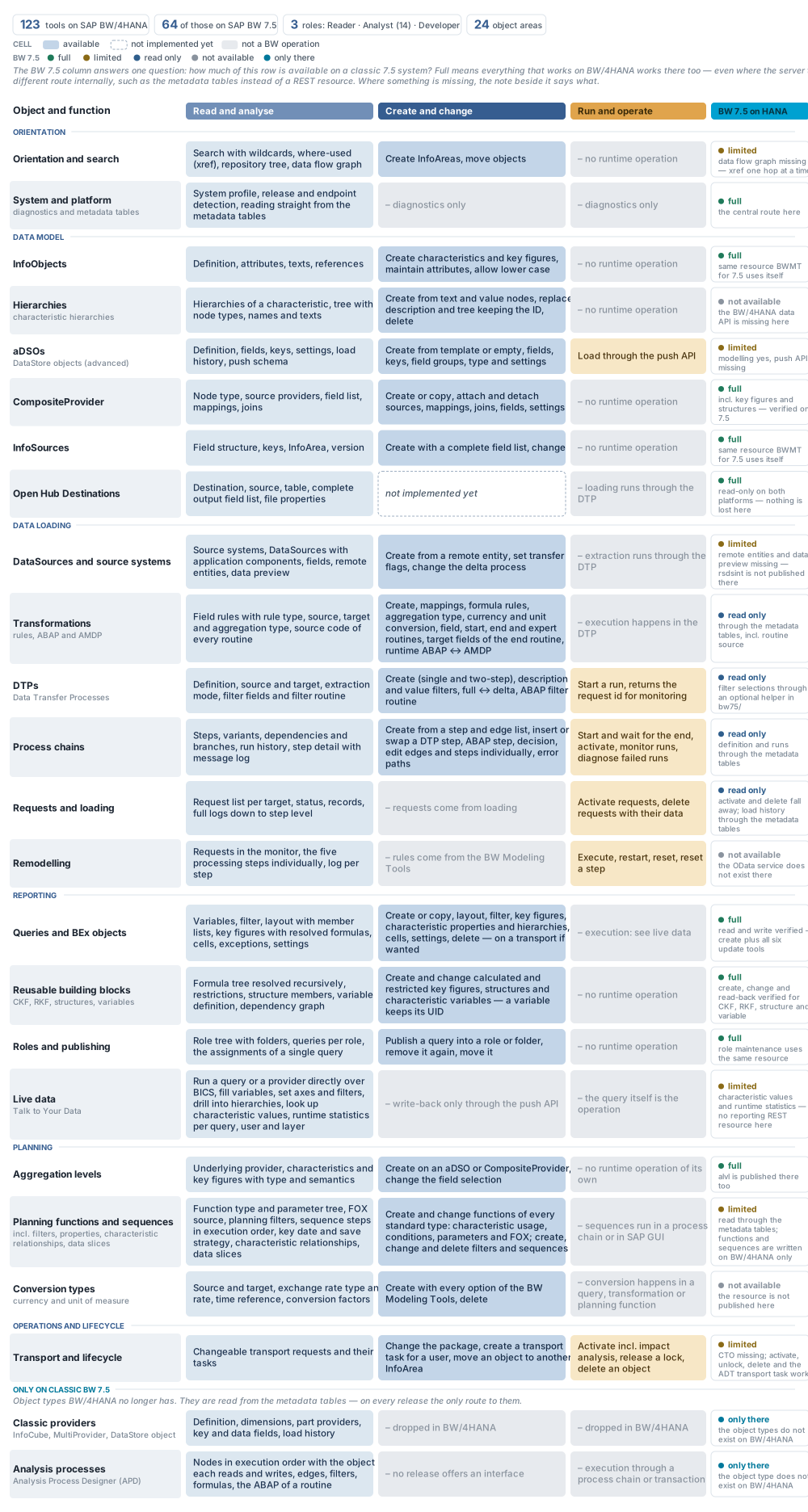
bw-modeling-mcp works best alongside an ADT MCP server such as vibing-steampunk or ARC-1. The two do not overlap as much as it may look.
This server owns the BW object and, with it, the body of the ABAP that BW generated for that object: the class behind a transformation routine, the program behind a DTP filter routine. Write those through bw_set_transformation_routine, bw_set_transformation_expert_routine and bw_set_dtp_filter_routine rather than through ADT — they do not only replace the source, they save the transformation master back afterwards, which is what re-registers the code in the transportable metadata. A class-only edit survives until the next regeneration or transport and is then gone.
The ADT MCP server covers ABAP as a subject in its own right: your own reports, classes, function modules and DDIC tables, repository search and navigation, arbitrary table reads, debugging, ATC, unit tests, dumps and transports. Together they cover the full cycle from BW object to ABAP logic.
- SAP BW/4HANA system with the internal SAP APIs enabled (SAP BW 7.5 works for modeling reads and most modelling writes once the enhancement in bw75/BW75-SUPPORT.md is in place)
- Node.js 22 or later
- An MCP-compatible AI client (Claude Desktop, Claude Code, etc.)
Two ways to run. Locally as a stdio server (one user, one machine — the steps below), or centrally hosted on SAP BTP Cloud Foundry behind XSUAA OAuth for a whole team → see docs/CENTRAL-HOSTING-SETUP.md. The installation and configuration below cover local stdio use. Upgrading from 1.x: see Upgrading to 2.0.
# Option 1: Install via npm (recommended)
npm install -g bw-modeling-mcp

# Option 2: Clone and build
git clone https://github.com/dnic-dev/bw-modeling-mcp.git
cd bw-modeling-mcp
npm install
npm run buildFor local (stdio) use, the server is configured via environment variables. For central BTP hosting, connection and credentials come from the BTP destination and service bindings instead — see docs/CENTRAL-HOSTING-SETUP.md.
| Variable | Description | Required |
|---|---|---|
BW_URL |
BW system URL (e.g. https://myhost:50001) |
yes |
BW_USER |
SAP user name | yes (or BW_COOKIE_FILE) |
BW_PASSWORD |
SAP password | yes (or BW_COOKIE_FILE) |
BW_CLIENT |
SAP client (e.g. 001) |
yes |
BW_LANGUAGE |
Language for object texts (e.g. EN, DE). Default: DE |
no |
BW_COOKIE_FILE |
Path to a browser-exported cookie file for SAML-/OAuth-fronted systems (e.g. BW Bridge). Netscape or name=value format. When set, BW_USER / BW_PASSWORD are optional. |
no |
BW_MCP_SERVER_NAME |
Server name advertised in the MCP initialize handshake. Default: bw-modeling-mcp. Give each instance a unique name when running several against different BW systems. |
no |
BW_MCP_SYSTEM_LABEL |
Free-text label of the connected BW system (e.g. AP4 (BW production, read-only)), put at the top of the MCP server instructions. Lets a model tell look-alike instances apart even in clients that show an opaque connector id instead of the server name. |
no |
BW_TOOL_MODE |
focused (default) or full. The default offers 21 tools: each stands for a group of operations and selects one through its type or operation parameter, and bw_describe gives the complete parameter definition of any operation. full offers every operation as a tool of its own (134 on BW/4HANA, three times the tool payload in the model's context) for clients that hold allowlists or scripts on the full tool names. See Tool modes. |
no |
BW_PLATFORM |
auto (default), classic or bw4. The server detects whether it is talking to BW/4HANA or a classic release and offers only the tools that release can answer. classic forces that verdict when detection cannot run, bw4 switches the filter off. See bw75/BW75-SUPPORT.md. |
no |
BW_SESSION_CLOSE |
on (default) or off. The server ends the SAP sessions of a tool call once it is answered, and all remaining ones when it stops. Set off only behind a proxy that holds the SAP session itself. |
no |
Cookie authentication (BW Bridge / SAP BTP): For BW systems that sit behind a SAML or OAuth login (such as BW Bridge on the SAP BTP ABAP stack), Basic Auth is not available. Export the authenticated session cookies from your browser into a file and point BW_COOKIE_FILE at it. The login/session approach is analogous to vibing-steampunk and ARC-1. When the session expires, refresh the cookie file and restart the server.
Add to claude_desktop_config.json:
{
  "mcpServers": {
    "bw-modeling-mcp": {
      "command": "node",
      "args": ["/path/to/bw-modeling-mcp/dist/stdio.js"],
      "env": {
        "BW_URL": "https://your-bw-host:50001",
        "BW_USER": "YOUR_USER",
        "BW_PASSWORD": "YOUR_PASSWORD",
        "BW_CLIENT": "001",
        "BW_LANGUAGE": "EN"
      }
    }
  }
}Add .mcp.json to your project root:
{
  "mcpServers": {
    "bw-modeling-mcp": {
      "command": "node",
      "args": ["/path/to/bw-modeling-mcp/dist/stdio.js"],
      "env": {
        "BW_URL": "https://your-bw-host:50001",
        "BW_USER": "YOUR_USER",
        "BW_PASSWORD": "YOUR_PASSWORD",
        "BW_CLIENT": "001",
        "BW_LANGUAGE": "EN"
      }
    }
  }
}The server talks to four SAP APIs, and only one of them needs a protocol worth describing.
The BW Modeling REST API (/sap/bw/modeling/) is a full-document API: there is no way to
change one attribute of an object. Every write therefore runs the same six steps.
- Lock — acquires an exclusive lock and returns a
lockHandle - Read — fetches the current complete XML of the object
- Modify — applies the change to that XML
- PUT — sends the whole document back, never a fragment
- Activate — promotes the inactive version to the active one
- Unlock — releases the lock
Two consequences are worth knowing. Saving and activating are separate: a document the server accepts can still fail to activate, so a successful write proves less than it appears to. And because the whole document travels, a read that came from a stale session buffer will silently write old values back — the tools read fresh for exactly this reason.
The other three need none of it. The ADT API (/sap/bc/adt/) is used narrowly and always for
an object BW generated itself: the body of a transformation routine (its generated class), the
body of a DTP filter routine (its generated program), the DataPreview service behind
bw_read_metadata_tables, plus transport checks and activation runs. Everything else ABAP —
writing your own reports, classes or DDIC tables, searching the repository, reading arbitrary
tables, debugging — is the job of an ABAP ADT MCP server alongside this one, see
Combining with an ADT MCP Server. The BW/4HANA manage API (/sap/bc/http/sap/bw4/) answers the request
monitor, the remodeling monitor and runtime operations. The Push API (/sap/bw4/v1/push/)
takes a JSON record array straight into a write-interface aDSO.
Session cookies and CSRF tokens are handled for all four.
See ARCHITECTURE.md for the full technical architecture and the complete endpoint reference.
Issues and feature requests are welcome — please use the Issue templates.
If you have access to a BW/4HANA system and want to help expand coverage, I am happy to hear from you. The best way to contribute is to try it out and report what works, what doesn't, and what's missing.
MIT