ViewEditMode


The ViewEditMode module controls the DetailView.ViewEditMode.
This is a platform agnostic module extends the IModelDetailView interface with the IModelDetailViewViewEditMode.

The module uses the next two strategies:
- It monitors the
DetailViewcreation and modifies its ViewEditMode property according to model configuration. However later ViewEditMode property modifications are allowed. - It monitors the
ViewEditModemodification and cancels it if theLockViewEditModeattribute is used.
Possible future improvements:
Any other need you may have.
Let me know if you want me to implement them for you.
The module is valuable in scenarios similar to:
- When you want to
navigatefrom aListViewto aDetailViewwithout the intermediate view which is set to View ViewEditMode. - When you develop a
master-detaillayout and you want to control the ViewEditMode state of your
XtraDashboardModule ,ExcelImporterModule are modules that use the ViewEditModeModule.
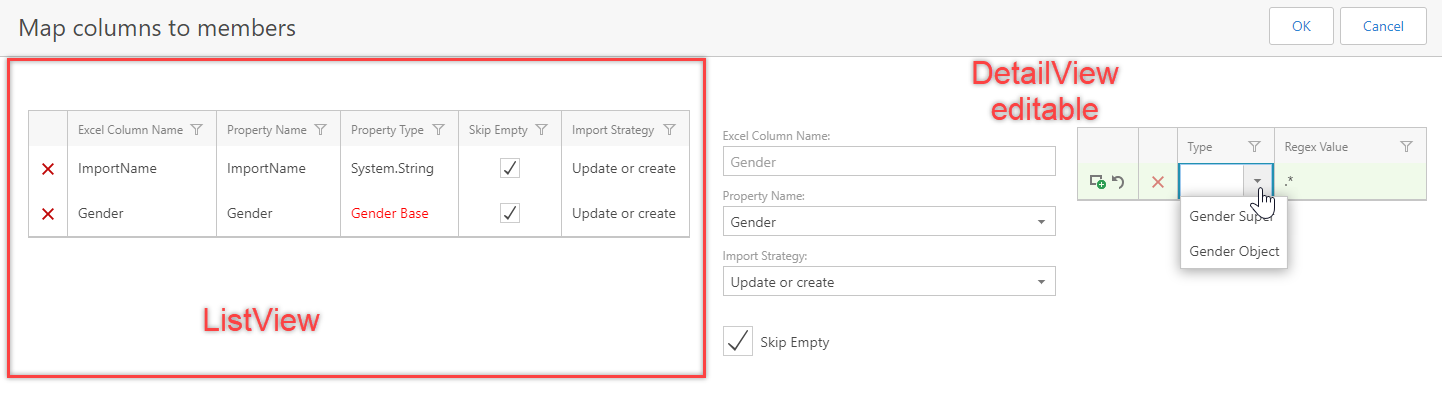
Next screenshot is an example from ExcelImporter from the view tha maps the Excel columns with the BO members.
-
First you need the nuget package so issue this command to the
VS Nuget package consoleInstall-Package Xpand.XAF.Modules.ViewEditMode.The above only references the dependencies and nexts steps are mandatory.
-
Ways to Register a Module or simply add the next call to your module constructor
RequiredModuleTypes.Add(typeof(Xpand.XAF.Modules.ViewEditModeModule));
The module is not integrated with any eXpandFramework module. You have to install it as described.
The module is not bound to DevExpress versioning, which means you can use the latest version with your old DevExpress projects Read more.
The module follows the Nuget Version Basics.
.NetFramework: net461
| DevExpress.ExpressApp | Any |
| Fasterflect.Xpand | 2.0.7 |
| JetBrains.Annotations | 2020.1.0 |
| System.Reactive | 4.4.1 |
| System.ValueTuple | 4.5.0 |
| Xpand.Extensions.Reactive | 2.202.58 |
| Xpand.Extensions.XAF | 2.202.58 |
| Xpand.XAF.Modules.Reactive | 2.202.58 |
| Xpand.VersionConverter | 2.202.10 |
To Step in the source code you need to enable Source Server support in your Visual Studio/Tools/Options/Debugging/Enable Source Server Support. See also How to boost your DevExpress Debugging Experience.
If the package is installed in a way that you do not have access to uninstall it, then you can unload it with the next call at the constructor of your module.
Xpand.XAF.Modules.Reactive.ReactiveModuleBase.Unload(typeof(Xpand.XAF.Modules.ViewEditMode.ViewEditModeModule))The module is tested on Azure for each build with these tests. All Tests run as per our Compatibility Matrix