
Home Assistant integration that turns your ESPAltherma sensor into a complete heat pump intelligence platform — cycle detection, per-mode COP, seasonal SPF, weather-normalized degradation, runtime + energy accounting, installer-grade curve advice, and 19 ML-powered alerts.
Local-only. No cloud. No accounts. Everything runs inside your Home Assistant box.







IoT class: calculated · Integration type: hub · 50 sensors · 15 binary sensors · 10 services · 19 alerts
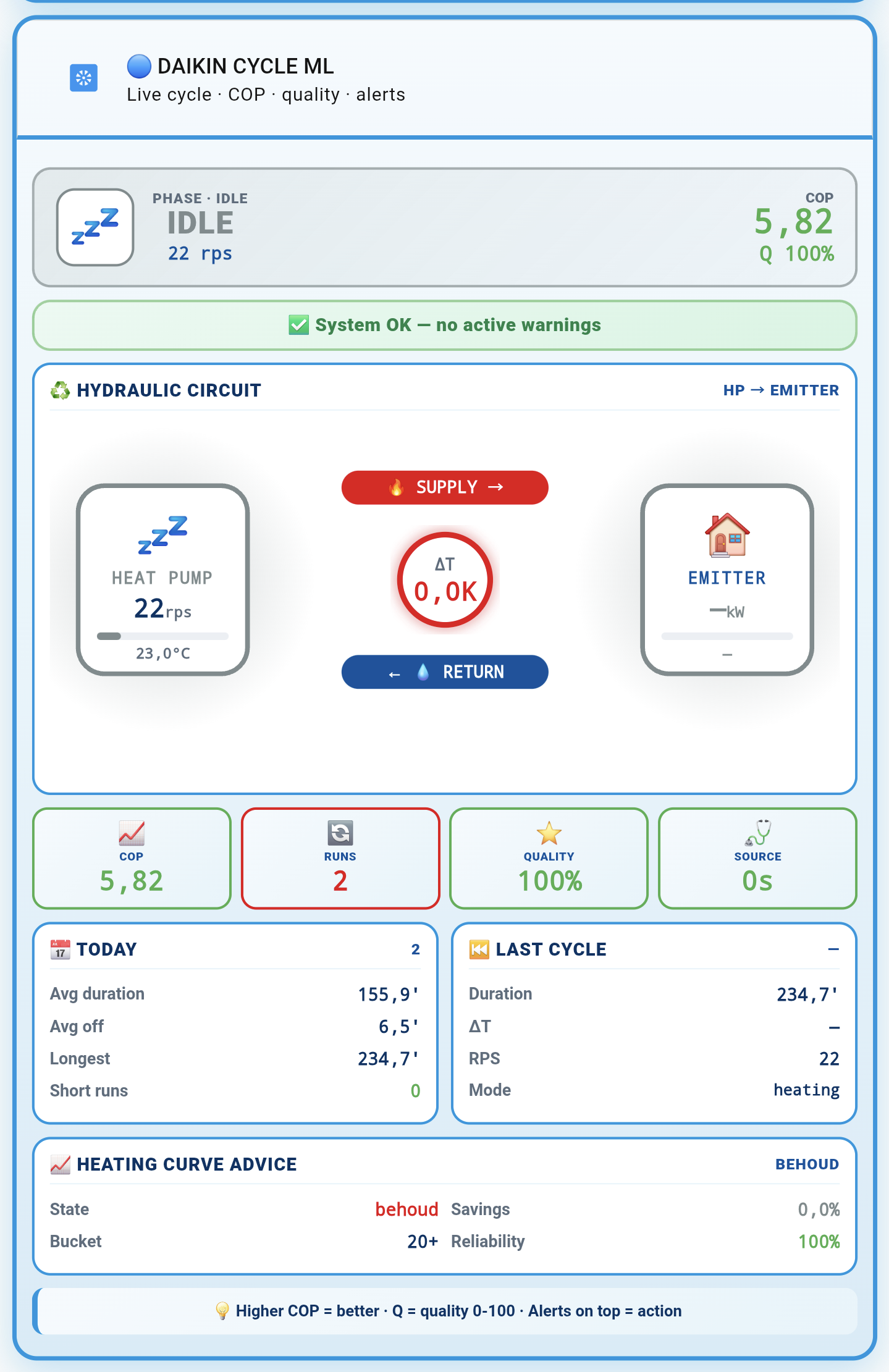
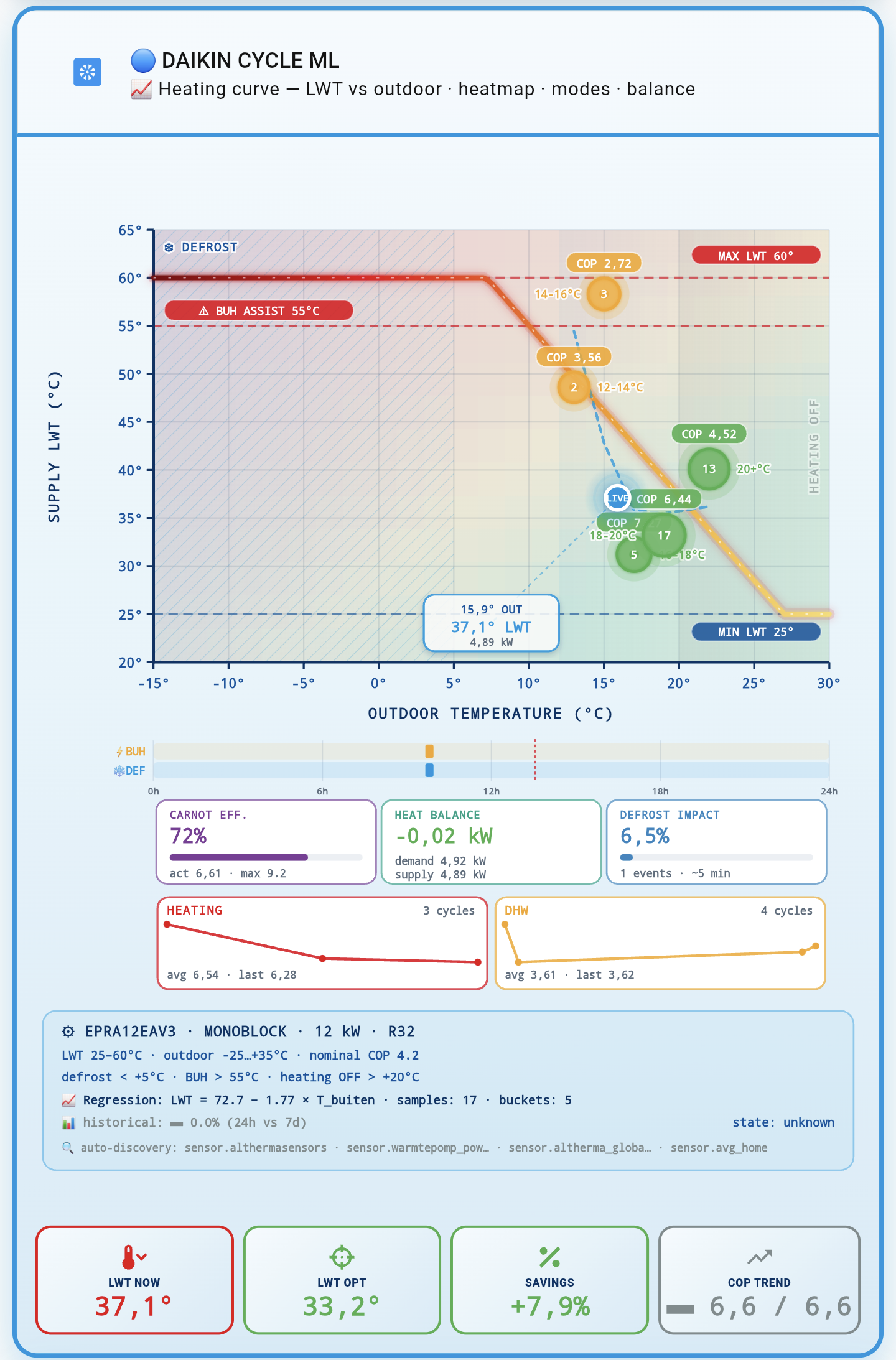
| Simple Card | Heating Curve | Daily Summary |
|---|---|---|
 |
 |
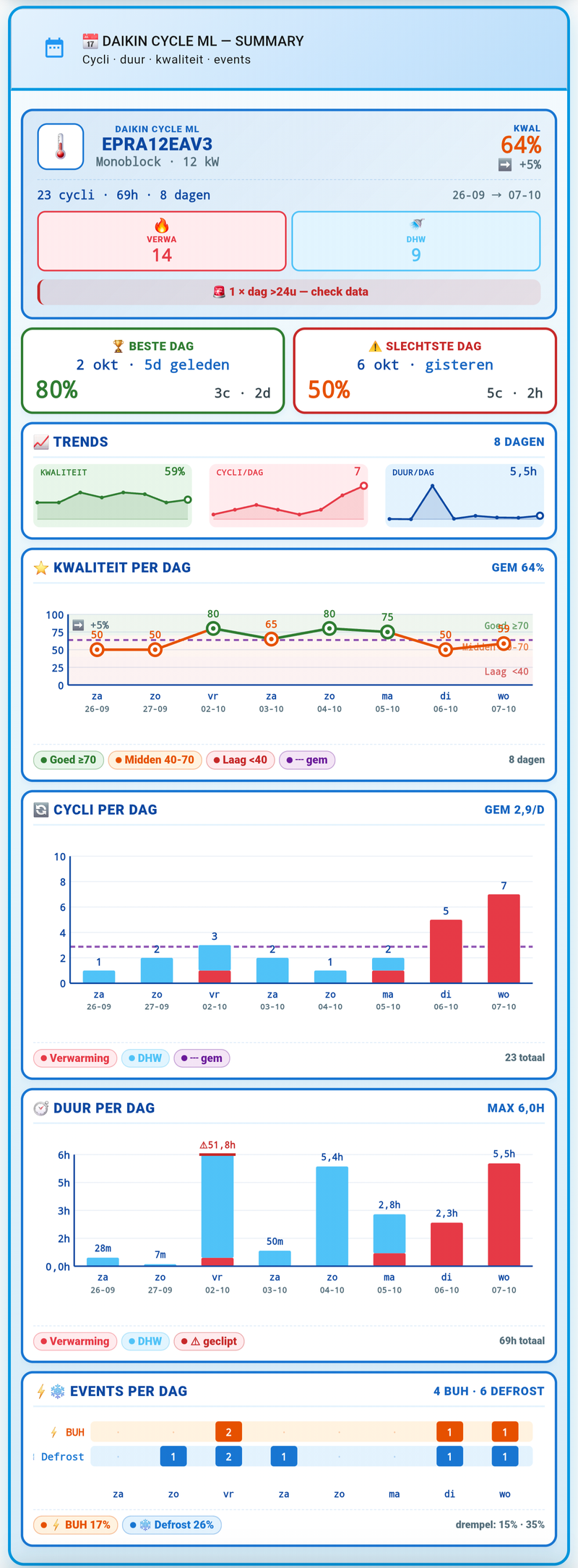 |
| One-glance overview | LWT vs outdoor | 8-day cycle history |
Lovelace dashboard cards — see dashboard/ for installation.
The integration watches every compressor start→run→stop transition and scores each cycle 0-100 based on runtime, water delta-T, off-time, backup-heater use, and defrost events. 8 pendulum patterns across Heating / Cooling / DHW detect short cycling hourly and daily. When cycling is excessive, the integration tells you exactly what to change — raise minimum run time, lower LWT setpoint, widen thermostat hysteresis.
9 per-mode COP sensors (heating / DHW / cooling × day / week / month) plus SPF seasonal, SPF year-to-date, and rolling 365-day SCOP. Weather-normalized 7-day-vs-7-day degradation with outdoor bin matching isolates hardware wear from weather variation. 30-day regression trend catches slow drift before it becomes a problem.
15 bundled Daikin Altherma models (8 EPRA + 7 ERLA) with full EN 14511 reference data. Your live COP is normalized to A7/W35 and compared to spec. cop_vs_datasheet_pct tells you if your pump is underperforming its design point — critical for detecting refrigerant loss, dirty filters, or sizing issues. Import your own datasheet for any non-bundled model.
Dynamic heat-curve advice in Daikin installer language: slope delta and offset delta, not just "raise/lower LWT". The suggested step is 1–3 °C scaled to the delta between measured and optimal LWT, with comfort guardrails (floor + ceiling on projected indoor temp) and tracking-error dampening so you never over-correct. Works with your LW setpoint (main) attribute for real accuracy.
12 sensors for compressor runtime, BUH runtime, defrost count/duration, duty cycle, and electrical/thermal kWh per mode. All energy sensors are HA Energy Dashboard compatible (state_class: total_increasing). Accumulator persistence across HA restarts — no more lost daily totals after a reboot.
19 alert types across 7 domains — pendulum, short cycle, ML, setpoint, COP/heat-curve, component health, data quality. Every alert has its own dedup window and — new in v1.9 — 11 per-alert toggles on top of 5 group toggles. Quiet hours with critical bypass, bilingual EN + NL templates, delivery to any notify.* service plus persistent notifications.
12-dimensional feature vector per cycle. Per-mode EWMA baseline with outlier skip. Adaptive thresholds (opt-in) that learn what "normal" looks like for your house. Weekly k-means clustering into 3 archetypes (pendulum / normal / dhw_like). Z-score anomaly detection flags unusual cycles before they become alerts. Energy anomaly detection with Welford baseline catches stuck valves and runaway demand.
8-step setup wizard with smart auto-import (v1.8) that detects non-canonical attribute names via alias table + fuzzy matching. Options menu with grouped sections and a dedicated notifications sub-menu. Reconfigure flows to change source sensor or model without re-adding. Diagnostics download for one-click troubleshooting support.
6724 tests, 100.00% coverage, mypy strict, Pylint 10/10, IQS Bronze + Silver + Gold. 8 GitHub Actions workflows enforced on every PR. No cloud. No telemetry. No accounts. Your heat pump data stays on your HA instance.
3 new alerts targeting database health, ML retraining, and energy anomalies:
db_retention_warning— DB not being pruned, catches stuck maintenancekmeans_retrain_stale— clustering hasn't succeeded in 14 days, catches ML degradationenergy_daily_anomaly— daily electrical consumption more than 2σ above baseline
Per-alert toggles — 11 new individual switches on top of the existing 5 group toggles. Silence specific alerts without touching their whole family.
Dedup windows — 19 new numeric fields, one per alert type. Fine-grained control over how often each alert can repeat.
Q4 fix — setpoint_osc no longer fires on monotonic drift (only real reversals).
I7/I8 fixes — retention fallbacks, defrost duration, energy accumulators decoupled from runtime lifecycle (daily energy totals now survive HA restarts even if runtime restore fails).
Onboarding that works even when your ESPAltherma firmware uses non-standard attribute names.
- Entity discovery — scans
sensor.*entities for overlap with the 13 canonical attributes - Alias table + fuzzy matching — 14+ community variants (benthouse, akaQ, Videopac, ...) resolve automatically
- Anti-alias guard —
Leaving water temp. after BUH (R2T)never wrongly resolves toR1T - Diagnose screen — new wizard step showing per-canonical match kind (
EXACT/ALIAS/FUZZY/MISSING) and sanity warnings
Turns the integration from a cycle-detector into a full HVAC performance platform.
- 9 per-mode COP sensors — heating / DHW / cooling × day / week / month
- SPF / SCOP — seasonal, year-to-date, rolling 365-day
- 15 bundled Daikin datasheets (8 EPRA + 7 ERLA) — normalized COP at A7/W35 + comparison vs spec
- Weather-normalized degradation — outdoor-binned 7d-vs-7d, BUH/defrost excluded
- 30-day regression trend — isolates hardware wear from weather
- Runtime + energy accounting — 12 new sensors, HA Energy Dashboard compatible
- OptionsFlow overhaul — grouped sections + notifications sub-menu
- Slope / offset advice in Daikin installer language
- Dynamic LWT step 1-3 °C — scaled to measured vs optimal delta, not hardcoded
- Comfort dual-loop — floor + ceiling on projected indoor temp
- Setpoint comparison — uses real
LW setpoint (main)instead of last bucket sample - Tracking-error dampening — smaller steps when unit lags setpoint
- 8 new attributes on
heating_curve_advice
- v1.4.0 — entity slug renames to
sensor.daikin_cycle_ml_<key> - v1.4.1-1.4.5 — cycle/quality/notify fixes, hydrate path, rollup extension to 720 h
- COP hourly rollup + KPI sensors (
cop_mean_day/_week/_month) - REST endpoint
GET /api/daikin_cycle_ml/cop_hourly sensor.cop_curve_recent(48 h recorder-safe window)export_cop_hourlyservice
See CHANGELOG.md for the complete history.
| Version | Date | Headline |
|---|---|---|
| v1.9.0 | 2026-10-20 | Alerts v2: 3 new alerts, per-alert toggles, dedup windows, recompute_kmeans service |
| v1.8.1 | 2026-10-08 | R331 fix — alert advice bleed |
| v1.8.0 | 2026-10-08 | Smart auto-import wizard |
| v1.7.2 | 2026-09 | Hotfix for issue #49 |
| v1.7.1 | 2026-09 | Security updates |
| v1.7.0 | 2026-09 | Defrost history helper sensors |
| v1.6.2 | 2026-10-06 | Onboarding fix — Automatic/Manual attribute mode (issue #25) |
| v1.6.1 | 2026-10-06 | Energy tick fix — standby power not booked as heating |
| v1.6.0 | 2026-10-06 | HVAC Parity — 3× features, breaking cop_today |
| v1.5.0 | 2026-10-03 | Dynamic LWT step + comfort dual-loop |
| v1.4.0 | 2026-09-29 | Entity slug renames (breaking) |
| v1.3.0 | 2026-09-26 | COP hourly rollup + REST endpoint |
| v1.2.x | 2026-09-20 | IQS Silver + Gold |
| v1.1.0 | 2026-09-15 | HACS-compliant layout |
| v1.0.x | 2026-09-10 | Initial release |
Short cycling is the #1 hidden cause of reduced COP and premature compressor wear on Daikin Altherma heat pumps. Existing HA integrations miss it because they look at temperature or power — not at the actual compressor runtime pattern.
Daikin Cycle ML is built for the ESPAltherma community: users who already have rich local data but no tool to interpret it. It detects every cycle, learns what "normal" looks like for your installation per mode, and warns you when patterns drift — long before you'd notice from your energy bill.
No cloud. No external API. No dependency on Daikin's infrastructure. Just your data, analysed locally.
- Is my heat pump short cycling? How often? Is it getting worse?
- Why is my COP lower this week than last week — weather or hardware?
- Is my heat curve too high? What should I change it to?
- Is my backup heater running more than it should?
- Is my defrost behaviour normal for the current weather?
- Is the pump degrading over time, or is it weather?
- Doesn't write to your heat pump (read-only)
- Doesn't call any cloud API (fully local)
- Doesn't replace your thermostat (diagnostic layer, not control)
Complete, per-topic guides are in docs/:
| Doc | What it covers |
|---|---|
| Configuration | Source sensor requirements, setup wizard, options menu, reconfigure flows, cookbook |
| Entities | All 50 sensors, 15 binary sensors, 10 services, 8 repair issues, automations reference |
| Alerts & Notifications | All 19 alert types, delivery channels, dedup, quiet hours, per-alert toggles, templates |
| Machine Learning | Feature vector, EWMA baseline, adaptive thresholds, k-means clustering, anomaly detection |
| Database | Schema reference, model_state keys, retention, migrations, backup/recovery |
| Development | Dev environment, test suite, CI gates, IQS status, scope boundaries, release procedure |
| Troubleshooting | Setup issues, cycle detection failures, alert issues, DB problems, log reference |
| Upgrade | Version-by-version breaking changes, migration steps, downgrade recovery |
- Home Assistant 2026.9.0 or newer
- Python 3.14 (bundled with HA 2026.9)
- ESPAltherma publishing attributes on a sensor (typically
sensor.althermasensors) - Recommended: outdoor temp + leaving-water temp attributes (needed for dT and COP)
- Install HACS if you haven't already
- HACS → Integrations → search "Daikin Cycle ML"
- Select Daikin Cycle ML → Download
- Restart Home Assistant (Settings → System → Restart)
- Settings → Devices & Services → Add Integration → "Daikin Cycle ML"
- Follow the wizard
The integration may not yet be listed in the HACS default catalog (submission pending). If the HACS search finds nothing, add it as a custom repository:
- HACS → Integrations → three dots (top right) → Custom repositories
- Add
https://github.com/elRadix/daikin_cycle_mlwith category Integration - Click Add → find Daikin Cycle ML in the list → Download
- Restart Home Assistant (Settings → System → Restart)
- Settings → Devices & Services → Add Integration → "Daikin Cycle ML"
- Follow the wizard
- Copy
custom_components/daikin_cycle_ml/to/config/custom_components/daikin_cycle_ml/ - Restart Home Assistant (full restart, not just config reload)
- Settings → Devices & Services → Add Integration → "Daikin Cycle ML"
- Follow the wizard
See docs/UPGRADE.md for version-by-version notes. Only two breaking changes in the entire history:
- v1.4.0 — entity slug renames
- v1.6.0 —
cop_todaychanged to heating-only
Everything else is backward compatible.
Verify your source sensor exposes the required attributes.
- Developer Tools → States
- Search
sensor.althermasensors - Expand "Attributes"
- Look for these 13 keys (exact names):
INV frequency (rps)
Operation Mode
I/U operation mode
3way valve
Defrost Operation
Leaving water temp after BUH (R2T)
Inlet water temp (R4T)
Flow sensor (l/min)
Water pump operation
Outdoor air temp (R1T)
DHW tank temp (R5T)
BUH Step1
BUH Step2
If one or more are missing: enable the register in ESPAltherma's .h file, restart the ESP, wait for republish. Or use Manual mode in the wizard to map them yourself.
Optional but recommended:
LW setpoint (main)— enables modern LWT advice +setpoint_oscillatingalertindoor_temp_sensor(a separate room sensor) — enables comfort guardrails
The wizard adapts to your setup:
| Your situation | Wizard path |
|---|---|
| Standard ESPAltherma, bundled model | 7 steps (user → attributes → cycle → pendulum → quality → notifications → finalize) |
| Standard, non-canonical attribute names | 7 steps + map_attributes |
| Custom model | 9 steps (adds HP spec + attribute mapping) |
| Custom with alias/fuzzy detection | 10 steps (adds diagnose screen) |
Key decisions:
- Source sensor — usually
sensor.althermasensors - Model — 17 bundled Daikin models (8 EPRA + 7 ERLA) + Custom. Pick your exact model if listed. Bundled = datasheet-backed COP comparison.
- Attribute mode —
autofor canonical names,manualif your firmware differs - RPS threshold — default 3. Lower = catches brief modulation dips, higher = misses short cycles.
- Thresholds — defaults are sensible; tune later once you have data
Full wizard walkthrough in docs/CONFIGURATION.md §3.
After the wizard completes, check in this order:
Within 1 minute:
sensor.daikin_cycle_ml_source_health— shows < 30 sbinary_sensor.daikin_cycle_ml_source_stale— should beoffbinary_sensor.daikin_cycle_ml_missing_attributes— should beoff
Within 1 hour:
sensor.daikin_cycle_ml_cycle_state— should transitionidle↔runningwhen compressor starts/stopssensor.daikin_cycle_ml_current_cycle— shows live cycle data during a running cyclesensor.daikin_cycle_ml_cycles_today— should increment after first cycle completes
Within 24 hours:
- First entries in
daily_summary(check diagnostics) sensor.daikin_cycle_ml_last_cycle— should show the last cycle's quality score
Within 7 days:
- K-means clustering runs Sunday 04:00 local → clusters assigned
- Energy baseline accumulates →
energy_daily_anomalycan fire (needs ≥ 7 days) ml_anomalystarts firing (needs ≥ 20 cycles per mode)
Check in this order:
- Is the compressor actually running? Check
sensor.daikin_cycle_ml_thermal_power_live— should be > 0 when heating - Is RPS > threshold? Options → Device →
compressor_rps_threshold. Try lowering to 2. - Is the source sensor fresh?
sensor.daikin_cycle_ml_source_health< 30 s - Are required attributes present?
binary_sensor.daikin_cycle_ml_missing_attributesoff - Wait longer — the first cycle takes ~1 h because it needs a full start→run→stop
Still stuck? See docs/TROUBLESHOOTING.md §3.
After 24 h of data, these entities start being useful:
sensor.daikin_cycle_ml_cycles_today— how many cycles? Typical: 6-20. Over 40 indicates excessive cycling.sensor.daikin_cycle_ml_quality_today— average quality 0-100. Above 70 is good. Below 50 means something to fix.sensor.daikin_cycle_ml_last_cycle— hover for attributes: duration, dT, RPS, COP, cluster
binary_sensor.daikin_cycle_ml_pendulum_hourly— going on/off during active heating? Check setpoint / hysteresisbinary_sensor.daikin_cycle_ml_short_run— cycles under 20 min? Raise minimum run time or lower LWT setpointbinary_sensor.daikin_cycle_ml_short_off— off-times under 5 min? Check thermostat hysteresis
sensor.daikin_cycle_ml_cop_today— heating-only COP. Typical: 2.5-5.0 depending on outdoor temp and LWTsensor.daikin_cycle_ml_cop_vs_datasheet_pct— if you selected a bundled model, this shows your COP as % of spec (should be near 100% in mild weather)
sensor.daikin_cycle_ml_heating_curve_advice— the main advice sensor. States:keep— no change neededlower_lwt— heat curve is too high, lower bystep_cdegreesraise_lwt— heat curve is too lowno_data— no recent heating samples, or DHW activeunknown— check thereasonattribute
If reason: within_deadband, no action needed. If reason: no_recent_heating, wait for heating activity.
Default thresholds work for most installs, but every installation is different:
If you get too many pendulum_hourly alerts:
- Options → Pendulum → raise
pendulum_cycles_per_hourfrom 4 to 6 or 8 - Or Options → Notifications → Content → disable
alert_group_pendulum
If you get too many short_run alerts:
- Options → Pendulum → raise
short_run_threshold_minfrom 20 to 30 or 45 - Or Options → Notifications → Dedup → raise
short_runwindow to 120 min
If you get too many short_off alerts:
- Options → Pendulum → raise
short_off_threshold_minfrom 5 to 10 - Check if your thermostat has a minimum off-time setting
The heat curve advice uses projected indoor temperature to decide how aggressive to be:
comfort_min_c(default 20°C) — never advise lowering LWT below what would project this indoor tempcomfort_max_c(default 24°C) — never advise raising LWT above this
Adjust to your comfort preferences:
- If advice is too conservative (never suggests lowering): raise
comfort_min_cto 21 or 22 - If advice is too aggressive (suggests lowering too much): lower
comfort_min_cto 19
Default notification behavior:
- Persistent notification in HA sidebar (always)
- No phone push (needs a
notify_service)
To enable phone notifications:
- Options → Notifications → Delivery → Notify service → select your
notify.*entity - Options → Notifications → Delivery → Emoji → keep on (phone notifications have emoji)
- Options → Notifications → Quiet hours → Enabled → set
22:00to07:00to avoid night alerts
Check diagnostics:
- Settings → Devices & Services → Daikin Cycle ML → menu → Download diagnostics
- Look at
database.extra.daily_summary— cycles per day, mode breakdown - Look at
database.extra.kmeans_state— cluster labels and sizes - Look at
database.extra.baseline_state— per-mode sample counts
Compare with your own observation:
- Do cycles/day match what you see in real life?
- Are cluster labels meaningful? (or all "normal"?)
- Is the energy baseline growing?
Automation that notifies you when the pump advises a heat-curve change:
alias: "Daikin: LWT advice → phone"
mode: single
trigger:
  - platform: state
    entity_id: sensor.daikin_cycle_ml_heating_curve_advice
    to:
      - "lower_lwt"
      - "raise_lwt"
condition:
  - condition: template
    value_template: >-
      {{ state_attr('sensor.daikin_cycle_ml_heating_curve_advice', 'betrouwbaarheid') | float(0) >= 0.6 }}
action:
  - service: notify.mobile_app_your_phone
    data:
      title: "Daikin LWT advice"
      message: >-
        {{ state_attr('sensor.daikin_cycle_ml_heating_curve_advice', 'state_label') }}
        · setpoint {{ state_attr('sensor.daikin_cycle_ml_heating_curve_advice', 'huidige_setpoint') }}
→ {{ state_attr('sensor.daikin_cycle_ml_heating_curve_advice', 'doel_setpoint') }} °CSee cycle history in the HA logbook:
alias: "Daikin: log cycles"
mode: queued
max_exceeded: silent
trigger:
  - platform: state
    entity_id: sensor.daikin_cycle_ml_last_cycle
action:
  - service: logbook.log
    data:
      name: "Daikin cycle"
      message: >-
        {{ state_attr('sensor.daikin_cycle_ml_last_cycle', 'duration_min') }} min
        · quality {{ states('sensor.daikin_cycle_ml_last_cycle') }}
        · dT {{ state_attr('sensor.daikin_cycle_ml_last_cycle', 'dt_avg_k') }} K
· {{ state_attr('sensor.daikin_cycle_ml_last_cycle', 'mode') }}alias: "Daikin: daily summary"
mode: single
trigger:
- platform: time
at: "22:00:00"
action:
- service: notify.mobile_app_your_phone
data:
title: "Daikin today"
message: >-
{{ states('sensor.daikin_cycle_ml_cycles_today') }} cycles
· COP {{ states('sensor.daikin_cycle_ml_cop_today') }}
· heating {{ states('sensor.daikin_cycle_ml_electrical_energy_heating_today') }} kWhTriggers when the ESPAltherma link is dead for 2+ minutes:
alias: "Daikin: source stale"
mode: single
trigger:
  - platform: state
    entity_id: binary_sensor.daikin_cycle_ml_source_stale
    to: "on"
    for: "00:02:00"
action:
  - service: notify.mobile_app_your_phone
    data:
      title: "Daikin source stale"
message: "ESPAltherma sensor not updating — check ESP device"The 6 energy sensors are directly compatible:
- Settings → Dashboards → Energy
- Click Add consumption under Grid or Solar
- Select
sensor.daikin_cycle_ml_electrical_energy_heating_today - All 6 energy sensors have
state_class: total_increasing— the dashboard handles them automatically
More recipes in docs/ENTITIES.md §9 and docs/CONFIGURATION.md §6.
No. The integration reads attributes from an ESPAltherma sensor. Without those attributes, cycle detection and COP analysis cannot work. It's not a cloud API client.
No. The integration is read-only toward the heat pump. All advice requires user action or user automation.
Yes. They don't conflict — different entities, different data sources.
Typically 10-40 MB after a full year, depending on retention settings. See docs/DATABASE.md §10.3.
Yes. Use daikin_cycle_ml.export_cycles and daikin_cycle_ml.export_cop_hourly services to export to JSON or CSV. See docs/ENTITIES.md §5.
No. All data stays in /config/.storage/daikin_cycle_ml.db on your HA instance. No cloud, no telemetry, no accounts.
Use Model = Custom in the wizard. You can optionally provide a datasheet JSON for full functionality, or leave it empty for Basic profile defaults.
ml_anomaly flags statistical deviations, not necessarily problems. Check top_dim attribute — it tells you which dimension triggered. top_dim: v5 (outdoor temp) is usually a weather outlier, not a bug.
Check the reason attribute. reason: dhw_active = DHW is running, advice pauses. reason: no_recent_heating = no heating activity. reason: within_deadband = advice is "keep", no action needed.
Options → Pendulum → pendulum_cycles_per_hour (default 4) and pendulum_cycles_per_day (default 40). Raise both if you get too many alerts; lower if you want earlier warning.
Known HA quirk — kmeans_retrain_stale may not appear in the panel under bulk notification. The alert is functional, just cosmetically missing in this one case. See docs/ALERTS.md §10.3.
Downgrading is not officially supported but is technically possible. See docs/UPGRADE.md §8. All historical data will be lost unless you export it first.
| Metric | Value |
|---|---|
| Tests | 6724 passed / 4 skipped |
| Coverage | 100.00% (6724 stmts / 1922 branches) |
| mypy strict | 35 files, 0 errors |
| Pylint | 10.00/10 |
| CI workflows | 8, all green |
| IQS | Bronze + Silver + Gold |
| Entities | 61 registered |
| Services | 10 |
| Repairs | 8 |
Run the full local quality gate before every push:
scripts/ci-local.shFull development guide in docs/DEVELOPMENT.md.
Daikin Cycle ML persists to:
/config/.storage/daikin_cycle_ml.db— SQLite: cycles, features, COP samples, model state/config/.storage/daikin_cycle_ml.alerts— HA Store: dedup timestamps/config/.storage/daikin_cycle_ml.user_datasheets— HA Store: user-imported model specs
All data stays on your HA instance. No telemetry, no cloud, no accounts.
Backup procedure in docs/DATABASE.md §8.
In scope:
- Cycle detection and quality scoring
- Per-mode COP / SPF / SCOP / degradation analysis
- Daikin datasheet integration
- Runtime + energy accounting
- LWT heat-curve advice
- ML (baseline, adaptive thresholds, clustering, anomaly)
- 19 alert types
- Setup wizard + OptionsFlow
Out of scope:
- Daikin cloud API
- Setpoint writes (read-only)
- Cost tracking / € calculations
- Consumption forecasting
- InfluxDB export (use HA recorder)
- Web UI cycle explorer
Full list in docs/DEVELOPMENT.md §1.
kmeans_retrain_stalemay not appear in Test-all — HA quirk under bulk notification burst, not a bug. See docs/ALERTS.md §10.3.- Energy baseline is not weather-normalized — cold snaps may trigger false
energy_daily_anomalyalerts. See docs/ML.md §7.5. defrost_used/buh_usedvariance may cause falseml_anomalyat shoulder seasons. See docs/ML.md §11.7.- No supervised ML —
label_cyclecollects labels but they are not used for training yet.
See docs/ML.md §11 for the full ML limitation list.
Daikin Cycle ML is free and open-source, built and maintained in my own time. No cloud, no accounts, no telemetry — your heat pump data stays on your Home Assistant instance.
If this integration has helped you reduce short cycling, understand your cycles, or improve your COP, a coffee is always appreciated and helps keep the project going.

- Issues: https://github.com/elRadix/daikin_cycle_ml/issues
- Discussions: https://github.com/elRadix/daikin_cycle_ml/discussions
- Tweakers ESPAltherma topic — largest user base, mixed NL/EN
- Before opening an issue: see docs/TROUBLESHOOTING.md and download diagnostics (Settings → Devices & Services → Daikin Cycle ML → menu → Download diagnostics)
See docs/DEVELOPMENT.md for:
- Dev environment setup (
scripts/bootstrap.sh) - Test suite (
pytest -q— 100% coverage required) - Code quality gates (ruff, mypy strict, markdown guard)
- Standard workflow (branch, commit, push, PR)
- IQS status and how to maintain it
Every PR must:
- Pass all 4 local gates (
scripts/ci-local.sh) - Have 100% test coverage for new code
- Update docs/ for any user-facing change
- Reference the tracker issue (
Refs #<num>on PR body line 1)
MIT — see LICENSE.
- ESPAltherma community — the source-sensor format that makes this possible
- Daikin Altherma users on Tweakers and HA forums — for the feedback loop that shaped every version
- Home Assistant core team — for the framework that makes custom components this easy
- IQS reviewers — for pushing toward Bronze + Silver + Gold compliance