Releases: exwm/yt_clipper
yt_clipper v5.43.0 [2026.04.12]

5.43.0 (2026-04-12)
Highlights
Command Palette
Shift+E: Open command palette to search and execute all shortcuts. Can also be opened with the scissors button in the right side of the video player controls.
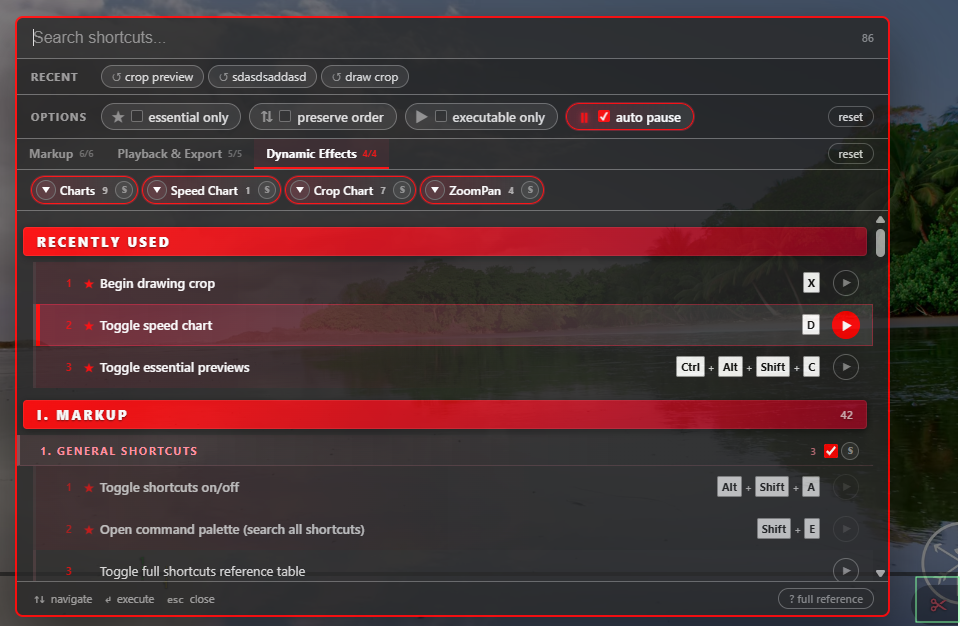
A shortcuts reference can also be toggled by clicking the full reference button in the footer of the command palette.
Features
- markup: add searchable command palette (shift+e) (c7308ef)
- markup: Ctrl+Alt+Shift+C to toggle essential previews now excludes dynamic crop chart looping (dfac3fe)
- markup: make it clearer that (Source) FPS Multiplier targts source video FPS, always show derived clip fps multiplier (95c0a92)
- markup: reorganize command shortcuts and improve command palette ux (5946cf1)
- markup: show warning when navigating to different video after activating yt_clipper (c93f3ba)
Bug Fixes
- markup: crop crosshair should rotate when video is rotated (3f7545e)
- markup: move marker by frame (alt+shift+mousewheel) should not jump to start when marker pair looping is enabled (f9f6c23)
- markup: yt: hide yt overlays that may interfere with cropping (fcc83fa)
- markup: move marker by frame (alt+shift+mousewheel) should not jump to start when marker pair looping is enabled (f9f6c23)
Documentation Updates
- readme: update shortcuts organization to match new command palette (2676e66c)
yt_clipper v5.41.0 [2026.03.27]
5.41.0 (2026-03-26)
Features
- clipper+markup: support dynamic speed with motion interpolation and improve its quality + preserve metadata in interpolated output (10d234c)
- Depends on forked version of video2x (v6.5.0-exwm: https://github.com/exwm/video2x/releases/tag/v6.5.0-exwm)
- This is included in the
*fullclipper download for windows.
- This is included in the
- BREAKING CHANGE: a value of 0 for FPS multiplier now disables disables motion interpolation.
- A value of 1 targets the original source video fps, compensating for slowdown.
- Higher values (e.g. 2) target N x source fps for extra-smooth slow motion.
- Depends on forked version of video2x (v6.5.0-exwm: https://github.com/exwm/video2x/releases/tag/v6.5.0-exwm)
Bug Fixes
- clipper: unknown args should be logged before exit (6667332)
yt_clipper v5.40.0 [2026.03.10]
5.40.0 (2026-03-10)
Features
- clipper+markup: add ai motion interpolation with video2x (45d1c3c)
- clipper: shift+x opens crop preview in pop up window (48a3e1e)
- markup: crop preview (ctrl+alt+x) shows hq gamma preview (912ffc8)
Bug Fixes
- markup: alt+mousewheel should jump to crop points (d54246f)
- markup: yt: marker numbers should hide when progress bar hidden (ec5980d)
Details
Motion Interpolation
New Motion interpolation feature (frame rate multiplication) is powered by video2x and is only supported on Windows and Linux for now.
To use it, video2x must be available at bin/video2x/ in the clipper script installation or on the system PATH if using the script directly:
- Easiest: Download the
yt_clipper_win_*_full.ziprelease — video2x v6.4.0 is pre-bundled atbin/video2x/. - Manual: Download video2x-qt6-windows-amd64.zip, extract it, and place the contents in
bin/video2x/inside your clipper installation directory.
Once installed, enable motion interpolation on a marker pair by setting FPS Multiplier in the markup script UI (in the advanced settings opened with shift+W) to a value greater than 1 (e.g. 2 to double the frame rate). The RIFE model is used for interpolation. Hardware-accelerated encoders do not yet work with video2x.
Note that video2x requires a vulkan-capable GPU. See also https://github.com/k4yt3x/video2x.
Pop-Out Crop Preview
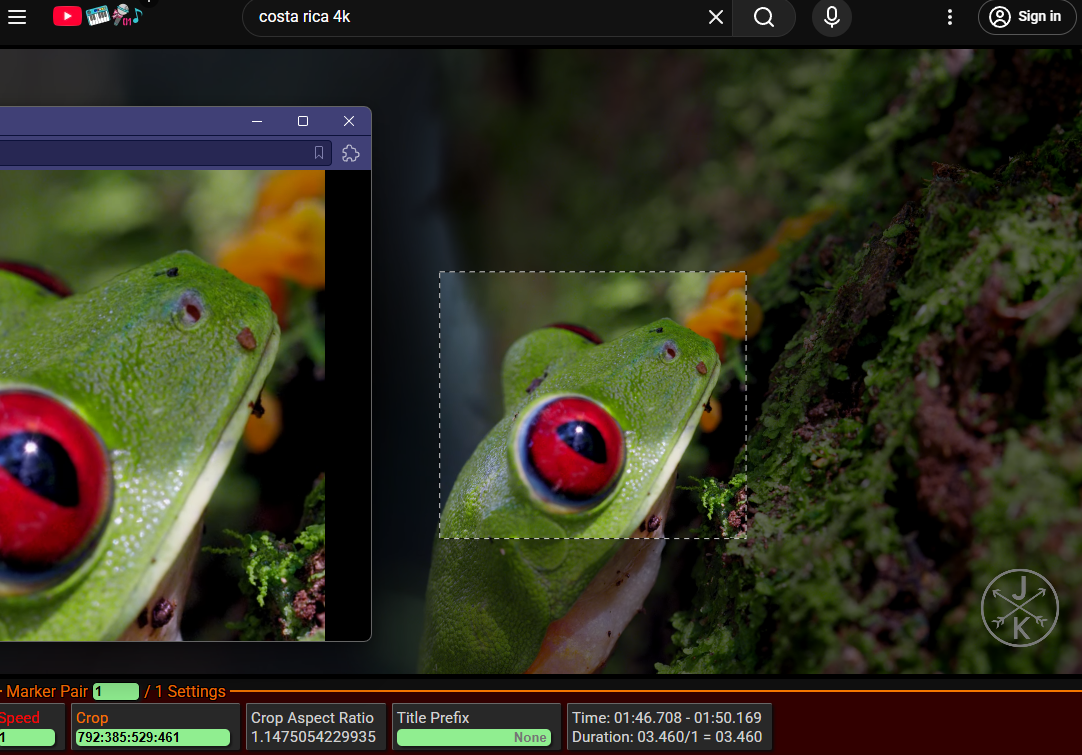
Shift+X: Toggle previewing crop in pop-out window.
yt_clipper v5.39.0 [2026.01.25]
5.39.0 (2026-01-25)
Features
- clipper: exit when given unknown arguments (abe881d)
Bug Fixes
- clipper: --download-video not working becuase video url not given in yt-dlp command (d83e570)
- clipper: h264 artifacting on 10-bit sdr input (4ab4ff5)
- clipper: h264_vulkan artifacting when going from HDR -> SDR (b6a5fce)
- clipper: merge clips should use mp4 for h264* codecs (82dbdaf)
Documentation Updates
- readme: add dynamic crop video tut link (840b183)
yt_clipper v5.38.0 [2025.12.27]
yt_clipper v5.37.0 [2025.12.04]
5.37.0 (2025-12-04)
Bug Fixes
- markup+clipper: improve dynamic crop preview accuracy (Ctrl+Alt+X), make instant crop ease in easier to use (e092521c)
⚠ BREAKING CHANGES
- markup+clipper: instant ease in behaviour and ease in timing changes
may produce slightly different videos with the same markers json
yt_clipper v5.36.0 [2025.12.01]
5.36.0 (2025-12-01)
Features
- clipper: add --ffmpeg-tools-dir option for changing where ffmpeg tools are found (cca924d)
- clipper: include deno runtime for yt-dlp youtube extraction (7c24a62)
- markup: cycle frame skip/seek speed (1 to 3 frames) on shift+mousewheel-click (6e84bdf)
Bug Fixes
- clipper: escape merged file name when logging (90c2f5c)
- clipper: security issues with options that change tool ytdl-location (413e768)
- The main attack vector would be untrusted markers json files
Major Dependency Upgrades
- clipper: update to ffmpeg 8.0.1 (f22b578)
yt_clipper v5.34.0 [2025.08.03]
5.34.0 (2025-08-03)
Bug Fixes
- clipper: input videos with display-only rotation should be correctly cropped (3725886)
- clipper: missed escaping of filename in some logs (a78e90f)
- clipper: vidstabtransform filter should be injected when video stabilization is enabled and video filter is large (#62) (6ae8704) by @codedealer
