English · Español
The AI-native E2E test runner that writes, runs, and debugs tests for you.










E2E Runner lets you test your web app without writing test code. Tests are plain JSON — and you don't even have to write that yourself: just ask Claude Code.
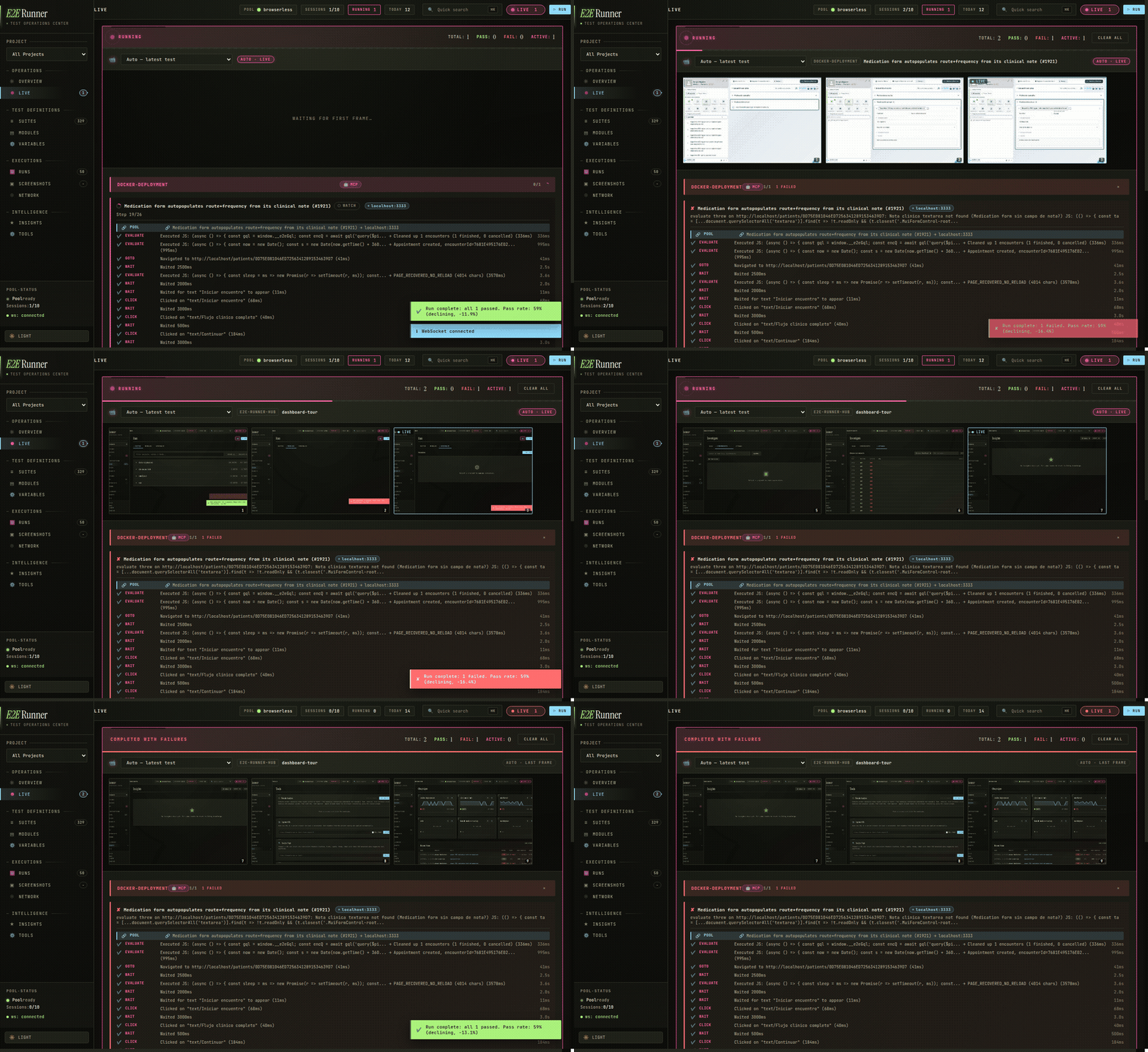
The live dashboard while a suite runs — every step streams a screenshot into the feed, in real time.
With the built-in MCP server, creating a test is a conversation — no docs, no syntax to memorize:
You: Create an E2E test for the login flow and run it.
Claude Code: writes the test, runs it in a real browser, and reports back — ✅
login-flowpassed in 2.3s · screenshot saved · no network errors.
Behind the scenes Claude just wrote and ran this. A test is just JSON — an ordered list of what a user does:
[
  { "name": "login-flow", "actions": [
    { "type": "goto", "value": "/login" },
    { "type": "type", "selector": "#email", "value": "user@test.com" },
    { "type": "type", "selector": "#password", "value": "secret" },
    { "type": "click", "text": "Sign In" },
    { "type": "assert_text", "text": "Welcome back" },
    { "type": "screenshot", "value": "logged-in.png" }
  ]}
]
No imports, no describe/it, no build step. If you can read it you can write it — or just ask.
Connect it to Claude Code (2 commands):
claude plugin marketplace add fastslack/mtw-e2e-runner
claude plugin install e2e-runner@matware
Now say "create a test for X and run it" — Claude gets 17 MCP tools, slash commands, and specialized agents.
Using a different agent (Cursor, Codex, Copilot, 40+ more)? Install the skill:
npx skills add fastslack/mtw-e2e-runner
| Section | What's inside | |
|---|---|---|
| 🚀 | Install & first test | npm setup · run with your own Chrome (no Docker), Obscura, or a Docker pool |
| ✨ | What you get | feature overview at a glance |
| ✍️ | Writing tests | test format · full action catalog · retries · serial · modules · auth · hooks |
| 🤖 | AI integration | Claude Code · OpenCode · 17 MCP tools · visual verification · issue-to-test |
| 📊 | Dashboard & insights | live dashboard · learning system · network logs · screenshot capture |
| 🌐 | Browser drivers | browserless · cdp · lightpanda · obscura · steel |
| ⚙️ | CLI, config & CI | commands · flags · e2e.config.js · GitHub Actions · programmatic API |
npm install --save-dev @matware/e2e-runner
npx e2e-runner init        # scaffolds e2e/ with a sample test + config
Then pick how to run the browser. You don't need Docker unless you want the parallel pool:
Launch any Chromium browser with a debugging port, then point the runner at it:
google-chrome --headless=new --remote-debugging-port=9222 &   # or brave / chromium / msedge
CHROME_POOL_URL=http://localhost:9222 POOL_DRIVER=cdp npx e2e-runner run --all
Or bake it into e2e.config.js so you never repeat it:
export default {
  baseUrl: 'http://localhost:3000',     // your app — plain localhost, no docker hostname
  poolUrls: ['http://localhost:9222'],
  poolDriver: 'cdp',
};
Nothing to install beyond npm, and baseUrl is just localhost (the browser is on your machine).
A single ~30 MB binary with built-in anti-detection. Install once, run it, point the runner at it:
obscura serve --port 9222 --stealth &
CHROME_POOL_URL=http://localhost:9222 POOL_DRIVER=obscura npx e2e-runner run --all
npx e2e-runner pool start (with poolDriver: 'obscura' in your config) prints the exact install command for your OS.
A shared, queue-managed Chrome pool that runs many tests at once:
npx e2e-runner run --all # the first run auto-starts the Docker pool for youRequires Docker. Set baseUrl: 'http://host.docker.internal:3000' so the containerized Chrome can reach your app.
Why host.docker.internal (Docker option only)?
With the Docker pool, Chrome runs inside a container, so localhost there means the container — not your machine. host.docker.internal bridges to your host. On Linux (Docker Engine, not Docker Desktop) add --add-host=host.docker.internal:host-gateway, or use your LAN IP. Options 1 & 2 don't have this — the browser is local, so plain localhost just works.
Open e2e/tests/sample.json — a flow is an ordered list of actions:
[
  { "name": "homepage loads", "actions": [
    { "type": "goto", "value": "/" },
    { "type": "assert_text", "text": "Welcome" },
    { "type": "screenshot", "value": "home.png" }
  ]}
]
Run it with npx e2e-runner run --all. Results — pass/fail, timing, screenshots, network errors — print to your terminal and to the web dashboard if it's open.
Add OpenCode (optional)
cp node_modules/@matware/e2e-runner/opencode.json ./
mkdir -p .opencode && cp -r node_modules/@matware/e2e-runner/.opencode/* .opencode/
See OPENCODE.md for details.
Each install method updates separately — bump the one(s) you use:
# npm dependency (per project)
npm install --save-dev @matware/e2e-runner@latest

# Claude Code plugin
claude plugin update e2e-runner@matware

# MCP-only install (npx caches the package — pin @latest to force a refresh)
claude mcp add --transport stdio --scope user e2e-runner \
  -- npx -y -p @matware/e2e-runner@latest e2e-runner-mcp
Note
Two gotchas: (1) npx prefers a copy found in the project's node_modules over its own cache — if a project pins an old version, the MCP server and dashboard run that old version, so update the project dependency too. (2) Already-running processes keep the old code in memory: after updating, restart the dashboard and reconnect the MCP server (/mcp → e2e-runner → Reconnect, or restart your session).
🧪 Zero-code tests — JSON files that anyone on your team can read and write. No JavaScript, no compilation, no framework lock-in.
🤖 AI-powered testing — Claude Code creates, executes, and debugs tests natively through 17 MCP tools. Ask it to "test the checkout flow" and it builds the JSON, runs it, and reports back.
🐛 Issue-to-Test pipeline — Paste a GitHub or GitLab issue URL. The runner fetches it, generates E2E tests, runs them, and tells you: bug confirmed or not reproducible.
👁️ Visual verification — Describe what the page should look like in plain English. The AI captures a screenshot and judges pass/fail against your description. No pixel-diffing setup needed.
🧠 Learning system — Tracks test stability across runs. Detects flaky tests, unstable selectors, slow APIs, and error patterns — then surfaces actionable insights.
⚡ Parallel execution — Run N tests simultaneously against a shared browser pool (browserless, raw CDP, Lightpanda, Obscura, or Steel). Serial mode available for tests that share state.
🎯 Pluggable browser drivers — Pick the engine that fits each test: real Chrome via browserless, Lightpanda or Obscura for fast lightweight runs, Steel for managed sessions. Set driver per test or override the whole run with --driver.
📊 Real-time dashboard — Live execution view, run history with pass-rate charts, screenshot gallery with hash-based search, expandable network request logs.
🔁 Smart retries — Test-level and action-level retries with configurable delays. Flaky tests are detected and flagged automatically.
📦 Reusable modules — Extract common flows (login, navigation, setup) into parameterized modules and reference them with $use.
🏗️ CI-ready — JUnit XML output, exit code 1 on failure, auto-captured error screenshots. Drop-in GitHub Actions example included.
🌐 Multi-project — One dashboard aggregates test results from all your projects. One Chrome pool serves them all.
🐳 Portable — Chrome runs in Docker, tests are JSON files in your repo. Works on any machine with Node.js and Docker.
Everything about authoring tests — the file format, the full action vocabulary, retries, state isolation, and reuse. Expand what you need:
Test format & file layout
Each .json file in e2e/tests/ contains an array of tests. Each test has a name and sequential actions:
[
  {
    "name": "homepage-loads",
    "actions": [
      { "type": "goto", "value": "/" },
      { "type": "assert_visible", "selector": "body" },
      { "type": "assert_url", "value": "/" },
      { "type": "screenshot", "value": "homepage.png" }
    ]
  }
]
Suite files can have numeric prefixes for ordering (01-auth.json, 02-dashboard.json). The --suite flag matches with or without the prefix, so --suite auth finds 01-auth.json.
Action catalog — navigation, input & interaction
| Action | Fields | Description |
|---|---|---|
goto |
value |
Navigate to URL (relative to baseUrl or absolute) |
click |
selector or text |
Click by CSS selector or visible text content. Text mode also takes scope: "dialog", visible: true, last: true |
type / fill |
selector, value |
Clear field and type text |
wait |
selector, text, gone, or value (ms) |
Wait for element/text to appear, for gone to disappear (spinner/dialog), or fixed delay. Prefer conditions over fixed value sleeps |
screenshot |
value (filename) |
Capture a screenshot |
select |
selector, value |
Select a dropdown option |
clear |
selector |
Clear an input field |
press |
value |
Press a keyboard key (Enter, Tab, etc.) |
scroll |
selector or value (px) |
Scroll to element or by pixel amount |
hover |
selector |
Hover over an element |
evaluate |
value |
Execute JavaScript in the browser context |
navigate |
value |
Browser navigation (back, forward, reload) |
clear_cookies |
— | Clear all cookies for the current page |
wait_network_idle |
optional value (idle ms, default 500), timeout |
Wait until the network has been idle for value ms — useful after actions that trigger background requests |
set_storage |
value ("key=val"), optional selector: "session" |
Set a localStorage key (or sessionStorage with selector: "session") |
gql |
value (query), optional text (variables JSON), optional selector (assertion) |
Run a GraphQL query/mutation via in-page fetch, with the auth token read from localStorage. Fails on GraphQL errors. selector is a JS expression asserted against the response r (e.g. "r.data.users.length > 0"). Installs window.__e2eGql for later evaluate steps |
Click by text — when click uses text instead of selector, it searches across common interactive and content elements:
button, a, [role="button"], [role="tab"], [role="menuitem"], [role="option"],
[role="listitem"], div[class*="cursor"], span, li, td, th, label, p, h1-h6
{ "type": "click", "text": "Sign In" }Assertions — verify text, elements, URLs, counts & network
| Action | Fields | Description |
|---|---|---|
assert_text |
text |
Assert text exists anywhere on the page (substring) |
assert_no_text |
text |
Assert text does NOT appear anywhere on the page — opposite of assert_text |
assert_text_in |
selector, text, optional value: "exact" |
Assert text inside a scoped container. text is a case-insensitive regex by default; value: "exact" switches to case-sensitive substring |
assert_element_text |
selector, text, optional value: "exact" |
Assert element's text contains (or exactly matches) the expected text |
assert_url |
value |
Assert current URL path or full URL. Paths (/dashboard) compare against pathname only |
assert_visible |
selector |
Assert element exists and is visible |
assert_not_visible |
selector |
Assert element is hidden or doesn't exist |
assert_attribute |
selector, value |
Check attribute: "type=email" for value, "disabled" for existence |
assert_class |
selector, value |
Assert element has a CSS class |
assert_input_value |
selector, value |
Assert input/select/textarea .value contains text |
assert_matches |
selector, value (regex) |
Assert element text matches a regex pattern |
assert_count |
selector, value |
Assert element count: exact ("5"), or operators (">3", ">=1", "<10") |
assert_no_network_errors |
— | Fail if any network requests failed (e.g. ERR_CONNECTION_REFUSED) |
assert_storage |
value ("key" or "key=expected"), optional selector: "session" |
Assert a localStorage/sessionStorage key exists or has a specific value |
assert_visual |
value (golden image), optional selector, text (max diff, e.g. "0.02"), fullPage, maskRegions, threshold |
Visual regression: compare a screenshot against a golden reference. The first run saves the golden; later runs fail if more pixels differ than the threshold (default 2%) and write a diff image |
get_text |
selector |
Extract element text (non-assertion, never fails). Result: { value: "..." } |
Framework-aware actions — React/MUI without evaluate boilerplate
These actions handle common patterns in React/MUI apps that normally require verbose evaluate boilerplate:
| Action | Fields | Description |
|---|---|---|
type_react |
selector, value, optional blur, waitAfter |
Type into React controlled inputs using the native value setter. Dispatches input + change events so React state updates correctly. blur: true commits on blur; waitAfter: "<ms>" waits after (debounced autocomplete). |
click_regex |
text (regex), optional selector, optional value: "last" |
Click element whose textContent matches a regex (case-insensitive). Default: first match. Use value: "last" for last match. |
click_option |
text |
Click a [role="option"] element by text — common in autocomplete/select dropdowns. |
select_combobox |
text, optional selector, filter, openWait/filterWait/waitAfter |
Open a MUI Autocomplete/Select, optionally type filter, then click the option matching text. Falls back across [role="option"], .MuiAutocomplete-option, li.MuiMenuItem-root. |
focus_autocomplete |
text (label text) |
Focus an autocomplete input by its label text. Supports MUI and generic [role="combobox"]. |
click_chip |
text |
Click a chip/tag element by text. Searches [class*="Chip"], [class*="chip"], [data-chip]. |
click_icon |
value (icon id), optional selector (scope) |
Click an icon by data-testid/data-icon/aria-label/class fragment or SVG <title> — MUI, FontAwesome, Heroicons, etc. Clicks the nearest clickable ancestor (button, link, tab). |
click_menu_item |
text, optional selector (scope) |
Click a menu item by text across [role="menuitem"], .dropdown-item, .menu-item, MUI MenuItem. |
click_in_context |
text (container text), selector (child) |
Click a child element inside the smallest container matching text — e.g. the delete button of one specific card/row. |
// Before: 5 lines of evaluate boilerplate
{ "type": "evaluate", "value": "const input = document.querySelector('#search'); const nativeSet = Object.getOwnPropertyDescriptor(window.HTMLInputElement.prototype, 'value').set; nativeSet.call(input, 'term'); input.dispatchEvent(new Event('input', {bubbles: true})); input.dispatchEvent(new Event('change', {bubbles: true}));" }

// After: 1 action
{ "type": "type_react", "selector": "#search", "value": "term" }
Multi-tab actions — popups, OAuth windows & cross-tab flows
| Action | Fields | Description |
|---|---|---|
open_tab |
value (URL), optional text (label) |
Open a new tab and navigate to the URL (relative to baseUrl or absolute). Label defaults to tab-<n> |
switch_tab |
value |
Switch the active tab by label, numeric index, or title/URL match (regex or substring). "default" returns to the original tab |
wait_for_tab |
optional text (label), timeout |
Wait for a new tab/popup opened by the app (window.open, target="_blank") and make it the active tab |
assert_tab_count |
value |
Assert the number of open tabs: exact ("2") or operators (">=2") |
close_tab |
optional value (label) |
Close the current (or named) tab and switch back to the last remaining one |
All subsequent actions run in the active tab:
{ "type": "click", "text": "Open report" }
{ "type": "wait_for_tab", "text": "report" }
{ "type": "assert_text", "text": "Quarterly results" }
{ "type": "close_tab" }
Retries & flaky detection
Test-level retry — retry an entire test on failure. Set globally via config or per-test:
{ "name": "flaky-test", "retries": 3, "timeout": 15000, "actions": [...] }Tests that pass after retry are flagged as flaky in the report and learning system.
Action-level retry — retry a single action without rerunning the entire test. Useful for timing-sensitive clicks and waits:
{ "type": "click", "selector": "#dynamic-btn", "retries": 3 }
{ "type": "wait", "selector": ".lazy-loaded", "retries": 2 }
Set globally: actionRetries in config, --action-retries <n> CLI, or ACTION_RETRIES env var. Delay between retries: actionRetryDelay (default 500ms).
Serial tests — for tests that share state
Tests that share state (e.g., two tests modifying the same record) can race when running in parallel. Mark them as serial:
{ "name": "create-patient", "serial": true, "actions": [...] }
{ "name": "verify-patient-list", "serial": true, "actions": [...] }
Serial tests run one at a time after all parallel tests finish — preventing interference without slowing down independent tests.
Testing authenticated apps
The simplest approach — log in via the UI like a real user:
{
  "hooks": {
    "beforeEach": [
      { "type": "goto", "value": "/login" },
      { "type": "type", "selector": "#email", "value": "test@example.com" },
      { "type": "type", "selector": "#password", "value": "test-password" },
      { "type": "click", "text": "Sign In" },
      { "type": "wait", "selector": ".dashboard" }
    ]
  },
  "tests": [...]
}
For SPAs with JWT, skip the login form by injecting the token directly:
{ "type": "set_storage", "value": "accessToken=eyJhbGciOiJIUzI1NiIs..." }Or set it globally in config:
// e2e.config.js
export default {
  authToken: 'eyJhbGciOiJIUzI1NiIs...',
  authStorageKey: 'accessToken',
};
Each test runs in a fresh browser context, so auth state is automatically clean between tests.
More strategies: Cookie-based auth, HTTP header injection, OAuth/SSO bypasses, reusable auth modules, and role-based testing — see docs/authentication.md
Reusable modules — extract common flows with $use
Extract common flows into parameterized modules:
// e2e/modules/login.json
{
  "$module": "login",
  "description": "Log in via the UI login form",
  "params": {
    "email": { "required": true, "description": "User email" },
    "password": { "required": true, "description": "User password" }
  },
  "actions": [
    { "type": "goto", "value": "/login" },
    { "type": "type", "selector": "#email", "value": "{{email}}" },
    { "type": "type", "selector": "#password", "value": "{{password}}" },
    { "type": "click", "text": "Sign In" },
    { "type": "wait", "value": "2000" }
  ]
}
Use in tests:
{
  "name": "dashboard-loads",
  "actions": [
    { "$use": "login", "params": { "email": "user@test.com", "password": "secret" } },
    { "type": "assert_text", "text": "Dashboard" }
  ]
}
Modules support parameter validation (required params fail fast), conditional blocks ({{#param}}...{{/param}}), nested composition, and cycle detection.
Hooks — beforeAll / beforeEach / afterEach / afterAll
Run actions at lifecycle points. Define globally in config or per-suite:
{
  "hooks": {
    "beforeAll": [{ "type": "goto", "value": "/setup" }],
    "beforeEach": [{ "type": "goto", "value": "/" }],
    "afterEach": [{ "type": "screenshot", "value": "after.png" }],
    "afterAll": []
  },
  "tests": [...]
}
Important:
beforeAllruns on a separate browser page that is closed before tests start. UsebeforeEachfor state that tests need (cookies, localStorage, auth tokens).
Exclude patterns — skip drafts from --all
Skip exploratory or draft tests from --all runs:
// e2e.config.js
export default {
  exclude: ['explore-*', 'debug-*', 'draft-*'],
};
Individual suite runs (--suite) are not affected by exclude patterns.
The whole point: your agent writes, runs, and verifies tests for you.
Claude Code — plugin install & MCP-only install
claude plugin marketplace add fastslack/mtw-e2e-runner
claude plugin install e2e-runner@matware
This gives Claude 17 MCP tools, a workflow skill, 4 slash commands (/e2e-runner:run, /e2e-runner:create-test, /e2e-runner:verify-issue, /e2e-runner:capture), and 3 specialized agents (test-analyzer, test-creator, test-improver).
MCP-only install (tools only, no skill/commands/agents):
claude mcp add --transport stdio --scope user e2e-runner \
  -- npx -y -p @matware/e2e-runner e2e-runner-mcp
OpenCode
cp node_modules/@matware/e2e-runner/opencode.json ./
mkdir -p .opencode && cp -r node_modules/@matware/e2e-runner/.opencode/* .opencode/
See OPENCODE.md for details.
The 17 MCP tools
| Tool | Description |
|---|---|
e2e_run |
Run tests (all, by suite, or by file) |
e2e_list |
List available test suites |
e2e_create_test |
Create a new test JSON file |
e2e_create_module |
Create a reusable module |
e2e_pool_status |
Check Chrome pool health |
e2e_app_pool_status |
Inspect the app environment pool (forks, ports, drivers) |
e2e_screenshot |
Retrieve a screenshot by hash |
e2e_capture |
Capture screenshot of any URL |
e2e_analyze |
Extract page structure (interactive elements, forms, headings) and emit test scaffolds |
e2e_dashboard_start |
Start web dashboard |
e2e_dashboard_stop |
Stop web dashboard |
e2e_dashboard_restart |
Restart the dashboard (new project dir/port, clear stale sessions) |
e2e_issue |
Fetch issue and generate tests |
e2e_network_logs |
Query network logs for a run |
e2e_learnings |
Query stability insights |
e2e_vars |
Manage SQLite-backed {{var.KEY}} project variables |
e2e_neo4j |
Manage Neo4j knowledge graph |
Pool start/stop are CLI-only — not exposed via MCP.
Visual verification — describe the page, AI judges it
Describe what the page should look like — AI judges pass/fail from screenshots:
{
  "name": "dashboard-loads",
  "expect": "Patient list with at least 3 rows, no error messages, sidebar with navigation links",
  "actions": [
    { "type": "goto", "value": "/dashboard" },
    { "type": "wait", "selector": ".patient-list" }
  ]
}
After test actions complete, the runner auto-captures a verification screenshot. The MCP response includes the screenshot hash — Claude Code retrieves it and visually verifies against your expect description. No API key required.
Issue-to-test — turn a bug report into a runnable test
Turn GitHub and GitLab issues into executable E2E tests. Paste an issue URL and get runnable tests — automatically.
How it works:
- Fetch — Pulls issue details (title, body, labels) via
ghorglabCLI - Generate — AI creates JSON test actions based on the issue description
- Run — Optionally executes the tests immediately to verify if a bug is reproducible
# Fetch and display
e2e-runner issue https://github.com/owner/repo/issues/42

# Generate a test file via Claude API
e2e-runner issue https://github.com/owner/repo/issues/42 --generate

# Generate + run + report
e2e-runner issue https://github.com/owner/repo/issues/42 --verify
# -> "BUG CONFIRMED" or "NOT REPRODUCIBLE"
In Claude Code, just ask:
"Fetch issue #42 and create E2E tests for it"
Bug verification logic: Generated tests assert the correct behavior. Test failure = bug confirmed. All tests pass = not reproducible.
Auth: GitHub requires gh CLI, GitLab requires glab CLI. Self-hosted GitLab is supported.
e2e-runner dashboard                  # Start on default port 8484
e2e-runner dashboard --port 9090      # Custom port
Web dashboard tour — live view, history, gallery, pool status
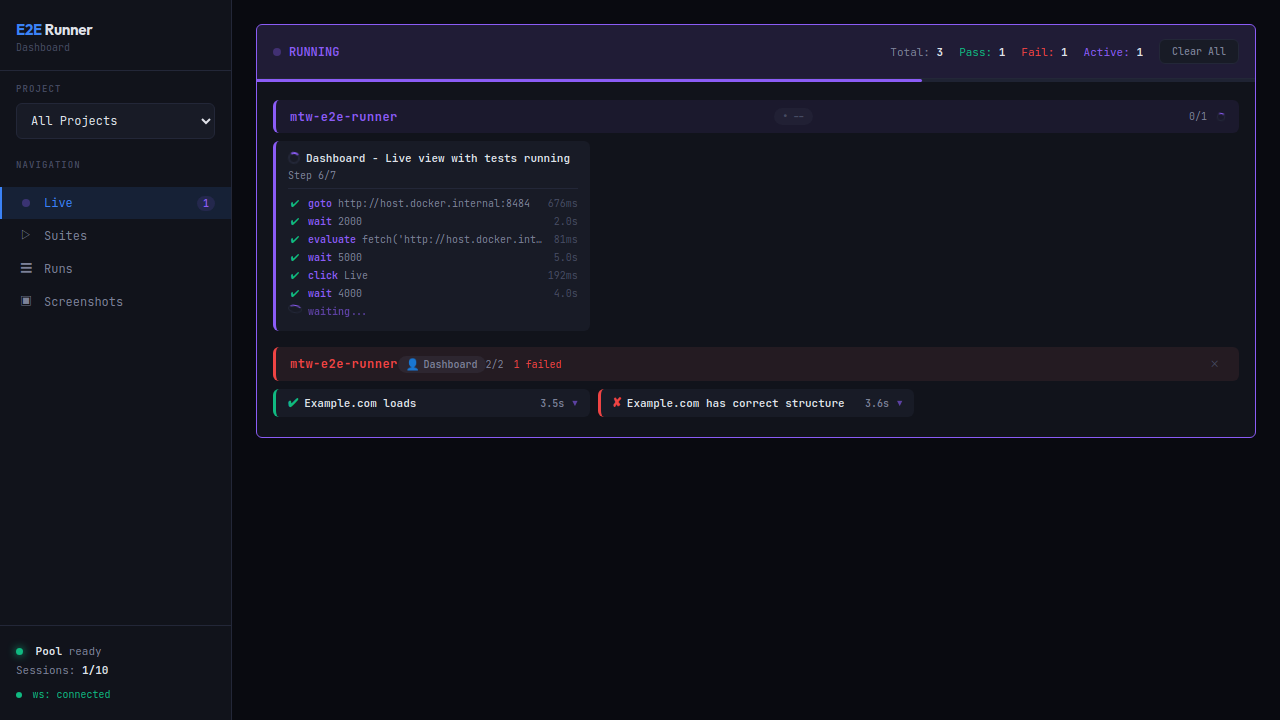
Live execution — monitor tests in real-time with step-by-step progress, durations, and active worker count.
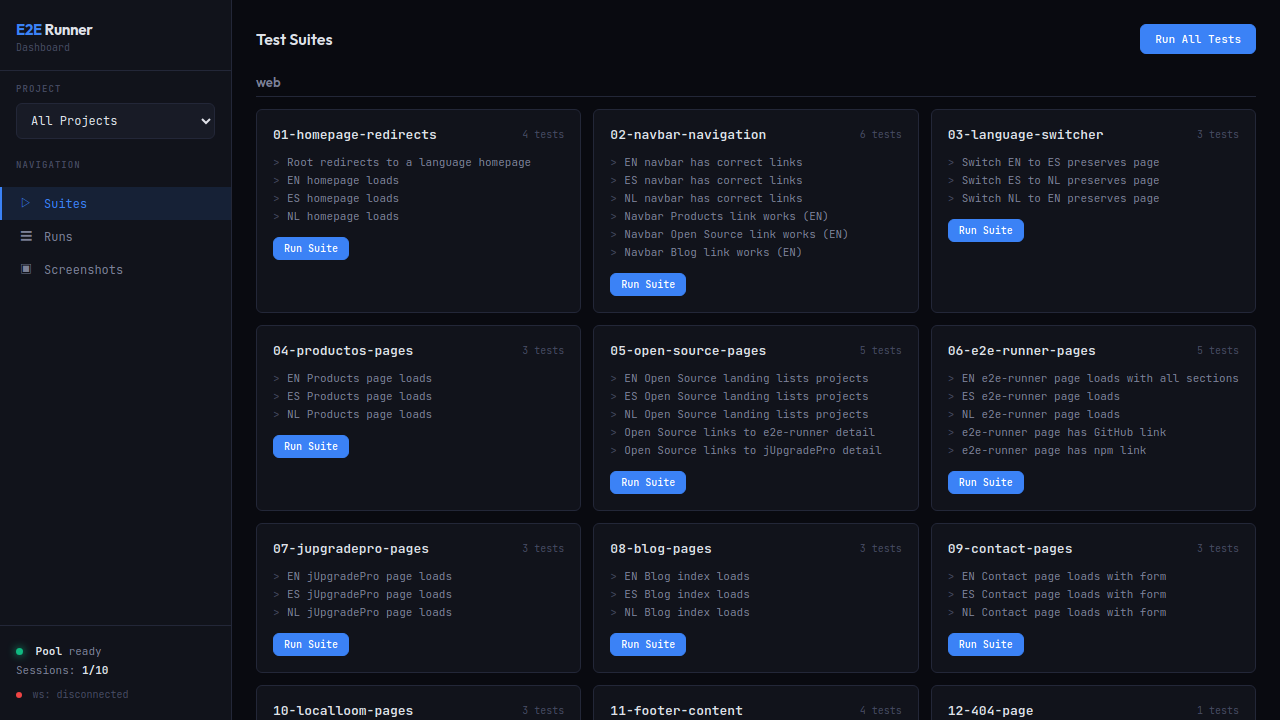
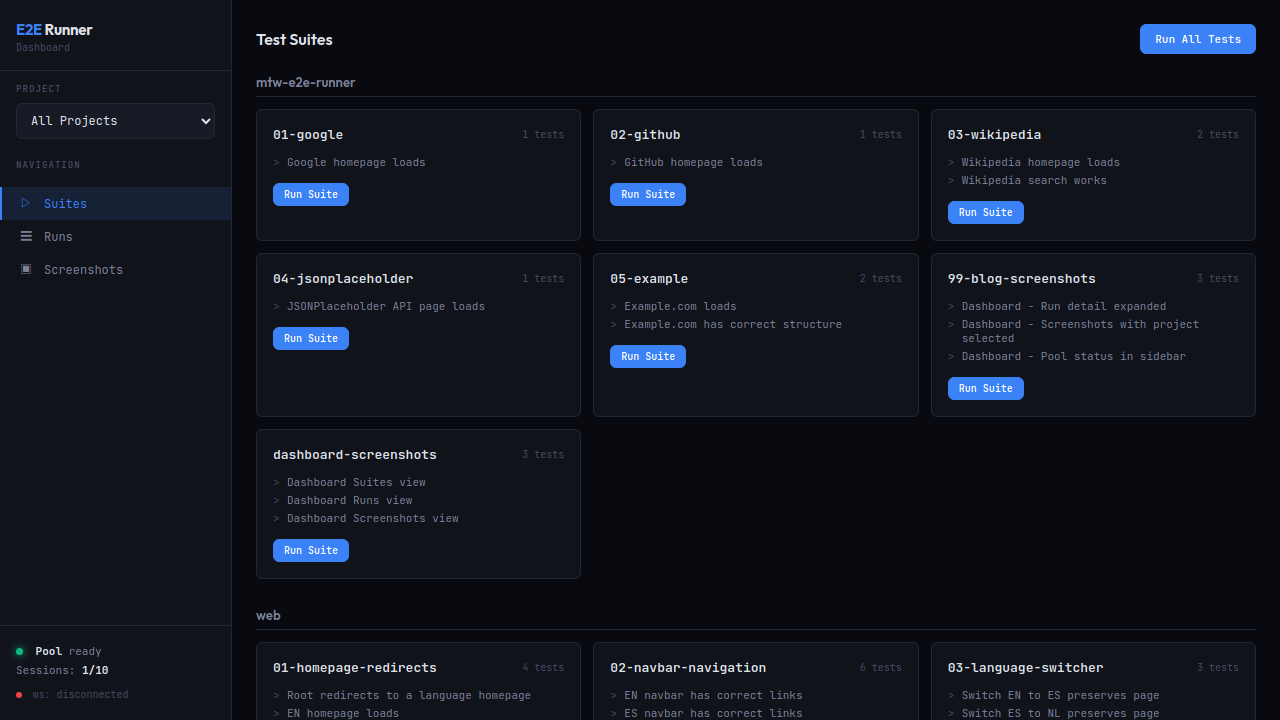
Test suites — browse all suites across projects. Run a single suite or all tests with one click.
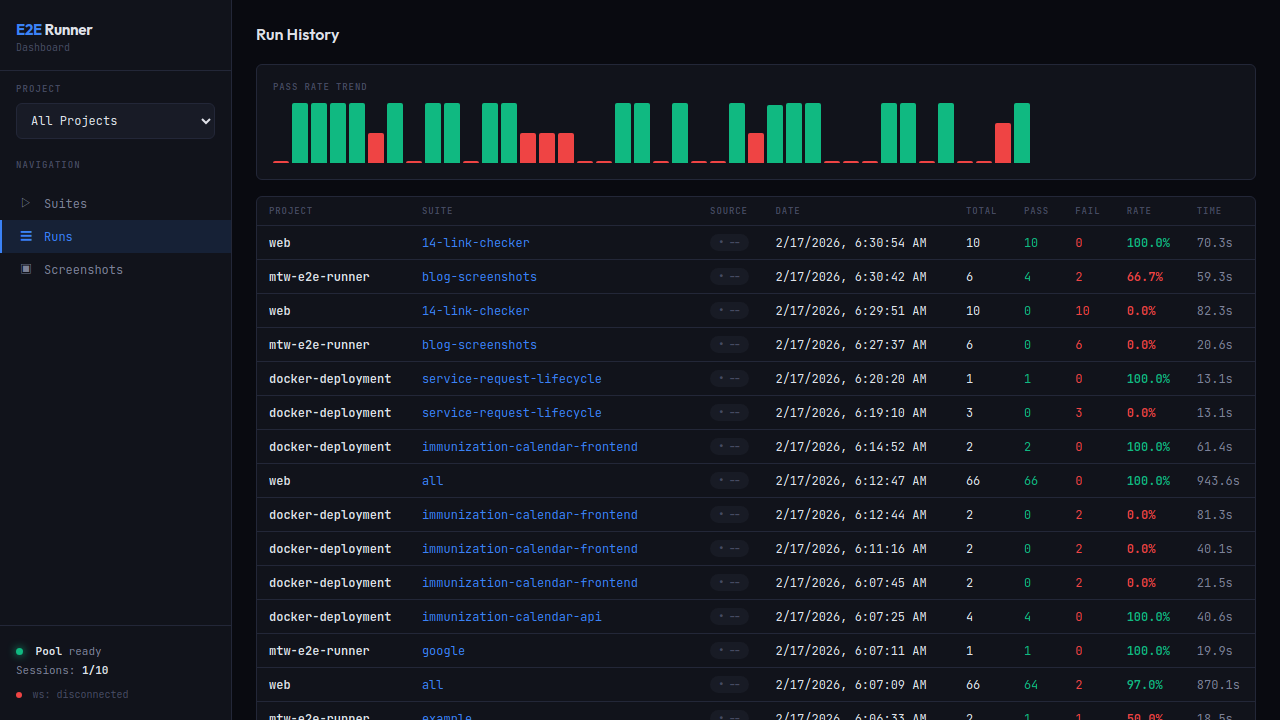
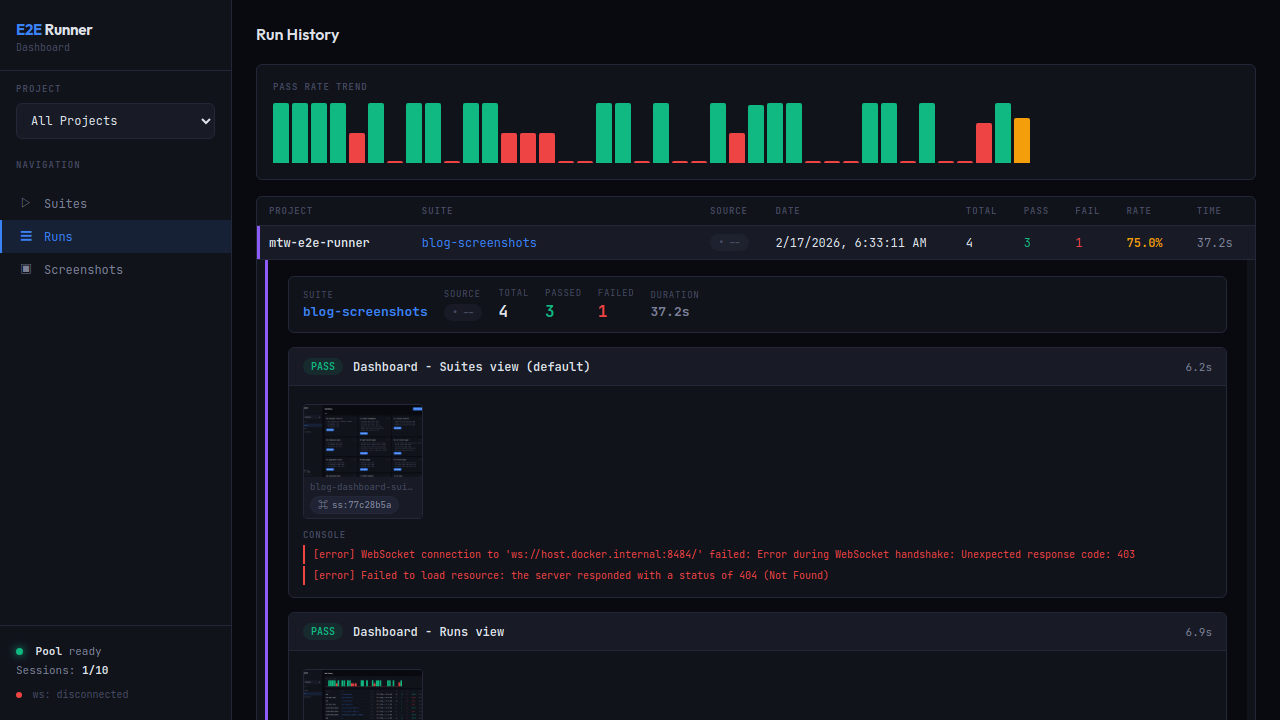
Run history — track pass-rate trends with the built-in chart. Click any row to expand full detail.
Run detail — PASS/FAIL badges, screenshot thumbnails with copyable hashes (ss:77c28b5a), formatted console errors, and network request logs.
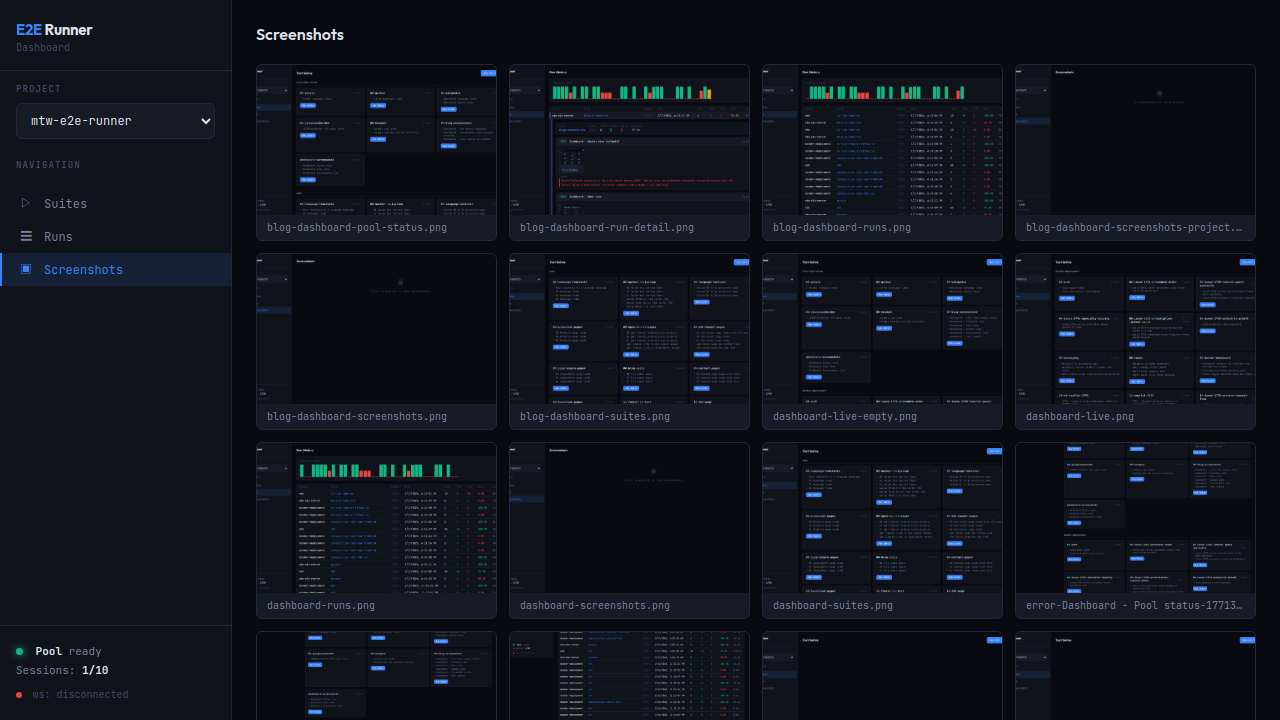
Screenshot gallery — browse all captured screenshots with hash search (action, error, and verification captures).
Pool status — Chrome pool health: available slots, running sessions, memory pressure.
Learning system — flaky tests, unstable selectors, slow APIs
The runner learns from every test run — building knowledge about your test suite over time. Query insights via the e2e_learnings MCP tool:
| Query | Returns |
|---|---|
summary |
Full health overview: pass rate, flaky tests, unstable selectors, API issues |
flaky |
Tests that pass only after retries |
selectors |
CSS selectors with high failure rates |
pages |
Pages with console errors, network failures, load time issues |
apis |
API endpoints with error rates and latency (auto-normalized: UUIDs, hashes, IDs) |
errors |
Most frequent error patterns, categorized |
trends |
Pass rate over time (auto-switches to hourly when all data is from one day) |
test:<name> |
Drill-down history for a specific test |
page:<path> |
Drill-down history for a specific page |
selector:<value> |
Drill-down history for a specific selector |
Storage & export:
- SQLite (
~/.e2e-runner/dashboard.db) — default, zero setup - Neo4j knowledge graph — optional, for relationship-based analysis. Manage via
e2e_neo4jMCP tool ordocker compose - Markdown report (
e2e/learnings.md) — auto-generated after each run
Test narration: Each test run generates a human-readable narrative of what happened step by step, visible in the CLI output and the dashboard.
Network error handling — assertions, global flag, full logging
Explicit assertion — place assert_no_network_errors after critical page loads:
{ "type": "goto", "value": "/dashboard" },
{ "type": "wait", "selector": ".loaded" },
{ "type": "assert_no_network_errors" }
Global flag — set failOnNetworkError: true to automatically fail any test with network errors:
e2e-runner run --all --fail-on-network-errorWhen disabled (default), the runner still collects and reports network errors — the MCP response includes a warning when tests pass but have network errors.
Full network logging — all XHR/fetch requests are captured with URL, method, status, duration, request/response headers, and response body (truncated at 50KB). Viewable in the dashboard with expandable request detail rows.
MCP drill-down flow:
1. e2e_run          → compact networkSummary + runDbId
2. e2e_network_logs(runDbId)                     → all requests (url, method, status, duration)
3. e2e_network_logs(runDbId, errorsOnly: true)   → only failed requests
4. e2e_network_logs(runDbId, includeHeaders: true) → with headers
5. e2e_network_logs(runDbId, includeBodies: true)  → full request/response bodies
The e2e_run response stays compact (~5KB) regardless of how many requests were captured. Use e2e_network_logs with the returned runDbId to drill into details on demand.
Screenshot capture — snapshot any URL on demand
Capture screenshots of any URL on demand — no test suite required:
e2e-runner capture https://example.com
e2e-runner capture https://example.com --full-page --selector ".loaded" --delay 2000
Via MCP, the e2e_capture tool supports authToken and authStorageKey for authenticated pages — it injects the token into localStorage before navigating.
Every screenshot gets a deterministic hash (ss:a3f2b1c9). Use e2e_screenshot to retrieve any screenshot by hash — it returns the image with metadata (test name, step, type).
The runner can talk to multiple browser engines through different drivers. The default is auto — it probes each pool URL and picks the right driver per pool.
| Driver | Engine | Detection probe | When to use |
|---|---|---|---|
browserless |
Real Chromium via browserless | /pressure returns JSON |
Default. Production-grade JS execution, screencast, full Chrome behavior |
cdp |
Generic CDP-compatible (raw Chrome, etc.) | /json/version reachable |
Fallback for any CDP server that isn't one of the others |
lightpanda |
Lightpanda (Zig) | /json/version Browser=lightpanda |
~9× faster, ~16× less memory than headless Chrome — ideal for high-volume scrape-style tests |
obscura |
Obscura (Rust + V8) | /json/version Browser=obscura |
~30 MB RAM footprint, built-in anti-detection (--stealth), stays close to real Chrome via Puppeteer |
steel |
Steel Browser | /v1/sessions returns JSON |
Managed session lifecycle, REST API for orchestration |
Pick a driver per test / force one per run
{
  "tests": [
    {
      "name": "checkout flow (heavy JS, real Chrome)",
      "driver": "browserless",
      "actions": [...]
    },
    {
      "name": "scrape product page (lightweight)",
      "driver": "obscura",
      "fallbackDriver": "cdp",
      "actions": [...]
    }
  ]
}
driver is optional. If set, only pools whose detected driver matches become candidates. fallbackDriver is explicit opt-in — without it, a missing target driver fails the test with a clear message. Pool busyness does not trigger fallback; the runner waits inside the filtered set.
Force a driver for a whole run (CLI overrides win over per-test fields — useful for A/B benchmarks):
e2e-runner run --all --driver obscura
e2e-runner run --all --driver obscura --fallback-driver cdp
Running each driver locally
# browserless (default) — managed by `pool start`
e2e-runner pool start

# Lightpanda — pool start uses templates/docker-compose-lightpanda.yml
e2e-runner pool start                 # with poolDriver: 'lightpanda' in config

# Obscura — install the binary and run it yourself
curl -LO https://github.com/h4ckf0r0day/obscura/releases/latest/download/obscura-x86_64-linux.tar.gz
tar xzf obscura-x86_64-linux.tar.gz
./obscura serve --port 9222 --stealth
# then point the runner at it: poolUrls: ['http://localhost:9222'], poolDriver: 'obscura'CLI commands
# Run tests
e2e-runner run --all                  # All suites
e2e-runner run --suite auth           # Single suite
e2e-runner run --tests path/to.json   # Specific file
e2e-runner run --inline '<json>'      # Inline JSON

# Pool management (CLI only, not MCP)
e2e-runner pool start                 # Start Chrome container
e2e-runner pool stop                  # Stop Chrome container
e2e-runner pool status                # Check pool health

# Issue-to-test
e2e-runner issue <url>                # Fetch issue
e2e-runner issue <url> --generate     # Generate test via AI
e2e-runner issue <url> --verify       # Generate + run + report

# Dashboard
e2e-runner dashboard                  # Start web dashboard

# Other
e2e-runner list                       # List available suites
e2e-runner capture <url>              # On-demand screenshot
e2e-runner init                       # Scaffold project
CLI options
| Flag | Default | Description |
|---|---|---|
--base-url <url> |
http://host.docker.internal:3000 |
Application base URL |
--pool-url <ws> |
ws://localhost:3333 |
Chrome pool WebSocket URL |
--concurrency <n> |
3 |
Parallel test workers |
--retries <n> |
0 |
Retry failed tests N times |
--action-retries <n> |
0 |
Retry failed actions N times |
--test-timeout <ms> |
60000 |
Per-test timeout |
--timeout <ms> |
10000 |
Default action timeout |
--output <format> |
json |
Report: json, junit, both |
--env <name> |
default |
Environment profile |
--fail-on-network-error |
false |
Fail tests with network errors |
--project-name <name> |
dir name | Project display name |
--driver <name> |
(per-test) | Force pool driver for the run: browserless, cdp, lightpanda, obscura, steel |
--fallback-driver <name> |
none | Explicit fallback if no pool with --driver is reachable |
Configuration — e2e.config.js & priority
Create e2e.config.js in your project root:
export default {
  baseUrl: 'http://host.docker.internal:3000',
  concurrency: 4,
  retries: 2,
  actionRetries: 1,
  testTimeout: 30000,
  outputFormat: 'both',
  failOnNetworkError: true,
  exclude: ['explore-*', 'debug-*'],

  hooks: {
    beforeEach: [{ type: 'goto', value: '/' }],
  },

  environments: {
    staging: { baseUrl: 'https://staging.example.com' },
    production: { baseUrl: 'https://example.com', concurrency: 5 },
  },
};
Config priority (highest wins):
- CLI flags
- Environment variables
- Config file (
e2e.config.jsore2e.config.json) - Defaults
When --env <name> is set, the matching profile overrides everything.
CI/CD — JUnit XML & GitHub Actions
e2e-runner run --all --output junitjobs:
e2e:
runs-on: ubuntu-latest
steps:
- uses: actions/checkout@v4
- uses: actions/setup-node@v4
with:
node-version: 20
- run: npm ci
- run: npx e2e-runner pool start
- run: npx e2e-runner run --all --output junit
- uses: mikepenz/action-junit-report@v4
if: always()
with:
report_paths: e2e/screenshots/junit.xmlProgrammatic API
import { createRunner } from '@matware/e2e-runner';

const runner = await createRunner({ baseUrl: 'http://localhost:3000' });

const report = await runner.runAll();
const report = await runner.runSuite('auth');
const report = await runner.runFile('e2e/tests/login.json');
const report = await runner.runTests([
  { name: 'quick-check', actions: [{ type: 'goto', value: '/' }] },
]);- Node.js >= 20
- Docker — only for Option 3 (the parallel Chrome pool). Options 1 & 2 don't need it.
Copyright 2026 Matias Aguirre (fastslack) — Matware
Licensed under the Apache License, Version 2.0. See LICENSE for details.