
A faster, memory-safe, and highly ergonomic slopfork of lazygit (🦀 rust btw).
This is mostly a "for me" tool — built for my own workflow. Not saying you shouldn't use it, but don't expect it to be a community project. But hey, it works for me!
Why fork? PRs were sitting too long, or the upstream direction didn't match how I wanted to work.
The goal: everything lazygit does, but faster and with opinions I actually agree with. (I can't promise backwards-compat w/ lazygit's config since it'll eventually drift w/ my own opinions, but I made sure to do that)
Make sure you have:
This fork (felipecm-br/lazygitrs):
cargo install --git https://github.com/felipecm-br/lazygitrs
# or from a local checkout:
cargo install --path .
just install
Upstream (Blankeos/lazygitrs):
brew install blankeos/tap/lazygitrs # Homebrew (macOS/Linux)
npm install -g lazygitrs            # or npm
bun install -g lazygitrs            # or bun
cargo binstall lazygitrs            # or cargo-binstall (prebuilt binary, faster)
cargo install lazygitrs             # or cargo (build from source)
curl -sSL https://raw.githubusercontent.com/Blankeos/lazygitrs/main/install.sh | sh # or linux/macos (via curl)
Then run:
lazygitrsDetects how you installed (brew / npm / bun / cargo / install.sh) and upgrades in place:
lazygitrs upgrade          # latest
lazygitrs upgrade 0.0.32 # specific version-
AI commit messages — works with whatever agent you already use (claude, opencode, codex, or my minimal shim modelcli). Set
git.commit.generateCommand(see Configuration):# ~/.config/lazygitrs/config.yml git: commit: # Using claude generateCommand: "claude -p 'Generate a conventional commit message for this diff. Do not hard-wrap lines; one bullet per line; blank line between paragraphs.' --no-session-persistence" # Using opencode generateCommand: "opencode run 'Generate a conventional commit message for this diff. Do not hard-wrap lines; one bullet per line; blank line between paragraphs.'" # Using codex generateCommand: "codex exec --ephemeral 'Generate a conventional commit message for this diff. Do not hard-wrap lines; one bullet per line; blank line between paragraphs.'" # Using modelcli generateCommand: 'DIFF=$(git diff --cached) && modelcli "Generate a conventional commit message for this diff. Always provide a bulletpoint body. Do not hard-wrap lines; one bullet per line. $DIFF"'
-
Smart Commit (
Min Files, orlazygitrs sgc) — splits all staged, unstaged and untracked changes into atomic Conventional Commits planned by your AI, then lets you review them:spacetoggle,eedit message,J/Kreorder,mmerge with the next group,gcycle granularity (coarse/medium/fine),rregenerate,Entercommit. Each group previews its own diff. Plans are cached by content hash (re-opening is instant, leftovers survive partial commits), lockfiles listed in.sgcignorestay in the plan with their content hidden from the model, commitlint rules are honored, and every commit usesgit commit --onlyso whatever else you staged is left alone. Headless:lazygitrs sgc --yes(commit all),--dry-run,--json,-g fine,-e(gitmoji),-l pt,-H "hint".git: commit: # Receives the full prompt on stdin (LAZYGITRS_AI_COMMIT_INPUT=prompt) and prints the answer. # Empty falls back to generateCommand. smartCommitCommand: "claude -p --model haiku" smartCommitGranularity: medium # coarse | medium | fine
-
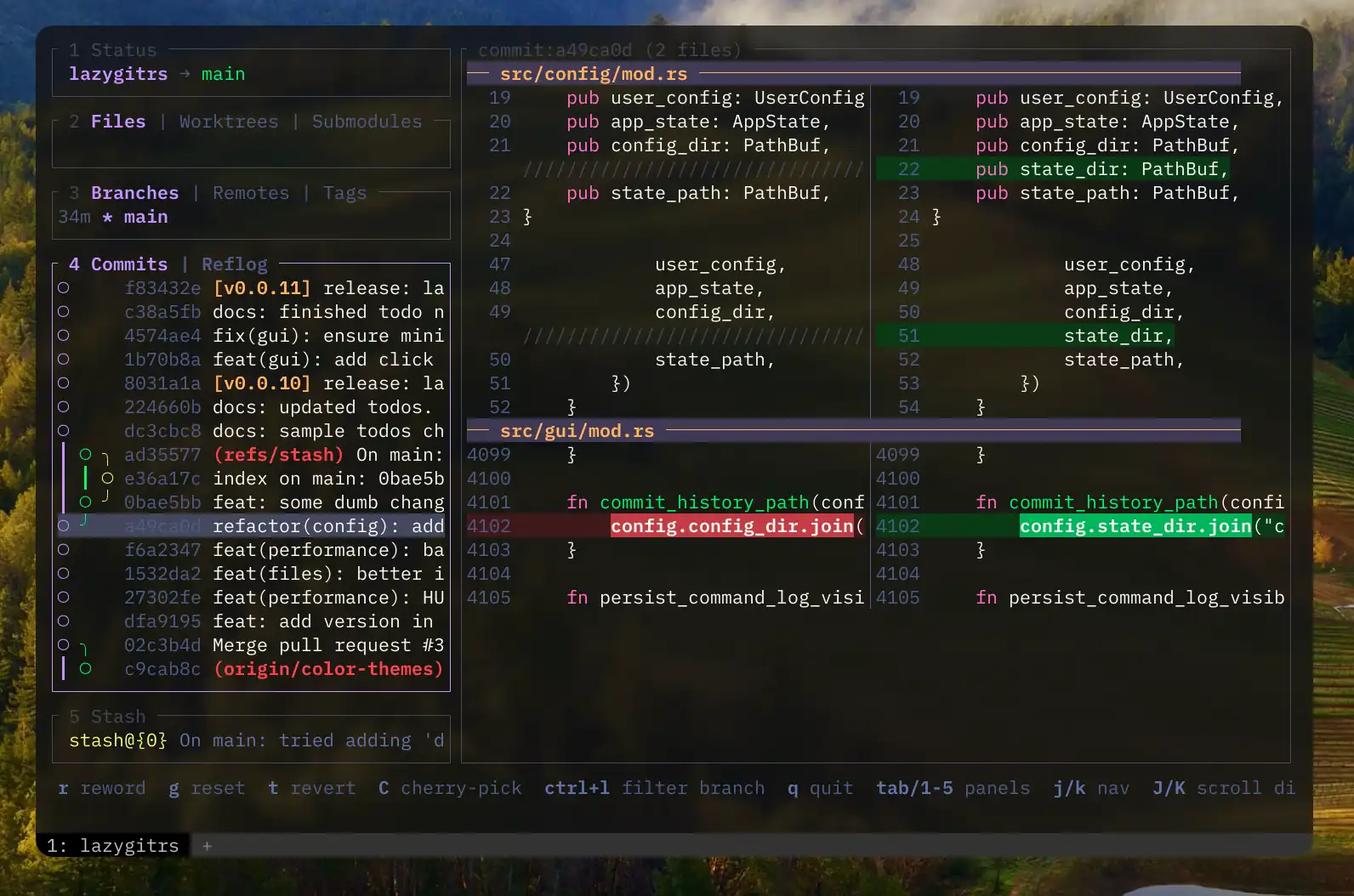
Side-by-side + unified diffs with syntax highlighting by default and unified as well, no pager hacks needed
-
Better diff navigation UX —
[]new/old only views,{}for hunk traveling,hjkl←↑↓→for line-by-line scrolling, supports mouse select/scroll too. Lots inspired by lumen -
Hunk Reverting & Undo (
<Enter>/u) — Revert hovered/selected diff blocks with<Enter>, and undo block reverts withu. Cycle selections using{and}. -
Default GitHub conveniences — copy repo url, open repo url, copy PR create url, open PR create, copy pr url, open pr. (The 'copy' variants are useful if you use different default browsers for work/personal.)
-
Enhanced Commits Panel & Branch Filtering — Filter commits by branch via interactive checklist menu (
<c-s>/Ctrl+S, dynamically reflected in the status bar) with<Clear Filter>support. Toggle commits view between all branches and HEAD-only (a). Quick bisect options (b), mark commit as fixup (<c-f>/Ctrl+F), and create fixup (F). Cherry-pick copy (C) and paste (V). -
Discard All Changes — Press
D(Shift+D) in the Files panel to permanently discard all local modifications (both tracked changes and untracked files/directories) across the entire repository. -
Execute Shell Commands — Press
:(colon) globally to open a popup input prompt, allowing you to run arbitrary shell commands. Executes via temporary shell scripts so aliases and shell functions work smoothly without TTY hangs. -
Hierarchical File Tree & Combined Diffs — Full directory folding (
-to fold/unfold any folder including root), parent/child traversal (,,.), and sibling navigation (<,>). Pressing<Enter>on any directory node instantly focuses a fullscreen combined diff of all modified child files. Drag vertical dividers to dynamically resize panels at 60 FPS. -
Built-in compare tool — Inspired by lumen, but more built into the TUI. Pick a commit/branch A and a commit/branch B, then see how they differ.
-
Interactive rebasing — Inspired by gitlens, a clean and easy-to-use UI for pick, reword, edit, squash, fixup, drop and fast rebasing.
-
Commit Details — Inspired by zed, just a small details panel about the commit that's easier to look at.
-
Command Palette — easily access stuff like:
-
git reset(globalG) — asks which branch/commit, has quick search, then soft/mixed/hard options. -
git diff/compare(globalW) and then asks what branch/commit A and B, has quick search. -
git rebase(globalI) and then asks rebase on top of what branch/commit. - 🎨 Themes + Theme-Picker!
-
-
Grep diff contents —
Ctrl-Fin Files / Commit Files / Compare searches hunk lines in-context,Enterjumps to the file in the current list. -
Universal AI Notes Architecture & Workflow — leave review comments on code diffs and instantly notify your AI CLI of choice to review or act on it.
lazygitrsuses a dynamically registeredlines.json(stored in.git/info/, never in your working tree) session architecture, supporting three transport layers to integrate with any AI tool on the market:- Subprocess Spawning (
notifyCommand): Spawns a background command (great foragy,claude, etc.) - HTTP Push (
serverUrl): Does an instant HTTP POST to local servers (great foropencode) - Server-Sent Events (
SSE): Real-time event streaming for wrapper scripts or IDE extensions. - Worktree Port Isolation: Each Git worktree runs on an isolated dynamic port saved to
lazygitrs.portin its git dir ($(git rev-parse --git-dir)/lazygitrs.port), preventing collisions during parallel agent execution. - Bidirectional Sync: AI review annotations are posted back directly into the lazygitrs TUI diff view.
- Note Interactions & Workflow: Press
cto create a note,n/Nto cycle notes,yto yank note text with a Neovim-style 500ms flash highlight,Sto send note to AI session,r/Rto reset note status,dto delete note, and<Enter>oroto view full note details.
- Subprocess Spawning (
Audited against Card, Moran & Newell's Keystroke-Level Model (KLM) (
| Key / Chord | Context / Mode | Action Executed | Biomechanical Mechanics | KLM Cost ( |
Ergonomic Rationale |
|---|---|---|---|---|---|
Esc |
Diff / Submenus | Unwind Focus to Files List | Left Pinky single tap (or CapsLock tap) | Hierarchical escape; prevents accidental closing during deep review. | |
Esc |
Root Files List | Dismiss Popup (or Double-Tap in Fullscreen) | Left Pinky single / double tap |
|
Instant popup dismissal; double-tap guard in fullscreen prevents accidental exits. |
Ctrl + W h / l / k / j / = |
Global | Shrink / Expand / Maximize / Reset Panels | CapsLock + W, then Home Row h/l/k/j/=
|
Vim window-resize idiom (Alt thumb adduction (Alt+h/l/k/j/r kept for compatibility). |
|
Ctrl + A |
Files Panel | Generate AI Commit Message | CapsLock (Pinky) + A (Left Pinky) | Direct 1-chord AI commit generation from Files panel. | |
M |
Files Panel | Smart Commit (split changes into atomic AI commits) | Right Index (Shift held by Left Pinky) | One key plans every change as reviewable atomic commits; Enter commits the checked ones. | |
q / Ctrl + C
|
Anywhere | Hard Exit Application | Left Pinky direct tap / Left Pinky + Left Index |
|
Standard terminal exit fallback. |
1 / 2 / 3 / 4 / 5 |
Root Navigation | Jump to Status / Files / Branches / Commits / Stash | Number row direct single tap | Direct panel selection bypassing sequential Tab traversal. | |
: (Colon) |
Global | Open Shell Command Prompt | Shift + ; (Right Pinky chord) |
Vim ex-command mnemonic; executes arbitrary scripts in repo root. | |
- (Minus) |
File Tree View | Fold / Unfold Directory Node | Right Pinky reach to top-right row | Explicit directory collapse toggle without triggering diff preview. | |
Enter (on dir) |
File Tree View | Fullscreen Combined Diff | Right Pinky tap on Enter | Instant multi-file inspection without entering subfolders individually. | |
Enter (on file) |
File Tree View | Fullscreen File Diff | Right Pinky tap on Enter | Focuses diff panel in full screen mode for deep review. | |
, (Comma) |
File Tree View | Navigate to Parent Directory | Right Middle reach to bottom row | Upward hierarchy movement without shifting hand position. | |
. (Period) |
File Tree View | Navigate to First Child Node | Right Ring reach to bottom row | Downward hierarchy movement into child directory. | |
< |
File Tree View | Navigate to Previous Sibling | Shift + , (Pinky + Middle) |
Horizontal sibling traversal across same directory depth. | |
> |
File Tree View | Navigate to Next Sibling | Shift + . (Pinky + Ring) |
Horizontal sibling traversal across same directory depth. | |
Ctrl + S |
Commits Panel | Branch Filter Menu (openLogMenu) |
CapsLock (Pinky) + S (Left Ring) | Home-row chord; status bar dynamically renders active binding. | |
Ctrl + F |
Commits Panel | Mark Commit as Fixup | CapsLock (Pinky) + F (Left Index) | Home-row inward chord; fast fixup target selection. | |
F (Shift+F) |
Commits Panel | Create Fixup Commit | Left Pinky (Shift) + Left Index (F) | Direct uppercase counterpart to fixup marking. | |
a |
Commits Panel | Toggle All Branches vs HEAD Log | Left Pinky direct tap on Home Row a
|
High-frequency log toggle with zero finger stretch. | |
b |
Commits Panel | Open Bisect Options Menu | Left Index reach down to b
|
Quick access to binary search debugging menu. | |
i |
Commits Panel | Interactive Rebase Menu | Right Middle reach up to i
|
Standard Git interactive rebase mnemonic. | |
C / V |
Commits Panel | Cherry-Pick Copy / Paste | Shift + C / Shift + V | Universal OS clipboard mnemonics adapted for Git commits. | |
s / S |
Commits Panel | Squash Down / Squash Above | Left Ring tap / Shift + Left Ring |
|
Directional squash actions on Home Row. |
r / R |
Commits Panel | Rename Commit (Inline / Editor) | Left Index reach up to r / Shift + R |
|
Quick inline rename or full editor opening. |
g |
Commits Panel | Git Reset Options Menu | Left Index reach to g
|
Soft, mixed, and hard reset selector. | |
{ / } |
Diff View | Previous / Next Diff Hunk | Shift + [ / ] (Right Pinky reach) |
Standard Vim paragraph/block navigation applied to hunks. | |
[ / ] |
Diff View | Old / New / Both Diff Side Switch | Right Pinky reach to bracket keys | Rapid single-panel inspection without altering diff contents. | |
Enter (in diff) |
Diff View | Revert Hovered Diff Block | Right Pinky tap on Enter | Immediate hunk rejection during review. | |
u (in diff) |
Diff View | Undo Last Revert Block | Right Index reach up to u
|
Reversible safety net for accidental hunk discards. | |
v |
Diff View | Toggle Visual Line Selection | Left Index reach down to v
|
Granular line-level staging and inspection. | |
c |
Diff View | Create Inline Review Note | Left Middle reach down to c
|
Direct note composition on hovered diff line. | |
n / N |
Diff View | Cycle Next / Prev Review Note | Right Index reach to n / Shift + N
|
|
Familiar Vim search-next navigation pattern for review notes. |
y (on note) |
Diff View | Yank / Copy Note to Clipboard | Right Index reach up to y
|
500ms Neovim-style visual flash feedback; copies note text. | |
S (Shift+S) |
Diff View | Send Note to Active AI Session | Left Pinky (Shift) + Left Ring (S) |
S = Send. Broadcasts prompt to AI via the worktree's lazygitrs.port. |
|
r / R (on note) |
Diff View | Reset Note Status to New
|
Left Index reach up to r
|
Re-evaluates note without having to re-type commentary. | |
d (on note) |
Diff View | Delete Review Note | Left Middle tap on Home Row d
|
Destructive single-note dismissal with auto-selection of next note. | |
Enter / o |
Diff View | View Note Full Details Popup | Right Pinky tap / Right Ring reach |
|
Full markdown rendering of rationale, author, and timestamp. |
📖 Definitive Keybinding Reference: For the full architectural deep-dive, design principles, and worktree isolation models, see _docs/KEYBINDINGS.md.
Selecting a PNG, JPEG, GIF (first frame), WebP, BMP, ICO, or TIFF file shows Before / After previews in Kitty and Ghostty. Added/deleted files show the available image full-width, labeled Added or Deleted. Staged previews use the index; commit-file and ref comparisons use the corresponding Git blobs.
Other binaries, unsupported/corrupt images, files over 20 MiB, and unsupported terminal environments keep the striped binary placeholder. Images are decoded with memory/dimension limits and resized in the background. SVG and video previews are not included yet.
Folder previews in the file tree mix text diffs with inline image sections. Each image section is capped at 12 rows; visible sections load in the background (two at a time) and offscreen pixels are released. This works in split/unified and wrapped views, including commit/stash folders and ref-comparison folders. Whole-commit overview buffers still retain binary placeholders. Inline images require Kitty/Ghostty placeholder graphics; other terminals keep stripes.
Set LAZYGITRS_IMAGE_PREVIEW=off to disable image previews. tmux, screen, and
Zellij currently fall back to stripes. iTerm2/WezTerm and Sixel are experimental
(LAZYGITRS_IMAGE_PREVIEW=experimental); their overlay cleanup is not yet fully
verified. Nested editor launches avoid terminal capability queries.
Config goes in ~/.config/lazygitrs/config.yml or ~/.config/lazygit/config.yml — both work, using either only won't break anything so you can reference the original lazygit config guide.
Editor completion: a JSON Schema for the config ships in _docs/config.schema.json (regenerate with lazygitrs --print-config-schema). With the YAML language server, add this line to the top of config.yml:
# yaml-language-server: $schema=https://raw.githubusercontent.com/felipecm-br/lazygitrs/main/_docs/config.schema.jsonUnknown keys aren't errors in the schema, because the file may be shared with lazygit. lazygitrs reports typos in the command log at startup.
Persisted State lives at ~/.local/state/lazygitrs/state.yml and ~/.local/state/lazygitrs/commit_message_history you won't need to touch this.
CLI Options:
lazygitrs --config <PATH>— Load configuration from custom YAML file.lazygitrs --print-default-config— Print the default configuration file.lazygitrs --clear-session— Clear/unregister active AI session globally.lazygitrs sgc— Smart Commit: review an AI-planned split of every change (--yescommits it,--dry-run/--jsonprint it).lazygitrs gc— Print an AI Conventional Commit message for staged changes:-astage all first,-ccommit it,-g 3pick from 3 candidates,-egitmoji,-l ptlanguage,-P claude -m haikupin agent/model,-ttitle only,-ddebug. Same AI command,.sgcignoreand commitlint rules assgc.lazygitrs gc hook install|uninstall|status—prepare-commit-msghook so a baregit commitopens with an AI message (skipped for-m, merges, amends; ignores thecommit.verbosediff).
New config properties:
git.commit.generateCommand— shell command for AI-generated commit messages. See What's different for examples.git.commit.smartCommitCommand/git.commit.smartCommitGranularity— AI command (prompt on stdin) and default grouping for Smart Commit.keybinding.files.smartCommit— open Smart Commit from the Files panel (defaultM).gui.border— can be a string (rounded,single,double,hidden) or an object for granular borders:Supported granular components:gui: border: default: hidden notes: rounded files: rounded branches: single commits: hidden stash: double status: rounded main: rounded
notes,files,branches,commits,stash,status,main,commandLog.gui.borderGradient— paints the active border (and any popup drawn in the same color) with a multi-color gradient running from the top-left to the bottom-right corner, interpolated in OKLab. Use a preset (aurora,nebula,rainbow,blackhole,warm,cool,lavender,monochrome) or two or more hex stops. Empty (the default) keeps the solid theme color.Thegui: borderGradient: aurora # or "#3ee8b5, #8f6cf5, #e46cc8"
LAZYGITRS_BORDER_GRADIENTenvironment variable overrides it (offdisables), so a session-wide toggle can switch it without editing the config. It is read at startup.gui.outerFrame— draws a rounded frame around the whole app so it reads as a popup (e.g. inside a borderless tmux popup). The frame is painted with the border gradient when one is set. Defaultfalse.Settinggui: outerFrame: true
LAZYGITRS_BORDER_GRADIENTto a gradient also turns the frame on, andLAZYGITRS_BORDER_TITLElabels it.~/.config/lazygitrs/themes/*.toml— drop custom theme files here (or~/.config/lazygit/themes/*.toml). See Themes.
If you need to clear or unregister an active AI session for the current repository, you can run the following command:
PORT=$(cat "$(git rev-parse --git-dir)/lazygitrs.port" 2>/dev/null || echo 47657)
curl -s -X POST http://127.0.0.1:$PORT/session-api \
  -H 'content-type: application/json' \
  --data '{"action":"unregister"}'
To clear active sessions globally across all your repositories (and unregister the currently active one in the directory), you can now simply use the built-in CLI flag:
lazygitrs --clear-sessionNote on Background Execution: Leaving
lazygitrsrunning in background (e.g. in a detached tmux session_lazygitrs-<workspace>) consumes ~0% CPU and ~15MB RAM, providing instant reconnection when starting a new AI session.
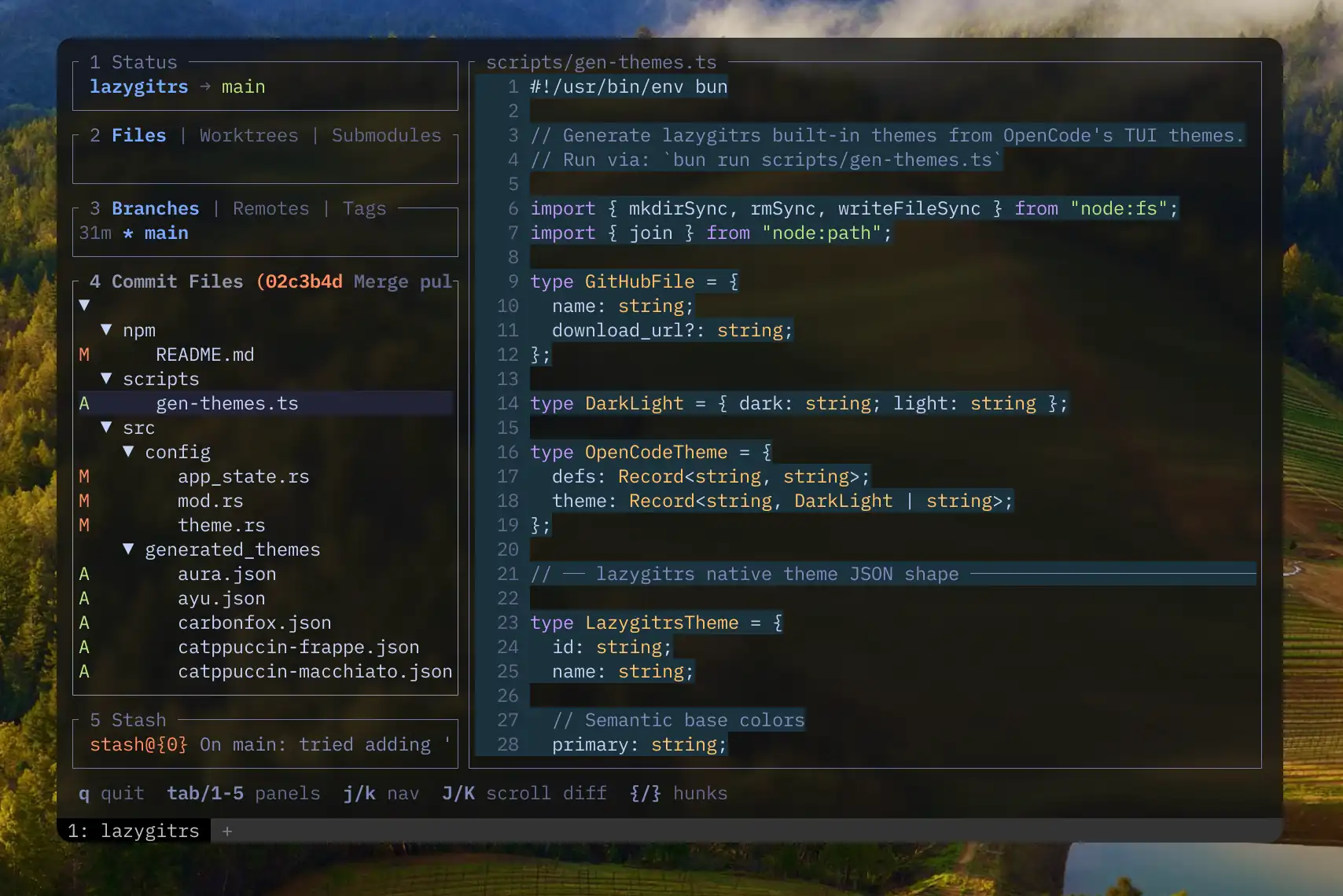
lazygitrs ships with 30+ built-in color themes (Catppuccin, Dracula, Tokyo Night, Gruvbox, Nord, White, etc.) defined in TOML format and sourced from OpenCode's TUI theme collection.
Unlike original lazygit, you can switch themes without touching any config file — just press ? > Color Themes > Enter. Your choice is saved automatically. User themes placed in ~/.config/lazygit/themes/ or ~/.config/lazygitrs/themes/ take priority over embedded built-in themes.
Custom themes: Drop a .toml file into ~/.config/lazygitrs/themes/ (or ~/.config/lazygit/themes/) and it appears in the picker. Start by copying an existing theme from src/generated_themes/ or src/themes/ and tweaking the colors. The format is TOML with all fields optional (unset values are derived from semantic base colors like primary, success, error):
id = "my-theme"
name = "My Custom Theme"
primary = "#ff6600"
success = "#00ff88"
error = "#ff3333"
warning = "#ffcc00"
text_strong = "#ffffff"
background = "#1a1a2e"Helix — Space G g to open, Space G f for file history
Add to ~/.config/helix/config.toml — capital G keeps the built-in space g changed-file picker intact:
[keys.normal.space.G]
g = [":insert-output lazygitrs", ":redraw"]
f = [":insert-output lazygitrs -f '%{file_path_absolute}'", ":redraw"]
Absolute path matters — -f resolves it to repo-relative (e.g. apps/nextjs/next.config.ts in a monorepo).
For e (edit back in hx) — ~/.config/lazygitrs/config.yml:
os:
  editPreset: "helix"
For o (open), leave the default — OS opener (Finder for folders on macOS).
Neovim (LazyVim / snacks.nvim) — <leader>gg to open, <leader>gF for file history
Snacks.lazygit() hardcodes lazygit, so use Snacks.terminal instead. In ~/.config/nvim/lua/plugins/snacks-lazygitrs.lua:
return {
  {
    "folke/snacks.nvim",
    opts = { lazygit = { configure = false } },
    keys = {
      { "<leader>gg", function() Snacks.terminal({ "lazygitrs" }, { cwd = LazyVim.root.git(), win = { style = "lazygit" } }) end, desc = "Lazygitrs" },
      { "<leader>gF", function() Snacks.terminal({ "lazygitrs", "-f", vim.fn.expand("%:p") }, { cwd = LazyVim.root.git(), win = { style = "lazygit" } }) end, desc = "Lazygitrs file history" },
    },
  },
}
Restart nvim (or :Lazy reload snacks.nvim) to pick it up.
For e (edit back in nvim) — ~/.config/lazygitrs/config.yml:
os:
  editPreset: "nvim"
For o (open), leave the default — it uses the OS opener (Finder for folders on macOS).
Startup benchmark using hyperfine:
Benchmark 1: lazygitrs --version
  Time (mean ± σ):       4.2 ms ±   1.3 ms    [User: 1.2 ms, System: 0.9 ms]
  Range (min … max):     2.7 ms …  15.4 ms    830 runs

Benchmark 2: lazygit --version
  Time (mean ± σ):      13.5 ms ±   2.5 ms    [User: 6.4 ms, System: 5.2 ms]
  Range (min … max):    10.2 ms …  21.2 ms    224 runs

Summary
  lazygitrs --version ran
    3.24 ± 1.16 times faster than lazygit --version
MIT
Feel free to fork and give it your own spin.