A modern, full-stack Trello-like project management application built with React, Node.js, Express, and PostgreSQL.
- Board Management: Create and organize teams and boards
- Card System: Add rich cards with titles, descriptions, and assignments
- Columns & Swimlanes: Organize cards with flexible column and swimlane layouts
- Real-time Collaboration: Live updates via Socket.io
- Activity Tracking: Complete activity feed for all board changes
- Comments: Add and manage comments on cards
- Labels & Assignments: Tag cards and assign to team members
- OAuth Authentication: Sign in with Google or Microsoft accounts
- User Profile: Edit display name and email; change password via the user menu
- Theme Selection: Switch between light, dark, and system-default appearance (persisted across sessions)
- Language Selection: Switch UI language between German, English, French, Italian, and Dutch; preference saved to user profile
- Storage for Attachments: Use local or S3 compatible storages
- Password Reset: Forgot-password flow with time-limited email links via Resend
- Responsive UI: Modern React-based interface with Tailwind CSS
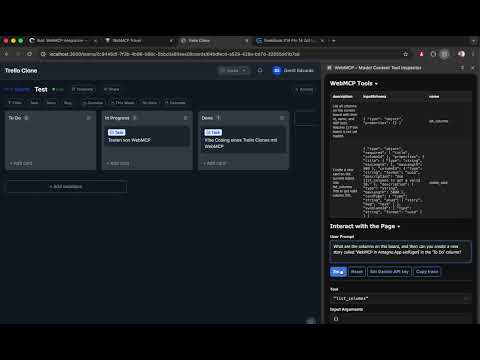
- AI Agent Integration: 10 WebMCP tools let AI agents manage boards, cards, and assignees directly via natural language (Chrome 146+)
- React 19 - UI framework
- Vite 6 - Build tool and dev server
- TypeScript 5.7 - Type safety
- Tailwind CSS 4 - Styling
- Zustand - State management
- React Router 7 - Navigation
- React Hook Form - Form handling with Zod validation
- Axios - HTTP client
- Socket.io Client - Real-time updates
- dnd-kit - Drag and drop
- Node.js 22 - Runtime
- Express 5 - Web framework
- TypeScript 5.7 - Type safety
- Drizzle ORM 0.38 - Database ORM
- PostgreSQL 17 - Database
- Socket.io 4.8 - Real-time WebSocket communication
- Passport.js - Authentication
- Resend - Transactional email (password reset)
- Pino - Logging
- pnpm - Package manager (workspace monorepo)
- Vitest - Unit testing
- Drizzle Kit - Database migrations
- ESLint - Code linting
- Prettier - Code formatting
- Docker & Docker Compose - Containerization
.
├── apps/
│   ├── api/                    # Express backend
│   │   ├── src/
│   │   │   ├── config/         # Configuration (env, database)
│   │   │   ├── db/             # Database schema and migrations
│   │   │   ├── middleware/     # Express middleware
│   │   │   ├── modules/        # Feature modules (teams, boards, cards, etc.)
│   │   │   ├── utils/          # Utilities
│   │   │   ├── ws/             # WebSocket setup
│   │   │   └── index.ts        # Entry point
│   │   ├── drizzle.config.ts   # Drizzle ORM config
│   │   └── package.json
│   └── web/                    # React frontend
│       ├── src/
│       │   ├── components/     # Reusable React components
│       │   ├── features/       # Feature-specific components
│       │   ├── stores/         # Zustand stores
│       │   ├── hooks/          # Custom React hooks
│       │   ├── api/            # API client functions
│       │   ├── utils/          # Utilities
│       │   ├── App.tsx
│       │   └── main.tsx        # Entry point
│       ├── vite.config.ts
│       └── package.json
├── packages/
│   └── shared/                 # Shared types and validation schemas
│       ├── types/              # TypeScript types
│       └── validation/         # Zod schemas
├── docs/
│   └── plans/                  # Development roadmap
├── docker-compose.yml          # Docker Compose configuration
├── Dockerfile                  # Root Dockerfile (if needed)
└── package.json
- Node.js 22+ or Docker
- pnpm (install via
npm install -g pnpm) - PostgreSQL 17+ (or use Docker)
- .env file with required environment variables
git clone <repository-url>
cd trello-clonepnpm installCreate a .env file in the root directory:
# Database
DATABASE_URL=postgresql://trello:trello_secret@localhost:5432/trello_clone

# API secrets (generate secure values for production)
JWT_SECRET=your_jwt_secret_min_10_chars
JWT_REFRESH_SECRET=your_refresh_secret_min_10_chars

# Server URLs
API_PORT=3001
WEB_URL=http://localhost:5173
API_URL=http://localhost:3001

# OAuth (optional - leave empty to disable)
GOOGLE_CLIENT_ID=
GOOGLE_CLIENT_SECRET=
MICROSOFT_CLIENT_ID=
MICROSOFT_CLIENT_SECRET=

# File storage (optional - defaults to local)
STORAGE_TYPE=local
# UPLOAD_DIR=./uploads                 # local storage path (default: ./uploads)
# AWS_ACCESS_KEY_ID=                   # required when STORAGE_TYPE=s3
# AWS_SECRET_ACCESS_KEY=               # required when STORAGE_TYPE=s3
# AWS_REGION=us-east-1                 # required when STORAGE_TYPE=s3
# AWS_S3_BUCKET=my-bucket              # required when STORAGE_TYPE=s3
# CDN_URL=                             # optional: CDN prefix for S3 file URLs

# Email / Resend (optional - required for password reset)
RESEND_API_KEY=re_your_api_key
FROM_EMAIL=noreply@yourdomain.com

FRONTEND_URL=http://localhost:5173

# Environment
NODE_ENV=development# Start PostgreSQL container
docker-compose up postgres
# In another terminal, run migrations
pnpm db:migrate# Make sure PostgreSQL is running locally, then
pnpm db:migratepnpm db:generateStart all services in parallel:
pnpm devThis will run:
- API: http://localhost:3001
- Web: http://localhost:5173
The web app will proxy API calls and WebSocket connections to the backend.
Frontend only:
cd apps/web
pnpm dev
Backend only:
cd apps/api
pnpm devpnpm build# Frontend
cd apps/web && pnpm build
# Backend
cd apps/api && pnpm build- Frontend:
apps/web/dist/- Static HTML/CSS/JS files - Backend:
apps/api/dist/- Compiled JavaScript modules
# Build and start all services
docker-compose up --build

# Services will be available at:
# - Web: http://localhost:3000
# - API: http://localhost:3001
# - Database: localhost:5432# Build individual images
docker build -f apps/api/Dockerfile -t trello-clone-api .
docker build -f apps/web/Dockerfile -t trello-clone-web .
# Or use docker-compose
docker-compose buildFor detailed Docker information, see DOCKER.md.
pnpm db:generatepnpm db:migratepnpm db:seed# Remove all data
dropdb trello_clone
createdb trello_clone
# Rerun migrations
pnpm db:migratepnpm testcd apps/api && pnpm test
cd apps/web && pnpm testpnpm test:watch # if configuredpnpm lintpnpm format # if configuredThe board page exposes 10 tools via the WebMCP browser API, allowing AI agents to manage boards and cards through natural language.
- Chrome 146+ with the Model Context Protocol flag enabled (
chrome://flags/#model-context-protocol) - No server-side changes required — tools are registered entirely in the frontend
| Tool | Description |
|---|---|
list_current_team_boards |
List all boards for the current team |
list_columns |
List columns on the current board |
list_cards |
List cards, optionally filtered by column or search term |
create_card |
Create a new card in a column |
update_card |
Update a card's title, description, type, or due date |
move_card |
Move a card to a different column (top or bottom position) |
delete_card |
Permanently delete a card |
list_current_team_members |
List team members (use to find user IDs for assignment) |
assign_user |
Assign a team member to a card |
unassign_user |
Remove a team member from a card |
Tools are registered when a user opens a board page via the useBoardWebMCP hook (apps/web/src/hooks/useBoardWebMCP.ts). The hook calls createBoardWebMCPTools({ boardId, teamId }) (defined in apps/web/src/hooks/boardWebMCPTools.ts) and registers the resulting tool definitions with navigator.modelContext.
All tools read live board state from the Zustand boardStore and call the existing REST API for mutations. Store updates are applied optimistically after each successful API call so the UI stays in sync.
- Development:
http://localhost:3001/api/v1 - Production: Configure via
API_URLenvironment variable
POST /auth/register- Register new userPOST /auth/login- LoginPOST /auth/refresh- Refresh JWT tokenPOST /auth/logout- LogoutPOST /auth/forgot-password- Request password reset emailPOST /auth/reset-password- Reset password with tokenGET /auth/google- Google OAuth flowGET /auth/microsoft- Microsoft OAuth flow
GET /teams- List user's teamsPOST /teams- Create new teamGET /teams/:teamId- Get team detailsPUT /teams/:teamId- Update teamDELETE /teams/:teamId- Delete team
GET /teams/:teamId/boards- List team's boardsPOST /teams/:teamId/boards- Create boardGET /teams/:teamId/boards/:boardId- Get boardPUT /teams/:teamId/boards/:boardId- Update boardDELETE /teams/:teamId/boards/:boardId- Delete board
GET /boards/:boardId/cards- List cardsPOST /boards/:boardId/cards- Create cardPUT /boards/:boardId/cards/:cardId- Update cardDELETE /boards/:boardId/cards/:cardId- Delete card
- Uses Socket.io for real-time board, card, and activity updates
- Connect to
http://localhost:3001with Socket.io client
For detailed API routes, see the route files in apps/api/src/modules/.
- Create types in
packages/shared/src/types/ - Create validation schemas in
packages/shared/src/validation/ - Create backend module in
apps/api/src/modules/*.controller.ts- Request handlers*.service.ts- Business logic*.routes.ts- Route definitions
- Create API client in
apps/web/src/api/ - Create React components in
apps/web/src/features/orcomponents/ - Add stores in
apps/web/src/stores/if needed
- TypeScript: All code must be type-safe
- ESLint: Run
pnpm lintbefore committing - Prettier: Code is auto-formatted on save
- Testing: Write tests for critical business logic
DATABASE_URL- PostgreSQL connection stringJWT_SECRET- JWT signing secret (min 10 chars)JWT_REFRESH_SECRET- Refresh token secret (min 10 chars)
API_PORT- Backend port (default:3001)WEB_URL/API_URL- Service URLs (defaults to localhost)FRONTEND_URL- Frontend base URL used in reset links (default:http://localhost:5173)GOOGLE_CLIENT_ID/GOOGLE_CLIENT_SECRET- Google OAuthMICROSOFT_CLIENT_ID/MICROSOFT_CLIENT_SECRET- Microsoft OAuth
By default, uploaded attachments are stored on the local filesystem in an uploads/ directory relative to the API working directory, and served at /uploads.
STORAGE_TYPE- Storage backend:local(default) ors3UPLOAD_DIR- Local storage path (default:./uploads; only used whenSTORAGE_TYPE=local)
For S3-compatible storage (set STORAGE_TYPE=s3):
AWS_ACCESS_KEY_ID- AWS access key (or compatible provider key)AWS_SECRET_ACCESS_KEY- AWS secret keyAWS_REGION- S3 region (e.g.us-east-1)AWS_S3_BUCKET- S3 bucket nameCDN_URL- Optional CDN prefix for serving uploaded files (e.g.https://cdn.example.com)
Password reset emails are sent via Resend. Leave these unset to disable password reset:
RESEND_API_KEY- Resend API key (get one at resend.com)FROM_EMAIL- Sender address for password reset emails (e.g.noreply@yourdomain.com)
For production deployment, ensure:
- All required variables are set
- Secrets are stored securely (use secrets manager)
NODE_ENV=production- Database has proper backups
- CORS origin matches actual deployment URL
- If using S3, the bucket has appropriate access policies
FROM_EMAILuses a domain verified in Resend
Error: connect ECONNREFUSED 127.0.0.1:5432
Solution: Ensure PostgreSQL is running. Use docker-compose up postgres or start your local PostgreSQL service.
Error: listen EADDRINUSE: address already in use :::3001
Solution: Change the port via environment variable or kill the process using the port:
# macOS/Linux
lsof -ti:3001 | xargs kill -9

# Or change port
API_PORT=3002 pnpm devnpm install -g pnpm# Clear and reinstall dependencies
rm -rf node_modules
pnpm install
# Regenerate database types
pnpm db:generate- Code Splitting: Routes are automatically code-split with React Router
- Image Optimization: Use appropriate formats and sizes
- Caching: Static assets are cached in browser
- Compression: Gzip enabled in production
- Database Indexing: Indexes configured in schema
- Connection Pooling: PostgreSQL connection pool configured
- Caching: Implement caching where appropriate
- Pagination: API endpoints support pagination
- CORS: Configured to specific origins
- Helmet: Security headers enabled
- JWT: Token-based authentication
- SQL Injection: Protected via Drizzle ORM parameterized queries
- Input Validation: Zod schema validation on all inputs
- HTTPS: Use in production
- Create a feature branch:
git checkout -b feature/your-feature - Make your changes and test them
- Run linting:
pnpm lint - Commit with clear messages
- Push and create a pull request
MIT License - see LICENSE file for details.
Copyright © 2026 Trello Clone Contributors
Permission is hereby granted, free of charge, to any person obtaining a copy of this software and associated documentation files (the "Software"), to deal in the Software without restriction, including without limitation the rights to use, copy, modify, merge, publish, distribute, sublicense, and/or sell copies of the Software, and to permit persons to whom the Software is furnished to do so, subject to the following conditions:
The above copyright notice and this permission notice shall be included in all copies or substantial portions of the Software.
For issues and questions:
- Check existing documentation
- Review the DOCKER.md for containerization info
- Check database migrations in
apps/api/src/db/migrations/ - Review sample implementations in existing modules
See docs/plans/ for planned features and development roadmap.