
A way into the drill engine fee[dB]ack already has, for fee[dB]ack.
The Note Detection plugin ships a complete riff repeater: a five-second audible lead-in with a beat-locked click, an accuracy goal per pass of the loop, a speed ladder it climbs as you clear it, an auto-slowdown after three sub-goal passes, loop widening once the passage is clean, and a coaching line. It is covered by its own tests. What it has never had is a way in, its source says so:
// NOTE: no standalone "Drill here" button here on purpose. The drill// conductor is a headless engine driven through feedBack's existing UI// (the coaching plugin's post-play "Drill this run" / "Practice this"// buttons call window.noteDetect.startDrill).
That coaching plugin was never written. Nothing in the ecosystem calls
startDrill, so the only thing that ever starts a drill is the auto-drill
trigger, a setting that defaults to 0 (off) and lives three screens away on
the Note Detection settings page. A complete, tested feature that a player has
no way to reach.
Riff Repeater is the missing caller. It adds no state machine of its own: it picks the passage, hands the engine a ladder and a goal, reads the engine's state back, and remembers what happened.

At rest: the section you picked on the strip, A and B, the speed ladder, and the two verbs at the bottom.
Status: alpha. Built and verified against a local library of about forty converted charts.
Your fee[dB]ack plugins directory is:
| Windows | …\Feedback\resources\slopsmith\plugins\ |
| Linux / macOS | the resources/slopsmith/plugins/ folder inside your install |
cd …/plugins
git clone https://github.com/cracklydisc/feedBack-plugin-riffrepeater.git riffrepeater
Restart fee[dB]ack, open a song, and the player's Plugins rail button has a ⏱ Riff Repeater in it. The panel opens parked at the top-right corner, the same place the 3D Highway keeps its settings pane and Live Tab its panel, so it never sits over the notes and never moves when a control changes.
Installed this way the app can update it for you: Plugins → Check for Updates finds new versions and installs them with one click.
Green Code button → Download ZIP, unpack it, and rename the unpacked
folder to riffrepeater inside your plugins directory. You should end up with
…/plugins/riffrepeater/plugin.json. Restart fee[dB]ack.
The drill engine lives in the note_detect plugin, and a drill is graded from
what you actually play. Without it the panel still picks passages, loops them,
and remembers your speed, but the Start drill button stays disabled and
says why.
You pick it on a timeline: a strip proportional to the song, one block per section, coloured by how well you play it. Accuracy is the block's hue, not the reason it is visible: until 0.7.0 a never-played section sat at 1.33:1 against the strip's own track, so on a ten-section song the picker rendered as two coloured smears with eight invisible gaps, and only became a map once you had already practised everything. A passage with no notes in it, a Noguitar marker, is drawn (the strip has to stay proportional or it is not a map) but hatched and left out of the hit table, so its pixels fall to the nearest real section and you cannot land on a range nothing can be done with. Click a block for its section, or drag across it for a custom range snapped to bar lines. Sweeping it names whatever is under the cursor, and every section has a click target at least 11px wide however thin its block is: on a real chart nine of twenty-one sections come out under 10px, and the thinnest is under two. It replaced a grid of 21+ chips, which was half the panel's height and needed a careful read to find "Solo 1"; position answers that at a glance, and a drag is something no arrangement of chips can offer.
Clicking a block is the only way to pick a section: the two chevrons that used
to flank the readout went in 0.11.0, because they were a second
stepper-shaped control directly under the phrase stepper, doing a job the
strip already does in one gesture. The , and . shortcuts stay registered,
so a keyboard or a controller still steps sections and the host's own help
panel still lists it.
There is no waveform. Drawing one means fetching and decoding a stem, which is expensive, duplicates work the player already did, and adds nothing, the useful signal here is not amplitude, it is where the sections are and how well you play them.
The blocks are the same passages the app's own Practice popover lists, built
the same way (consecutive same-name markers collapse, repeats get counted). A
block here is the same seconds as a chip there; that agreement is checked by
tests/ranges.test.js.
Inside a section there are its phrases: the app's "Part n of m", and one stepper walks both:
   ◀   Whole section · 2 phrases   ▶
   ◀        Part 1 of 2           ▶
Position zero is the whole section, so a step left from part 1 hands it back, and from a custom range a step left hands back the whole of the section that range starts in. That completeness is the condition the design rests on: version 0.6.0 removed three mode tabs on the argument that this stepper's position zero is the whole section, and the argument only holds if every state can reach position zero. It could not until 0.9.0, and a drag was a dead end. CHANGELOG has the count of gestures that made the tabs a readout rather than a control.
A drag across the timeline gives a custom range snapped to bar lines, for when you fluff something while playing and want the bars you are in. Trimming moves whole bars; the engine's own trim moves the loop edges by two seconds, and two seconds is a different amount of music in every song. A loop boundary off the grid turns a count-in into a guess.
A and B, from the playhead: the way you actually mark a passage. Press
A (or I), let the song run to the end of the phrase, press B (or
O). Both snap to the bar grid. One row per edge:
A                              −   0:08   +
B                              −   0:22   +
The letter sets that edge at the playhead, the stepper moves it a bar. It was one row of nine controls until 0.8.0, and it fitted, but at 26px those are not touch targets, and at the touch scale the same nine need more width than the panel has. Splitting costs one row and buys 18px on each of eight targets. Pressing A with nothing selected gives you a loop of the default bar count immediately, so there is always something armable between the two presses; pressing B behind A is refused rather than silently swapped.
The readout tells you what you have picked and what it costs: Verse 1 · 1:24 → 1:39 · 15.3s · 95 notes. The note count comes from the filtered chart, so it
follows the difficulty slider, at 60% a passage genuinely has fewer notes in
it.

While a drill runs the panel folds down to this: the current speed, what is left to clear the goal, the passage in hand, and the notes missed. The numbers are the engine's, not ours.
The ladder and the goal live in a fold: HOW YOU DRILL 80→90→100 · goal 85%: because they are policy rather than part of the passage. That was a bug,
not a tidying: they write straight to localStorage, so from two rows under
the passage you had just picked they looked per-passage while changing every
passage of every song. The summary keeps the value on screen and the heading
says whose it is. The kit's DESIGN.md §15
generalises it, follow the write: and 0.7.0's changelog has the four other
places the same question found something.
Widen when clean is the third setting in there: once you clear the goal at
full speed the loop grows by one bar each side (up to two), so you play the
passage back into the music around it before the drill lets go. It was
labelled just "Widen" until 0.10.0, a verb with no object, explained only by
a tooltip, and "what is that button for?" was the report that fixed it. The
object stayed; the paragraph that came with it did not. That sentence is on a
? badge now, because a fold makes prose cheap and that is not the same as
making it wanted.
Pick the ladder as rungs, 50 · 65 · 80 · 90 · 100: and a goal, which
defaults to 100%: every judged note clean before the ladder steps up. That
is stricter than the engine's own 0.85 and deliberately so, a goal that
graduates you at 85% teaches a passage you can nearly play, and the cost is
a slower climb, so the stepper reaches down to 50 for a passage where clean is
too much to ask. The engine's default ladder is [80, 90, 100] and its floor of 80% is a judgement
about time-stretch artefacts, which is reasonable about the sound and not
reasonable for somebody learning a passage they cannot play at 80%. So the
slower rungs exist and the panel says what they cost.
100% is always the last rung. A ladder that tops out at 90% never asks you to perform the passage, which is the point of the exercise.
While a drill runs, the panel shows the engine's own numbers, rung, goal, best-so-far, its coaching line, plus every graded pass as a row of percentages, so you can see whether you are improving or just repeating. And it says what has to happen next, which changes at the top of the ladder: below it, clear the goal to speed up; at it, clear it three times at full tempo to finish.

What you have played and how well, per song. "Loop weakest" takes the worst passage and arms it without making you look for it.
Your practice speed, per song. The app resets playback to 100% on every song load, which is right as a default and wrong for a chart you are three sessions into at 80%.
Your best, per passage. The timeline blocks are coloured by it, and a Where you struggle list puts the worst first, from this run while you are playing, from the store when you are not. Click a row to select that passage, or press Practice weakest to select the worst one and arm a drill on it in one press.
Optionally the difficulty, per song: off by default, and worth understanding before turning on: the app stores master difficulty as one global setting, not per song, so restoring a per-song value also moves the global one. The settings panel says so.
Loop, speed and difficulty are three controls in three different places today, the sections in the Practice rail pill, the loop and the difficulty in the Advanced settings popover, the speed in the transport. They are the three knobs of one activity, so the panel carries all three next to the passage they apply to.
The panel's look and its controls come from
feedBack-plugin-kit,
vendored into src/kit/ and assets/kit.css. Its DESIGN.md carries the
rules, each one with the Riff Repeater version number of the bug that taught
it, and its Layer 2 implements the device recipes the app's own
docs/host-theme-contract.md proposes but has not yet shipped, so the glow on
the primary is a slot a glow-less shop skin can neutralise rather than a
literal box-shadow.
Four of those rules, because they are the ones this panel is shaped by:
One control family per meaning, and the families must not collide. A segmented control is "pick one of a small fixed set", the Play at speed row. A chip group is "pick a subset", the Climb ladder. A toggle pill is a boolean. Version 0.2 drew the ladder and the speed as the same rail of pills with the same five numbers, which is two different things wearing one costume; they are different shapes and different words now.
One lit primary, in a sticky footer, with one alternative beside it.
Nothing else in the panel is accent-filled, so there is never a question about
what to press. It sat mid-panel until 0.10.0, after the passage picker,
before the speed row, which meant you configured and then hunted, and the
groups below it read as though they came after pressing. It is pinned to the
bottom now, with Loop next to it rather than under it: a quieter button
underneath a primary reads as a caption, not as a choice.
Nothing else rides on it. It carried a status dot until 0.8.0, and the dot was
always ready whenever the button was enabled, because a blocked engine is
what disables it. A signal visible exactly when it said nothing. The reason a
drill cannot start is a sentence directly above the button instead.
Every size comes from the scale, so touch is one change. Under
(pointer: coarse) the kit swaps the height scale to 32 · 44 · 52 and all
four control families grow together, a stepper is 32px under a mouse and
44 × 44 under a thumb, which is WCAG 2.5.5. Growing the control that was
complained about instead is how a row ends up with a 44px stepper beside a
26px chip and no shared band left.
A data signal never looks like a selection signal. Accuracy is the timeline block's fill and the weak list's bar; selection is a white bracket. One signal per channel, 0.2 had accuracy as a coloured underline on the same chips whose border meant "selected", and a reviewer read the amber as a second kind of selected.
No paragraph of explanation, and no box drawn to hold one. A warning is a badge with its sentence in the tooltip. A blocked action explains itself on the control it blocks, and carries a status dot for the input. Values a stepper cannot reach live on the settings page, a form belongs there, not in the player.
The clearest instance of all four is the ladder, which does double duty: idle it is the setting, and while a drill runs it is the progress display, the rung being played is filled, cleared rungs go green, the rest wait.
Registered through the host's own window.registerShortcut, so they appear in
its ? panel and its Settings → Keybinds tab, and it warns about collisions
instead of two handlers quietly both firing.
D |
start or end a drill on the selected passage |
↑ ↓ |
playback speed ±5% |
I O |
set the loop start (A) / end (B) at the playhead |
, . |
previous / next section (while the panel is open) |
Which keys was a question for the registry rather than for taste. In the
player scope the app already owns Space (play/pause), ← → (seek),
Escape, [ and ] (A/V offset) and + − (volume), so the obvious
guitarist bindings are all taken, and rebinding them would break the transport
to add a convenience.
- No control over the number of full-speed repetitions. The engine fixes it
at three and takes no option for it:
startDrillacceptslabel,focus,goal,speedLadder,expandContextandmaxExpansions, and nothing else. A control the engine ignores is worse than no control. - No control over the auto-slowdown either. Miss the goal three passes in
a row and the engine drops the speed by 15 points, down to a floor of 40%.
All three numbers are constants inside the engine, the streak length, the
step and the floor, and
startDrilltakes none of them. So a player who wants "give me five tries before you slow me down" cannot have it, and the panel does not pretend otherwise. It is a fair default; it is simply not ours to move. Changing that needs a change in Note Detection, and this plugin's request for one is written down at the end of this file. - No second scoring system. Timing and pitch verdicts, the clean-hit windows, the miss diagnostics on the highway, all of that is Note Detection's, and this reads it rather than reimplementing it.
- No verdicts counted twice. Verdicts scored while a drill runs are left out of the per-passage map. A drill plays the same fifteen seconds ten times, slowed; folding that in would make every drilled passage report whatever its last iterations looked like. The engine measures drill iterations properly and reports a best when the drill ends, that arrives separately.
- No drill result from a drill you abandoned. Ending one before a single
pass has been graded reports
best = 0, and storing that would stamp 0% onto a passage nobody played.
The two plugins are meant to be on together, and not only because they look alike.
Riff Repeater picks the passage and arms the drill. Live Tab is where that drill becomes readable: the judged window takes the green, the run-in stays hatched, and the notes outside this pass lose their colour. You can see which bars count by looking at the tab rather than at the panel.
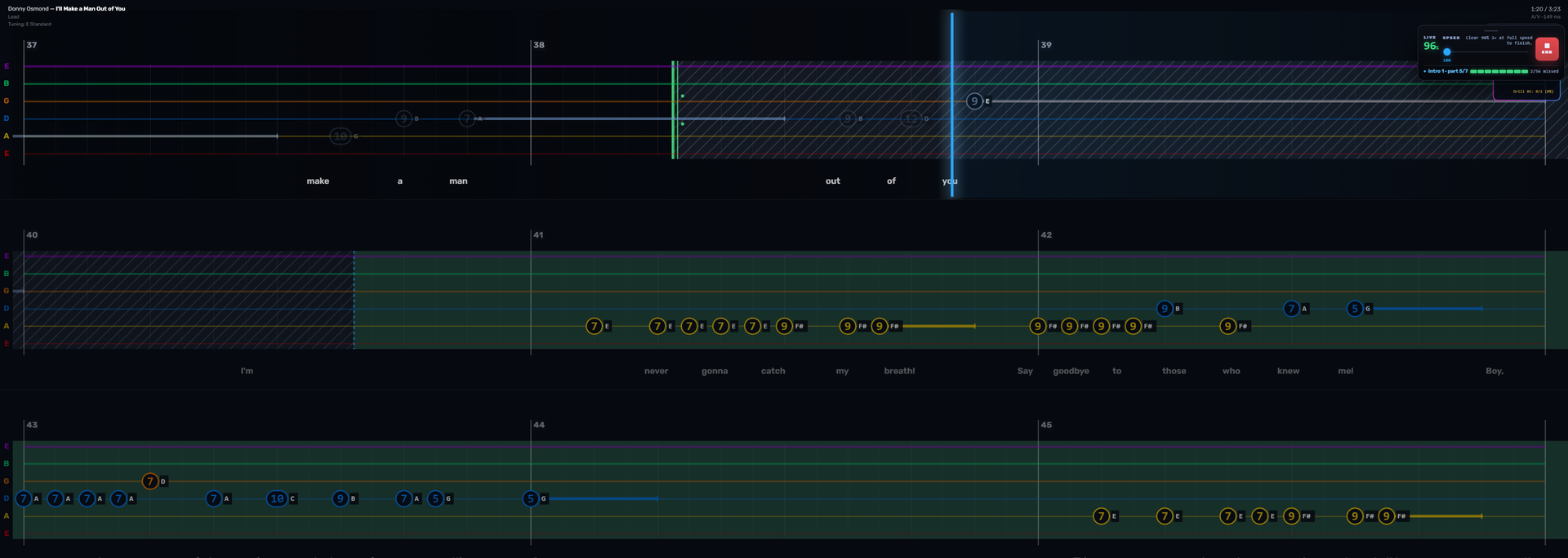
A drill armed by Riff Repeater, seen from Live Tab: green is the part that counts, the hatch is the run-in, and grey are the notes this pass does not ask you to play.
One arms, the other shows. Either works alone; together you stop having to remember where the passage ends.
Every control here, the racks, the wells, the steppers, the segmented rails, the footswitch, comes from the fee[dB]ack plugin kit, a small design system with its own tests and its own DESIGN.md.
The kit is vendored, not imported: it is copied into src/kit/ and
assets/kit.css rather than fetched from another plugin at runtime. Any plugin
can be disabled, and there is no load order to rely on, a panel that fails to
draw because somebody turned off a dependency is a panel that fails at the
worst possible moment.
Live Tab draws its own panel and settings screen from the same kit, which is why the two plugins look like one object rather than two things that resemble each other.
Settings → Plugins → Riff Repeater carries the defaults a drill starts with, the two remember this switches, and the store. Everything about a specific passage lives in the panel, next to the passage.
Per-passage bests are kept in this browser's localStorage only, keyed by the
pack's filename (which carries its content hash) plus the arrangement. A pack
that gets re-converted starts a fresh history, inheriting a best earned
against different notes would be the dishonest option even though it keeps
more.
window.riffRepeater (feature-detect it):
window.riffRepeater.open();                       // show the panel
window.riffRepeater.ranges();                     // { sections, parts, bars }
window.riffRepeater.select(key);                  // pick a passage
await window.riffRepeater.startDrill();           // drill the selection
await window.riffRepeater.startDrill({ start, end, label });   // …or any range
window.riffRepeater.endDrill();
window.riffRepeater.drillState();                 // the engine's state, in percentages
window.riffRepeater.map();                        // { ranges, weakest, run } for this song
window.riffRepeater.settings.get() / .set(patch);
window.riffRepeater.onChange(fn);                 // -> unsubscribe
map().weakest is the interesting one: the passages you play worst, worst
first, with a live flag saying whether the number is from this run or the
store. A practice-journal or a career plugin can build a session plan out of it
without touching a note event.
This repository is shaped for that, because a floating panel launched from the
plugins rail is not where these controls belong. In core they belong in a
third row of the Section Practice popover, next to the chips the user
already clicks. The reason they are not there now is that the popover has no
sanctioned extension point for a plugin, core's docs/plugin-v3-ui.md
documents exactly one, feedBack.ui.playerControlSlot(): and injecting would
mean winning on specificity and re-injecting after every re-render, the way
Tidy has to.
So the split is by directory:
src/*.js |
pure logic and one host seam. Moves to static/js/, unchanged. |
src/ui/*.js |
the button, the panel, the portal. Thrown away. |
assets/riffrepeater.css |
the panel's look. Mostly thrown away; the chip bands and the weak-list rows are worth keeping. |
tests/*.test.js |
move with src/. |
Nothing in src/ outside src/ui/ touches a DOM node of its own, and none of
those files import anything from src/ui/. The panel reads exactly one thing,
model.snapshot(): and writes through exactly one thing, the actions object
in src/main.js. Re-mounting it is a matter of building the same rows inside
_sectionPracticeBarInnerHtml() and pointing them at the same actions.
Two things learned from the DOM, in case that PR is written by somebody else:
#section-practice-bartolerates a third row.renderSectionPracticeBar()rewrites only#section-practice-scroll, and_ensureSectionPracticeDom()patches in place rather than rebuilding. The one hazard is_migrateSectionPracticeDomLayout(), which doesbar.replaceChildren(...)and would drop an unknown child, but it is guarded byif (bar.querySelector('.section-practice-controls-row')) return, so on current markup it never runs.src/ui/lives undersrc/because/api/plugins/<id>/src/<path>and/api/plugins/<id>/assets/<path>are the only two file routes a plugin gets. A top-levelui/404s.
window.setSpeeddoes not write the speed slider. It moves the rate, the label and the preset highlight, but leaves#speed-slider.valueat its old number, so while a drill runs the slider reads 100 and the song plays at 0.8.applySpeedPresetdoes it correctly.src/host.jssplits the two readings (speedPct= what is playing,chosenSpeedPct= what the user picked) rather than trusting either alone.song:loadedfires before the section table exists. The song identity is available a beat beforehighway.getSections()returns anything, so any consumer that builds a table onsong:loadedgets an empty one and has to rebuild onsong:ready.- An unnamed section marker becomes
Section, notSection 5. The host's_sectionPracticeBaseNamebuilds the positional fallback and then strips trailing digits, taking its own number off. The visible label is fine because the counter re-adds one; it is only surprising if you rely on the helper directly. Reproduced here rather than fixed, so the labels keep matching.
node --test tests/*.test.js120 tests, no dependencies, no build step.
src/kit/ and assets/kit.css are vendored: edit them in
feedBack-plugin-kit and
copy them back, never here. There is no shared-library mechanism in this host
(no import maps, no guaranteed plugin load order, and a plugin can be
disabled), so a runtime dependency on another plugin would break every consumer
when one is switched off. Four suites cover the pure modules, the range table,
the ladder, the per-passage statistics, and the store. A fifth covers the
selection walk, with the host's globals stubbed, because since 0.6.0 that
walk is the only way to get from a phrase back to the section it lives in, so a
regression there is silent, the panel goes on looking right while one grain
becomes unreachable. It earned its keep immediately: it caught a section change
carrying "part 2 of 2" onto the next section. The rest of the host seam and the
panel are verified in the running app instead; they are the parts a unit test
can only mock.
To develop against a checkout rather than an install, point the app at a directory of symlinks:
FEEDBACK_PLUGINS_DIR=/path/to/dev-pluginsBump version in plugin.json whenever assets/riffrepeater.css changes,
the stylesheet is cache-busted with ?v=<version>.
AGPL-3.0-or-later, matching fee[dB]ack. See LICENSE.