SQLFat a fully parallel database built on top of SQLite using the socket and multithreading modules within Python 3. SQLFat is built with a multi-master multi-worker architecture, where any machine in the cluster can act as both data storage and can handle client connections for query processing.The master daemons will parse SQL, build Query Execution Plans (QEP) and maintain ACID transaction properties, the worker daemons (data nodes) maintain their respective shards via SQLite .db files according to the partitioning and repication scheme determined by the master.
For a full install, copy this directory to each of the nodes in the database cluster, ensure both sqlite3 and the proper python packages are installed. Then each machine must set this environemnt variable to indicate the location of the sqlfat directory. Furthermore, you should extend your PATH variable to reflect this.
export SQLFAT_HOME=[location]/sqlfat
export PATH=$PATH:$SQLFAT_HOME
Now make the scripts executable with
chmod a+x sqlfat sqlfat-server start-cluster
In the etc/config file ensure that you enter in the correct IP addresses and port numbers for your nodes (by convention masters listen for client on 50000, datanodes listen for master on 50001 and inter-master connections are on 50002).
Now you can start the data and master daemons.
sqlfat-server datanode &
sqlfat-server master &
Just make sure that you only start up the master daemons AFTER all of the datanode daemons are running. Otherwise, if you have passwordless SSH enabled between all the machines in the cluster you can simply run the startup script on one machine to bootstrap the entire cluster.
start-cluster
Docker Simulation
In the case that you do not have your own cluster of machines you can try out sqlfat with a Dockerized cluster provided in this package. The cluster is built on top of the centos official docker image. To stand up the cluster enter the following commands.
cd simulation
chmod a+x cluster
./cluster build
./cluster run
To stop the cluster (and remove the containers)
./cluster stop
The cluster will have 3 nodes on their own network addressed 200.0.0.11 - 200.0.0.13. The containers will have sqlfat fully installed with env variables and executables set. However, because docker does not play nicely with background processes you will have to ssh into each of these and start up the datanode and master daemons yourself.
Once installation is complete we can connect to our cluster with the client interface.
sqlfat 200.0.0.11
SQL statements can be entered directly. Syntax should generally obey MySQL rules with a few notable exeptions. For now the statements must be entered in one line, and do not need to be terminated with a semicolon. In the next version (or whenever I feel like it) this will be fixed and the interface should work in a more traditional fashion.
The client will print status messages for every command or SQL statement executed on the cluster.
Additionally, this package includes a python connector class for the sqlfat database (client.py). Like any traditional database connector, the client can get a connection and execute sql statements via simple commands-- use(), execute(), quit(). Rather than using a cursor, the status and results of any query will be stored in the class variables client.response and client.cache respectively.
As stated before, this is a multi-master architecute. Any node in the cluster can handle client connections and execute sql accross the nodes.
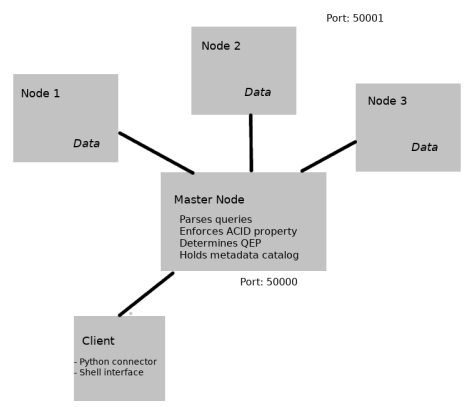
Moreover, each master maintains a catalog database which holds metadata for each table accross all databases in the system. The catalogs are automatically synchornized with the creation of any new table.
Catalog
The catalogs hold meta data for each table in the system. The meta data lists the database and table names, the partition column, the partition method, and the partition parameters. This information can be accessed via the interface via the command.
DESCRIBE [table name]
SQL Parsing
Once an SQL statement entered in client it will be sent to the master node for parsing and execution. The parsing is handled by a utility class which uses an ANTLR4 parse tree walker and listener along with a custom built grammar (hacked together from the MySQL and SQLite grammars). The utility will take this parsed SQL and write a corresponding statement to be sent to each of the datanodes. For instance, an INSERT with a single row will only produce a single statement for the data node with the corresponding partition. Likewise, a SELECT statement will produce a set of queries for each of the datanodes holding values we are looking to retrieve.
Message Protocol
Messages and data sent between the client, masters, and datanodes are sent as pickled tuples. The client only sends a single valued tuple containing the sql statement. The master sends a tuple containing instructions and message data to the clients; e.g. ("_query", "SELECT * FROM table") or ("_ddl", "CREATE TABLE ..."). Once the data ndoes have completed their operation the master will return a status response string and data (if any) to the client; e.g. ("Query returned 2 rows", [[001, "John"], [002, "Paul"]]).
Transactions
As a fully parallel RDBMS sqlfat ensures ACID property compliance for each transaction. This is accomplished through a two-phase transactional protocol.
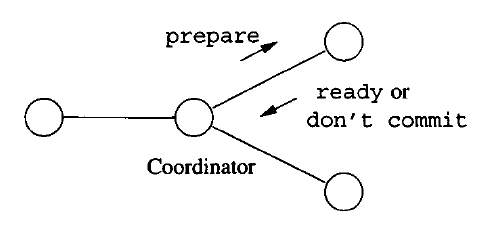
Once the master recieves a transaction from the client, it preforms the necessary processing (i.e.indexing/partitioning) then forwards the transaction to the data nodes. The datanodes begin their work by aquiring a lock, performing an intial execution and reporting success or failure back to the master. Once the master has recieved status reports from all the nodes it sends back a commit or abort message accordingly (only commit if all node succeeded in their first transaction). Once this is complete, the lock is released.
Partitioning
SQLFat requires that all tables be partitioned for storage on the datanodes. The number of partitions should correspond to the number of running datanodes. The partition function can either be by range or by hash. The range function requires that we give a min and a maximum value for the partitioned column, for example.
CREATE TABLE t1 (uid INT, name VARCHAR) PARTITION BY RANGE(uid, 1, 1000) PARTITIONS 3
Where 1 and 1000 are the min and max values we will store. Once the range partition is determined, the master will automatically determine the location for each row of data; in this example rows 1-333 would be stored in node1, 334-666 in node2, etc.
The hash function works off of a simple modulo operator, however in the future I might add other functions so this must be specifed in the CREATE statement.
CREATE TABLE t1 (uid INT, name VARCHAR) PARTITION BY HASH (uid, modulo) PARTITIONS 3
Finally, I should note that while this system does support column constraints such as UNIQUE, and NOT NULL, as well as PRIMARY KEYs, it does not support FOREIGN KEY table constraints.
Parallel Loader
For utility sake I have also added a parallel loading utility to import csv files into database tables. The csv's must have headers corresponding to the column names in the table. The loader will look for the csv files in the /sqlfat/load directory, meaning that the LOAD DATA INFILE LOCAL option is not supported. To execute a load simply enter a statement as such.
LOAD DATA INFILE file.csv INTO TABLE t1 DELIMITER | ENCLOSED BY '
DELIMTER and ENCLOSED BY also have the NULL options, which will use the default delimiter ',' and default quotechar None. Make sure that you do not use quotes to surround the file name or any of the options here.
*Query Processing
The query processor currently can supports multiple and or nested conditionals in SELECT statements. For now, nested sub-queries and joins are not supported. The join algorithm is currently under construnction.
Additional work needs to be done on this project before we can say it has full functionality.
- Parallel join algorithm
- Basic security
- Improved terminal interface.