



Privacy-Preserving Medical AI for Multi-Institutional Collaboration
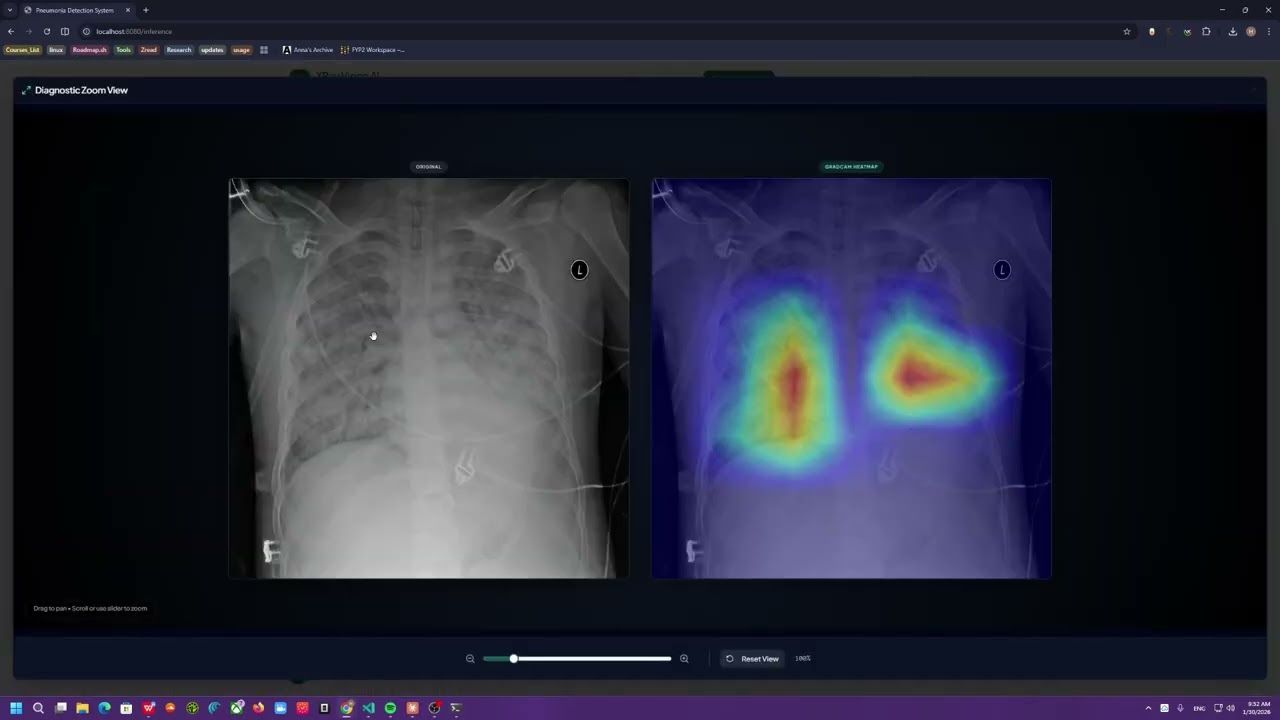
Click the image above to watch the full system demo on YouTube.
Pneumonia is a lung infection that can quickly reduce oxygen levels and become life-threatening, especially for older adults and children. Early detection is critical — every hour influences outcomes.
Chest X-rays can reveal it early. But radiologists are limited in number and unevenly distributed across regions. Computer vision models can scale expert-level screening — they learn pneumonia patterns and support clinicians with fast, consistent, repeatable assistance.
The catch: the best medical data is locked behind strict privacy boundaries. Hospital data is protected by HIPAA, GDPR, and institutional governance. You can't just pool it centrally.
Federated learning with FedAvg. Each hospital trains locally, keeps patient records on-site, and shares only model weight updates. A central server aggregates these updates into a stronger global model — without any raw data ever leaving the institution.
This project builds that system end-to-end: a privacy-preserving training pipeline, a real-time monitoring dashboard, clinical inference with explainability (Grad-CAM), and an AI research assistant — all in one platform.
graph TB
    subgraph Users["Users"]
        Clinician["Clinician / Researcher"]
    end

    subgraph Frontend["Frontend - React/Vite"]
        Dashboard["Training Dashboard"]
        InferenceUI["Inference Interface"]
        ChatUI["AI Research Assistant"]
        AnalyticsUI["Analytics & Reports"]
    end

    subgraph APIGateway["API Gateway - FastAPI"]
        REST["REST Endpoints"]
        WebSocket["WebSocket Server"]
        Middleware["Security & Error Handling"]
    end

    subgraph ControlLayer["Control Layer"]
        Analytics["AnalyticsFacade"]
        Training["Training Orchestrator"]
        Inference["Inference Engine"]
        Agentic["AI Agentic System"]
    end

    subgraph DataLayer["Data Layer"]
        PostgreSQL[("PostgreSQL + pgvector")]
        FileStorage["File System"]
        Cache["In-Memory Cache"]
    end

    subgraph External["External Services"]
        WandB["Weights & Biases"]
        ArXiv["ArXiv API"]
        LLM["Gemini API"]
    end

    Clinician --> Dashboard
    Clinician --> InferenceUI
    Clinician --> ChatUI

    Dashboard --> REST
    InferenceUI --> REST
    ChatUI --> REST
    Dashboard -.->|Real-time Metrics| WebSocket

    REST --> Middleware
    Middleware --> ControlLayer

    Analytics --> PostgreSQL
    Training --> PostgreSQL
    Training --> FileStorage
    Inference --> FileStorage
    Agentic --> PostgreSQL

    Training -.->|Experiment Tracking| WandB
    Agentic -.->|Literature Search| ArXiv
    Agentic -.->|LLM Generation| LLM

    style Frontend fill:#61DAFB,stroke:#1565C0,color:#000
    style APIGateway fill:#009688,stroke:#004D40,color:#fff
    style ControlLayer fill:#FF6F00,stroke:#E65100,color:#fff
    style DataLayer fill:#7C4DFF,stroke:#4527A0,color:#fff
    style External fill:#00C853,stroke:#1B5E20,color:#fff
The system follows a strict N-layer Clean Architecture — API never touches the database directly, the Control layer owns all business logic, and the Entities layer is framework-agnostic:
graph LR
    subgraph Layers["Clean Architecture Layers"]
        direction TB
        API["API Layer<br/>FastAPI / WebSocket"]
        Control["Control Layer<br/>Business Logic"]
        Boundary["Boundary Layer<br/>DB / External APIs"]
        Entities["Entities Layer<br/>Models / Datasets"]
        Internals["Internals<br/>Utils / Logging"]
    end

    API --> Control
    Control --> Boundary
    Control --> Entities
    Boundary --> Entities
    Internals --> API
    Internals --> Control
    Internals --> Boundary
    Internals --> Entities

    style API fill:#FF6F00,stroke:#E65100,color:#fff
    style Control fill:#2962FF,stroke:#1565C0,color:#fff
    style Boundary fill:#AA00FF,stroke:#7B1FA2,color:#fff
    style Entities fill:#D50000,stroke:#B71C1C,color:#fff
    style Internals fill:#00897B,stroke:#00695C,color:#fff
| Layer | Purpose | Key Components |
|---|---|---|
| API | HTTP/WebSocket entry points | FastAPI routers, middleware, schemas |
| Control | Business logic orchestration | Trainers, AnalyticsFacade, AgenticSystem |
| Boundary | External interface adapters | SQLAlchemy CRUD, Vector DB queries |
| Entities | Pure domain models | ResNet model, XRay dataset, config |
| Internals | Cross-cutting utilities | Transforms, logging, constants |
A core design decision: the federated client reuses the same CentralizedTrainer pipeline rather than duplicating training logic. Each Flower client is just a CentralizedTrainer scoped to its local data partition. This means:
- Bugs fixed in the centralized pipeline automatically benefit federated clients
- Metrics collection, callbacks, and checkpointing behave identically in both modes
- The
is_federatedflag onMetricsCollectorCallbackis the only divergence point
graph LR
    subgraph Centralized["Centralized Training"]
        CData["Central Dataset"]
        CModel["ResNet50 Model"]
        CTrain["PyTorch Lightning Trainer"]
        CMetrics["Metrics & Checkpoints"]

        CData --> CTrain
        CTrain --> CModel
        CModel --> CMetrics
    end

    subgraph Federated["Federated Training"]
        FServer["FL Server (Flower)"]
        FStrategy["ConfigurableFedAvg"]

        subgraph Clients["Client Nodes"]
            C1["Client 1<br/>Hospital A"]
            C2["Client 2<br/>Hospital B"]
            C3["Client 3<br/>Hospital C"]
        end

        FServer -->|Global Model| C1
        FServer -->|Global Model| C2
        FServer -->|Global Model| C3

        C1 -->|Local Weights| FStrategy
        C2 -->|Local Weights| FStrategy
        C3 -->|Local Weights| FStrategy

        FStrategy -->|Aggregated Model| FServer
    end

    CMetrics --> Comparison
    FServer --> Comparison

    Comparison["Comparison Engine"]

    style Centralized fill:#E3F2FD,stroke:#1565C0,color:#000
    style Federated fill:#F3E5F5,stroke:#7B1FA2,color:#000
    style Clients fill:#FFF3E0,stroke:#E65100,color:#000
    style Comparison fill:#E8F5E9,stroke:#2E7D32,color:#000
The ConfigurableFedAvg strategy extends standard FedAvg with weighted aggregation by client example counts, real-time WebSocket broadcasting after each round, and direct database persistence — so the dashboard reflects federated progress in the same format as centralized training.
Federated training supports three partitioning strategies to simulate realistic hospital scenarios:
| Strategy | Description | When to Use |
|---|---|---|
iid |
Uniform random splits | Baseline comparison |
non-iid |
Patient-based splits with class skew | Realistic hospital variation |
stratified |
Balanced class distribution per client | Controlled experiments |
The dl_model control module was deliberately designed to be purely experimental — every hyperparameter, architecture choice, and training behavior is driven by default_config.yaml. Nothing is hardcoded.
This was a deliberate choice for reproducibility: given the same config file, you get the exact same model, the same data splits (seeded), the same callback thresholds, and the same optimizer schedule. Experiments can be diff'd by config alone.
system:
  img_size: [256, 256]
  batch_size: 32
  validation_split: 0.20
  seed: 42

experiment:
  learning_rate: 0.0015
  epochs: 15
  num_rounds: 15          # Federated rounds
  num_clients: 5          # Federated clients
  clients_per_round: 3
  partition_strategy: "non-iid"  # iid | non-iid | stratified
  optimizer_type: "adamw"
  scheduler_type: "cosine"
  early_stopping_patience: 5

monitoring:
  wandb_enabled: true
  tensorboard_enabled: true
The model itself is a ResNet50 backbone with a custom classification head, trained with progressive unfreezing — backbone layers are frozen early, then gradually released across four scheduled checkpoints at 15%, 35%, 55%, and 75% of total epochs. This prevents catastrophic forgetting of pretrained ImageNet features while still allowing domain adaptation.
Every training run — centralized or federated — streams metrics to the dashboard over WebSocket, persists epoch data to PostgreSQL, and tracks the full experiment in Weights & Biases.
sequenceDiagram
    participant User as User
    participant Frontend as Frontend
    participant API as FastAPI
    participant Control as Control Layer
    participant DB as PostgreSQL
    participant WS as WebSocket

    User->>Frontend: Upload Dataset
    Frontend->>API: POST /training/start
    API->>Control: Initiate Training
    Control->>DB: Create Run Record
    Control-->>WS: Stream Metrics
    WS-->>Frontend: Real-time Updates

    loop Each Epoch/Round
        Control->>Control: Train/Evaluate
        Control->>DB: Save Metrics
        Control-->>WS: Batch Metrics
        WS-->>Frontend: Update Charts
    end

    Control->>DB: Finalize Run
    Control-->>API: Return Results
    API-->>Frontend: Training Complete
    Frontend-->>User: Show Results
Monitoring is not an afterthought — it's a first-class concern. Two independent observability stacks run in parallel:
Every training run logs loss curves, accuracy, recall, precision, and F1 per epoch. Confusion matrices and Grad-CAM visualizations are logged as media artifacts. The system monitor tracks GPU/CPU utilization and memory throughout training.
| Feature | Capability |
|---|---|
| Metrics Tracking | Loss, accuracy, recall, precision per epoch |
| Media Logging | Confusion matrices, Grad-CAM visualizations |
| Hyperparameter Sweeps | Automated hyperparameter optimization |
| System Monitoring | GPU/CPU utilization, memory usage |
Batch-level metrics streaming:

Single run metrics dashboard:

System resource monitoring:

Every AI research assistant interaction is traced end-to-end: the full conversation flow, retrieval steps, reranking decisions, and LLM generation are all captured with token counts and latency. Automated hallucination detection runs on a 25% sample of responses.
| Feature | Capability |
|---|---|
| Trace Visualization | Full conversation flow with token usage |
| Hallucination Detection | Automated evaluation (25% sampling) |
| Performance Metrics | Latency, token count, cost tracking |
| Feedback Loops | Answer relevance scoring |
Agent trace visualization:


Training dynamics captured through the agent pipeline:

Beyond training, the system includes a RAG-powered chat interface for clinical literature queries. A single research assistant agent retrieves relevant papers from a pgvector store, reranks results with BM25 + semantic scoring, and generates answers with full source attribution — while maintaining session-scoped conversation memory.
graph TB
    subgraph UserQuery["User Query"]
        Query["Research Question"]
    end

    subgraph Assistant["Research Assistant Agent"]
        Agent["AI Research Assistant"]
    end

    subgraph RAG["RAG Pipeline"]
        Retriever["Vector Store Retriever<br/>(pgvector)"]
        Reranker["BM25 + Semantic Reranker"]
        Generator["Context-Aware Generator"]
    end

    subgraph Tools["External Tools"]
        ArXiv["ArXiv MCP Search"]
        Embeddings["Sentence Transformers"]
    end

    subgraph Memory["Memory"]
        ChatHistory["PostgreSQL Chat History"]
        Context["Session Context"]
    end

    Query --> Agent
    Agent --> Retriever

    Retriever --> Reranker
    Reranker --> Generator

    Agent -.->|Literature Search| ArXiv
    Retriever -.->|Embeddings| Embeddings

    Generator --> ChatHistory
    Generator --> Context

    Generator --> Response["AI Response"]

    style UserQuery fill:#E1F5FE,stroke:#0288D1,color:#000
    style Assistant fill:#F3E5F5,stroke:#7B1FA2,color:#000
    style RAG fill:#FFF8E1,stroke:#F57F17,color:#000
    style Tools fill:#E8F5E9,stroke:#2E7D32,color:#000
    style Memory fill:#FFF3E0,stroke:#E65100,color:#000
| Component | Version | Check |
|---|---|---|
| Python | 3.12+ | python --version |
| uv | latest | uv --version |
| Node.js | 20+ | node --version |
| PostgreSQL | 14+ | psql --version |
| CUDA (optional) | 12.0+ | nvidia-smi |
# Clone repository
git clone <repository-url>
cd FYP2

# Install Python dependencies
uv sync

# Install frontend dependencies
cd xray-vision-ai-forge && npm install && cd ..

# Configure environment
cp .env.example .env
# Edit .env with your database credentials# One-command launch (PowerShell)
.\scripts\start.ps1
# Or manually - Backend
uv run uvicorn federated_pneumonia_detection.src.api.main:app --reload --host 127.0.0.1 --port 8001
# Or manually - Frontend
cd xray-vision-ai-forge && npm run devAccess Points:
- Dashboard: http://localhost:5173
- API Docs: http://127.0.0.1:8001/docs
- WebSocket: ws://localhost:8765
from federated_pneumonia_detection.src.control.dl_model.centralized_trainer import CentralizedTrainer

trainer = CentralizedTrainer(
    config_path="federated_pneumonia_detection/config/default_config.yaml"
)
results = trainer.train(
    source_path="path/to/dataset.zip",
    experiment_name="baseline_centralized"
)
print(f"Best F1: {results['best_model_score']:.4f}")from federated_pneumonia_detection.src.control.federated_learning.federated_trainer import FederatedTrainer
trainer = FederatedTrainer(partition_strategy="non-iid")
results = trainer.train(
source_path="path/to/dataset.zip",
experiment_name="federated_hospitals"
)
print(f"Rounds: {results['num_rounds']}, Clients: {results['num_clients']}")import requests
response = requests.post("http://localhost:8001/api/v1/chat/stream", json={
"message": "What are the latest findings on pneumonia detection using deep learning?",
"session_id": "research-session-1"
})
for chunk in response.iter_content():
print(chunk.decode(), end="")# Backend tests
pytest # All tests
pytest --cov=federated_pneumonia_detection # With coverage
pytest tests/unit/ # Component tests
pytest tests/integration/ # End-to-end workflows
# Frontend tests
cd xray-vision-ai-forge
npm run test # Unit tests
npm run test:coverage # With coverage| Category | Technologies |
|---|---|
| Deep Learning | PyTorch, PyTorch Lightning, TorchVision |
| Federated Learning | Flower (flwr), flwr-datasets |
| API Framework | FastAPI, Uvicorn, WebSockets |
| Database | SQLAlchemy 2.0, PostgreSQL, pgvector |
| AI/LLM | LangChain, LangGraph, Google Generative AI |
| Experiment Tracking | Weights & Biases, TensorBoard, LangSmith |
| Data Science | NumPy, Pandas, Matplotlib, Seaborn |
| Category | Technologies |
|---|---|
| Framework | React 18, Vite, TypeScript |
| Styling | Tailwind CSS, Shadcn UI, Radix Primitives |
| State Management | React Query, React Context |
| Visualization | Recharts, Framer Motion |
| Testing | Vitest, React Testing Library |
FYP2/
├── federated_pneumonia_detection/    # Backend Python package
│   ├── src/
│   │   ├── api/                      # FastAPI entry points
│   │   ├── control/                  # Business logic
│   │   │   ├── dl_model/             # Centralized training (experimental platform)
│   │   │   ├── federated_new_version/# Federated learning (reuses dl_model)
│   │   │   ├── analytics/            # Analytics services
│   │   │   └── agentic_systems/      # AI chat & RAG
│   │   ├── boundary/                 # Database access
│   │   ├── entities/                 # Domain models
│   │   └── internals/                # Utilities
│   ├── config/                       # YAML configurations
│   └── tests/                        # Test suites
├── xray-vision-ai-forge/             # React frontend
│   ├── src/
│   │   ├── components/               # React components
│   │   ├── services/                 # API/WebSocket clients
│   │   └── types/                    # TypeScript definitions
│   └── package.json
├── docs/                             # Documentation & monitoring screenshots
├── scripts/                          # Orchestration scripts
├── alembic/                          # Database migrations
└── docker/                           # Container configurations
| Feature | Implementation |
|---|---|
| Input Validation | Pydantic schemas for all API inputs |
| Prompt Injection Detection | MaliciousPromptMiddleware for AI endpoints |
| Error Sanitization | Structured error responses without stack traces |
| Request Tracing | X-Request-ID middleware for audit trails |
| Data Privacy | Federated learning — raw data never leaves clients |
| Document | Description |
|---|---|
| AGENTS.md | AI agent entry point and system overview |
| docs/INDEX.md | Complete documentation index |
| docs/architecture/INTEGRATION.md | System integration map |
| docs/operations/ANALYTICS_API.md | Analytics API reference |
| scripts/README.md | Orchestration scripts guide |
MIT License — see LICENSE
This is a research project for educational purposes.
For clinical deployment, consult medical professionals and ensure compliance with regulatory guidelines (FDA, HIPAA, GDPR). The system is not intended for direct patient diagnosis without proper validation and approval.