

Boring UI is an opinionated framework for building agent-centric apps, built on Pi.
Traditional SaaS is built around workflows users drive by hand: buttons, forms, pages, dashboards.
Agents change that.
When software can understand intent and act, every app collapses to two surfaces:
- Chat — tell the agent what to do.
- Workbench — inspect, steer, and refine the results.
That's what the Boring UI core provides: a workbench the agent can control and reshape.
- Give it a try
- Built on Pi
- Make it yours
- Roadmap
- Repo map
- Plugin shape
- Built with boring-ui
- Architecture
- Hosting
- Working in the repo
- Documentation
Boring UI is designed for building hosted agent-centric apps.
But it also runs fully locally: no auth, no database, no setup complexity.
Just a stateless agent + workspace running directly on your machine.
To get started:
export OPENAI_API_KEY=
npx @hachej/boring-ui-cli
Boring UI uses Pi as the agent harness (more on this in the next section), so you simply need to configure LLM access through environment variables (ANTHROPIC_API_KEY, OPENAI_API_KEY) or via a Pi LLM provider.
When building Boring UI, I was heavily inspired by the Pi project.
It’s an open-source agent harness that is super lightweight and built to be highly extensible.
I also really connected with the vision and philosophy of its creator Mario Zechner, which pushed me to adopt Pi as the core harness behind Boring UI.
At a high level, the system is organized around four main components:
- Web Frontend → chat + workspace UI
- Web Backend → API layer shared by both the frontend and the agent tools
- Pi Harness → agent runtime
- Sandbox → isolated filesystem + execution runtime
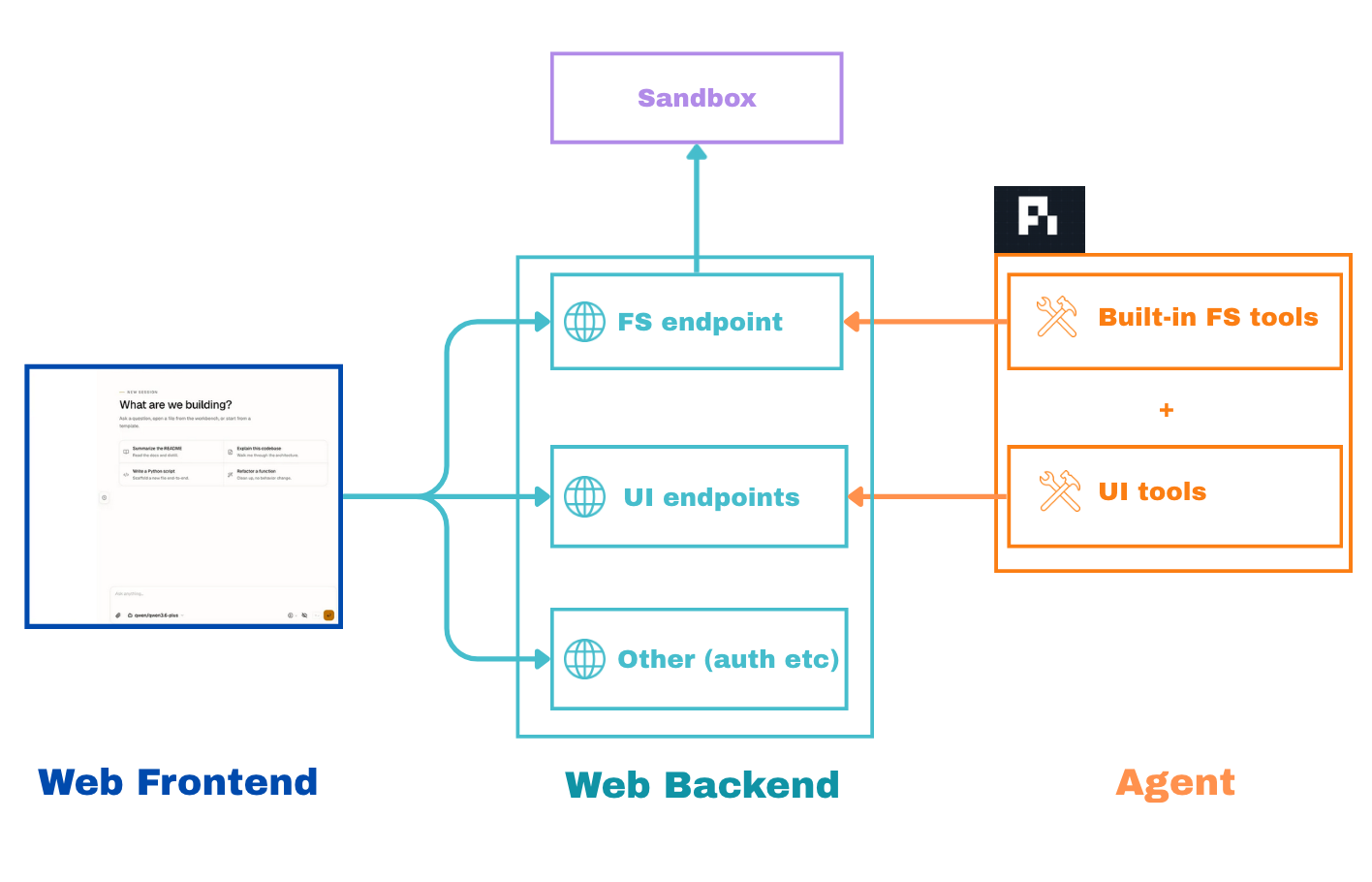
One important design axiom I had from the beginning was that the agent and the user should interact with the same core primitives through the same interfaces.
For example, there is a single file API shared by both:
- the frontend file tree
- the agent filesystem tools
The same applies to the UI itself: the agent sees the workspace the same way the user does and can interact with it through dedicated UI tools.
Of course every app, every workflow, every use case is different.
Different data. Different visualisations. Different agent skills.
So the real question is: how do you keep the same agent-centric shell, while adapting it to all of those different needs without rebuilding the whole app every time?
The answer is extensibility through a plugin system.
Fortunately, Pi’s plugin system is one of its biggest strengths: anyone can publish a package to extend it with custom prompts, skills, and tools.
I wanted Boring UI to take full advantage of that ecosystem instead of reinventing it.
So rather than introducing yet another plugin model, Boring UI simply extends the one Pi already provides.
Pi plugins focus on the agent layer:
- prompts
- skills
- tools
- slash commands
Boring UI adds a UI layer on top of them with concepts such as:
- panels
- command palette actions
- UI events
- catalogs
The two layers are fully compatible: any Pi plugin works out of the box inside Boring UI.
In practice, a plugin is simply a Node package with two manifest blocks:
pi.*→ agent side: prompts, skills, toolsboring.*→ UI side: panels, commands, catalogs, surface resolvers
Example of package.json:
{
  "name": "my-plugin",
  "keywords": ["pi-package"],
  "pi": {
    "extensions": ["agent/index.ts"],
    "skills": ["agent/skills"],
    "prompts": ["agent/prompts"],
    "systemPrompt": "Short agent guidance."
  },
  "boring": {
    "label": "My Plugin",
    "front": "front/index.tsx",
    "server": "server/index.ts"
  }
}
This makes customization extremely flexible.
You can install any existing Pi plugin directly to customize the agent’s behavior.
And if needed, you can progressively enhance that same plugin with Boring UI capabilities like custom panels, commands, or interactive UI surfaces.
Plugins also compose naturally: multiple plugins can coexist side by side, or shared primitives can be wrapped into reusable packages.
I already have a few plugins in the repository:
- ask-user → Agent-to-human Q&A with a UI prompt

- data-catalog → Catalog tab built on Data Explorer

- deck → Plugin to let the agent create HTML slide decks.

Install them in your Boring UI project and you instantly get those capabilities.
I have hundreds of ideas for plugins that could emerge from this model:
- Kanban boards
- LLM-powered wikis / second brains
- orchestration interfaces
- observability dashboards
- workflow builders
- an OpenClaw-like daemon
Near-term priorities:
- More sandbox support — Kube, AWS agent sandboxes
- Make hot reload work in CLI static mode — so local runtime/plugin frontend iteration works cleanly in the packaged CLI.
- Make hot reload work in sandboxed modes — extend the same editing and reload loop to sandbox-backed environments.
| Package | Role | README |
|---|---|---|
@hachej/boring-agent |
Agent runtime, tools, chat UI | packages/agent |
@hachej/boring-workspace |
Workbench, panels, plugin system | packages/workspace |
@hachej/boring-core |
Auth, DB, app factory | packages/core |
@hachej/boring-ui-kit |
Shared UI primitives | packages/ui |
@hachej/boring-ui-cli |
Zero-setup local entrypoint | packages/cli |
| Plugin | What it adds | README |
|---|---|---|
@hachej/boring-ask-user |
Agent-to-user question/answer surface and ask_user tool |
plugins/ask-user |
@hachej/boring-data-explorer |
Searchable, faceted data tables — the primitive for explorer-style panels | plugins/data-explorer |
@hachej/boring-data-catalog |
Configurable catalog tab built on data-explorer |
plugins/data-catalog |
| App/internal plugin template | Publishable package-plugin reference; create with boring-ui-plugin create |
packages/plugin-cli/templates/plugin |
| App | Purpose | README |
|---|---|---|
apps/full-app |
Production-shaped reference: auth, DB, multi-workspace | apps/full-app |
apps/agent-playground |
@hachej/boring-agent alone — no workbench, no DB |
apps/agent-playground |
apps/workspace-playground |
@hachej/boring-workspace + plugins — no auth backend |
apps/workspace-playground |
Plugins are standard Node packages. package.json#pi describes hot-reloadable
agent resources, while package.json#boring describes workspace UI/static app
integration:
{
  "name": "my-plugin",
  "keywords": ["pi-package"],
  "pi": {
    "extensions": ["agent/index.ts"],
    "skills": ["agent/skills"],
    "prompts": ["agent/prompts"],
    "systemPrompt": "Short agent guidance."
  },
  "boring": {
    "label": "My Plugin",
    "front": "front/index.tsx",
    "server": "server/index.ts"
  }
}pi.*— hot-reloadable agent resources loaded by Pi (extensions,skills,prompts,systemPrompt)boring.front— workbench UI fromdefinePlugin({ ... }): panels, commands, catalogs, surface resolvers, providers, bindingsboring.server— explicit static/boot-time server integration fromdefineServerPlugin({ ... }): agent tools that need backend state and HTTP routes. Restart the workspace server after changes.
For a publishable package plugin, run boring-ui-plugin create <name> --path plugins. For a front/Pi hot-reloadable local plugin, run boring-ui-plugin scaffold <name>.
| Plugin surface | Local .pi/extensions / CLI |
App/internal package plugins | Notes |
|---|---|---|---|
pi.systemPrompt, pi.skills, pi.prompts, pi.extensions |
hot-reload via /reload |
hot-reload when discovered as plugin package resources | Agent context updates without server restart. |
boring.front panels/commands/catalogs/surface resolvers |
hot-reload via /reload in dev/playground |
static by default; package front assets can be rediscovered in dev | Browser import failures are surfaced and previous version is kept. |
boring.server / defineServerPlugin({ routes, agentTools }) |
not hot-reloaded | boot-time only | Restart/redeploy after changes. Generated runtime plugins should omit boring.server. |
| Runtime plugin frontend in packaged CLI static mode | not yet | n/a | Planned: local plugin-dev transform endpoint / embedded Vite for CLI. |
Planned direction: keep app/internal plugins powerful and boot-composed, but keep generated/runtime plugins route-free. Generated plugins should use manifest-declared front surfaces plus brokered tools/RPC rather than custom backend routes.
What you can add:
- Panels — arbitrary React panes in the workbench (editors, charts, tables, anything)
- Left tabs — persistent sidebars (data catalogs, file navigators, status views)
- Commands — entries in the command palette, triggered by user or agent
- Catalogs — searchable, faceted data explorers the agent can surface
- Agent tools — new capabilities the model can call, with schema-defined parameters
- Skills + prompts — domain knowledge and reasoning patterns the agent follows
| Plugin | Description |
|---|---|
| ask-user | Agent-to-human Q&A with a UI prompt |
| data-explorer | Searchable, faceted data tables |
| data-catalog | Catalog tab built on data-explorer |
| coming: llm-wiki | LLM powered second brain |
| coming: tasks | Task tracking, Kanban boards the agent can read and update |
| coming: workflows | Multi-step agent orchestration — chain steps, define branches, trigger sub-agents |
| coming: data-branch | Fork, explore, and compare agent-generated datasets side by side in the workbench |
See Pi extensions docs for the full Pi plugin surface.
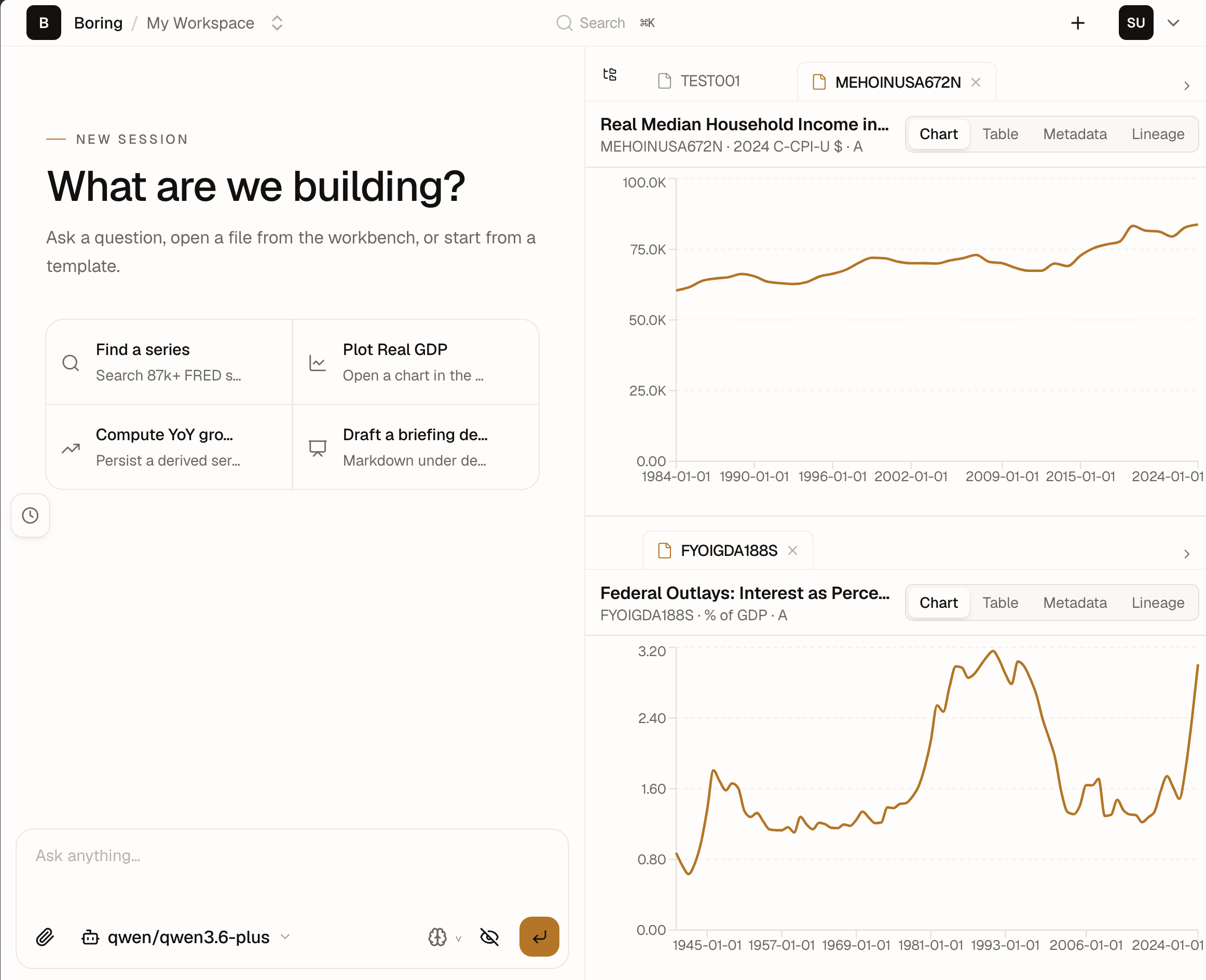
MacroAnalyst — an interactive macroeconomic analyst powered by Boring UI.
Ask in plain English, get charts back in under a minute. Behind the scenes the agent:
- Fetches live time series from a database of 800,000+ series
- Transforms, resamples, and joins them using Python functions it chooses and writes
- Renders interactive decks charts in the workbench
| App | Status |
|---|---|
| boring-accountant — accounting workflows | Coming |
| boring-design — design review and iteration | Coming |
| boring-lawyer — legal research and document review | Coming |
Two layers connected by a bridge.
Frontend is React + Vite — renders chat, file tree, and workbench. The workbench is a pane container that displays files, tables, charts, or custom plugin views.
UiBridge is the link between frontend and backend. The agent or server posts commands (openFile, openPanel, openSurface) and the workbench dispatches them. This is how the agent drives the UI without touching the DOM.
Backend is Node.js.
Agent runtime is the Pi agent loop (AgentHarness). It runs natively on the backend — no VMs, no containers needed. It receives user messages, streams chat responses, delegates tool calls to a ToolCatalog, and manages sessions. It knows nothing about files, shells, or UI — only AgentTool[].
AgentHarness is an interface, not a hardcoded dependency. The design leaves room for swapping in a different harness later. For now, Pi is the only implementation.
The agent just calls the tools — we handle where they actually run.
That's why Workspace and Sandbox exist: they abstract the execution layer so the same tools (ls, read, write, exec) work identically whether hitting the local filesystem, a Linux container, or a remote VM.
| Interface | Defined in | Used for | Adapters |
|---|---|---|---|
Workspace |
@hachej/boring-agent/shared |
Read/write files (agent + UI filetree) | NodeWorkspace, VercelSandboxWorkspace |
Sandbox |
@hachej/boring-agent/shared |
Shell execution (agent commands) | DirectSandbox, BwrapSandbox, VercelSandboxExec |
UiBridge |
@hachej/boring-workspace/shared |
Workbench control (agent + command palette) | in-memory bridge (room for browser-side adapter) |
AgentHarness |
@hachej/boring-agent/shared |
Agent loop | Pi (room for more) |
Sandbox abstracts isolated execution. The agent runs commands through it — the same bash tool works identically regardless of where the shell is:
| Sandbox | Implementation | When to use |
|---|---|---|
| direct | child_process.exec |
Local dev, no isolation |
| bwrap | Linux bubblewrap | Local dev with filesystem isolation |
| vercel-sandbox | Vercel Firecracker VM | Remote sandbox |
Workspace is the filesystem abstraction that both the agent tools and the frontend file routes consume. It defines operations — readFile, writeFile, readdir, stat, watch — and each adapter implements them for its target environment.
Pi ships native tools for read, write, edit, find, grep, ls. In local mode they call node:fs directly. In remote mode we adapt them to call through the Workspace interface over HTTP. Same tools, same agent, different backend.
| Workspace | Implementation |
|---|---|
| NodeWorkspace | Local filesystem via node:fs |
| VercelSandboxWorkspace | Remote filesystem over HTTP to a sandbox VM |
Sandbox and Workspace are always created together as a pair so they share the same filesystem:
| Mode | Sandbox | Workspace |
|---|---|---|
| direct | DirectSandbox |
NodeWorkspace |
| local | BwrapSandbox |
NodeWorkspace |
| vercel-sandbox | VercelSandboxExec |
VercelSandboxWorkspace |
The full app ships two deployment targets:
- Fly.io — Docker container + Postgres. The
apps/full-appDockerfile builds the monorepo in dependency order. Runfly launch, set secrets (DATABASE_URL,AUTH_SECRET), deploy. - Vercel — serverless function for agent routes + edge static assets.
@hachej/boring-coreships avercelEntryand build script (build-vercel-api.mjs) that bundle the backend into a single Vercel Function.
Both targets use the same @hachej/boring-core app factory (createCoreApp) — swap the entry point, same app.
pnpm install
pnpm build            # build all packages
pnpm dev              # run all dev servers
pnpm typecheck        # tsc --noEmit across all packages
pnpm test             # vitest across all packages
pnpm lint:invariants  # plugin contract + agent isolation lint
pnpm ci               # lint + typecheck + test + invariants + e2e
Scoped commands during development:
pnpm --filter @hachej/boring-workspace test
pnpm --filter @hachej/boring-agent test:watch
pnpm --filter full-app dev
Apps that consume @hachej/boring-workspace source need the workspace built once first:
pnpm --filter @hachej/boring-workspace build && pnpm --filter workspace-playground testdocs/README.md is the documentation entry point: global
structure, package map, and links to each package's own docs/ (architecture,
abstractions, decisions). Agent rules and coding guidance live in
AGENTS.md. Historical plans are archived under
docs/plans/archive/ and packages/*/docs/plans/archive/.
MIT