ROSClaw Southbound Driver for Autoware — bridges LLM agents to Autoware via the Model Context Protocol (MCP).
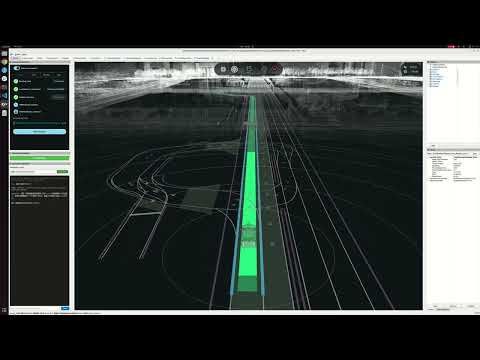
Autoware CLAW lets an LLM agent query vehicle state, resolve GPS coordinates to lane-aligned goals, and send control commands to Autoware — all through a structured MCP tool interface. The agent runs inside an isolated NemoClaw sandbox with GPU-accelerated inference via Ollama, while an RViz panel provides an operator chat UI for oversight.
┌───────────────────────────────────────────────────────────────────────┐
│  Host Machine (ROS 2 Humble)                                          │
│                                                                       │
│  ┌─────────────────────┐          ┌────────────────────────────────┐ │
│  │  Autoware Planning   │          │  Docker Containers             │ │
│  │  Simulator           │          │                                │ │
│  │                      │          │  ┌──────────────────────────┐  │ │
│  │  - Localization       │          │  │  NemoClaw (LLM Agent)    │  │ │
│  │  - Perception         │          │  │  - OpenClaw sandbox      │  │ │
│  │  - Planning           │          │  │  - Web dashboard :18789  │  │ │
│  │  - Control            │          │  │  - Brave web search      │  │ │
│  │  - Vehicle Simulator  │          │  └───────────┬──────────────┘  │ │
│  └──────────┬───────────┘          │              │ internal-net     │ │
│             │                      │  ┌───────────▼──────────────┐  │ │
│             │ ROS 2 topics         │  │  Ollama (LLM Inference)  │  │ │
│             │                      │  │  - gemma4 model          │  │ │
│  ┌──────────▼───────────┐          │  │  - GPU accelerated       │  │ │
│  │  Autoware MCP Server │          │  └──────────────────────────┘  │ │
│  │  (ROS 2 Node)        │◄─── SSE/JSON-RPC ──►                     │ │
│  │  :8765               │          └────────────────────────────────┘ │
│  └──────────────────────┘                                             │
│                                                                       │
│  ┌───────────────────────────────────────────────────────────────┐   │
│  │  RViz2 + Autoware CLAW Chat Panel                             │   │
│  │  - Operator oversight & chat interface                        │   │
│  │  - Pre-configured layout with vehicle visualization           │   │
│  └───────────────────────────────────────────────────────────────┘   │
└───────────────────────────────────────────────────────────────────────┘
-
MCP Server (host, ROS 2 node)
- Subscribes to Autoware ROS 2 topics and caches vehicle state with thread-safe locking
- Exposes 17 MCP tools via SSE transport on
127.0.0.1:8765 - Publishes control commands, gear, turn indicators, hazard lights, and heartbeat
- Resolves GPS coordinates to lane-aligned goals using Lanelet2 + MGRSProjector
-
NemoClaw + Ollama (Docker containers)
- NemoClaw: NVIDIA's LLM agent sandbox with Autoware MCP tools pre-configured
- Ollama: Local LLM inference server running
gemma4with GPU acceleration - Network isolation:
internal-net(Ollama, no internet) +egress-net(web search, MCP) - L7 network policy restricts MCP access to
/sse,/messages/**,/health
-
RViz Chat Panel (C++ / Qt)
- Operator-facing chat UI embedded in RViz
- Connects to NemoClaw gateway with health monitoring
- Dark theme, monospace font, persistent URL configuration
Operator types in RViz Chat Panel
        │
        ▼
NemoClaw receives message, reasons using gemma4 (Ollama)
        │
        ▼
NemoClaw calls MCP tools (e.g., autoware_get_vehicle_state)
        │
        ▼
MCP Server reads cached ROS 2 state / publishes commands
        │
        ▼
Autoware executes (planning, control, vehicle simulation)
        │
        ▼
Response flows back: Autoware → MCP → NemoClaw → RViz Chat
Subscriptions (state caching):
| Topic | Message Type | Purpose |
|---|---|---|
/localization/kinematic_state |
nav_msgs/Odometry |
Vehicle pose (x, y, z, yaw) |
/vehicle/status/velocity_status |
VelocityReport |
Longitudinal/lateral velocity |
/vehicle/status/steering_status |
SteeringReport |
Steering tire angle |
/vehicle/status/gear_status |
GearReport |
Current gear |
/vehicle/status/control_mode |
ControlModeReport |
Control mode |
/api/operation_mode/state |
OperationModeState |
Operation mode (AUTONOMOUS/LOCAL/REMOTE/STOP) |
/perception/object_recognition/objects |
PredictedObjects |
Surrounding detected objects |
/perception/traffic_light_recognition/traffic_signals |
TrafficLightGroupArray |
Traffic signal states |
/control/current_gate_mode |
GateMode |
AUTO/EXTERNAL gate mode |
/api/autoware/get/engage |
Engage |
Engage state |
Publications (commands):
| Topic | Message Type | Purpose |
|---|---|---|
/external/selected/control_cmd |
Control |
Steering, velocity, acceleration |
/external/selected/gear_cmd |
GearCommand |
Gear shifts |
/external/selected/turn_indicators_cmd |
TurnIndicatorsCommand |
Turn signals |
/external/selected/hazard_lights_cmd |
HazardLightsCommand |
Hazard lights |
/external/selected/heartbeat |
Heartbeat |
Heartbeat for vehicle_cmd_gate |
/control/gate_mode_cmd |
GateMode |
Switch AUTO/EXTERNAL mode |
/autoware/engage |
Engage |
Engage/disengage |
/planning/mission_planning/goal |
PoseStamped |
Navigation goal |
| Package | Language | Description |
|---|---|---|
autoware_claw |
Python | MCP server, ROS 2 node, coordinate resolver, Docker integration |
autoware_claw_rviz_plugins |
C++ / Qt | RViz chat panel plugin for operator interaction |
| Tool | Parameters | Description |
|---|---|---|
autoware_get_vehicle_state |
none | Position (x, y, z, yaw), velocity, steering angle, gear, system status |
autoware_get_operation_mode |
none | Current mode (AUTONOMOUS/LOCAL/REMOTE/STOP), transition state |
autoware_get_surrounding_objects |
max_distance_m (optional) |
Detected objects: cars, trucks, buses, motorcycles, bicycles, pedestrians with position, velocity, dimensions, and classification |
autoware_get_traffic_signals |
none | Traffic signal groups: color (RED/AMBER/GREEN), shape (CIRCLE/ARROW), status (SOLID_ON/OFF/FLASHING), confidence |
autoware_get_diagnostics |
none | Engage state, MRM state/behavior, gate mode, control mode, gear |
| Tool | Parameters | Description |
|---|---|---|
autoware_resolve_goal |
lat, lon, search_radius (opt, default: 50m) |
Convert GPS lat/lon to lane-aligned goal candidates on Lanelet2 centerlines. Returns up to 5 candidates sorted by lateral distance |
autoware_get_lane_info |
x, y, search_radius (opt, default: 10m) |
Lanelet ID, length, subtype, and speed limit near a map-frame coordinate |
| Tool | Parameters | Description |
|---|---|---|
autoware_set_goal |
x, y, z (opt), yaw_rad |
Send navigation goal in map frame. Use autoware_resolve_goal first to get candidates |
autoware_engage |
engage (boolean) |
Enable (true) or disable (false) Autoware autonomous control |
| Tool | Parameters | Description |
|---|---|---|
autoware_set_gate_mode |
mode (AUTO/EXTERNAL) |
Switch vehicle_cmd_gate: AUTO (Autoware planning) or EXTERNAL (MCP direct control) |
autoware_send_control |
steering_rad, velocity_mps, acceleration_mps2 (opt) |
Send direct steering, velocity, acceleration. Requires EXTERNAL gate mode |
autoware_send_gear |
gear (DRIVE/REVERSE/PARK/NEUTRAL/LOW) |
Send gear command |
autoware_set_turn_indicators |
command (LEFT/RIGHT/DISABLE) |
Set turn indicators |
autoware_set_hazard_lights |
command (ENABLE/DISABLE) |
Set hazard lights on/off |
autoware_emergency_stop |
none | Send zero velocity, deceleration -2.5 m/s^2, and stop heartbeat |
| Tool | Parameters | Description |
|---|---|---|
autoware_start_heartbeat |
none | Start heartbeat publisher (required for vehicle_cmd_gate to accept external commands) |
autoware_stop_heartbeat |
none | Stop heartbeat (vehicle_cmd_gate will trigger emergency stop) |
- ROS 2 Humble with Autoware workspace built
- Docker with NVIDIA Container Toolkit (for GPU inference)
- NVIDIA GPU (required for Ollama + gemma4 inference)
- Python packages:
rosclaw,mcp,uvicorn,starlette(installed via pip) - Brave API key (optional, for NemoClaw web search): set
BRAVE_API_KEYenvironment variable
For a detailed step-by-step guide on integrating autoware_claw into an Autoware workspace, see Building with Autoware.
# Build autoware_claw and its RViz plugins
colcon build --packages-select autoware_claw autoware_claw_rviz_plugins
source install/setup.bash
During the first build, Docker images are built and the gemma4 model (~5 GB) is pulled into a persistent volume. Subsequent builds skip the download.
Launches Autoware planning simulator + MCP server + NemoClaw/Ollama Docker containers + RViz with chat panel:
ros2 launch autoware_claw planning_simulator.launch.xml \
  map_path:=/path/to/your/map
Example with a specific map:
ros2 launch autoware_claw planning_simulator.launch.xml \
map_path:=$HOME/Downloads/shinjyuku/Shinjuku-Map/mapIf you want to run only the MCP server against an already-running Autoware instance:
ros2 launch autoware_claw mcp_server.launch.xmlWith custom configuration:
ros2 launch autoware_claw mcp_server.launch.xml \
  host:=0.0.0.0 \
  port:=9000 \
config_file:=/path/to/custom_config.yaml| Argument | Default | Description |
|---|---|---|
map_path |
(required) | Point cloud and Lanelet2 map directory |
vehicle_model |
sample_vehicle |
Vehicle model name |
sensor_model |
sample_sensor_kit |
Sensor model name |
rviz |
true |
Launch RViz |
rviz_config |
autoware_claw.rviz | RViz config with Claw panel |
| Argument | Default | Description |
|---|---|---|
launch_claw |
true |
Launch autoware_claw MCP server |
launch_nemoclaw_docker |
true |
Start NemoClaw + Ollama containers |
mcp_host |
127.0.0.1 |
MCP server bind address |
mcp_port |
8765 |
MCP server port |
mcp_transport |
sse |
MCP transport (sse or stdio) |
mcp_config_file |
mcp_server.param.yaml |
MCP server config file |
| Argument | Default | Description |
|---|---|---|
perception/enable_object_recognition |
true |
Enable object detection |
perception/enable_detection_failure |
true |
Enable detection failure simulation |
perception/enable_traffic_light |
false |
Enable traffic light recognition |
# Without NemoClaw Docker (use external LLM agent)
ros2 launch autoware_claw planning_simulator.launch.xml \
  map_path:=/path/to/map \
  launch_nemoclaw_docker:=false

# Without perception (lighter resource usage)
ros2 launch autoware_claw planning_simulator.launch.xml \
  map_path:=/path/to/map \
  perception/enable_object_recognition:=false \
  perception/enable_detection_failure:=false

# Custom MCP port
ros2 launch autoware_claw planning_simulator.launch.xml \
  map_path:=/path/to/map \
  mcp_port:=9000

# With Brave web search enabled
BRAVE_API_KEY=your-key-here ros2 launch autoware_claw planning_simulator.launch.xml \
map_path:=/path/to/map/**:
ros__parameters:
# MCP transport
transport: "sse" # "sse" (HTTP) or "stdio" (stdin/stdout)
host: "127.0.0.1" # Bind address (use 0.0.0.0 for Docker access)
port: 8765 # MCP server port
# Heartbeat for vehicle_cmd_gate external input
heartbeat_rate_hz: 20.0
# Vehicle parameters
wheelbase_m: 2.79 # Wheelbase for bicycle model (twist -> steering conversion)
max_steering_rad: 1.0 # Max steering angle limit
max_velocity_mps: 25.0 # Max velocity limit
# Lanelet2 map (for coordinate resolver - GPS to lane alignment)
map_path: "" # Path to lanelet2_map.osm file
map_origin_lat: 0.0 # Map origin latitude
map_origin_lon: 0.0 # Map origin longitude
map_origin_alt: 0.0 # Map origin altitude| Service | Image | Port | Purpose |
|---|---|---|---|
ollama |
ollama/ollama:latest |
(internal only) | LLM inference with GPU, serves gemma4 model |
nemoclaw |
autoware_claw-nemoclaw:latest |
127.0.0.1:18789 |
LLM agent sandbox + web dashboard |
NemoClaw runs inside Docker with layered network isolation:
┌─────────────────────────────────────────────┐
│  Docker                                      │
│                                              │
│  ┌──────────┐   internal-net   ┌──────────┐ │
│  │ NemoClaw │◄────────────────►│  Ollama  │ │
│  │          │   (no internet)  │  (GPU)   │ │
│  └────┬─────┘                  └──────────┘ │
│       │                                      │
│       │ egress-net (L7 policy restricted)    │
│       │                                      │
└───────┼──────────────────────────────────────┘
        │
        ▼ host.docker.internal:8765
   MCP Server (host)
- internal-net (bridge,
internal: true) — Ollama only. No external access. - egress-net (bridge) — NemoClaw can reach:
- Host MCP server via
host.docker.internal:8765 - Brave Search API (if
BRAVE_API_KEYis set)
- Host MCP server via
- L7 network policy (
autoware-mcp-policy.yaml) restricts MCP endpoints to:GET /sse— SSE stream connectionPOST /messages/**— JSON-RPC tool callsGET /health— Health check
- NemoClaw dashboard binds to
127.0.0.1:18789only (not exposed to network) - Config lockdown —
openclaw.jsonis owned by root with444permissions. Gateway auth token is generated at build time.
After launching, you can interact with the LLM agent through:
- RViz Chat Panel — Type messages directly in the chat panel embedded in RViz
- NemoClaw Dashboard — Open
http://localhost:18789in a browser
The agent can autonomously:
- Query vehicle state (
autoware_get_vehicle_state) - Check surrounding traffic (
autoware_get_surrounding_objects) - Find a route to a GPS location (
autoware_resolve_goal->autoware_set_goal) - Engage/disengage autonomous driving (
autoware_engage) - Send direct vehicle controls in EXTERNAL mode (
autoware_set_gate_mode->autoware_send_control) - Trigger emergency stop (
autoware_emergency_stop)
autoware_claw/
├── autoware_claw/                  # Python ROS 2 package
│   ├── autoware_claw/              # Python modules
│   │   ├── autoware_mcp_server.py  # MCP tool registration, handlers, SSE/stdio server
│   │   ├── autoware_ros_node.py    # ROS 2 subscriptions, publishers, state cache
│   │   ├── coordinate_resolver.py  # Lanelet2 GPS-to-lane mapping via MGRSProjector
│   │   ├── topic_adapters.py       # ROS message builders (Twist->Control, etc.)
│   │   └── types.py                # Dataclasses: VehicleState, DetectedObject, etc.
│   ├── config/
│   │   └── mcp_server.param.yaml   # MCP server configuration
│   ├── docker/
│   │   ├── nemoclaw.Dockerfile     # Multi-stage: Node.js builder + sandbox runtime
│   │   └── autoware-overlay/
│   │       ├── inject-mcp-config.py       # Injects MCP endpoint into openclaw.json
│   │       └── autoware-mcp-policy.yaml   # L7 network policy for sandbox
│   ├── docker-compose.yml          # Ollama + NemoClaw service definitions
│   ├── launch/
│   │   ├── mcp_server.launch.xml           # Standalone MCP server launch
│   │   └── planning_simulator.launch.xml   # Full integration launch
│   ├── CMakeLists.txt
│   ├── package.xml
│   ├── setup.py
│   └── setup.cfg
│
└── autoware_claw_rviz_plugins/     # C++ RViz2 plugin package
    ├── src/
    │   ├── autoware_claw_panel.hpp # Qt panel: URL input, status, chat display, message input
    │   └── autoware_claw_panel.cpp # Network communication, health checks, message handling
    ├── rviz/
    │   └── autoware_claw.rviz      # Pre-configured RViz layout with Claw panel
    ├── CMakeLists.txt
    └── package.xml
If perception packages are not built, disable them:
ros2 launch autoware_claw planning_simulator.launch.xml \
  map_path:=/path/to/map \
  perception/enable_object_recognition:=false \
perception/enable_detection_failure:=falseEnsure NVIDIA Container Toolkit is installed:
nvidia-smi                           # GPU driver check
docker run --rm --gpus all nvidia/cuda:12.4.0-base-ubuntu22.04 nvidia-smi # Docker GPU checkVerify the MCP server is running and healthy:
curl http://localhost:8765/health
# Expected: {"status": "ok", "connected": true}The model (~5 GB) is cached in a Docker volume. If the initial pull is slow, you can pre-download it:
docker compose -f $(ros2 pkg prefix autoware_claw)/share/autoware_claw/docker/docker-compose.yml \
run --rm ollama-pullApache-2.0