Complete web signup automation with AI-powered CAPTCHA solving and email verification
AutoSign is an intelligent AI agent that automates the entire signup process across any website. It handles form filling, CAPTCHA solving, email verification, and account creation - all with a single natural language command.





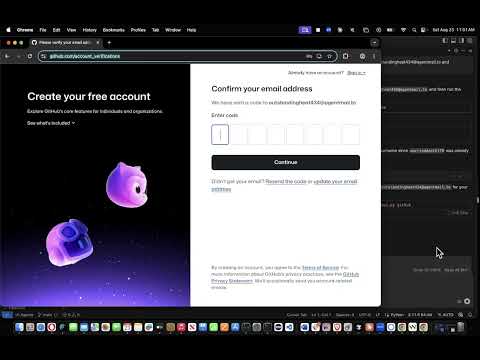
Click to watch Demo: Github Sign up + Email Verification using Browser Use and AgentMail
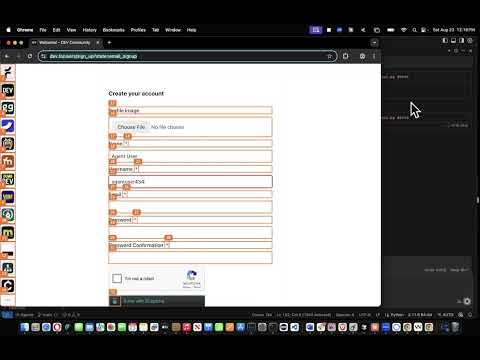
Click to watch Demo: Dev.to Sign up + Captcha Solving with 2Captcha and Agents by Browser Use
- 🤖 AI-Powered: Uses Claude Sonnet 4 for intelligent web automation
- 📧 Email Integration: Seamlessly handles email verification with AgentMail
- 🛡️ CAPTCHA Solving: Supports 2captcha integration and built-in solving
- 🌐 Universal: Works with any website that has signup forms
- 🎯 Natural Language: Just describe what you want in plain English
- ⚡ One Command: Complete signup automation with a single line
# Clone the repository
git clone https://github.com/hetpatel-11/AutoSign.git
cd AutoSign

# Create virtual environment
python -m venv .venv
source .venv/bin/activate  # Windows: .venv\Scripts\activate

# Install dependencies
pip install browser-use python-dotenv requests# Set up your API keys (you'll get these in the next steps)
export ANTHROPIC_API_KEY="your_anthropic_key"
export AGENTMAIL_API_KEY="your_agentmail_key"
export AGENTMAIL_INBOX_ID="your_email@agentmail.to"
export TWOCAPTCHA_API_KEY="your_2captcha_key" # Optional# Sign up for GitHub
python signup_with_direct_api.py "sign me up for GitHub"
# Create a dev.to account
python signup_with_direct_api.py "create a dev.to account"
# Any custom website
python signup_with_direct_api.py "sign up for https://example.com"- Go to Anthropic Console
- Create an account and get your API key
- Set:
export ANTHROPIC_API_KEY="sk-ant-api03-..."
- Visit AgentMail
- Create account and get API key
- Create an inbox (e.g.,
myemail@agentmail.to) - Set:
export AGENTMAIL_API_KEY="your_api_key"
export AGENTMAIL_INBOX_ID="myemail@agentmail.to"
- Go to 2captcha.com
- Create account and add funds ($3 minimum)
- Get your API key
- Set:
export TWOCAPTCHA_API_KEY="your_2captcha_key"
# Built-in platforms (tested & working)
python signup_with_direct_api.py "sign me up for GitHub"
python signup_with_direct_api.py "create a dev.to account"
python signup_with_direct_api.py "sign up for Stack Overflow"
python signup_with_direct_api.py "create Reddit account"

# Custom websites
python signup_with_direct_api.py "sign up for https://newsite.com"
python signup_with_direct_api.py "create account on https://example.com"- 🤖 AI Agent navigates to the signup page
- 📝 Form Filling - enters email, username, password
- 🛡️ CAPTCHA Handling - solves any CAPTCHAs encountered
- 📧 Email Verification - checks AgentMail for verification codes
- ✅ Account Creation - completes the signup process
| Platform | Features | Status |
|---|---|---|
| GitHub | 8-digit verification codes, flexible extraction | ✅ Working |
| dev.to | 2captcha integration, third-party CAPTCHA solving | ✅ Working |
| Stack Overflow | reCAPTCHA handling, developer platforms | ✅ Working |
| 6-digit codes, rate limiting handling | ✅ Working |
AutoSign/
├── signup_with_direct_api.py    # 🎯 MAIN FILE - Run this!
├── simple_agentmail_api.py      # 📧 Email verification system
├── browser_config.py            # 🌐 Browser setup & persistence
├── agentmail_helper.py          # 🛠️ Backup email system
├── test_latest_code.py          # 🧪 Testing email extraction
└── README.md                    # 📖 This file
signup_with_direct_api.py- Main entry point, processes your commandssimple_agentmail_api.py- Reads emails and extracts verification codesbrowser_config.py- Sets up persistent browser sessionsagentmail_helper.py- Alternative email handling (backup)test_latest_code.py- Test email extraction functionality
python signup_with_direct_api.py "sign me up for GitHub"What it does:
- Navigates to GitHub signup
- Fills in username, email, password
- Handles 8-digit verification codes
- Completes account creation
python signup_with_direct_api.py "create a dev.to account"What it does:
- Navigates to dev.to signup
- Fills form and encounters reCAPTCHA
- Uses 2captcha to solve CAPTCHA
- Waits 40 seconds for solving
- Completes signup process
python signup_with_direct_api.py "sign up for https://newsite.com"What it does:
- Navigates to any website
- Automatically detects signup form
- Fills in required fields
- Handles verification if needed
1. API Key Errors
# Check your environment variables
echo $ANTHROPIC_API_KEY
echo $AGENTMAIL_API_KEY
echo $AGENTMAIL_INBOX_ID
2. Browser Issues
# Clear browser cache
rm -rf ~/.config/browseruse/profiles/persistent
3. Email Verification Issues
# Test email extraction
python test_latest_code.py
4. CAPTCHA Not Working
# Check 2captcha setup
echo $TWOCAPTCHA_API_KEY
# Make sure you have funds in your 2captcha account- Check that all API keys are set correctly
- Ensure you have funds in 2captcha (if using CAPTCHA solving)
- Verify your AgentMail inbox is working
- Test with a simple platform like GitHub first
Create a .env file for persistent settings:
echo "ANTHROPIC_API_KEY=your_key" > .env
echo "AGENTMAIL_API_KEY=your_key" >> .env
echo "AGENTMAIL_INBOX_ID=your_email@agentmail.to" >> .env
echo "TWOCAPTCHA_API_KEY=your_key" >> .envAdd new websites to signup_with_direct_api.py:
'newwebsite': {
    'url': 'https://newwebsite.com/signup',
    'signup_task': 'Go to signup page and create account...',
    'verification_task': 'Handle email verification...'
}- AI Agent Automation: Intelligent web interaction
- API Integration: Multiple service integrations
- CAPTCHA Solving: Advanced security bypass
- Email Verification: Complete workflow automation
- Natural Language: User-friendly interface
- Universal Application: Works with any website
- Flexible Code Extraction: Handles any verification code length
- Persistent Browser Sessions: Maintains state across runs
- Third-party Service Integration: 2captcha, AgentMail
- Error Handling: Robust failure recovery
- Real-time Monitoring: Live progress tracking
Want to add support for more platforms or improve AutoSign?
- Test new platforms and add configurations
- Improve CAPTCHA handling for different types
- Add more email providers beyond AgentMail
- Enhance error handling and recovery
- Create better documentation and examples
This project is open source and available under the MIT License.
# Get started in 5 minutes!
git clone https://github.com/hetpatel-11/AutoSign.git
cd AutoSign
python -m venv .venv
source .venv/bin/activate
pip install browser-use python-dotenv requests

# Set your API keys and run!
python signup_with_direct_api.py "sign me up for GitHub"
AutoSign: Authentication for computers using agents 🚀
Built with ❤️ for the AI automation community