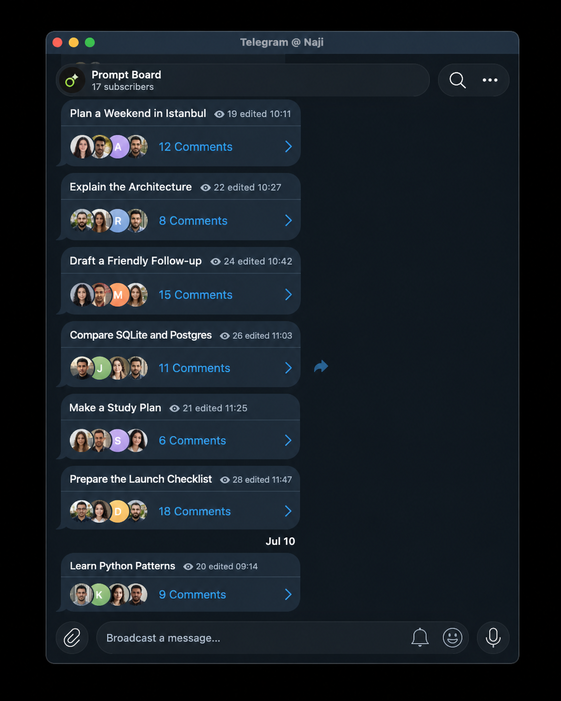
Turn a Telegram channel into a personal AI chat list.
Start a chat with /new. Each post becomes a conversation title; its comment thread is the chat. Postak replies as you type and names the post after the first reply.
Caution
Postak is under active development. APIs, commands, and storage may change.
- Channel as chat list — each
/newpost becomes an auto-titled conversation. - Rich streaming replies — rich Telegram messages: tables, checklists, ...
- Per-thread memory — each conversation keeps its own context.
- multi-channel support · Custom prompts · Commenter mentions · Scoped access · Thread tools · Pluggable models and storage
- Send
/newin your channel — or in its discussion group — to start a conversation. - Telegram forwards the post into its discussion group as a comment thread.
- Reply in the thread — Postak answers, streaming as it types.
- The first reply auto-titles the post, so your feed reads like a chat list.
- Python 3.10+
- A Telegram bot (@BotFather) and a channel with a linked discussion group
- An OpenAI-compatible LLM endpoint
- In Telegram, create a channel and enable comments by linking a discussion group. Add your bot as an admin of both.
Important
Turn the bot's privacy mode off so it can see comments: in @BotFather run /setprivacy → select your bot → Disable. If the bot was already in the group, remove and re-add it after changing this.
- Configure and run:
uv sync
cp .env.example .env    # fill in BOT_TOKEN, TARGET_CHANNEL_ID, LLM_MODEL, …
uv run postak

# or, from PyPI:
#   pip install postak
# postak # reads .env from the current directory- Send
/newin your channel or discussion group, then reply in the new thread.
Tip
To serve another channel later, link its discussion group in Telegram, then either run /postak add in that group or just send /new there — no restart needed. See Admin commands.
Postak reads settings from the environment (via a .env file):
| Variable | Required | Default | Description |
|---|---|---|---|
BOT_TOKEN |
✔ | — | Telegram bot token from @BotFather |
TARGET_CHANNEL_ID |
— | Channel id(s) to serve, comma-separated (e.g. -1001234567890,-1009876543210). Leave empty and a Postak admin can add channels later — see Admin commands |
|
LLM_MODEL |
✔ | — | Model name, e.g. gpt-4o-mini |
LLM_ENDPOINT |
OpenAI API | Base URL of an OpenAI-compatible endpoint | |
LLM_API_KEY |
not-needed |
API key for the LLM endpoint | |
POSTAK_ADMINS |
— | Comma-separated Telegram user ids who may manage Postak. Required if TARGET_CHANNEL_ID is empty, since that's the only way to add a channel |
|
DATABASE_URL |
sqlite+aiosqlite:///postak.db |
Store URL: a SQLite path, or :memory: |
|
HISTORY_WINDOW |
20 |
Max recent messages kept as context (the system prompt is always kept) |
from aiogram import Bot, Dispatcher

from postak import OpenAIGenerator, Postak

postak = Postak(
    generator=OpenAIGenerator(model="gpt-4o-mini", api_key="..."),
    store="sqlite+aiosqlite:///postak.db",
    channels=[-1001234567890],
    admins=[123456789],
)

bot = Bot("telegram-token")
dp = Dispatcher()

postak.attach(dp)
dp.run_polling(bot)Postak admins manage everything with /postak (/postak help lists it all):
Access
admin list— show admins ·admin add|remove <user_id>— grant or revoke rightsaccess list— show all access rulesaccess allow|revoke <user_id> global|group|thread— per-user accessaccess public on|off global|group|thread— open or close a scope to everyone; a public/allowed group (or global scope) also lets non-admins run/newin an already-linked group, not just comment
Channels
add [chat_id]— link a channel, discovering its discussion group via Telegram; defaults to the chat you're in, or pass either side's idremove [chat_id]— unlink it and drop that group's access rules
A Postak admin can skip add entirely: sending /new in a group Postak doesn't know yet links its channel and starts the conversation in one step.
In a thread
digest— summarize the conversationcompress— replace history with a compact summarytitle— regenerate the post title ·settitle <text>— set it yourselfregenerate— redo the last answerdelete— delete the message you replied to
Model
model get— show the current model ·model set <model>— switch it
System prompt — targets the surrounding thread when run inside one, else the global default
sysprompt— show it ·sysprompt <text>— set it ·sysprompt delete— reset it- The global prompt applies to conversations opened after the change and is admin-only; a thread's prompt takes effect on its next reply and can also be managed by anyone allowed to chat in that thread
uv sync
uv run python -m unittest discover -s tests
uv run ruff check .
uv run mypy postak