⭐ If this package helps you, please star the repo on GitHub — it helps others find it.
A lightweight, offline-capable, auto-resizing LaTeX renderer for React Native using KaTeX. No native modules. No internet required.
This package is the right choice when:
- You are using Expo managed workflow and cannot add native modules
- You are on the Old Architecture and cannot use Fabric/TurboModules
- You need zero native setup — no
pod install, no Kotlin/Swift, no build configuration - You are rendering standalone LaTeX equations (not full markdown documents)
If your use case goes beyond standalone LaTeX, better-suited libraries exist:
| Need | Recommended library |
|---|---|
| Markdown + math (headers, bold, tables, code blocks) | react-native-enriched-markdown by Software Mansion — fully native, no WebView, New Architecture |
| Markdown + math with streaming (LLM/SSE outputs) | react-native-nitro-markdown — native C++ parser, built-in streaming support |
Both of those libraries require the New Architecture and native module setup. If that is not a constraint for you, they will give you better performance and broader feature coverage than this package.
- Offline: KaTeX is fully bundled — no CDN, no network required.
- Auto-resizing: Automatically adjusts height based on content.
- Zero native modules: Works in Expo managed workflow and Old Architecture projects out of the box.
- Customizable: Extensive styling options for container, text, and math elements.
- TypeScript Support: Fully typed for better development experience.
# npm
npm install @adheil_gupta/react-native-latex-renderer react-native-webview

# yarn
yarn add @adheil_gupta/react-native-latex-renderer react-native-webview
KaTeX is bundled inside the package — no CDN links, no additional setup needed.
Pass content as a string with math equations wrapped with:
$ ... $-> to display inline math$$ ... $$-> to display the equation on a new line
import { KaTeXAutoHeightWebView, createKaTeXHTML } from '@adheil_gupta/react-native-latex-renderer';
import { View, StyleSheet } from 'react-native';

const testString = `
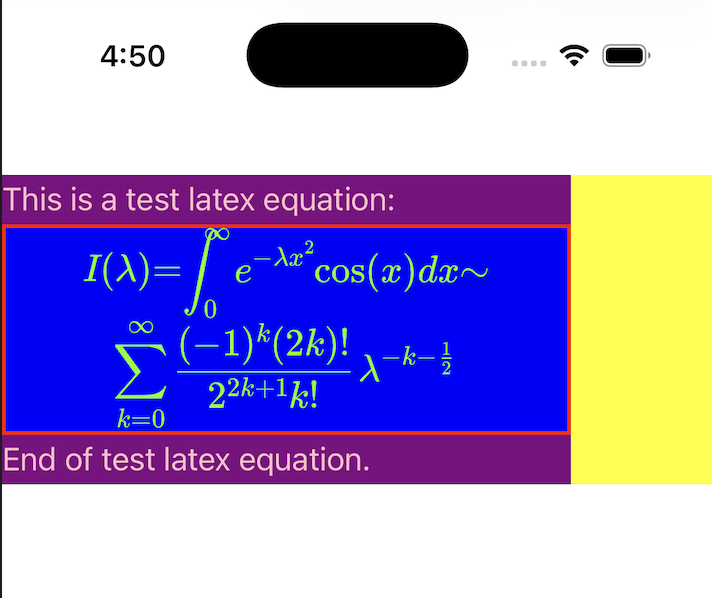
  This is a test latex equation:
  $$
  I(\\lambda)
  =
  \\int_0^{\\infty} e^{-\\lambda x^2}\\cos(x)\\,dx
  \\sim
  \\sum_{k=0}^{\\infty}
  \\frac{(-1)^k (2k)!}{2^{2k+1} k!}
  \\lambda^{-k-\\tfrac12}
  $$
  End of test latex equation.
`;

export default function HomeScreen() {
  const src = createKaTeXHTML(
    testString,
    {
      'width': '75%',
      'font-size': '15px',
      'color': 'pink',
      'background-color': 'green',
      'border': '1px solid black',
    },
    {
      'color': 'white',
      'background-color': 'purple',
      'border': '1px solid red',
    }
  );

  return (
    <View style={styles.container}>
      <KaTeXAutoHeightWebView
        source={src}
        onHeightChange={(height) => console.log('New height:', height)}
        containerStyle={{
          width: '100%',
          backgroundColor: 'yellow',
          borderWidth: '1',
          borderColor: 'orange',
        }}
      />
    </View>
  );
}

const styles = StyleSheet.create({
  container: {
    flex: 1,
    backgroundColor: '#fff',
    paddingVertical: 80,
  },
});
Generates the HTML source string for the WebView.
| Parameter | Type | Description |
|---|---|---|
content |
string |
The text content containing LaTeX delimiters. |
containerStyles |
object |
Styles for the HTML container (font, padding, color, etc.). |
latexStyles |
object |
Styles specifically applied to KaTeX elements. |
The main component that renders the LaTeX content.
| Prop | Type | Default | Description |
|---|---|---|---|
source |
string |
- | The HTML string returned by createKaTeXHTML. |
onHeightChange |
(height: number) => void |
- | Callback fired when content height changes. |
minHeight |
number |
50 |
Minimum height of the WebView. |
containerStyle |
object |
- | Styles for the outer React Native View. |
...props |
WebViewProps |
- | Any other props accepted by react-native-webview. |
You can style the component at three levels:
- React Native Container: Using the
containerStyleprop on<KaTeXAutoHeightWebView />. - HTML Content: Using the second argument of
createKaTeXHTML. Supports standard CSS properties likefont-size,color,padding,line-height. - LaTeX Elements: Using the third argument of
createKaTeXHTML. Styles applied directly to.katexelements.
MIT