Course Content and Resources for CS101, sponsored by Heights Philadelphia, taught through Arcadia University.
Associated Lab: lab15_StringComparison
Always use
.equals()to compare Strings in Java — never==.==compares memory references, not text content.Common String methods:
 s.equals("hi")           // true if same text
 s.equalsIgnoreCase("Hi") // ignores case
 s.length()               // number of characters
 s.isEmpty()              // true if ""
 s.contains("fox")        // true if found
 s.startsWith("The")      // true if starts with
 s.endsWith("dog")        // true if ends with
 s.toUpperCase()          // "HELLO"
 s.toLowerCase()          // "hello"
 s.replace("a", "b")     // replace all "a" with "b"
 s.trim()                 // remove leading/trailing spaces
 String[] parts = s.split(","); // split into array
Note: String methods return new Strings — they do not change the original.
Associated Labs: lab13_ArrayList and lab14_FileScanner
An ArrayList is like an array, but it can grow and shrink in size.
 import java.util.ArrayList;
 ArrayList<String> names = new ArrayList<String>();
Note: ArrayLists use object types (
String,Integer,Double), not primitives (int,double).Common methods:
 names.add("Alice");       // add to the end
 names.get(0);             // access by index
 names.set(0, "Bob");      // change an element
 names.remove("Alice");    // remove by value
 names.size();             // number of elements
 names.contains("Bob");    // check if element exists
A Scanner can read from a file just like it reads from
System.in:import java.io.File; File file = new File("data.txt"); Scanner fileScanner = new Scanner(file); while (fileScanner.hasNextLine()) { String line = fileScanner.nextLine(); } fileScanner.close();
Associated Labs: lab11_Arrays and lab12_Arrays2d
- w3 Java Arrays
- w3 Java Arrays Loop
- w3 Java Multidimensional Arrays
- Learn Java arrays in 9 minutes!
- Learn Java 2D arrays in 9 minutes!
An array is a variable that holds multiple values of the same type.
To create an array with values already known:
int[] numbers = {10, 20, 30, 40, 50};To create an empty array of a specific size:
int[] numbers = new int[5];Access or modify elements using their index (starting at 0):
 System.out.println(numbers[0]); // prints the first element
 numbers[1] = 99;                // changes the second element
Use a for-each loop to iterate over elements:
for (int num : numbers) { System.out.println(num); }A multidimensional array is an array of arrays — it lets you store data in a grid (rows and columns).
To create a 2D array:
 int[][] grid = {
    {1, 2, 3},
    {4, 5, 6},
    {7, 8, 9}
 };
To create an empty 2D array (3 rows, 4 columns):
int[][] grid = new int[3][4];Access elements using two indices —
[row][column]:System.out.println(grid[0][2]); // row 0, column 2 → prints 3 grid[1][0] = 99; // changes row 1, column 0
Associated Lab: lab10Methods
Methods are a named, reusable block of code that performs a specific task.
Java methods use the syntax:
 public static <returnType> <methodName>(<parameters>) {
   // code that runs when the method is called
 }
returnTypeis the data type the method sends back (e.g.int,String,boolean). Usevoidif the method returns nothing.parametersare inputs the method receives, each with a type and name, separated by commas. A method does not need to haveparameters.For example, a method named "add" that that takes two integers,
aandb, as parameters and returns their sum as anint:public static int add(int a, int b) { return a + b; }You call a method by placing parenthesis to the right of the method. Inside the parenthesis, add comma separated arguments matching the type(s) of the method's parameters.
int result = add(3, 5); // Passing in the arguments 3 and 5In this example, the return value from the method is assigned to
result
Associated Lab: Lab8: While Loops
Java while loops use the syntax:
 while (<condition>) {
   // code runs repeatedly as long as <condition> is true
 }
- The
conditionis checked before each iteration. If it istrue, the block of code will run once and then checkconditionagain, continuing to run as long asconditionistrue. Ifconditionisfalsefrom the start, the loop body never runs.For example, to print the numbers from 1 to 5:
 int i = 1;
 while (i <= 5) {
    System.out.println(i);
    i++;
 }
A do-while loop runs the body at least once, then checks the condition:
 do {
   // code runs at least once
 } while (<condition>);
Associated Lab: Lab7: For Loops
- w3 Java For Loops
- w3 Java Nested For-Loops
- Java for loops are easy!
- Learn Java nested loops in 8 minutes!
Java for-loops use the syntax:
 for (<start>; <stop>; <how>) {
   // code is run from <start> to <stop>, incrementing by <how>
 }
- For the
start, initialize a variable to some integer- For the
stop, create a condition which defines when the for loop stops running- For the
how, define how the variable that you initialized in thestartis going to be updated each loopFor example, to print the numbers from 3 to 12, incrementing by 3 each time, you could use:
 for (int n = 3; n <= 12; n+=3) {
    System.out.println(n);
 }
Associated Lab: Lab6-Compiled-Interpreted-Handout
-
Videos
-
Extra
Associated Lab: lab5_booleans_conditionals
-
START WITH: #15 Boolean Java Tutorial
-
w3 Pages
- w3 Java Comparison Operators
- w3 Java Logical Operators
- w3 If...Else --> Go through all of these EXCEPT the "Short Hand If...Else", this will be covered later.
-
tutorials (intentionally out of order)
Associated Lab: lab4_input_and_casting
- User Input
- Type Casting
- parseInt
Associated Lab: lab3_variables
- Variables
- Arithmetic
Associated Lab: lab2_java_print_statements
- Tutorials
The basic boilerplate for a java class is:
public class helloWorld {
    public static void main(String[] args) {
       System.out.println("Hello, World!");
   }
}
The name of the file must match the name of the class. In this case it must be
helloWorld.java.
Associated Lab: lab1_shell_script
- Tutorials
- Codecademy:
- SW Carpentry
- Ubuntu Tutorial
- Command Line Crash Course For Beginners (44min) Reference Cheatsheets (list of commands): One Pager and/or One With Descriptions
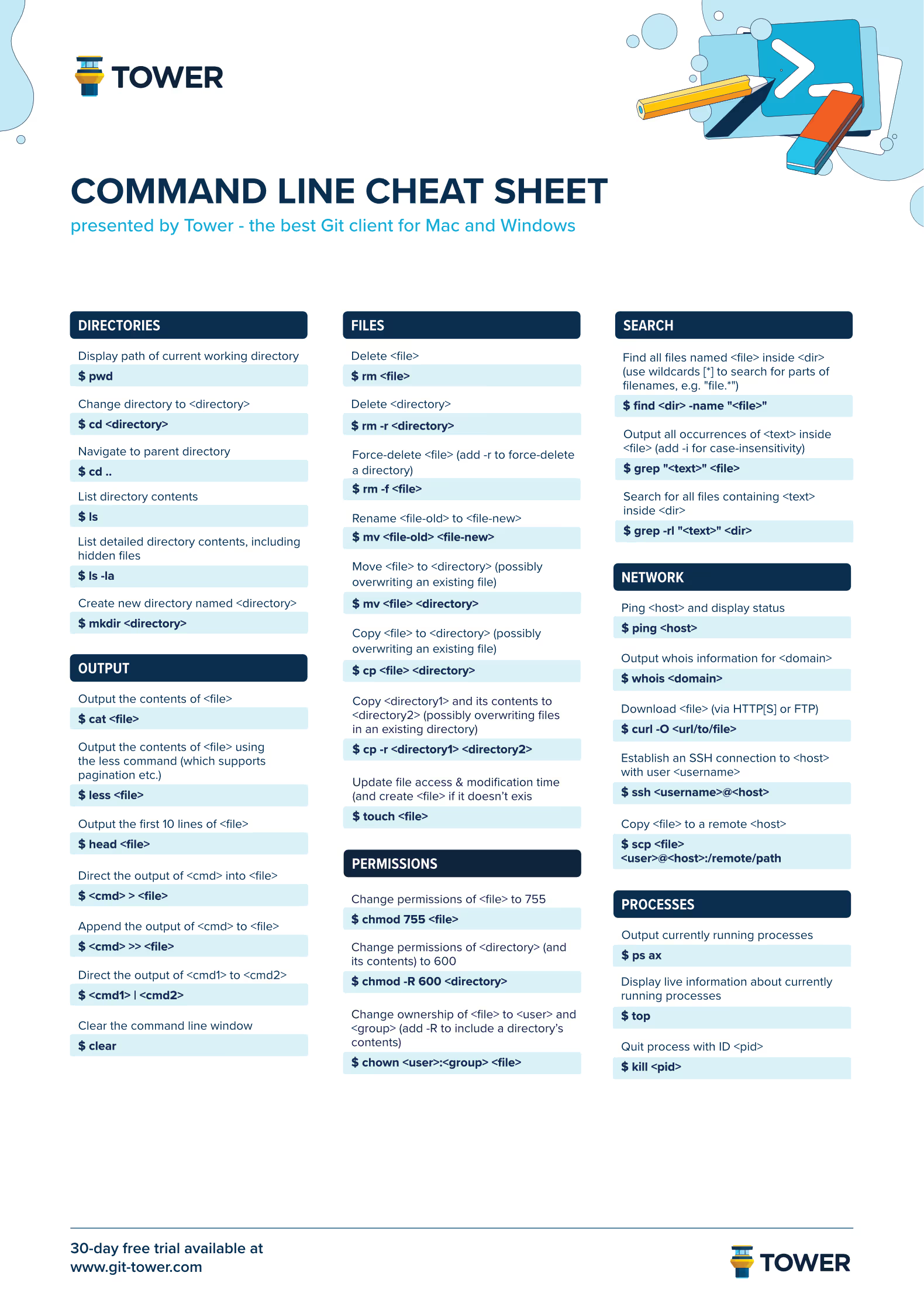
- Be very careful with the
rmcommand. There is no way to undo! It is easy to accidently delete important files forever.- If you get stuck in a weird interface, try:
- Hit
Entera few times- Hit
CTRL-corCTRL-d- Hit
q- (last resort) Close window and start over
- typing.com : Used for typing tests to calculate extra credit points
- KeyBr : Typing practice
- TypingClub : Typing exercises
- VS Code with Java Extensions - Free lightweight editor with plugins for (almost) everything
- Harvard CS50 Codespaces - Online version of VS Code accessible via browser (connects to remote machine)
- Purposefully does NOT have tab-completion
- Includes CS50s Duck Debugger, a free ChatGPT powered AI that will guide your learning, but will not write code for you.
- Intellij IDEA - Professional level IDE; No additional setup required for Java development
- Requires significant RAM and may be too slow on old machines
- Eclipse IDE - Similar to Intellij, with slightly smaller RAM footprint and older-looking interface
- Uninstall ubuntu
- Use windows key, search "Ubuntu", select "Uninstall"
- Open the app
Powershellas an Administrator - Run commands
wsl --unregister Ubuntuwsl --uninstall
- Uninstall the follow apps
Microsoft 365 Copilot