
Visualize your Git branches and Jira ticket statuses on a Miro board with GitApolloMiraisor.
This tool seamlessly integrates your Git repositories with Jira issues, generating a comprehensive visual overview of your development progress. Easily track differences between branches and navigate to Jira tickets directly from the Miro board, streamlining your project management and collaboration efforts. Embrace the wisdom of Apollo and unlock the potential of your software development process with GitApolloMiraisor.
English how to use: TODO
Bulgarian how to use:
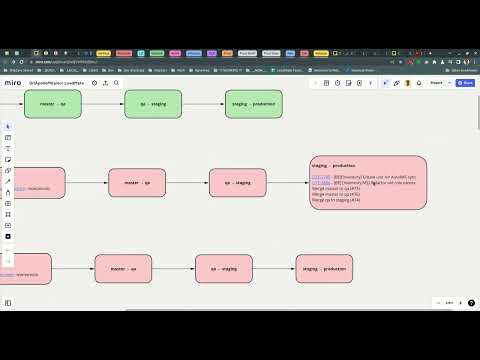
Fill missing info and execute to start:
docker run -it --name git-apollo-miraisor \
  -e REPOS=repo1,repo2 \
  -e BRANCHES=master,qa,staging,production \
  -e GITHUB_OWNER=github-owner \
  -e GITHUB_API_TOKEN=... \
  -e MIRO_API_TOKEN=... \
  -e MIRO_BOARD_ID=... \
  -e REPO_PADDING=200 \
  -e SHAPES_X_PADDING=150 \
  -e SHAPE_COLOR_NO_TICKETS='#AFE1AF' \
  -e SHAPE_COLOR_TICKETS='#FFCCCB' \
  -e JIRA_API_URL=https://my-atlasian-domain.atlassian.net \
  -e JIRA_USERNAME=... \
  -e JIRA_API_TOKEN=... \
  -e JIRA_BROWSE_URL=${JIRA_API_URL}/browse \
  -e EXECUTE_EACH_SECONDS=0 \
idachev/git-apollo-miraisor:latestexport REPOS=repo1,repo2export BRANCHES=master,qa,staging,production
export GITHUB_OWNER=...export GITHUB_API_TOKEN=...
Check here how to obtain an API token: GitHub Classic Token
export JIRA_API_URL=https://my-atlasian-domain.atlassian.netexport JIRA_USERNAME=...export JIRA_API_TOKEN=...export JIRA_BROWSE_URL=${JIRA_API_URL}/browse
Check here how to obtain an API token: Jira Manage API Tokens
export MIRO_API_TOKEN=...export MIRO_BOARD_ID=...
Check here how to obtain an API token: Miro Getting Started with OAuth
export REPO_PADDING=200- vertical padding between reposexport SHAPES_X_PADDING=150- horizontal padding between shapesexport SHAPE_COLOR_NO_TICKETS='#AFE1AF'- shape fill color when there nothing to be mergedexport SHAPE_COLOR_TICKETS='#FFCCCB'- shape fill color when there are tickets to be merged
export EXECUTE_EACH_SECONDS=0- if positive the process will sleep and recreate the board.
The image is located here: Docker Hub
Check these scripts: ./docker-run-local.sh
This template should be copied to ./docker-run-env.sh and filled with missing env values, it is
git ignored:
./docker-run-env-template.sh