




A complete full-stack web application that allows users to manage a list of products. It demonstrates CRUD (Create, Read, Update, Delete) functionality with a modern tech stack, featuring a responsive[...]
Live Demo: https://product-store-1-03hn.onrender.com/
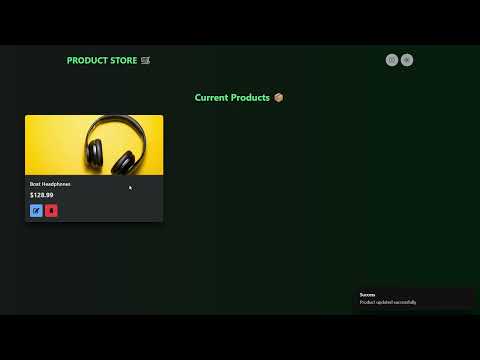
Watch the demo on YouTube: https://youtu.be/7cdcZy1xmZU
- View All Products: A responsive grid displays all products fetched from the database.
- Create Products: A dedicated page with a form to add new products.
- Update Products: Edit product details through an in-place dialog modal.
- Delete Products: Remove products from the database.
- Responsive Design: The layout is fully responsive and works on various screen sizes.
- Light/Dark Mode: Toggle between light and dark themes, with styles adapting accordingly.
- Toast Notifications: User-friendly feedback for actions like creating, updating, or deleting products.
-
Frontend:
- Framework: React
- Build Tool: Vite
- UI Library: Chakra UI
- Routing: React Router
- State Management: Zustand
-
Backend:
- Runtime: Node.js
- Framework: Express.js
- Database: MongoDB (with Mongoose)
-
Deployment:
- The Node.js/Express server is configured to serve the static frontend build in a production environment.
The project is organized as a monorepo with two main directories:
product-store/
├── backend/         # Node.js, Express, and MongoDB logic
│   ├── db/
│   ├── models/
│   ├── controllers/
│   ├── routes/
│   └── index.js     # Server entry point
├── frontend/        # React, Vite, and Chakra UI application
│   ├── src/
│   │   ├── components/
│   │   ├── pages/
│   │   ├── store/   # Zustand state management
│   │   └── App.jsx
│   └── vite.config.js
└── README.md
- Node.js (v18 or newer)
npmor your favorite package manager- MongoDB installed and running, or a MongoDB Atlas connection string.
-
Clone the repository:
git clone https://github.com/your-username/product-store.git cd product-store -
Navigate to the backend directory:
cd backend -
Install dependencies:
npm install
-
Set up environment variables: Create a
.envfile in thebackenddirectory and add your MongoDB connection string:MONGO_URI=your_mongodb_connection_string PORT=5000
-
Run the backend server:
npm run dev
The server will start on
http://localhost:5000by default.
-
Navigate to the frontend directory (from the root, in a new terminal):
cd frontend -
Install dependencies:
npm install
-
Run the frontend app:
npm run dev
The application will be available at
http://localhost:5173(or another port if 5173 is in use).
-
Build Command:
npm run build
-
Start Command (for development)
npm run start
-
Start Command (for production)
npm run dev
The backend exposes the following RESTful API endpoints under the /api/products base path:
| Method | Endpoint | Description |
|---|---|---|
GET |
/ |
Get all products. |
POST |
/create |
Create a new product. |
PUT |
/:id |
Update an existing product. |
DELETE |
/:id |
Delete a product. |
Request Body for POST /create and PUT /:id:
{
  "name": "string",
  "price": "number",
  "image": "string"
}Contributions are welcome! Please feel free to submit a Pull Request.
This project is licensed under the MIT License - see the LICENSE file for details.
Thank you for checking out this project! Happy coding! 🚀