





Encrypted secrets manager for developers.
murk stores encrypted secrets in a single .murk file designed to be committed to git. Values are encrypted with age, key names remain readable. It works with direnv and supports teams — one binary, no runtime dependencies.
murk is pre-1.0 and has not been independently audited. Use good judgment with production secrets.
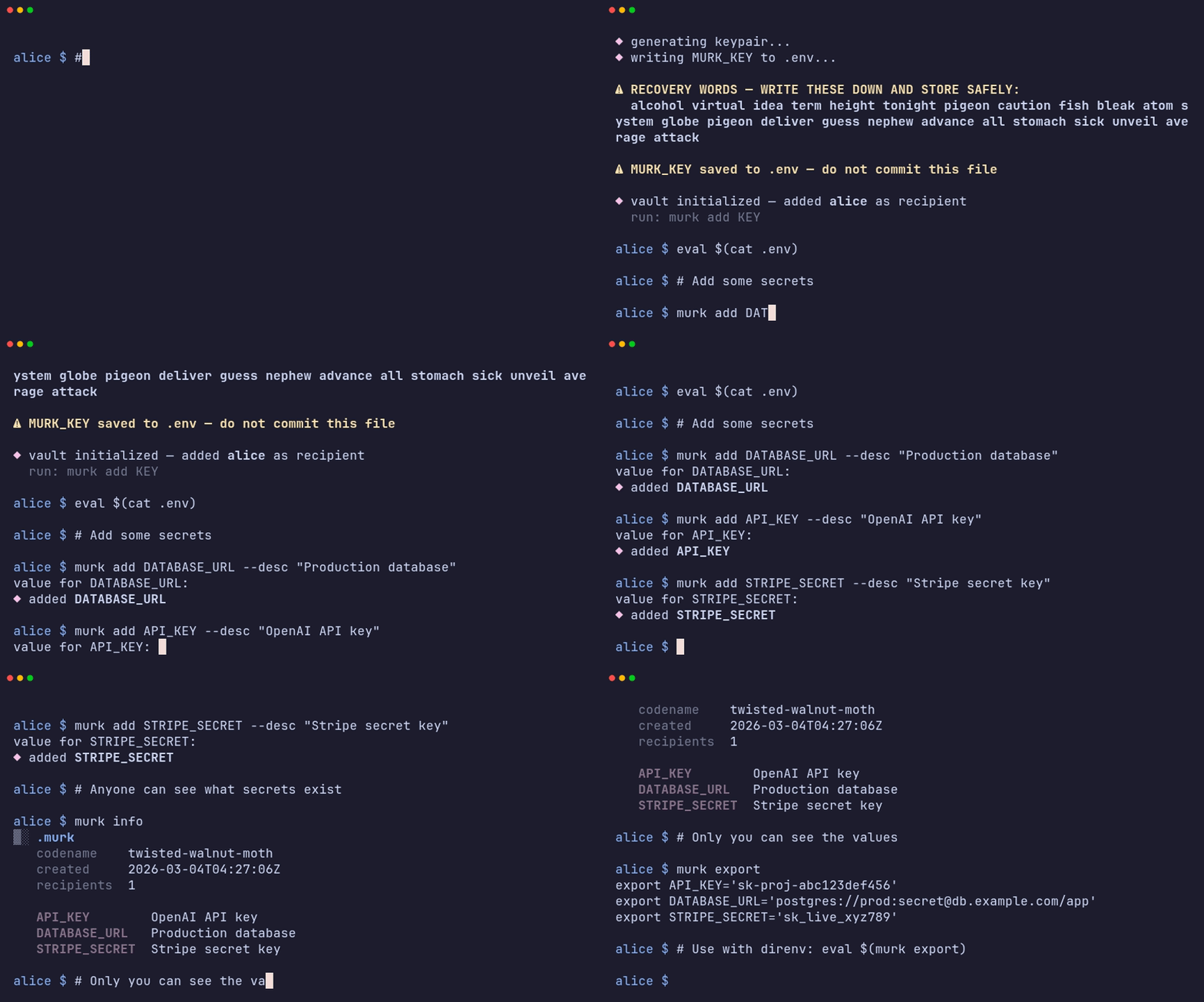
Most teams share .env files over Slack. That's bad. Tools like SOPS and Vault exist but they're complex, require cloud setup, or pull in runtimes you don't want.
murk is simple: one key on your machine, one encrypted file in your repo. See THREAT_MODEL.md for what it protects and what it doesn't.
| murk | SOPS | Vault | dotenvx | git-crypt | |
|---|---|---|---|---|---|
| Encrypted values, readable keys | Yes | Yes | N/A | Yes | No (whole file) |
| Per-recipient encryption | Yes | Yes | ACL-based | No (shared key) | Yes (GPG) |
| Scoped per-user overrides | Yes | No | No | No | No |
| Requires a server | No | No | Yes | No | No |
| Cloud KMS required | No | Optional | Typically | No | No |
| Single binary, no runtime | Yes | Yes | No | Yes | Yes |
| Built-in direnv integration | Yes | No | No | Yes | No |
| Recovery phrase | Yes (BIP39) | No | No | No | No |
SOPS is the closest alternative. Both encrypt values in-place and support age. murk differs in having scoped (per-user) secrets, a single-file vault model, built-in team management (murk circle), and BIP39 key recovery. SOPS has broader KMS backend support and a larger ecosystem.
Vault solves a different problem — it's centralized infrastructure for secret storage, rotation, and dynamic credentials. If you need a secrets server, use Vault. murk is scoped to encrypted secrets in a repo.
dotenvx encrypts .env files but uses a single shared key for the whole team. There's no per-recipient encryption — if someone leaves, everyone needs a new key.
git-crypt encrypts entire files via git filters. Diffs are opaque, and revoking a team member is effectively impractical without re-encrypting git history.
brew tap iicky/murk && brew install murkOr via Cargo (requires Rust toolchain):
cargo install murk-cliOr download a pre-built binary:
curl -fsSL https://raw.githubusercontent.com/iicky/murk/main/install.sh | shPre-built binaries are available for Linux (x86_64, aarch64, armv7), macOS (x86_64, Apple Silicon), and Windows on the releases page. Binary releases are attested and can be verified with gh attestation verify murk-* --owner iicky.
# Initialize — generates your key and recovery phrase
murk init

# Add secrets (prompts for value, hidden input)
murk add DATABASE_URL
murk add OPENAI_KEY

# Use with direnv — source .env for the key, then decrypt
echo -e 'dotenv\neval $(murk export)' > .envrc
direnv allow
Your key is stored in ~/.config/murk/keys/ with restricted permissions. The .env file in your project just contains a MURK_KEY_FILE reference — no secrets in the repo directory.
Without direnv, use murk exec:
murk exec ./deploy.sh # runs with all secrets in the environmentYour .murk file has a plaintext header (key names, descriptions — no values) and encrypted values. Anyone can see what secrets exist via murk info. Only recipients with a valid MURK_KEY can see values.
murk info           # Public schema — works without a key
murk ls             # List key names
murk get KEY        # Print a single value
murk export # Shell export statementsmurk has two layers of encryption inside the .murk file:
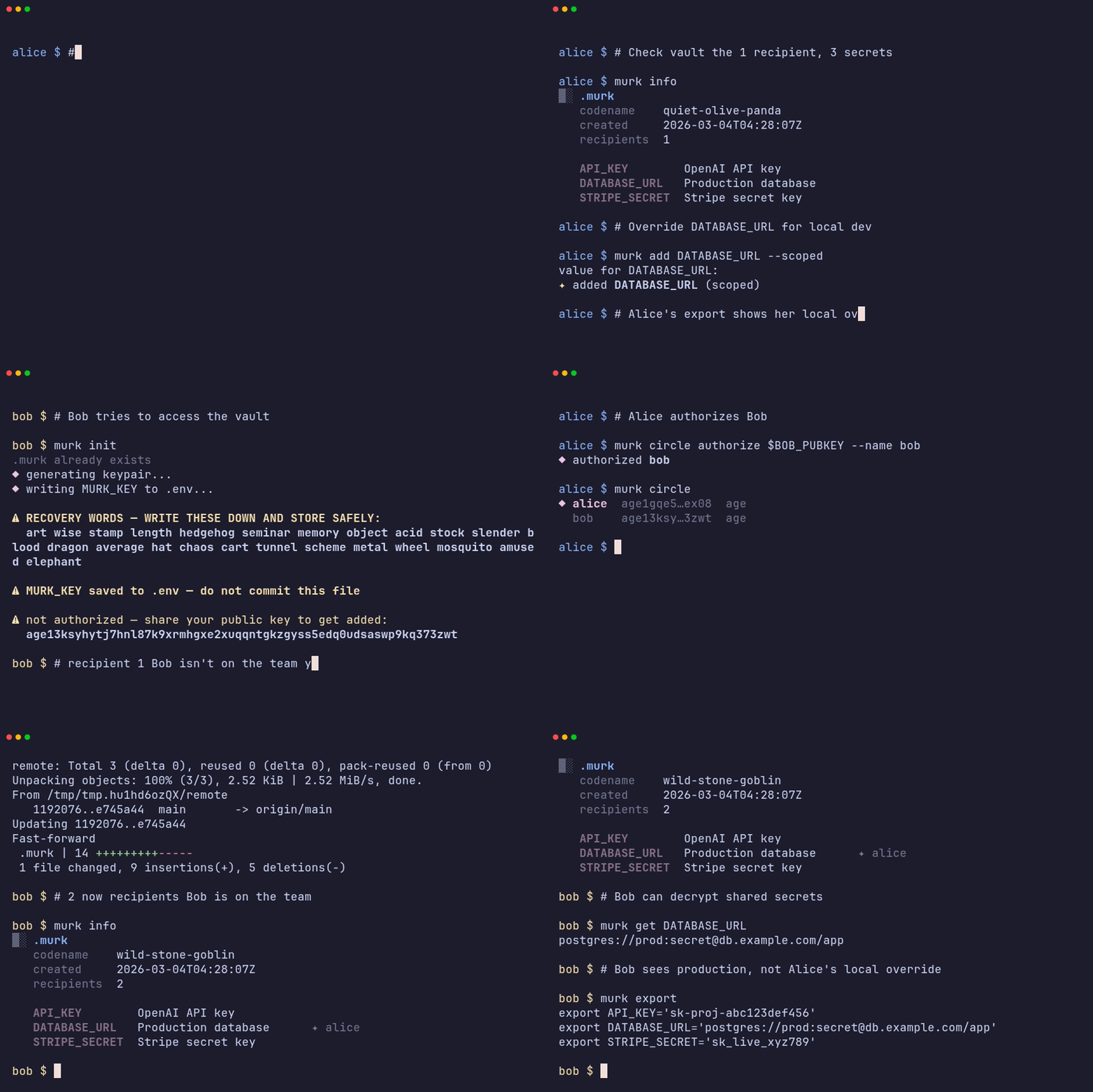
Shared secrets (the murk) are encrypted to all recipients. When you run murk add KEY, every authorized team member can decrypt it. This is where production credentials, API keys, and other team-wide secrets live.
Scoped secrets (motes) are encrypted to only your key. When you run murk add KEY --scoped, the value is encrypted to only your key in the vault. During murk export, scoped values override shared ones — so you can use a local database URL while the rest of the team uses production.
# Shared — everyone sees this (prompts for value, hidden input)
murk add DATABASE_URL

# Scoped — only you see this, overrides the shared value during export
murk add DATABASE_URL --scoped

# Or pipe for scripting (use a command that doesn't leak to shell history)
pbpaste | murk add DATABASE_URL# Alice sets up the vault
murk init
murk add DATABASE_URL
# Bob generates his own key
murk init
# Alice adds Bob as a recipient
murk circle authorize age1bob... --name bob@example.com
# Bob can now decrypt
murk export
# Bob overrides a value for local dev
murk add DATABASE_URL --scoped
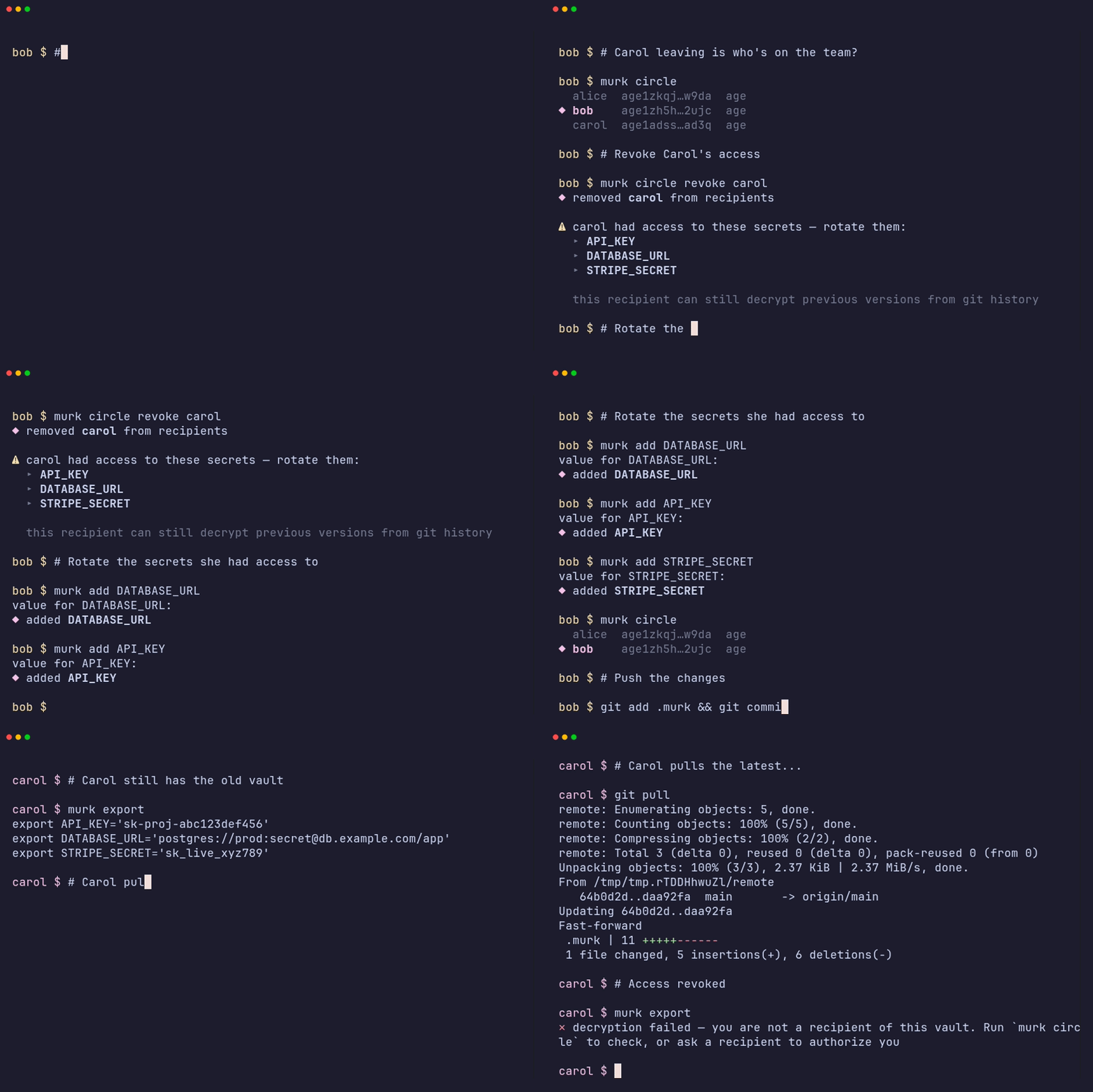
When someone leaves, revoke their access and rotate the secrets:
murk circle revoke carol
murk rotate --all         # prompts for each secret
git commit -am "revoke carol, rotate secrets" && git push
Revocation re-encrypts the vault going forward, but old versions remain in git history. The revoked user can still decrypt any version they previously had access to. Always rotate secrets after revocation.
If you already have new values in a file, import them directly:
murk circle revoke carol
murk import .env.rotated  # bulk-update from a file
Use murk-action to decrypt secrets in GitHub Actions workflows:
steps:
  - uses: actions/checkout@v4
  - uses: iicky/murk-action@v1
    with:
      murk-key: ${{ secrets.MURK_KEY }}
  - run: ./deploy.sh  # all vault secrets are now in the environment
Store your MURK_KEY as a GitHub Actions secret. Decrypted values are registered with GitHub's log masking, but masking depends on GitHub's runner behavior and is not a hard security boundary.
Your key is a BIP39 mnemonic. murk init prints 24 recovery words — write them down.
# Lost your key? Recover it (prompts for phrase, hidden input)
murk restore| Command | Description |
|---|---|
murk init |
Generate keypair and create vault |
murk add KEY [--scoped] |
Add or update a secret (prompts for value) |
murk generate KEY [--hex] [--length N] |
Generate a random secret and store it |
murk rotate KEY [--generate] |
Rotate a secret with a new value |
murk rotate --all |
Rotate all secrets (prompts for each) |
murk rm KEY |
Remove a secret |
murk get KEY |
Print a single decrypted value |
murk edit [KEY] [--scoped] |
Edit secrets in $EDITOR |
murk ls |
List key names |
murk export |
Print all secrets as shell exports |
murk exec CMD... |
Run a command with secrets in the environment (--only, --clean-env) |
murk diff [REF] |
Show secret changes since a git ref |
murk import [FILE] |
Import secrets from a .env file |
murk describe KEY "..." |
Set description for a key |
murk info |
Show public schema (no key required) |
murk circle |
List recipients |
murk circle authorize PUBKEY [--name NAME] |
Add a recipient (age key, ssh:path, or github:user) |
murk circle revoke RECIPIENT |
Remove a recipient |
murk scan [PATHS...] |
Scan files for leaked secret values |
murk skeleton |
Export schema-only vault with no secrets or recipients |
murk restore |
Recover key from BIP39 phrase |
murk recover |
Show recovery phrase for current key |
- age for encryption, BLAKE3 for integrity — no custom cryptographic primitives, documented integrity layer
- Git is the audit trail — murk doesn't replicate what git does
- Header is public, values are private — key names are visible, values are not
- Explicit over magic — never silently overwrites or destroys data
The .murk file is designed to be committed — key names are readable, values are individually encrypted:
{
  "version": "2.0",
  "recipients": ["age1abc..."],
  "schema": {
    "DATABASE_URL": { "description": "Production database" },
    "STRIPE_SECRET": { "description": "Stripe secret key" }
  },
  "secrets": {
    "DATABASE_URL": { "shared": "age-encryption.org/v1\n..." },
    "STRIPE_SECRET": { "shared": "age-encryption.org/v1\n..." }
  },
  "meta": "age-encryption.org/v1\n..."
}
See SPEC.md for the full specification.
Shell history — murk add and murk restore prompt interactively with hidden input. Prefer these over passing secrets as arguments or via echo, which can leak to shell history. When piping from scripts, use commands that don't record to history (e.g. pbpaste | murk add KEY or reading from a file).
Key names are plaintext — the .murk header exposes key names (e.g. STRIPE_SECRET_KEY, DATABASE_URL) so that murk info works without a key and git diffs stay readable. Only values are encrypted. If your threat model requires hiding what services you use, this is a trade-off to be aware of.
Key storage — your secret key lives in ~/.config/murk/keys/ with chmod 600 permissions, outside your repository. The .env file in your project contains only a MURK_KEY_FILE reference to this path, not the key itself. Similar to SSH keys in ~/.ssh, but murk also exposes secrets via export and exec into subprocess environments. If a machine is compromised, rotate your key and re-authorize with a new one.
Access control is advisory — any authorized recipient can decrypt all shared secrets. Per-key access metadata in the schema is cosmetic and not enforced cryptographically. If a recipient has MURK_KEY and is in the recipient list, they can read everything in the shared layer. Use scoped secrets (motes) for values that should stay private to one recipient.
See THREAT_MODEL.md for the full threat model.
AI agents — if you're using murk with AI coding agents, see docs/ai-agents.md for safe patterns.
MIT OR Apache-2.0