
A self-contained Home Assistant integration and Lovelace card for Bosch / Siemens / Neff / Balay dishwashers via the Home Connect cloud API. One install, one OAuth flow, one device per dishwasher, and a polished dashboard card with no manual entity wiring.
This integration does not depend on Home Assistant's core home_connect component. It only knows about dishwashers and ships everything it needs.
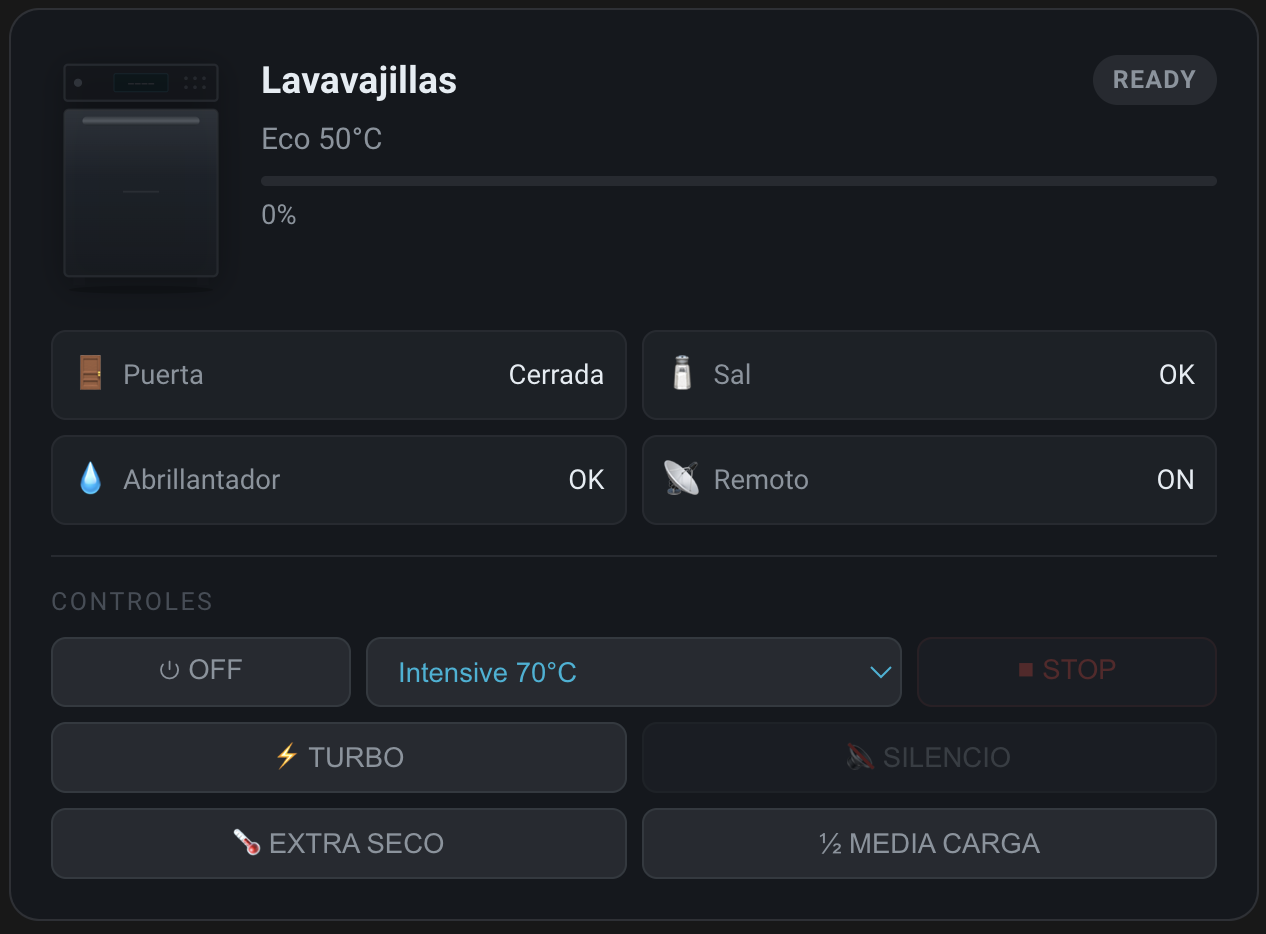
- A
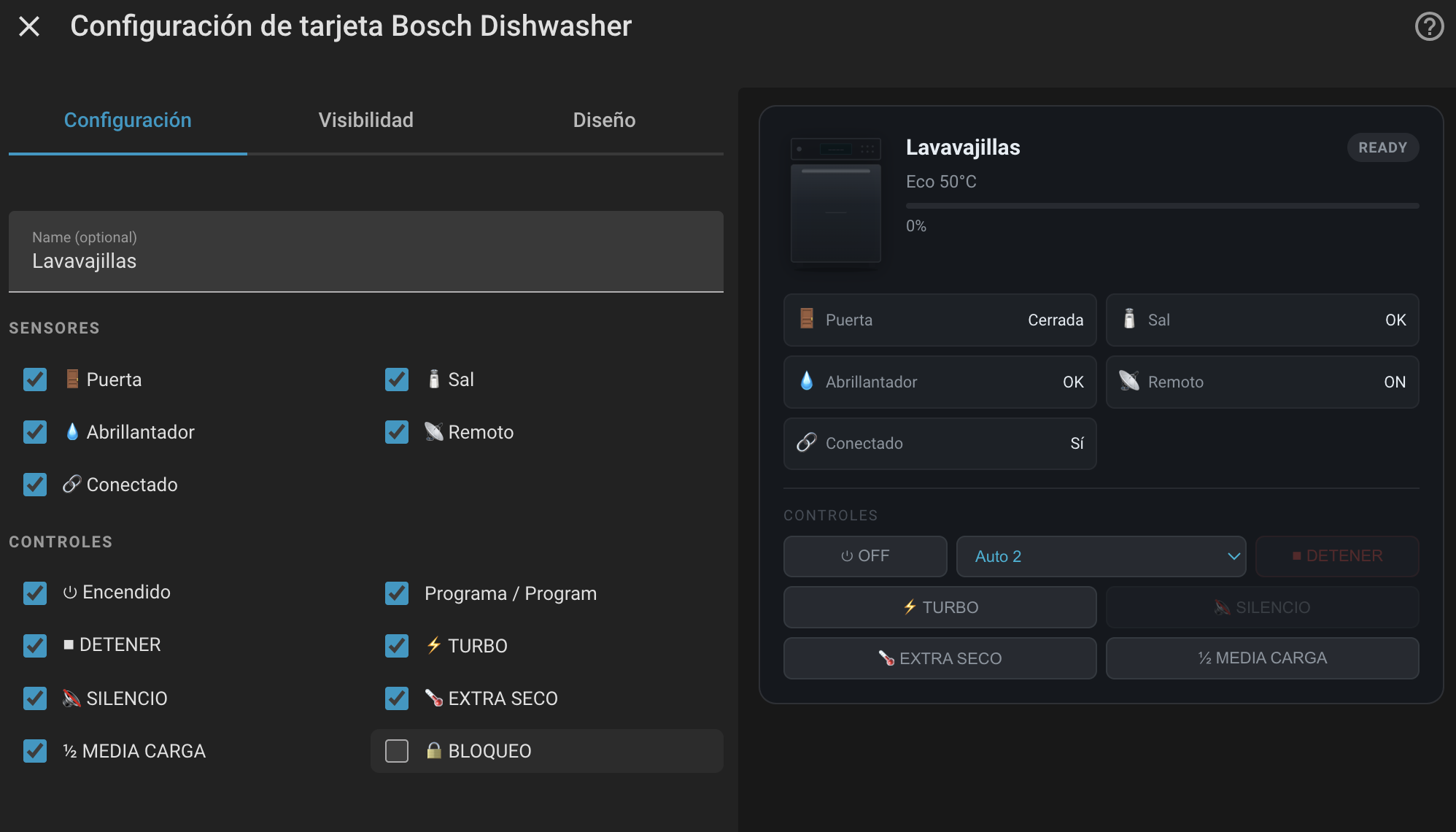
bosch_dishwasherintegration that discovers every dishwasher on your Home Connect account and creates one device per appliance - Full Home Connect entity coverage: power, child lock, all 9 option switches (Intensiv Zone, Brilliance Dry, VarioSpeed+, Silence on Demand, Half Load, Extra Dry, Hygiene+, Eco Dry, Zeolite Dry), program selectors, door, operation state, progress, remaining time, salt / rinse-aid warnings, remote control flags, open / pause / resume / stop buttons
- A Lovelace card auto-registered as
custom:bosch-dishwasher-cardwith a GUI device-picker editor — no entity-id typing - English + Spanish translations from day one
- DHCP discovery: HA auto-prompts you to configure the integration when a Bosch / Siemens / Neff / Balay appliance appears on your network
You need a Home Connect Developer Portal account and a registered application. This is OAuth 2.0 with Client ID + Client Secret — there is no "API key". Full step-by-step in docs/developer-portal-setup.md.
Short version:
- Sign up at https://developer.home-connect.com/
- Register an application at https://developer.home-connect.com/applications/add
- Set the Redirect URI to:
https://my.home-assistant.io/redirect/oauth - Note your Client ID and Client Secret
- In HACS → Integrations → ⋮ → Custom repositories, add this repo's URL with category Integration.
- Install Bosch Dishwasher.
- Restart Home Assistant.
- Settings → Devices & Services → ⋮ → Application Credentials → Add Application → choose
Bosch Dishwasherand paste your Client ID + Client Secret. - Settings → Devices & Services → Add Integration → Bosch Dishwasher → walk through the OAuth flow in your browser.
- Every dishwasher on your Home Connect account is created as a device automatically.
The Lovelace card is registered automatically — no www/ copy, no resource registration.
Edit a dashboard → Add card → search for Bosch Dishwasher Card. The GUI editor shows a device picker with every dishwasher the integration discovered. Pick one. Done.
YAML equivalent:
type: custom:bosch-dishwasher-card
device: 2c4a1f8b9e7d4f6a8c3b1d5e7f9a2b4c   # device_id from the picker
name: Lavavajillas # optional overrideAll entity labels are translated via translation_key so language follows your HA locale.
| Platform | translation_key | Description |
|---|---|---|
switch |
power |
Power on/off |
switch |
child_lock |
Child lock |
switch |
intensiv_zone |
Intensiv Zone option |
switch |
brilliance_dry |
Brilliance Dry option |
switch |
vario_speed_plus |
VarioSpeed+ option |
switch |
silence_on_demand |
Silence on Demand (only available mid-cycle) |
switch |
half_load |
Half Load option |
switch |
extra_dry |
Extra Dry option |
switch |
hygiene_plus |
Hygiene+ option |
switch |
eco_dry |
Eco Dry option |
switch |
zeolite_dry |
Zeolite Dry option |
select |
active_program |
Currently running program |
select |
selected_program |
Program to start next |
sensor |
operation_state |
inactive / ready / delayed_start / run / pause / action_required / finished / error / aborting |
sensor |
door_state |
open / closed / locked |
sensor |
program_progress |
0–100 % |
sensor |
remaining_program_time |
Timestamp sensor — when the cycle will finish |
sensor |
program_finished |
Event sensor: off / present / confirmed |
sensor |
program_aborted |
Event sensor: off / present / confirmed |
binary_sensor |
connected |
Cloud connectivity |
binary_sensor |
remote_control |
Remote control enabled on the appliance |
binary_sensor |
remote_control_start_allowed |
Remote start allowed |
binary_sensor |
local_control |
Local control active |
binary_sensor |
salt_nearly_empty |
Problem class — salt low |
binary_sensor |
rinse_aid_nearly_empty |
Problem class — rinse aid low |
button |
open_door |
Open the door (when supported) |
button |
partly_open_door |
Partly open the door (when supported) |
button |
pause_program |
Pause the current cycle |
button |
resume_program |
Resume a paused cycle |
button |
stop_program |
Stop / cancel the current cycle |
The card consumes a curated subset of these. Power users can build automations against any of them.
- "Custom element not found: bosch-dishwasher-card" — hard-refresh the dashboard. The card is auto-registered at
/api/bosch_dishwasher/card.js; if your HA cached the previous resource URL bump it with?v=N. - Card is empty / says "Selecciona un dispositivo" — open the card editor and pick a device from the integration-filtered list.
- OAuth fails with
invalid_redirect_uri— your Home Connect Developer Portal application must havehttps://my.home-assistant.io/redirect/oauthset as the redirect URI exactly. - Silencio button stays disabled — Home Connect reports
silence_on_demandasunavailablewhile the dishwasher is off or idle; it only becomes controllable mid-cycle. - Some option switches don't appear — Home Connect only exposes the options supported by the currently selected program. Pick a program first.
- Missing entities entirely — Home Connect API limitation. Check what your model returns at https://developer.home-connect.com/simulator.
Source for the card lives in src/bosch-dishwasher-card.js. The root bosch-dishwasher-card.js and custom_components/bosch_dishwasher/www/bosch-dishwasher-card.js are build artifacts produced by esbuild — never hand-edit them.
npm install
npm run build        # minified bundle → root + custom_components/.../www/
npm run build:dev    # sourcemapped non-minified

# Local dev harness — file:// blocks ES module imports
python3 -m http.server 8080
# Open http://localhost:8080/dev/test.html
dev/test.html simulates the live integration via mocked hass.entities + hass.devices and supports three modes: device-id (new), legacy prefix, and two-dishwasher (verifies the picker).
The Python integration lives in custom_components/bosch_dishwasher/. See CLAUDE.md for the architectural map.
MIT — see LICENSE.
Not affiliated with or endorsed by BSH Hausgeräte GmbH. "Bosch", "Siemens", "Neff", "Balay" are trademarks of their respective owners. The SVG illustration in the card is a generic dishwasher front view, not a reproduction of any branded product.