model agnostic, local-first AI coding assistant
Prism is an open source coding assistant that runs locally on your machine through Ollama, or cloud through OpenRouter (300+ models).
actively built and tested. expect breaking changes. decentralized intelligence is cool.
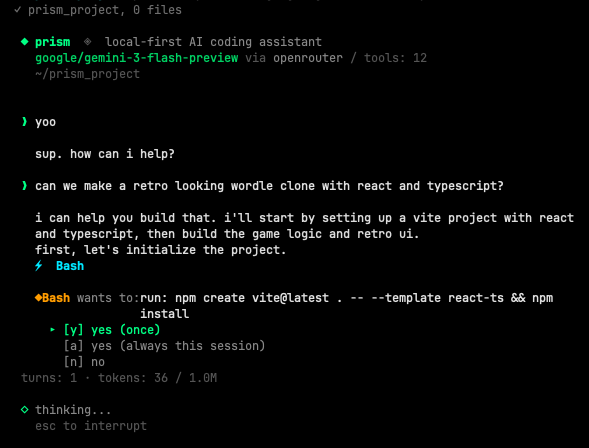
requires Node.js 20+.
npm install -g @itsautomata/prism
prism
to run local (free, via ollama, requires Ollama v0.20.2+ for proper tool calling):
brew install ollama
ollama serve
ollama pull deepseek-r1:14bprism auto-installs shell completion the first time you run it (zsh and bash supported). after the first launch, restart your shell or run exec $SHELL to reload in place.
then:
prism --<TAB>          # shows all flags
prism --or <TAB>       # shows openrouter models
prism <TAB>            # shows local ollama models
opt out of auto-install: set PRISM_NO_AUTO_COMPLETION=1 in your environment before the first run.
re-install manually (or for a different shell):
prism --install-completion           # auto-detects your shell
prism --install-completion zsh       # explicit
prism --install-completion bash # explicitlocal (free, ollama)
prism                       # deepseek-r1:14b (default)
prism qwen3:14b
cloud (openrouter, 300+ models)
add your API key to ~/.prism/config.toml (created on first run), then:
prism --or qwen/qwen3.6-plus                  # $0.325/M tokens
prism --or deepseek/deepseek-v3.2-speciale    # $0.40/M tokens
prism --or google/gemini-2.0-flash-lite-001   # $0.075/M
prism --or anthropic/claude-haiku-4.5         # $1.00/M tokens
the model must support tool calling on openrouter. see openrouter.ai/docs for available models.
prism auto-saves your conversation after every turn. resume where you left off:
prism --continue                              # resume last session in this directory
prism -c                                      # same
prism --or qwen3:14b --continue               # resume with a different model
prism --sessions                              # list recent sessions (numbered)
prism -r 1                                    # resume the most recent session
prism -r 3                                    # resume the 3rd most recent
prism --resume <full-id>                      # resume by full id (for scripting)
sessions saved at ~/.prism/sessions/.
| tool | what it does |
|---|---|
| Bash | execute shell commands |
| Read | read files, PDFs, Word docs, notebooks |
| Edit | exact string replacement |
| Write | create or overwrite files |
| Glob | find files by pattern |
| Grep | search file contents |
| Agent | spawn read-only subagents for parallel research |
| useSkill | invoke a named workflow from skills/.md |
| WebFetch | fetch and convert web pages to markdown |
| WebSearch | query a search backend, return ranked results |
write operations ask before executing. read operations auto-allow. by default, subagents are read-only. user-defined agents can declare permissions: inherit to write through the parent's permission prompt.
◆ Bash wants to: run: git push
  ▸ [y] yes (once)
    [a] yes (always this session)
    [n] no
prism ships with a built-in read-only research subagent. define your own at ./agents/<name>.md (project) or ~/.prism/agents/<name>.md (user), with YAML frontmatter:
---
description: refactorer focused on extracting React hooks
tools: ['Read', 'Edit', 'Grep']
permissions: inherit
max_turns: 8
---

you are a refactoring specialist. read the file first, propose the
extraction, then apply it. do not touch tests.
permissions: deny-writes (default) blocks writes. permissions: inherit lets the subagent write through the parent's permission prompt. list with /agent, invoke directly with /agent <name> <task>, or have the model call Agent with agent: "<name>". deny-writes agents spawned in the same turn run in parallel.
reusable workflows the model follows on demand. drop a markdown file at ./skills/<name>.md or ~/.prism/skills/<name>.md:
---
mode: invoke
require-permission: true
---

scan the staged diff for security issues. report findings as a table
with file:line and severity.

## quick
do a fast pass only.

## thorough
trace data flow from input boundaries.
mode: invoke(default): one-shot. trigger with/run <name> [section] [task]or let the model calluseSkill.mode: passive: ambient. toggle with/skill <name>, the body lands in the system prompt every turn until toggled off.require-permission: true: prompts before the model can invoke it.
## headings become section targets, so /run review thorough run just that block. /skill lists all skills (passive in cyan, invoke in green).
prism learns per model. rules persist across sessions.
/teach never run git push without asking first
/rules
/forget 2
rules saved at ~/.prism/models/<model>.json.
/model <name>     switch model mid-conversation (keeps context)
/plan             enter plan mode (model proposes before executing)
/exec-plan        exit plan mode and execute the plan
/cancel-plan      exit plan mode without executing
/agent [name]     list agents, show one, or invoke a named subagent
/skill [name]     list skills or toggle a passive skill on/off
/run <name>       invoke a skill one-shot (optional section, task)
/remember <fact>  add a timestamped fact to project memo
/teach <rule>     teach the model a rule
/rules            show learned rules
/forget <n>       remove a rule
/max-tools <n>    limit tools for this model
/clear            clear conversation
/help             show commands
/exit             quit
type / in the prompt to see the list with arrow-key navigation; press tab to complete the selected command.
for ambiguous tasks where the wrong opening move costs time. type /plan, ask the model what you want done, read the plan it proposes, push back and revise as needed, then type /exec-plan when you're ready for it to execute. type /cancel-plan to abandon without executing.

while in plan mode, the banner shows an amber plan mode indicator. the model is told to research with read-only tools and write a markdown plan, not to call Edit, Write, or destructive Bash. the plan stays in conversation context so the model can execute against it after /exec-plan.
iteration: typing feedback without /exec-plan keeps you in plan mode and lets the model revise.
prism remembers per project across sessions in two layers:
- lens at
./lens.mdor any.prism/*.mdfile (multiple files supported): rules you enforce, extra context... - memo at
~/.prism/projects/<id>/memo.md: facts the model and you accumulate as you work. lives outside the repo. add an entry with/remember <fact>. each entry is timestamped with the date so the model can spot stale info.
example lens.md:
use pytest for testing.
never modify files in data/.
this project uses pydantic v2.
opt out at startup: prism --no-scan (skip live project scan), prism --no-memory (skip lens.md + memo). both flags = bare prompt.
prefix any input with ! to run it as a shell command without leaving prism. output stays in your terminal (the model never sees it unless you describe it).

the prompt switches to amber $ when you type !, signaling shell mode. press esc to exit shell mode.
useful for: checking state mid-conversation (git status, file existence, processes) without burning model tokens or polluting context.
default: 10,000 tokens per response. adjust if needed:
prism --max-tokens 16000      # more for heavy analysis
prism --max-tokens 4000 # less for quick tasksgit clone https://github.com/itsautomata/prism.git
cd prism
npm install
npm run dev # run from source via tsx
npm run build # produce dist/cli.js (required before global install from the local dir)
npm install -g . # symlink your local build as the global `prism`you can run prism on itself to make itself better, and shape it to your workflow

npm test            # run all tests
npm run test:watch  # watch mode
covering:
- CLI parsing
- sessions and
--resume - shell completion
- slash command autocomplete and prompt input
- plan mode dispatch
- memo persistence (per-project memory)
- git context detection
- context compaction (token counting + summary fallback)
- subagent registry, runner, and parallel-safety
- skill loader (frontmatter, sections, name sanitization)
- lens loader (
.prismdirectory) - command-injection guards (grep, glob)
- permission prompt mount and key handling
- tools, permissions, subagent permission contract
- web fetching
!cmdshell escape
- prism is only as good as the model you point it at. orchestration can only use and optimize what a model already has: better recovery, cleaner context, sharper tool use. but it can't make a model smarter.
- if one model isn't working for a task, you can switch to a smarter model mid-conversation with
/model.