
[Perfecly Work On Debut Theme]
Step 1: Login to your store and click on "Online Store". See Screenshot 
Step 2: Choose your theme and click on "Actions". A drop down will be open. Then Click on "Edit Code". See Screenshot! 

Step 3: On the left hand Side, Click on "Snippet" and "Add a new snippet". A pop up will open write your snippet name whatever you want. For eg "cart-drawer", it will create a file as "cart-drawer.liquid". Then Paste the code in the file and Save it. See Screenshot 

Step 4: Now open "Assets file" and paste your CSS and JS code in "theme.css" and "custom.js" file respectively. Add the "jQuery CDN" & "custom.js" file in "theme.liquid" file. See Screenshot! 
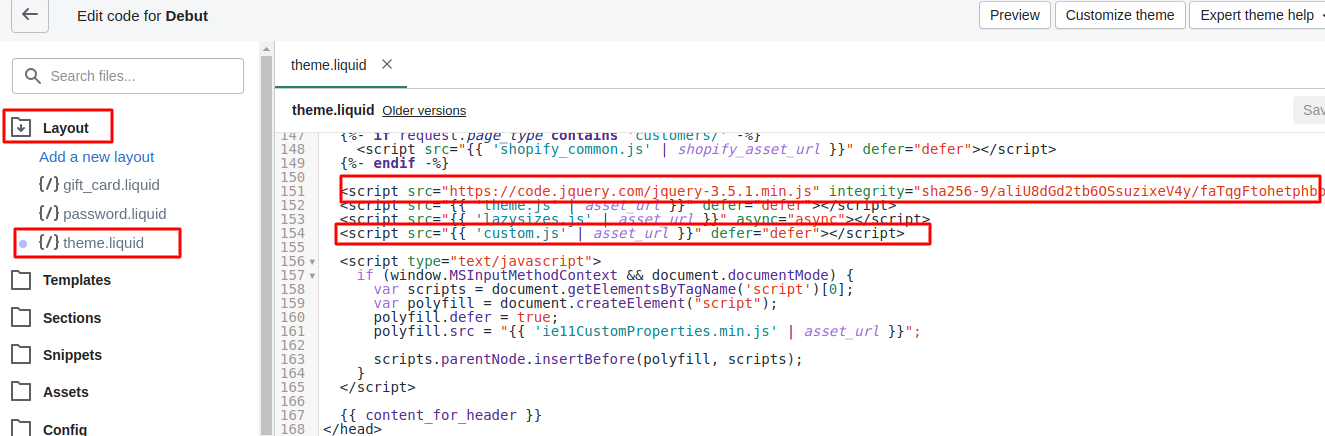
Step 5: Now Paste this code {% include 'cart-drawer' %} in "theme.liquid" and Save the file. See Screenshot! 
Final Step: Now Checkout your store. You have successfully add the cart drawer to your Store.